-
-
Notifications
You must be signed in to change notification settings - Fork 2.1k
zh use context compress
github-actions[bot] edited this page Mar 9, 2026
·
1 revision
在 v4.11.0 之后,AstrBot 引入了自动上下文压缩功能。
AstrBot 会在对话上下文达到使用的对话模型上下文窗口的最大长度的 82% 时,自动对上下文进行压缩,以确保在不丢失关键信息的情况下,尽可能多地保留对话内容。
目前有两种压缩策略
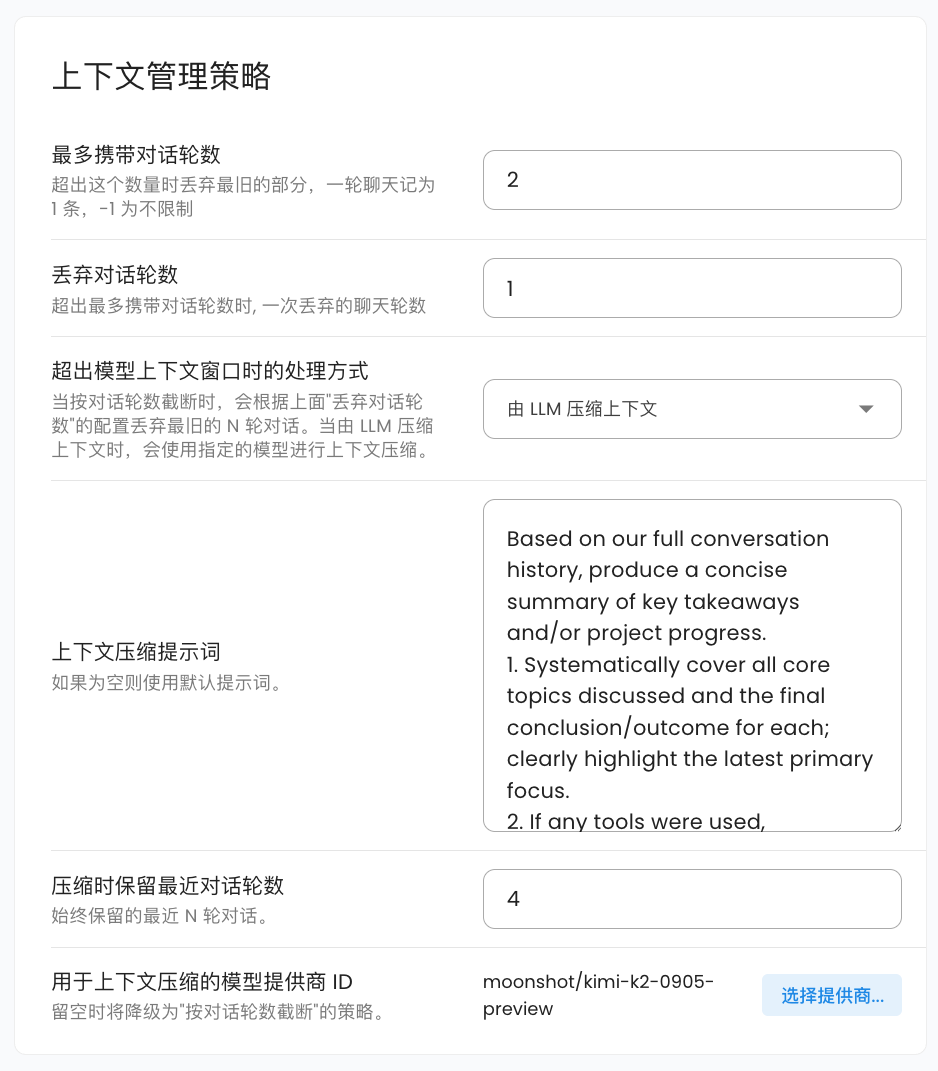
- 按照对话轮数截断。这种策略会简单地删除最早的对话内容,直到上下文长度符合要求。您可以指定一次性丢弃的对话轮数,默认为 1 轮。这种策略为默认策略。
- 由 LLM 压缩上下文。这种策略会调用您指定的模型本身来总结和压缩对话内容,从而保留更多的关键信息。您可以指定压缩时使用的对话模型,如果不选择,将会自动回退到 “按照对话轮数截断” 策略。您可以设置压缩时保留最近对话轮数,默认为 4。您还可以自定义压缩时的提示词。默认提示词为:
Based on our full conversation history, produce a concise summary of key takeaways and/or project progress.
1. Systematically cover all core topics discussed and the final conclusion/outcome for each; clearly highlight the latest primary focus.
2. If any tools were used, summarize tool usage (total call count) and extract the most valuable insights from tool outputs.
3. If there was an initial user goal, state it first and describe the current progress/status.
4. Write the summary in the user's language.
在压缩一轮之后,AstrBot 会二次检查当前上下文长度是否符合要求。如果仍然不符合要求,则会采用对半砍策略,即将当前上下文内容砍掉一半,直到符合要求为止。
- AstrBot 会在每次对话请求前调用压缩器进行检查。
- 当前版本下 AstrBot 不会在工具调用过程中进行上下文压缩,未来我们会支持这一功能,敬请期待。
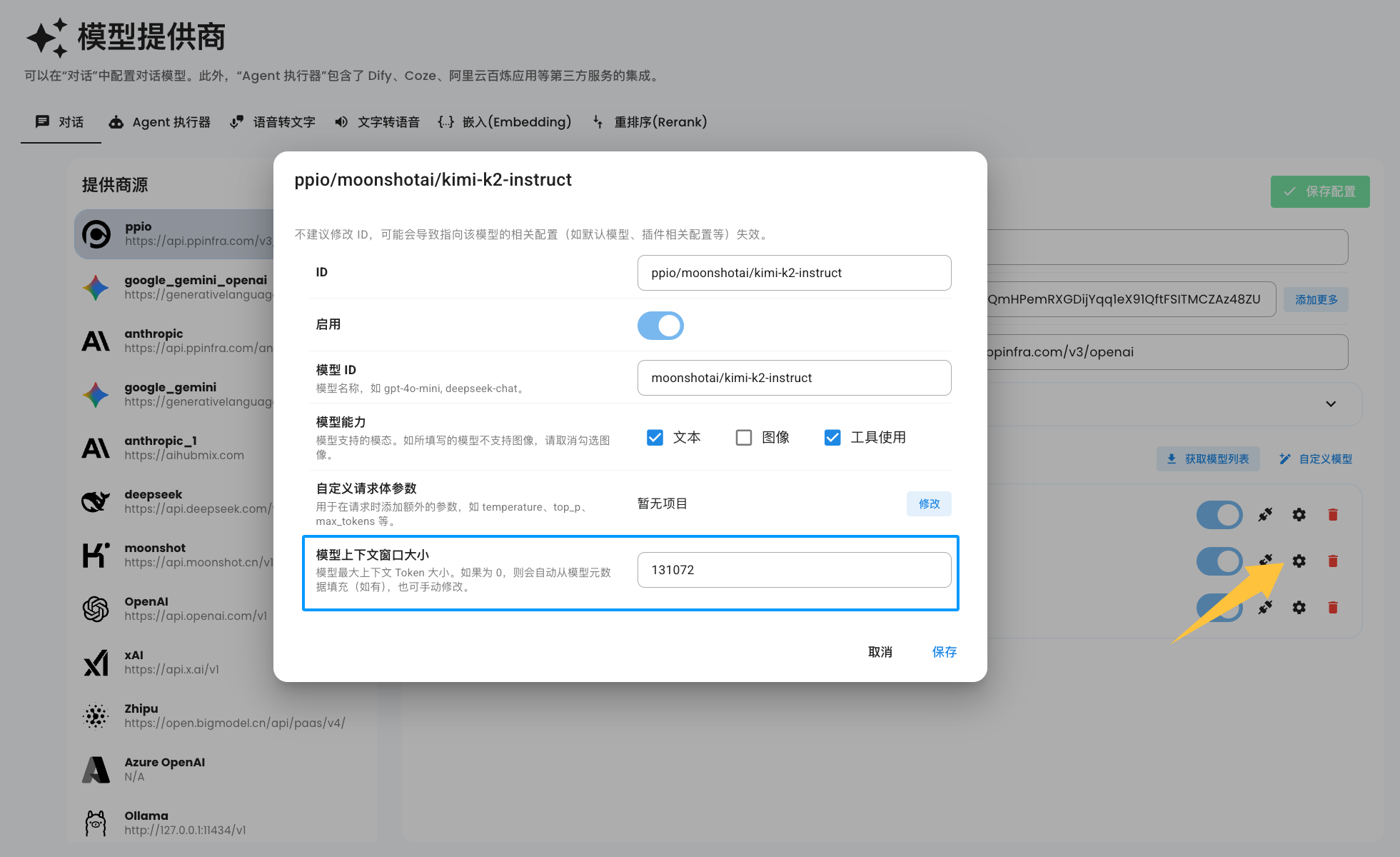
默认情况下,当您添加模型时,AstrBot 会自动根据模型的 id,从 MODELS.DEV 提供的接口中获取模型的上下文窗口大小。但由于模型种类繁多,部分提供商甚至会修改模型的 id,因此 AstrBot 不能自动推断出您所添加的模型的上下文窗口大小。
您可以手动在模型配置中设置模型的上下文窗口大小,参考下图:
Note
如果没有看到上图中的配置项,请您删除该模型,然后重新添加模型即可。
当模型上下文窗口大小被设置为 0 时,在每次请求时,AstrBot 仍会自动从 MODELS.DEV 获取模型的上下文窗口大小。如果仍为 0,则这次请求不会启用上下文压缩功能。
- 首页
- 文档入口
- Top Level
- community events
- deploy
- dev
- others
- platform
- 接入 OneBot v11 协议实现
- 接入钉钉 DingTalk
- 接入 Discord
- 接入 Kook
- 接入飞书
- 接入 LINE
- 接入 Matrix
- 接入 Mattermost
- 接入 Misskey 平台
- 接入 QQ 官方机器人平台
- 通过 QQ官方机器人 接入 QQ (Webhook)
- 通过 QQ官方机器人 接入 QQ (Websockets)
- 接入 Satori 协议
- 接入 server-satori (基于 Koishi)
- 接入 Slack
- 接入消息平台
- 接入 Telegram
- 接入 VoceChat
- AstrBot 接入企业微信
- 接入企业微信智能机器人平台
- AstrBot 接入微信公众平台
- 接入个人微信
- providers
- use
- Home
- Docs Entry
- Top Level
- config
- deploy
- Deploy AstrBot on 1Panel
- Deploy AstrBot on BT Panel
- Deploy AstrBot on CasaOS
- Deploy AstrBot from Source Code
- Community-Provided Deployment Methods
- Deploy via Compshare
- Deploy AstrBot with Docker
- Deploy AstrBot with Kubernetes
- Deploy AstrBot with AstrBot Launcher
- Other Deployments
- Package Manager Deployment (uv)
- Installation via System Package Manager
- Preface
- dev
- ospp
- others
- platform
- Connect OneBot v11 Protocol Implementations
- Connect to DingTalk
- Connecting to Discord
- Connect to KOOK
- Connecting to Lark
- Connecting to LINE
- Connecting to Matrix
- Connecting to Mattermost
- Connecting to Misskey Platform
- Connect QQ Official Bot
- Connect QQ via QQ Official Bot (Webhook)
- Connect QQ via QQ Official Bot (Websockets)
- Connect to Satori Protocol
- Connect server-satori (Koishi)
- Connecting to Slack
- Messaging Platforms
- Connecting to Telegram
- Connect to VoceChat
- Connect AstrBot to WeCom
- Connect to WeCom AI Bot Platform
- Connect AstrBot to WeChat Official Account Platform
- Connect Personal WeChat
- providers
- 接入 302.AI
- Agent Runners
- Built-in Agent Runner
- Connect to Coze
- Connect to Alibaba Cloud Bailian Application
- Connect to DeerFlow
- Connect to Dify
- Connect AIHubMix
- coze
- dashscope
- dify
- 大语言模型提供商
- NewAPI
- 接入 PPIO 派欧云
- 接入 LM Studio 使用 DeepSeek-R1 等模型
- Integrating Ollama
- Connecting to SiliconFlow
- Connecting Model Services
- Connecting to TokenPony
- use
- Agent Runner
- Agent Sandbox Environment ⛵️
- astrbot sandbox
- Docker-based Code Interpreter
- Built-in Commands
- Computer Use
- Context Compression
- Custom Rules
- Function Calling
- AstrBot Knowledge Base
- MCP
- AstrBot Star
- Proactive Capabilities
- Anthropic Skills
- Agent Handoff and SubAgent
- Unified Webhook Mode
- Web Search
- WebUI