-
-
Notifications
You must be signed in to change notification settings - Fork 2.1k
en platform vocechat
github-actions[bot] edited this page Mar 9, 2026
·
1 revision
Tip
AstrBot does not include this adapter by default. Install astrbot_plugin_vocechat, developed by HikariFroya.
Warning
This adapter is community-maintained and not officially maintained by AstrBot.
VoceChat is an open-source instant messaging platform with simple multi-platform deployment.
See deployment methods on the VoceChat official website.
In AstrBot Dashboard Plugin Market, search for astrbot_plugin_vocechat and install it.
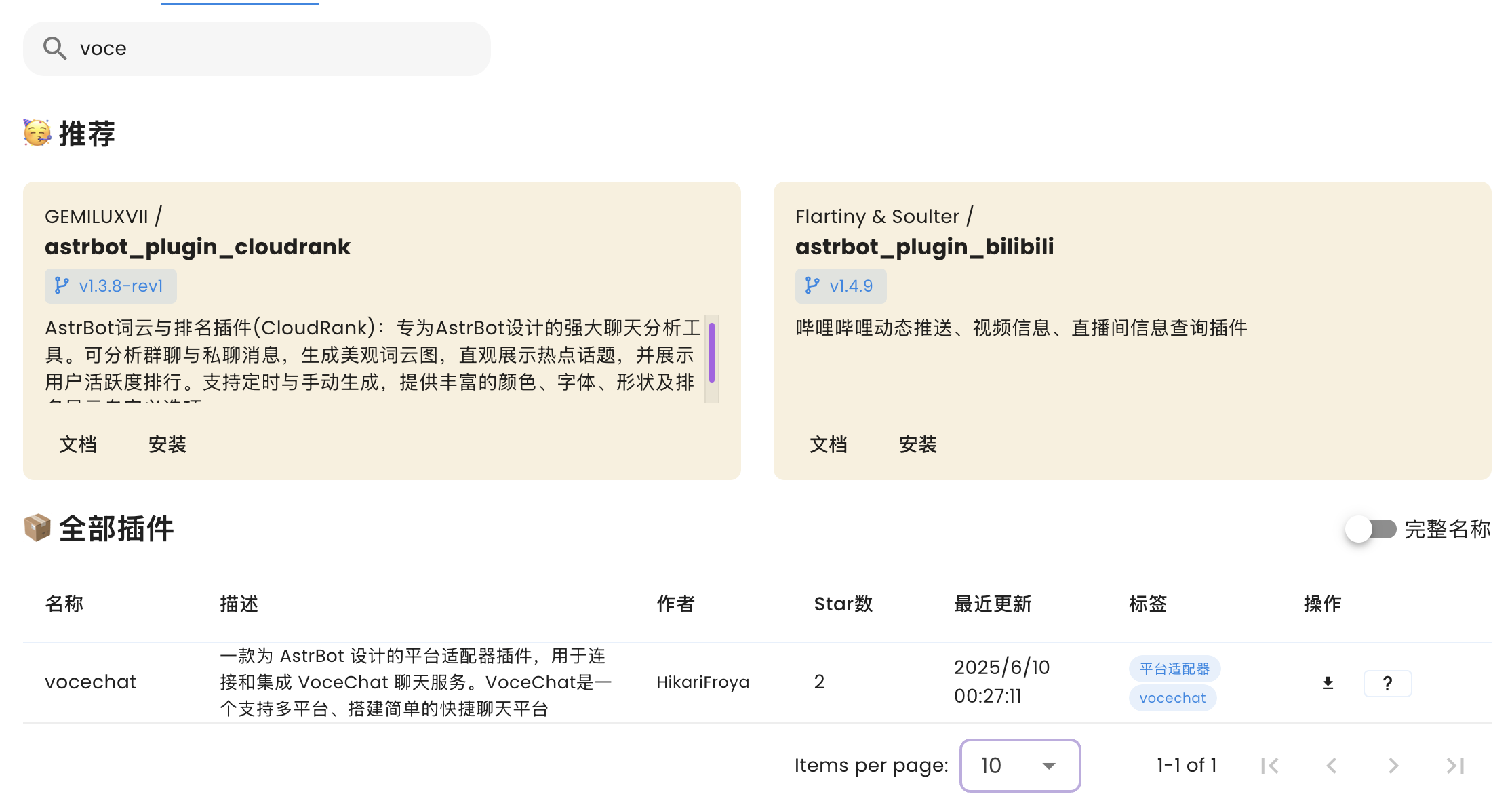
After installation, go to Bots -> + Create Bot -> VoceChat.
If VoceChat is missing, restart AstrBot or verify plugin installation.
Enable the adapter in the configuration dialog.
-
vocechat_server_url(required): full VoceChat server URL, e.g.http://localhost:3009orhttps://your.vocechat.domain(no trailing/). -
api_key(required): API key generated for the bot account in VoceChat. -
webhook_path(recommended default/custom): webhook path used by AstrBot to receive VoceChat messages, e.g./vocechat_webhook. -
webhook_listen_host(usually0.0.0.0): listen host for AstrBot webhook server. -
webhook_port(required): listen port for AstrBot webhook server, e.g.8080. -
get_user_nickname_from_api(boolean, defaulttrue): fetch nickname via VoceChat API. -
send_plain_as_markdown(boolean, defaultfalse): send plain text in markdown format. -
default_bot_self_uid(required): UID of your VoceChat bot account.
After configuration, click Save and test in VoceChat.
If needed, report issues to:
- 首页
- 文档入口
- Top Level
- community events
- deploy
- dev
- others
- platform
- 接入 OneBot v11 协议实现
- 接入钉钉 DingTalk
- 接入 Discord
- 接入 Kook
- 接入飞书
- 接入 LINE
- 接入 Matrix
- 接入 Mattermost
- 接入 Misskey 平台
- 接入 QQ 官方机器人平台
- 通过 QQ官方机器人 接入 QQ (Webhook)
- 通过 QQ官方机器人 接入 QQ (Websockets)
- 接入 Satori 协议
- 接入 server-satori (基于 Koishi)
- 接入 Slack
- 接入消息平台
- 接入 Telegram
- 接入 VoceChat
- AstrBot 接入企业微信
- 接入企业微信智能机器人平台
- AstrBot 接入微信公众平台
- 接入个人微信
- providers
- use
- Home
- Docs Entry
- Top Level
- config
- deploy
- Deploy AstrBot on 1Panel
- Deploy AstrBot on BT Panel
- Deploy AstrBot on CasaOS
- Deploy AstrBot from Source Code
- Community-Provided Deployment Methods
- Deploy via Compshare
- Deploy AstrBot with Docker
- Deploy AstrBot with Kubernetes
- Deploy AstrBot with AstrBot Launcher
- Other Deployments
- Package Manager Deployment (uv)
- Installation via System Package Manager
- Preface
- dev
- ospp
- others
- platform
- Connect OneBot v11 Protocol Implementations
- Connect to DingTalk
- Connecting to Discord
- Connect to KOOK
- Connecting to Lark
- Connecting to LINE
- Connecting to Matrix
- Connecting to Mattermost
- Connecting to Misskey Platform
- Connect QQ Official Bot
- Connect QQ via QQ Official Bot (Webhook)
- Connect QQ via QQ Official Bot (Websockets)
- Connect to Satori Protocol
- Connect server-satori (Koishi)
- Connecting to Slack
- Messaging Platforms
- Connecting to Telegram
- Connect to VoceChat
- Connect AstrBot to WeCom
- Connect to WeCom AI Bot Platform
- Connect AstrBot to WeChat Official Account Platform
- Connect Personal WeChat
- providers
- 接入 302.AI
- Agent Runners
- Built-in Agent Runner
- Connect to Coze
- Connect to Alibaba Cloud Bailian Application
- Connect to DeerFlow
- Connect to Dify
- Connect AIHubMix
- coze
- dashscope
- dify
- 大语言模型提供商
- NewAPI
- 接入 PPIO 派欧云
- 接入 LM Studio 使用 DeepSeek-R1 等模型
- Integrating Ollama
- Connecting to SiliconFlow
- Connecting Model Services
- Connecting to TokenPony
- use
- Agent Runner
- Agent Sandbox Environment ⛵️
- astrbot sandbox
- Docker-based Code Interpreter
- Built-in Commands
- Computer Use
- Context Compression
- Custom Rules
- Function Calling
- AstrBot Knowledge Base
- MCP
- AstrBot Star
- Proactive Capabilities
- Anthropic Skills
- Agent Handoff and SubAgent
- Unified Webhook Mode
- Web Search
- WebUI
