en dev star guides send message
Passive messages refer to the bot responding to messages reactively.
@filter.command("helloworld")
async def helloworld(self, event: AstrMessageEvent):
    yield event.plain_result("Hello!")
    yield event.plain_result("你好!")

    yield event.image_result("path/to/image.jpg") # Send an image
    yield event.image_result("https://example.com/image.jpg") # Send an image from URL, must start with http or https
Active messages refer to the bot proactively pushing messages. Some platforms may not support active message sending.
For scheduled tasks or when you don't want to send messages immediately, you can use event.unified_msg_origin to get a string and store it, then use self.context.send_message(unified_msg_origin, chains) to send messages when needed.
from astrbot.api.event import MessageChain

@filter.command("helloworld")
async def helloworld(self, event: AstrMessageEvent):
    umo = event.unified_msg_origin
    message_chain = MessageChain().message("Hello!").file_image("path/to/image.jpg")
    await self.context.send_message(event.unified_msg_origin, message_chain)
With this feature, you can store the unified_msg_origin and send messages when needed.
Tip
About unified_msg_origin.
unified_msg_origin is a string that records the unique ID of a session. AstrBot uses it to identify which messaging platform and which session it belongs to. This allows messages to be sent to the correct session when using send_message. For more about MessageChain, see the next section.
AstrBot supports sending rich media messages such as images, audio, videos, etc. Use MessageChain to construct messages.
import astrbot.api.message_components as Comp

@filter.command("helloworld")
async def helloworld(self, event: AstrMessageEvent):
    chain = [
        Comp.At(qq=event.get_sender_id()), # Mention the message sender
        Comp.Plain("Check out this image:"),
        Comp.Image.fromURL("https://example.com/image.jpg"), # Send image from URL
        Comp.Image.fromFileSystem("path/to/image.jpg"), # Send image from local file system
        Comp.Plain("This is an image.")
    ]
    yield event.chain_result(chain)
The above constructs a message chain, which will ultimately send a message containing both images and text while preserving the order.
Tip
In the aiocqhttp message adapter, for messages of type plain, the strip() method is used during sending to remove spaces and line breaks. You can add zero-width spaces \u200b before and after the message to resolve this issue.
Similarly,
File
Comp.File(file="path/to/file.txt", name="file.txt") # Not supported by some platformsAudio Record
path = "path/to/record.wav" # Currently only accepts wav format, please convert other formats yourself
Comp.Record(file=path, url=path)
Video
path = "path/to/video.mp4"
Comp.Video.fromFileSystem(path=path)
Comp.Video.fromURL(url="https://example.com/video.mp4")from astrbot.api.event import filter, AstrMessageEvent
@filter.command("test")
async def test(self, event: AstrMessageEvent):
from astrbot.api.message_components import Video
# fromFileSystem requires the user's protocol client and bot to be on the same system.
music = Video.fromFileSystem(
path="test.mp4"
)
# More universal approach
music = Video.fromURL(
url="https://example.com/video.mp4"
)
yield event.chain_result([music])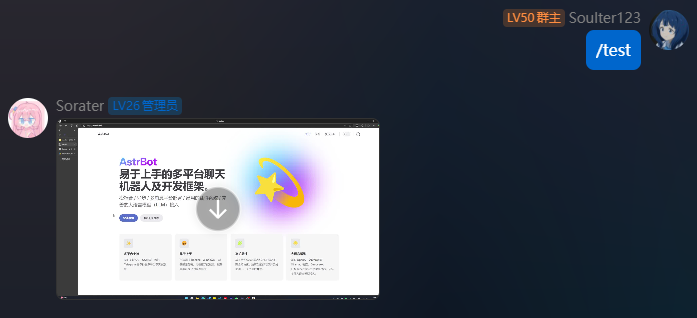
Most platforms do not support this message type. Current support: OneBot v11
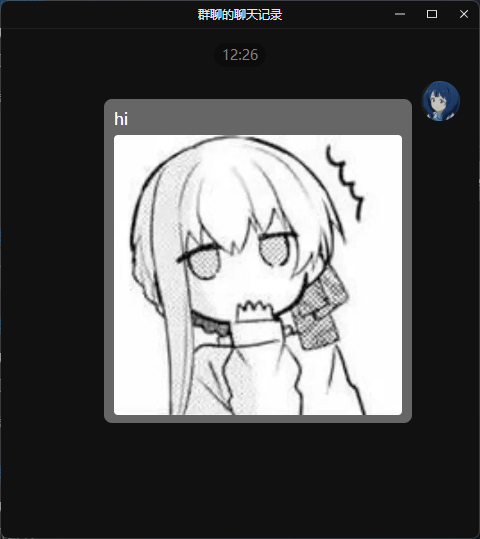
You can send group forward messages as follows.
from astrbot.api.event import filter, AstrMessageEvent

@filter.command("test")
async def test(self, event: AstrMessageEvent):
    from astrbot.api.message_components import Node, Plain, Image
    node = Node(
        uin=905617992,
        name="Soulter",
        content=[
            Plain("hi"),
            Image.fromFileSystem("test.jpg")
        ]
    )
    yield event.chain_result([node])