




Geolistrik CLI is a command-line utility to generate stacking charts and electrode configuration tables for five common resistivity methods in geophysical survey:
- Wenner-Schlumberger (
ws) - Wenner (
wn) - Pole-Pole (
pp) - Pole-Dipole (
pd) - Dipole-Dipole (
dd)
It saves outputs in .png (chart) and .xlsx (data) formats.
✅ Support 5 array types
✅ CLI options: --outdir, --no-plot
✅ Output: .png (chart), .xlsx (data)
✅ Windows & Linux standalone builds
✅ Easy to use for students, researchers, and engineers
-
Run the installer and follow the instructions.
-
After the installation is complete, manually add the following folder:
C:\Program Files (x86)\Geolistrikto your system PATH manually. This the tutorial:
- Click Start, type "env", and select
Edit the system environment variables
- In the System Properties window, click the
Environment Variables…button
- Under the System Variables section, find
Pathand clickEdit
- In the Edit Environment Variable window, click New to add a new path

- Close all dialogue boxes by clicking
OKto save your changes - Restart terminal to ensure the PATH changes take effect
- Click Start, type "env", and select
-
Open CMD and type:
geolistrik
You'll see the welcome banner:

-
Uninstall:
- Uninstall via Control Panel → Uninstall a Program
- Remove the path entry from the system PATH


-
Make the file executable
For example, if the file is in the~/Downloadsfolder:chmod +x ~/Downloads/geolistrik-linux-1.0.0.bin -
Move the file to a directory in your PATH Typically this would be
~/.local/bin(for local install) or/usr/local/bin(for global install).- Global installation (for all users):
sudo mv ~/Downloads/geolistrik-linux-1.0.0.bin /usr/local/bin/geolistrik - Local installation (for current user only):
First, ensure
~/.local/binis included in your$PATH. Check with:If it’s not included, add it to yourecho $PATH
.bashrcor.zshrc:If it is already included, simply run:echo 'export PATH="$HOME/.local/bin:$PATH"' >> ~/.bashrc source ~/.bashrc
Now you can use the CLI from anywhere:mkdir -p ~/.local/bin mv ~/Downloads/geolistrik-linux-1.0.0.bin ~/.local/bin/geolistrik
Just like on Windows, you should see a welcome banner.geolistrik
- Global installation (for all users):
-
Uninstall
Simply delete the binary from your system:sudo rm /usr/local/bin/geolistrik
geolistrik [config] [min] [max] [spacing] [--outdir DIR] [--no-plot]| Code | Configuration |
|---|---|
| ws | Wenner-Schlumberger |
| wn | Wenner |
| pp | Pole-Pole |
| pd | Pole-Dipole |
| dd | Dipole-Dipole |
| Option | Description |
|---|---|
--outdir |
Set output directory for files |
--no-plot |
Skip plotting .png, just generate data |
--version |
Show app version |
--about |
Show app metadata |
--update |
Update app |
By default, this command produces:
- Image file (
[config]_[min]_[max]_a[space].png) - Data table (
[config]_[min]_[max]_a[space].xlsx)
Example:
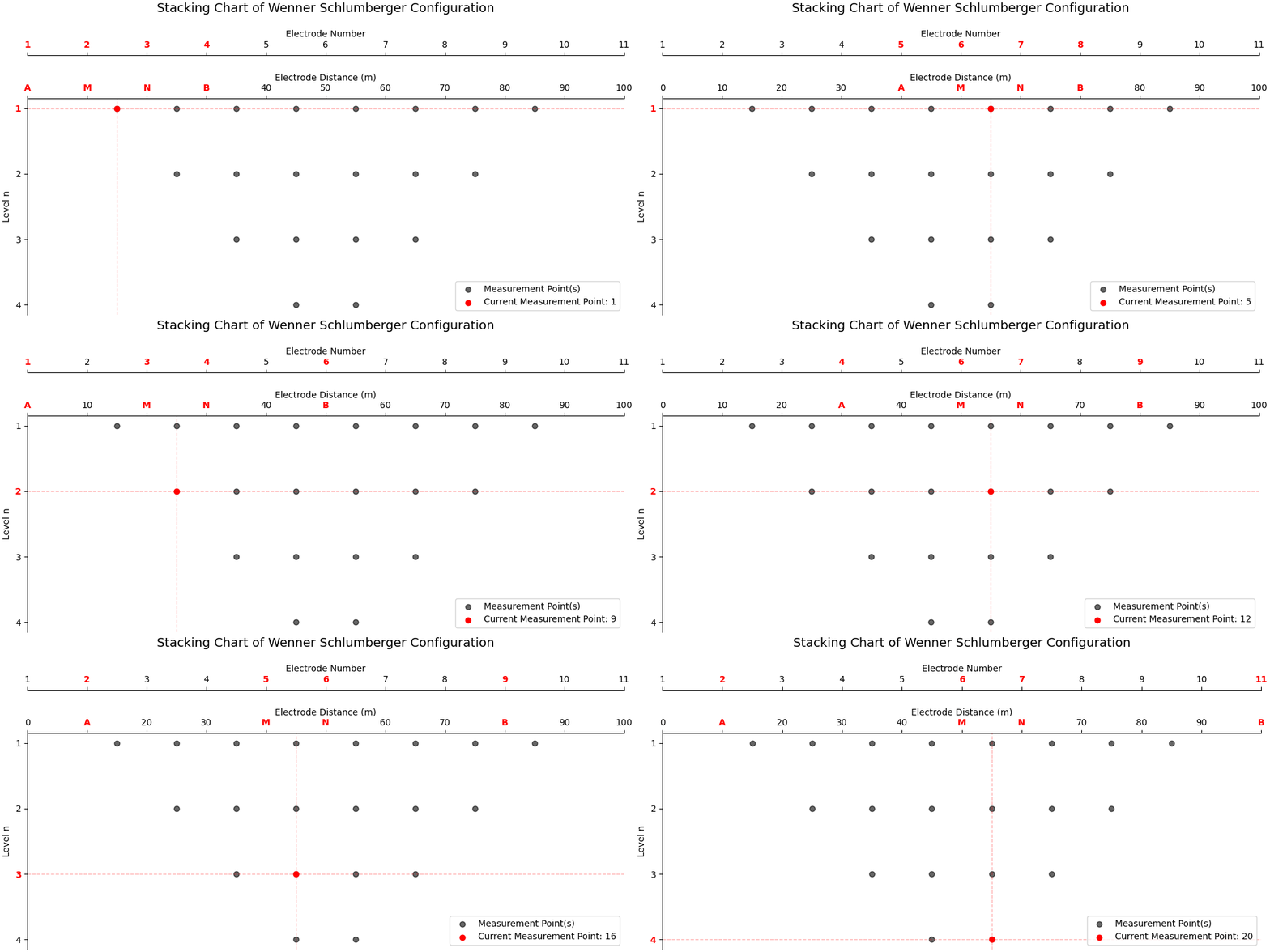
geolistrik ws 0 100 10This is how the data acquisition process in the field corresponds to the table created:
Use --no-plot to disable chart generation:
geolistrik ws 0 100 10 --no-plotAdd --outdir to specify output folder:
geolistrik ws 0 100 10 --outdir "./results"-
Clone this repository:
git clone https://github.com/vysf/geolistrik-cli cd geolistrik-cli -
Install dependencies:
pip install -r requirements.txt
-
Run locally:
python -m geolistrik --help
-
Build with Nuitka: See
build.bator use:nuitka --standalone --onefile --include-package=geolistrik --output-dir=build geolistrik/__main__.py
-
Compile Windows Installer:
- Requires Inno Setup
- Run:
ISCC geolistrik_setup.iss
PRs are welcome!
- Fork this repository
- Commit changes to a branch
- Submit a pull request
- Or open an issue to report bugs/suggestions
📫 Contact: Yusuf Umar Al Hakim
✉️ yusufumaralhakim@gmail.com
🌐 GitHub Project
- development flow
flag-bartinya create adan switch
git checkout dev master
git checkout -b feature/cli-wizard
# koding...
git commit -m "feat: add CLI wizard command"
git checkout dev
git merge feature/cli-wizard
git push origin dev
# testing oke
git checkout master
git merge dev
git tag v2.0.0
git push origin master --tags
- next update
geolistrik generate res2d --config wn --min 0 --max 100 --spacing 5 --res-value 200
geolistrik update
geolistrik about
geolistrik wizard
geolistrik --version

![@github-actions[bot]](https://avatars.githubusercontent.com/in/15368?s=64&v=4)