Данный текст доступен на русском языке.
This console is a wrapper over fift,lite-client and validator-engine-console. It was created to facilitate wallet, domain and validator management on Linux OS.
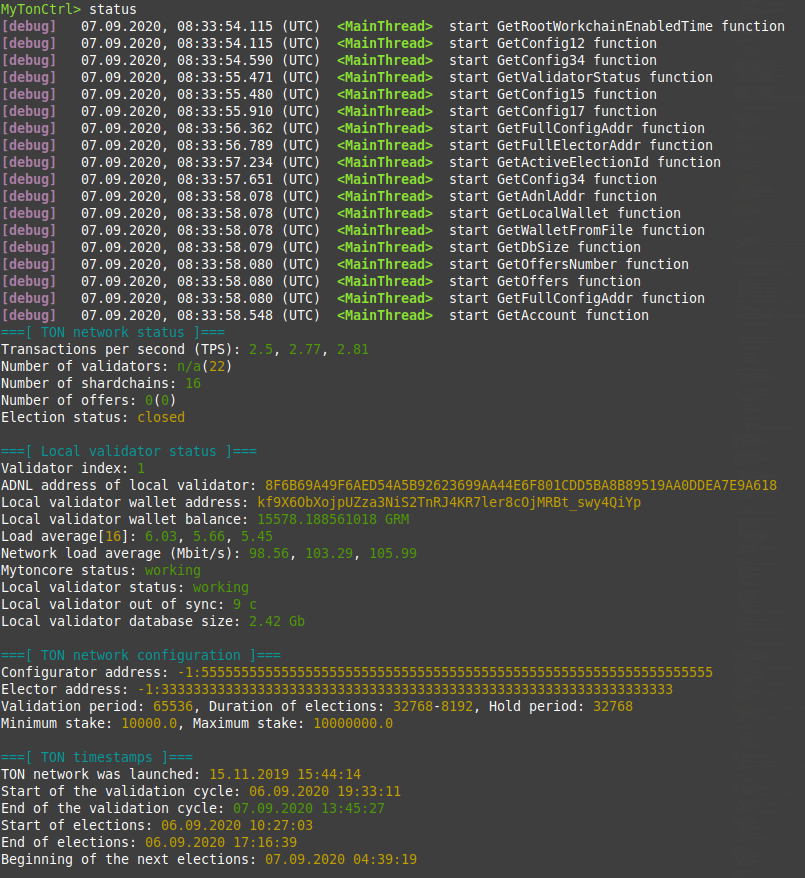
- Show TON network status
- Management of local wallets
- Create local wallet
- Activate local wallet
- Show local wallets
- Import wallet from file (.pk)
- Save wallet address to file (.addr)
- Delete local wallet
- Show account status
- Show account balance
- Show account history
- Show account status from bookmarks
- Transferring funds to the wallet
- Transfer of a fixed amount
- Transfer of the entire amount (all)
- Transfer of the entire amount with wallet deactivation (alld)
- Transferring funds to the wallet from bookmarks
- Transferring funds to a wallet through a chain of self-deleting wallets
- Manage bookmarks
- Add account to bookmarks
- Show bookmarks
- Delete bookmark
- Offer management
- Show offers
- Vote for the proposal
- Automatic voting for previously voted proposals
- Domain management
- Rent a new domain
- Show rented domains
- Show domain status
- Delete domain
- Automatic domain renewal
- Controlling the validator
- Participate in the election of a validator
- Return bet + reward
- Autostart validator on abnormal termination (systemd)
- Send validator statistics to https://toncenter.com
Ubuntu 16.04 LTS (Xenial Xerus) - Error: TON compilation error
Ubuntu 18.04 LTS (Bionic Beaver) - OK
Ubuntu 20.04 LTS (Focal Fossa) - OK
Debian 8 - Error: Unable to locate package libgsl-dev
Debian 9 - Error: TON compilation error
Debian 10 - OK
toninstaller.sh: clonesTONandmytonctrlsources to/usr/src/tonand/usr/src/mytonctrlfolders, compiles programs from sources and writes them to/usr/bin/.mytoninstaller.py: configures the validator andmytonctrl; generates validator connection keys.
There are two installation modes: lite and full. They both compile and install TON components. However the lite version does not configure or run the node/validator.
- Download and execute the
install.shscript in the desired installation mode. During installation the script prompts you for the superuser password several times.
wget https://raw.githubusercontent.com/ton-blockchain/mytonctrl/master/scripts/install.sh
sudo bash install.sh -m <mode>- Done. You can try to run the
mytonctrlconsole now.
mytonctrl- Download and execute the
install.shscript in the desired installation mode. During installation the script prompts you for the superuser password several times.
wget https://raw.githubusercontent.com/ton-blockchain/mytonctrl/master/scripts/install.sh
su root -c 'bash install.sh -m <mode>'- Done. You can try to run the
mytonctrlconsole now.
mytonctrlBy default, mytonctrl sends validator statistics to the https://toncenter.com server.
It is necessary to identify network abnormalities, as well as to quickly give feedback to developers.
To disable telemetry during installation, use the -t flag:
sudo bash install.sh -m <mode> -tTo disable telemetry after installation, do the following:
MyTonCtrl> set sendTelemetry falseTo control the node/validator through the browser, you need to install an additional module:
mytonctrl -> installer -> enable JR
Next, you need to create a password for connection:
mytonctrl -> installer -> setwebpass
Ready. Now you can go to https://tonadmin.org site and log in with your credentials. git: https://github.com/igroman787/mtc-jsonrpc
To set up a local https://toncenter.com copy on your server, install an additional module:
mytonctrl -> installer -> enable PT
Ready. A local copy of toncenter is available at http://<server-ip-address>:8000
git: https://github.com/igroman787/pytonv3