
The ObdGraphs Android application, is a feature-rich tool designed for real-time vehicle telemetry visualization using ELM327 and STNxxxx OBD2 adapters.
Built atop the ObdMetrics Java framework, it offers a comprehensive suite of functionalities tailored for automotive diagnostics and performance monitoring.
- Broad Adapter Compatibility: Seamlessly connects with ELM327 and STNxxxx OBD2 adapters via Bluetooth, WiFi, or USB.
- Real-Time Data Visualization: Transforms raw sensor data into intuitive, customizable gauges and high-frequency graphs for instant analysis.
- Native Engine Support: Features specialized, native support for high-performance engines, specifically optimized for:
- Alfa Romeo 1.75 TBI - 4C, Giulietta
- Alfa Romeo 2.0 GME - Giulia, and Stelvio
- Android Auto Integration: Extends the diagnostic experience directly to your vehicle’s infotainment screen, allowing you to monitor critical engine parameters safely while on the road.
- Alerting: Ability to set upper and lower threshold for individual metrics
- Adapter Compatibility: Supports various connection types including Wi-Fi, Bluetooth, and USB for ELM327 and STN1170/STN2120 adapters.
- Android Auto Integration: Provides dedicated dashboards for performance metrics and trip information, enhancing the driving experience.
- Data Logging: Automatically records trip data, enabling users to review historical telemetry at any time
- Configurable views - The application offers few different kind of gauges which can visualize telemetry in the real-time, e.g: Boost, MAF, OIL temp
- Vehicle Profiles: Allows creation of customizable profiles with vehicle-specific settings and PID configurations.
The application includes native integration with the ObdGraphsLogViewer project. This integration allows users to:
- Export Telemetry Logs: Save detailed session data from the mobile app in the Google Drive.
- Online Log Visualization: Utilize the specialized ObdGraphsLogViewer to analyze logs on a larger screen, enabling deep-dive performance reviews and trend analysis.
To analyze your vehicle's performance on a larger screen, follow these steps to sync your data:
- Enable Recording: Within the ObdGraphs mobile app, ensure that data logging is active during your drive. The app automatically saves trip data to your local storage.
- Upload to Cloud: Navigate to the synchronization settings in the app and use the Cloud Synchronization feature to upload your recorded trip logs directly to your Google Drive.
- Launch Analyzer: Visit the Online Log Analyzer on your desktop.
- Analyze: Connect your Google Drive account within the web analyzer to instantly access and visualize your uploaded logs.
For a detailed video walkthrough of this process, refer to the official tutorial: ObdGraphs - Online Log Analyzer (YouTube).
| Resource | Link |
|---|---|
| Official Website | https://my-giulia.com/ |
| Online Log Analyzer | my-giulia.com/#analyzer |
| Google Play Store | Download ObdGraphs |
| GitHub (Log Viewer) | ObdGraphsLogViewer Project |
Note: For the best performance and highest data sampling rates, the use of high-quality STNxxxx based adapters is recommended.
This application can serve as a template to support various vehicles, each with its own set of custom PIDs. Example for such use-case can be found here
Open Source:Licensed under Apache 2.0, encouraging community contributions and modifications.Modular Architecture:The codebase is organized into distinct modules (e.g., datalogger, screen_renderer, automotive), promoting maintainability and scalability.Custom PID Integration:Supports the addition of new PIDs through external JSON configurations, enabling adaptability to various vehicle models.
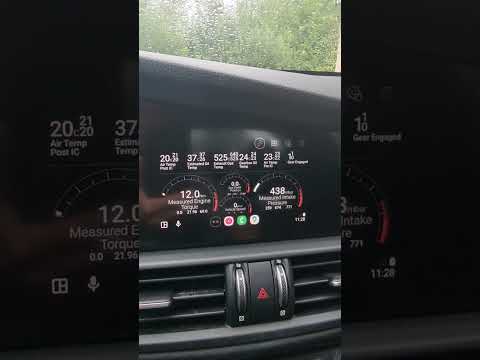
Application offers few configurable screens which visualize vehicle telemetry data.
 |
 |
 |
 |
 |
 |
 |
 |
 |
 |
 |
 |
 |
- Performance optimization
- Support for PIDs creation through application