An inspectable, deterministic execution simulator for replaying real order-book data, with a Python-facing API and equivalent Python/C++ execution engines.
Most backtests collapse execution into a final PnL line. ordersim exists to
inspect the path between order intent and actual fills.
It is built for researchers who need to audit every order intent, compare many strategies on the exact same replay, and let humans or AI agents write strategies against a small gateway API.
ordersim focuses on execution replay and execution-aware simulation. Areas of
interest include order-book replay, market replay, latency modeling,
queue-position effects, fill simulation, execution modeling, execution-aware
backtesting, and market microstructure research.
- Replays order-book data and simulates order execution with explicit order lifecycle events: place, cancel, fill, and passive fill.
- Prefers a compiled C++ engine for ordinary replay when it is available, while keeping a plain Python reference engine for inspection and equivalence tests.
- Exposes own resting orders with visible queue-ahead size during replay.
- Runs multi-strategy A/B comparisons on the same replay while keeping each strategy's orders, position, and portfolio state isolated.
- Exposes a small, regular Python API that is easy to read, debug, test, and extend.
- It is not a general backtesting framework. You own the strategy loop.
- It is not a live trading system.
- It is not a signal library.
- It is not a speed-first HFT framework.
The design goal is clarity per line of code. Raw event throughput is secondary to understanding why an order did or did not fill, but compiled speed is welcome when it preserves the same observable behavior.
Aggregate PnL is not enough when the strategy depends on queue position, latency, cancel timing, partial fills, and passive resting orders.
ordersim treats the order-intent log as a first-class artifact. A run should
answer:
- What did the strategy try to do?
- What did the simulated venue receive?
- Which orders filled immediately?
- Which orders rested?
- How much visible queue remained ahead of a resting order?
- Which orders were cancelled?
- Which fills arrived passively later?
- Do two strategy variants behave differently on the same market replay?
The editorial argument for this kind of inspection lives at Trading Reality — Markets in Production
Use hftbacktest when you need a mature, speed-oriented HFT backtesting
framework with Rust/Numba acceleration, queue-position models, latency models,
and crypto-focused examples.
Use ordersim when you want a smaller library with a Python-facing API focused
on inspectable execution replay:
| Need | Better Fit |
|---|---|
| HFT throughput and optimized hot loops | hftbacktest |
| Crypto live-trading examples | hftbacktest |
| Pure Python debuggability | ordersim |
| Full order-intent audit logs | ordersim |
| Deterministic multi-strategy comparisons on one replay | ordersim |
| A small gateway API for human or AI-written strategies | ordersim |
The projects serve different workflows.
The pure Python engine is still the reference implementation, because it is the
clearest place to inspect queue behavior and prove equivalence. Packaged wheels
include the compiled CppMatchingEngine; ordinary Replay(...) runs prefer it
because it is the compiled implementation the project intends to keep
equivalent and scale over time. The direct C++ batch-ingest path is already
substantially faster for callers that own the event loop; ordinary audited
Replay(...) currently remains event-by-event so it can record per-event
valuation marks. Source checkouts build the extension during normal
installation:
python -m pip install -e ".[dev]"If the extension is unavailable, Replay(...) falls back to the Python engine.
Use the Python engine explicitly when you are debugging fill behavior, teaching
the model, developing a new engine, or working in an environment where compiling
extensions is not worth the friction:
from ordersim import MatchingEngine, Replay

replay = Replay(
    data=source,
    instrument=spec,
    execution_engine_factory=MatchingEngine,
)
Compiled-engine work is accepted only when it passes the same public equivalence fixtures as the Python engine.
Install the current release from PyPI with:
pip install ordersimOptional data integrations and file formats are installed separately as extras:
pip install "ordersim[databento]"
pip install "ordersim[parquet]"
Normalized CSV input works without optional dependencies:
from ordersim import CsvSource

source = CsvSource("events.csv")
For repeated research runs, the recommended path is to normalize once, materialize the canonical Parquet form, and replay from that thereafter:
import databento as db

from ordersim import DatabentoMboSource, ParquetSource, write_parquet

store = db.DBNStore.from_file("GLBX.MDP3-ES-20260102.mbo.dbn.zst")
raw_source = DatabentoMboSource(store)
write_parquet(raw_source, "events.parquet")

source = ParquetSource("events.parquet")
Direct raw-source replay is still useful for one-off inspection and connector development:
import databento as db

from ordersim import DatabentoMboSource

store = db.DBNStore.from_file("GLBX.MDP3-ES-20260102.mbo.dbn.zst")
source = DatabentoMboSource(store)This example uses synthetic fixture data shipped with the package, so it does
not require a market-data subscription. A runnable version lives in
examples/canonical.py.
from decimal import Decimal

from ordersim import Replay
from ordersim.fixtures.synthetic import SyntheticSource
from ordersim.specs import InstrumentSpec


def strategy(gateway):
    gateway.advance_to(1_000_000_100)
    bid, ask = gateway.book_top()

    result = gateway.place_limit(
        side="buy",
        price=bid,
        size=1,
    )

    gateway.advance_to(gateway.now_ns() + 1_000_000_000)

    if gateway.position() == 0:
        if result.order_id is not None:
            gateway.cancel(result.order_id)
        gateway.place_market(side="buy", size=1)


spec = InstrumentSpec(
    symbol="GC",
    tick_size=Decimal("0.10"),
    point_value=Decimal("100"),
    commission_per_contract=Decimal("2.50"),
)

events = []
replay = Replay(
    data=SyntheticSource.small_mbo(),
    instrument=spec,
    record_to=events,
)

result = replay.run(strategy)

print(result.fills)
print(result.order_events)
print(result.execution_summary)
print(result.equity_curve)
The important output is not just final realized PnL. The important output is the fill ledger, equity curve, and event log showing what the strategy tried to do and what the simulated venue did in response.
Strategies advance replay time explicitly with gateway.advance_to(...); the
library supplies execution semantics, not a strategy framework.
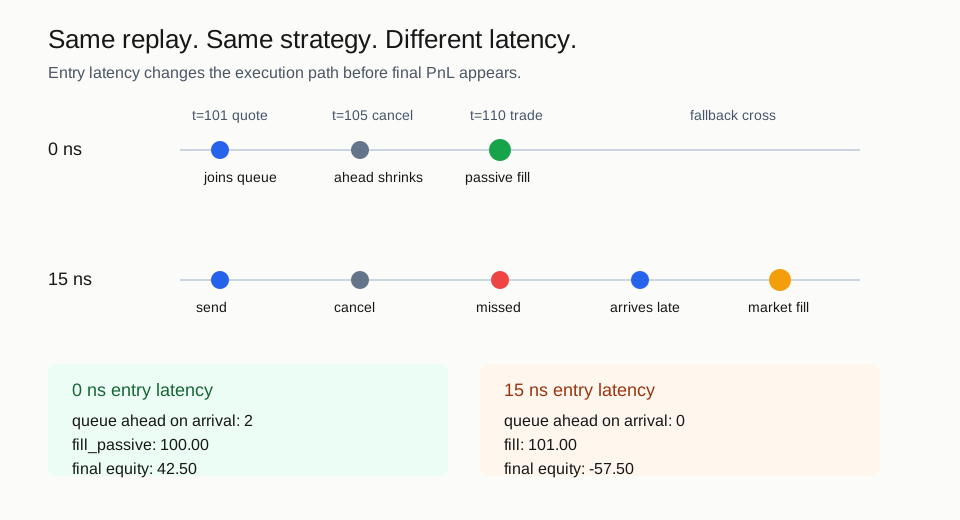
Replay can also apply entry latency before orders and cancels reach the simulated venue:
from ordersim import ConstantLatency

replay = Replay(
    data=SyntheticSource.small_mbo(),
    instrument=spec,
    latency_model_factory=lambda: ConstantLatency(entry_ns=25_000_000),
)
For a visual latency comparison, run examples/latency_demo.py.
ordersim can run several strategy variants over the same market replay while
keeping private state isolated:
result = replay.run_many(
    {
        "baseline": baseline_strategy,
        "wider_quote": wider_quote_strategy,
        "faster_cancel": faster_cancel_strategy,
    }
)
The intended guarantee is solo-equivalence: the fills for baseline inside
run_many() should match the fills from running baseline by itself on the
same input.
0.1.x is live on PyPI. The current public line includes the Python reference
engine, packaged C++ default, canonical connector -> Parquet -> replay workflow,
latency models, economics, and public execution-equivalence fixtures.
Planned next milestones:
v0.2: broaden connector recipes, latency experiments, and notebook-first research ergonomics while keeping the C++ and Python engines equivalent.v1.0: research-grade execution lab with notebook-first workflows, connector recipes, latency model gallery, and public replay-equivalence harness.
- Assumptions:
docs/assumptions.md - Execution economics:
docs/economics.md - Execution engines:
docs/execution-engines.md - Latency models:
docs/latency.md - Architecture:
docs/architecture.md - Data guide:
docs/data-guide.md - Connectors:
docs/connectors.md - Releasing:
docs/releasing.md - Engineering standards:
docs/engineering-standards.md - Benchmarks:
docs/benchmarks.md - Example:
examples/canonical.py - Schema reference:
docs/schema.md - AI agent guide:
AGENTS.md
For execution-engine work, SyntheticSource.execution_equivalence_mbo() gives
contributors a tiny public queue-priority fixture to use with the equivalence
harness.
Compiled or alternative execution engines should pass
ordersim.testing.assert_execution_equivalence_suite(...) before they are
trusted.
The easiest first contribution is a data connector.
Good connector PRs:
- implement the
DataSourceprotocol; - include a tiny fixture or generator;
- document source timestamp semantics, UTC normalization, price, size, and order-id semantics;
- add at least one replay test.
For simple examples, prefer the canonical CsvSource schema before adding a
new vendor-specific connector.
MIT.