You signed in with another tab or window. Reload to refresh your session.You signed out in another tab or window. Reload to refresh your session.You switched accounts on another tab or window. Reload to refresh your session.Dismiss alert
Prior to installing support package get the Composer dependency manager for PHP because it'll simplify installation.
composer require tamedevelopers/support
All Paths
function name
Description
base_path()
Get absolute base directory path. Accepts a param string if given, and append to path
directory()
Thesame as base_path()
public_path()
Root/public path. Accepts a param string if given, and append to path
storage_path()
Root/storage path. Accepts a param string if given, and append to path
app_path()
Root/app path. Accepts a param string if given, and append to path
config_path()
Root/config path. Accepts a param string if given, and append to path
lang_path()
Root/lang path. Accepts a param string if given, and append to path
domain()
Returns domain URI. Accepts a param string if given, and append to path
Number to Words
Has three chainable methods
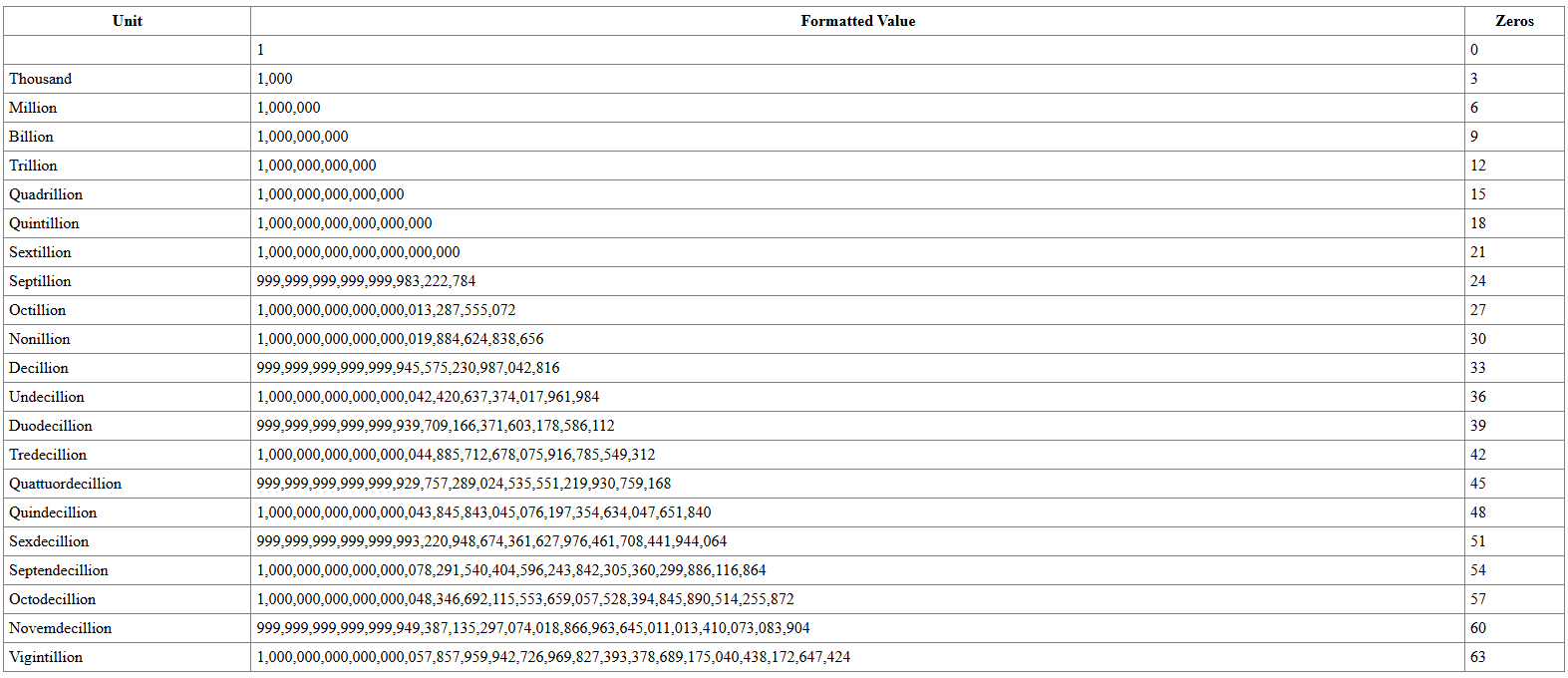
Can translate all the way to vigintillion
It's helper class can be called, using -- NumberToWords()
Currency (iso-4217) code
cents
number
NGN | EUR | USD
true | false
int|float|string
If iso is given and found, it'll automatically converts the text into a currency format
If you want the decimals to be translated to text as well.
numeric figures: 299 | '42,982' | 3200.98
Iso
Takes param as string and case-insensitive
NumberToWords::iso('ngn');
Cents
Takes param as boolean. Default is false
By default, it doesn't format the decimals .00 Must be set to true, to format if needed.
NumberToWords::cents(true);
Value
Takes one param as int | float | string
If numbers is larger than a trillion 1_000_000_000_000, then the value must be passed as a string.
NumberToWords::value(1290);
toText
Convert number to readable words
Below, we're using the function helper method
NumberToWords()
    ->iso('TUR')
    ->value('120.953')
    ->cents(true)
    ->toText();

// Output: One hundred and twenty lira, nine hundred and fifty-three kuruş
toNumber
Convert words to number
comma , is used to seperate decimals in words
useTamedevelopers\Support\NumberToWords;
NumberToWords::value('twelve million three hundred thousand, six hundred and ninety-eight')
->cents(true)
->toNumber()
// Output: 12300000.698
Tame
The Core Class of Components
It's helper class can be called, using -- Tame()
useTamedevelopers\Support\Tame;
byteToUnit
Accepts 5 param. first param alone is needed
All other params are [optional]
Params
Description
bytes
The size in bytes to be converted
format
Whether to preserve case (default: lowercase)
gb
Custom label for GB (default: 'GB')
mb
Custom label for MB (default: 'MB')
kb
Custom label for KB (default: 'KB')
Tame()->byteToUnit(6880);

// Output: 7kb
unitToByte
Tame()->unitToByte('24mb');

// Output: 25165824
fileTime
Returns last edited time of the file as an - int|false
Tame()->fileTime(base_path('filepath.php'));
exists
Checks if a file exists and is not a directory - bool
Tame()->exists(base_path('filepath.php'));
// Output: true or false
unlink
Deletes a file from the server if it exists and does not match the restricted file name - void
Converts an image file to its Base64 representation. Supports local files and direct URLs - null|string
Tame()->imageToBase64(base_path('path/to/image.jpg'));
// Output: "data:image/jpg;base64,..." (Base64 string for the image)Tame()->imageToBase64('https://example.com/image.png', true);
// Output: "data:image/png;base64,..." (Base64 string for the URL image)
platformIcon
Returns the path to the SVG icon for the specified platform or operating system.
Params
Description
$platform
Platform name windows | linux | android | mobile | phone | unknown | mac | macintosh | ios | iphone | c | os x
It's helper class can be called, using -- TameSanitizer()
Sanitizer Usage
useTamedevelopers\Support\TextSanitizer;
$text = "My number is 0812300089 and another is zero eight one two three four five six seven.Visit https://x.com google.com or mail me at test@mail.com +23400000209I love #coding with @friends. I also have two cats. 11092092-3";
$text2 = "I'm a beautiful zero nine zero and sweet in seven five seven eight available from ";
$text3 = "Reach me on zero eight one double two 555 nine or 0812220000";
$text4 = "Visit https://x.com google.com or mail me at test@mail.com @username.com. +23400";
$sanitizer->phoneInt($text); // $sanitizer->phoneWords($text2); // I'm a beautiful [phone] available from $sanitizer->phoneWords($text3); // Reach me on [phone]$sanitizer->url($text4); // Visit [url] [url] or mail me at test@mail.com @username.com. +23400$sanitizer->email($text4); // Visit https://x.com google.com or mail me at [email] @username.com. +23400$sanitizer->mention($text4); // Visit https://x.com google.com or mail me at test@mail.com [username]. +23400$sanitizer->findPhoneWords($text); // Collect all numbers both in words as return as int in array// array [// 0 => "0812300089"// 1 => "081234567"// 2 => "23400000209"// 3 => "2110920923"// ]$sanitizer->sanitize($text); // sanitize all in a go!// My number is [phone] and another is [phone].// Visit [url] [url] or mail me at [email]. +[phone]// I love [hastag] with [mention]. I also have two cats. [phone]-3// sanitize(// string $text,// array $rules = [// 'phoneInt' => '[phone]',// 'phoneWords' => '[phone]',// 'url' => '[url]',// 'email' => '[email]',// 'mention' => '[mention]',// 'hastag' => '[hastag]',// ]// );
TextToImage
Generate initial-based avatar images similar to Google profile placeholders.
Supports all languages (Latin, CJK, Arabic, etc.) with automatic font resolution.
Precision alignment and various background patterns.
TextToImage Options
The run() method accepts an array of configuration options.
Below is a detailed breakdown of every possible parameter you can pass to customize the output.
Option
Type
Default
Description
name
string
''
The string to extract initials from. Supports multiple words and Unicode characters
size
int
256
The width and height of the image in pixels
type
string
'square'
The background shape or pattern. Supports circle, radius, square, gradient, diagonal
radius
int|null
null
Corner radius for the radius type. Defaults to size / 6 if null
bg_color
mixed
''
Background color. Supports Hex, RGB string, or RGB Array. Default is [147, 51, 234]
text_color
mixed
''
Color of the initials. Supports Hex, RGB string, or RGB Array. Default is #FFFFFF
font_path
string|null
null
Absolute path to a custom .ttf font file
font_size
int|null
null
The font size in pts. Calculates the best fit automatically if null
font_weight
string
'normal'
Font weight for auto-selecting system fonts. Supports normal or bold
output
string
'save'
Method of return. Supports save (path), view (stream), download (stream), or data (base64)
destination
string|null
null
File path or directory to save the image. Defaults ('storage/avatars')
generate
bool
false
When true, appends a unique random suffix to the filename to prevent overwriting
The Core Class For Email and String manipulations analysiss
It's helper class can be called, using -- TameUtility()
Utility Usage
useTamedevelopers\Support\Utility;
$text = "The Christ the Redeemer Sanctuary, located in the heart of Rio de Janeiro, is the world’s first open-air sanctuary, offering a sacred space welcoming people of all cultures, beliefs, and backgrounds.";
$email = "maxwell+example@xd.org";
$email2 = "maxwell.example@gmail.com";
$email3 = "example+maxwell@icloud.com";
$util = Utility::text($text);
$util->readingTime(); // 10 seconds$util->wordCount(); // 32$util->charCount(); // 207$util->sentenceCount(); // 1$util->reverse(); // used to reverse the text words
Utility::text('This is a new text')->readingTime(); // 2 seconds
Utility::text("A man, a plan, a canal: Panama")->isPalindrome(); //true$util->maskEmail($email); // *********xample@xd.org
Utility::normalizeEmail($email); // maxwell+example@xd.org
Utility::normalizeEmail($email2); // maxwell.example@gmail.com
Utility::normalizeEmail($email3); // example@icloud.com
Utility::isGmail($email2); // true
Utility::validateEmail($email); // true
Country
Country data and helpers
Class: Tamedevelopers\Support\Country
It's helper class can be called, using -- TameCountry()
Clear buffers and send email in the background without waiting (But only to be used when using an API/Submitting via Ajax/Fetch or similar method of form submission)
[unlink] Default is true unlinks file after download
TameZip()->download('newData.zip')
PDF
Require package to be installed - composer require dompdf/dompdf
It's helper class can be called, using -- TamePDF()
options
Description
content string
HTML Content
paper_size string
Default is A4 --- letter | legal
paper_type string
Default is portrait --- landscape
destination string
Full path to where file has to be save public_path(invoice/file.pdf)
By default it saves the pdf generated by timename to your project root [dir] |
| output string | Default is view --- save \| download |
| isRemoteEnabled bool | Default is false --- true If the content of html contains file/image link |
| title string | If the html content of PDF has no title, file name will automatically become the title |
| delete bool | Default is true --- false If output is view you can choose to delete file after preview |
Uses the config_asset() Default path as an entry level for root-level folder
name
Description/Usage
@css
@css('css/app.css')
@js
@js('js/app.js')
@asset
@asset('images/logo.png', true, true) - Similar to tasset()
@svg
@svg('images/icon.svg', 'w-6 h-6 text-gray-500') - Takes path and custom class to be attached to the svg
// if you've define root access inside the public folderconfig_asset(
base_path: '/', // staring from project root[no default folder]
cache: true, // ability to invalidate and cache files
);
useTamedevelopers\Support\View;
// Using a child view that extends a layout$view = newView('tests.layout.home2', [
'title' => 'Homepage',
]);
echo$view->render();
Rendering multiple times safely (same instance)
$view = newView('tests.layout.home2', [
'title' => 'Homepage',
]);
// First renderecho$view->render();
// Second render (fresh render, no duplicated sections)echo$view->render();
@extends('layout.partials.app')
@section('content')
<h1>Welcome to the Homepage!</h1>
@endsection@include('layout.partials.footer', ['year'=>2025])
@yield('content')
@foreach($conditionas$value)
@endforeach@if($condition)
@else@endif
View Helper
It's helper class can be called, using -- tview()
// set base folder for views// [optional], but when set - this will be the default path to look for view files.tview()->base('tests');
// Create a view instance via helper and render$view = tview('layout.home2', ['title' => 'Homepage']);
echo$view->render();
// One-liner (render via static call)useTamedevelopers\Support\View;
echo View::render('layout.home2', ['title' => 'Homepage']);
Env
By default it use the default root as .env path, so mandatory to install vendor in root directory.
Env Create
To create an environment .env file. Create or ignore if exists
useTamedevelopers\Support\Env;
Env::load('path_to_env_folder')
// or // Just as the name says. It'll load the `.env` file or fail with status code of 404. An error
Env::loadOrFail('path_to_env_folder')
Env Update
Returns true|false. Used to update env variables
It's helper class can be called, using -- env_update()
Params
Description
key
ENV key
value
ENV value
quote
true | false - Default is true (Allow quotes within value)
space
true | false - Default is false (Allow space between key and value)
/** * Custom Language Handler * * @param mixed $key * @return mixed */function__lang($key){
// since the config only takes the filename follow by dot(.) and keyname// then we can manually include additional folder-name followed by / to indicate that it's a folder// then message.key_name// To make this Laravel kind of language, we can add the default value to be returned as the key// Do not forget that it starts from your root base directory, as the Package already has your root pathreturnServer()->config("en/message.{$key}", "message.{$key}", 'lang');
}
--- Structure of folder example
--- (d) for directory and (f) for file
Base/
├── Lang/
│ ├── en/
| | ────── message.php (File)
| | ────── error.php (File)
| |
│ ├── tr/
| | ────── message.php (File)
| | ────── error.php (File)
│ └── ...
└── ...
The package enforces a valid application key in .env as APP_KEY.
If APP_KEY is missing, invalid, or manually altered, the application will return HTTP 500 until a new key is generated via the API below.
useTamedevelopers\Support\Capsule\Manager;
// Generate and persist a new key to .env and the fingerprint store
Manager::regenerate();
// Or ensure env is booted then enforce key (called internally)
Manager::startEnvIFNotStarted();
Valid key format is Laravel-style: base64: followed by base64 of 32 random bytes.
Helper tmanager
You can use the helper for convenience:
// Generate and persist a new keytmanager()->regenerate();
// Optionally start env and enforce keytmanager()->startEnvIFNotStarted();
Autoload Register
Takes a string|array as parameter
Register one or more folders containing your PHP files
Automatically loads Files|Classes in the folder and sub-folders
useTamedevelopers\Support\AutoloadRegister;
// Single folder
AutoloadRegister::load('folder');
// Multiple folders
AutoloadRegister::load(['folder', 'folder2']);
// Or use the helperautoload_register('folder');
autoload_register(['folder', 'folder2']);