


Quota, usage, and token visibility for OpenCode.




npx @slkiser/opencode-quota initImportant
OpenCode >= 1.4.3 and Node.js >= 18 are required.
The installer adds missing plugin/config entries and keeps your unrelated settings. Re-running it updates only installer-owned Quota UI choices.
| Question | Pick this when you want... |
|---|---|
| Install scope | This repo/worktree only, or your global OpenCode config. |
| Quota UI | Sidebar panel, toasts, compact status line, terminal/slash-command only, or a mix. |
| Provider mode | Auto-detect providers, or choose a provider list yourself. |
| Quota reset periods | Show one reset period per provider, or all known reset periods. |
| Quota percentage meaning | Show quota remaining, or quota already used. |
| Session token details | Hide token counts for shorter output, or show them when available. |
| Maintainer announcements | Keep bundled maintainer announcements enabled, or opt out. Yes is the default; Sidebar or Compact status installs the TUI plugin, where home notices can appear. |
- Restart OpenCode.
- Run
/quota. - If something looks wrong, run
/quota_status. - If you kept maintainer announcements enabled and installed the TUI plugin, the home screen can show
Notice: Maintainer announcement available. Run /quota_announcements.or the plural count form. Without the TUI plugin, the same count-only notice can appear once after the first visible quota toast. Run/quota_announcementsto read active notices. - If you enabled the Sidebar panel, open the session sidebar and look for
Quota. - If you enabled Compact status line, look for the home-bottom quota line and the chat/session prompt quota line.
Run without installing the binary first:
npx @slkiser/opencode-quota showOr, if opencode-quota is already on your PATH:
opencode-quota show --provider copilot- A
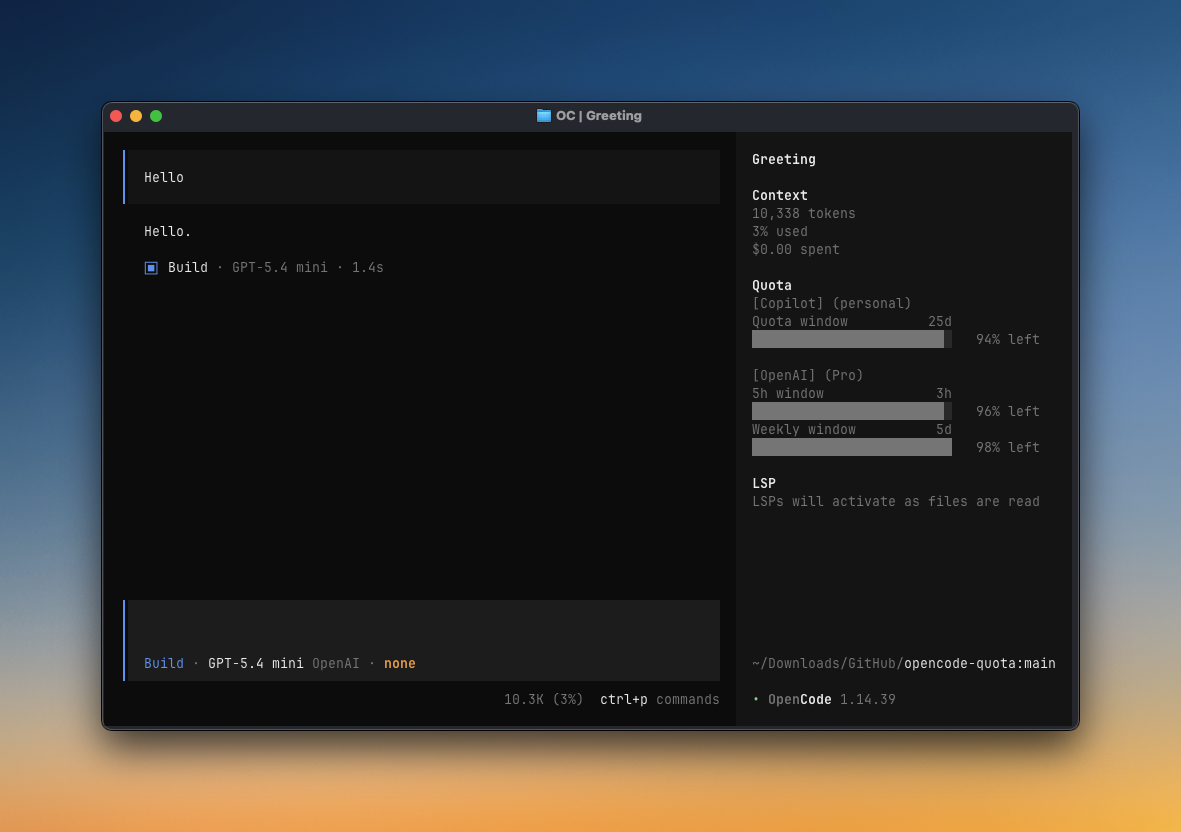
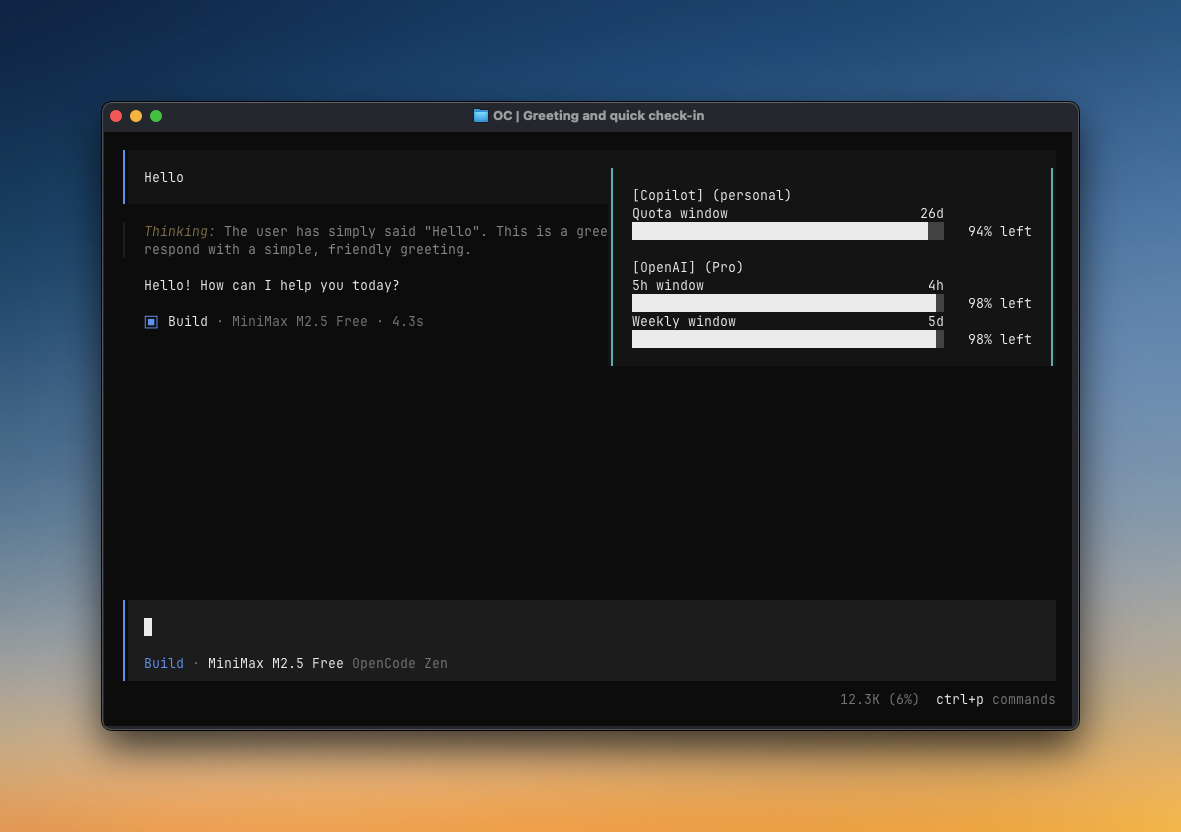
QuotaSidebar panel in the TUI - Popup quota toasts in OpenCode
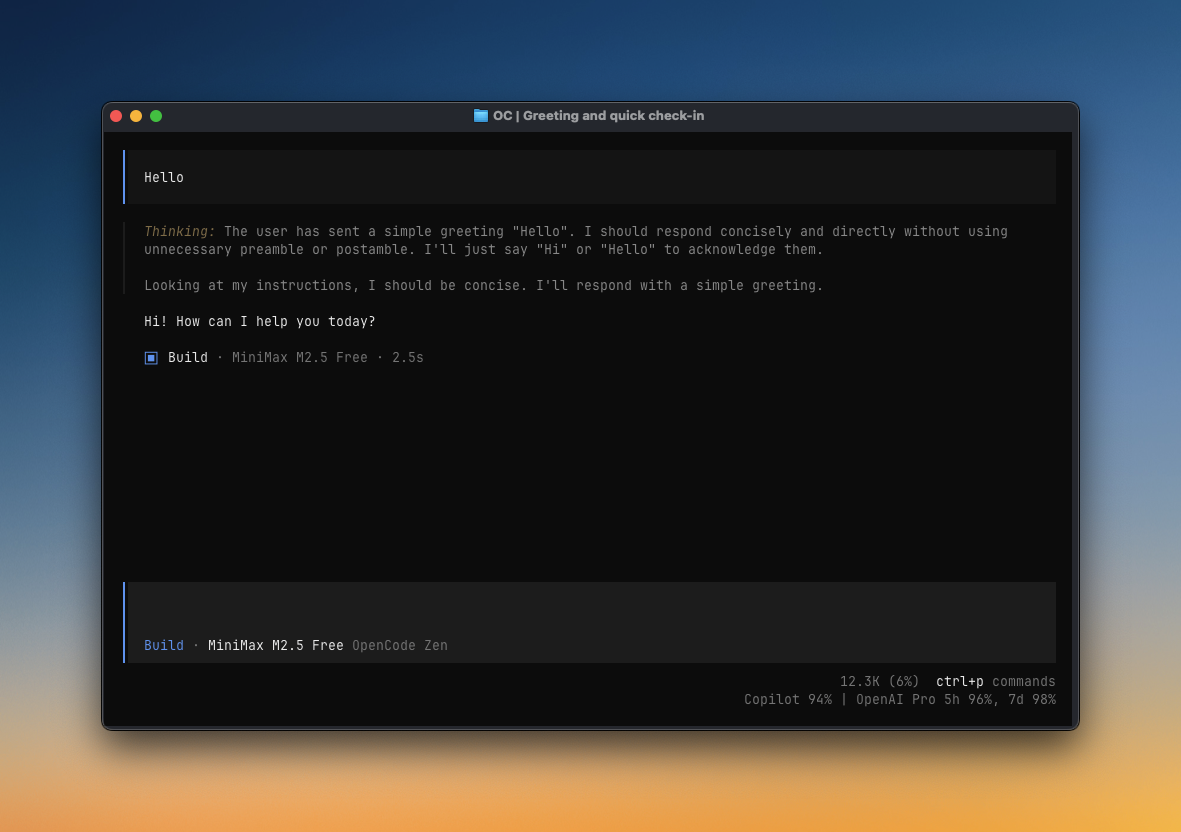
- A Compact status line in the TUI
/quota,/quota_status, and/quota_announcementsslash commands- Token reports such as
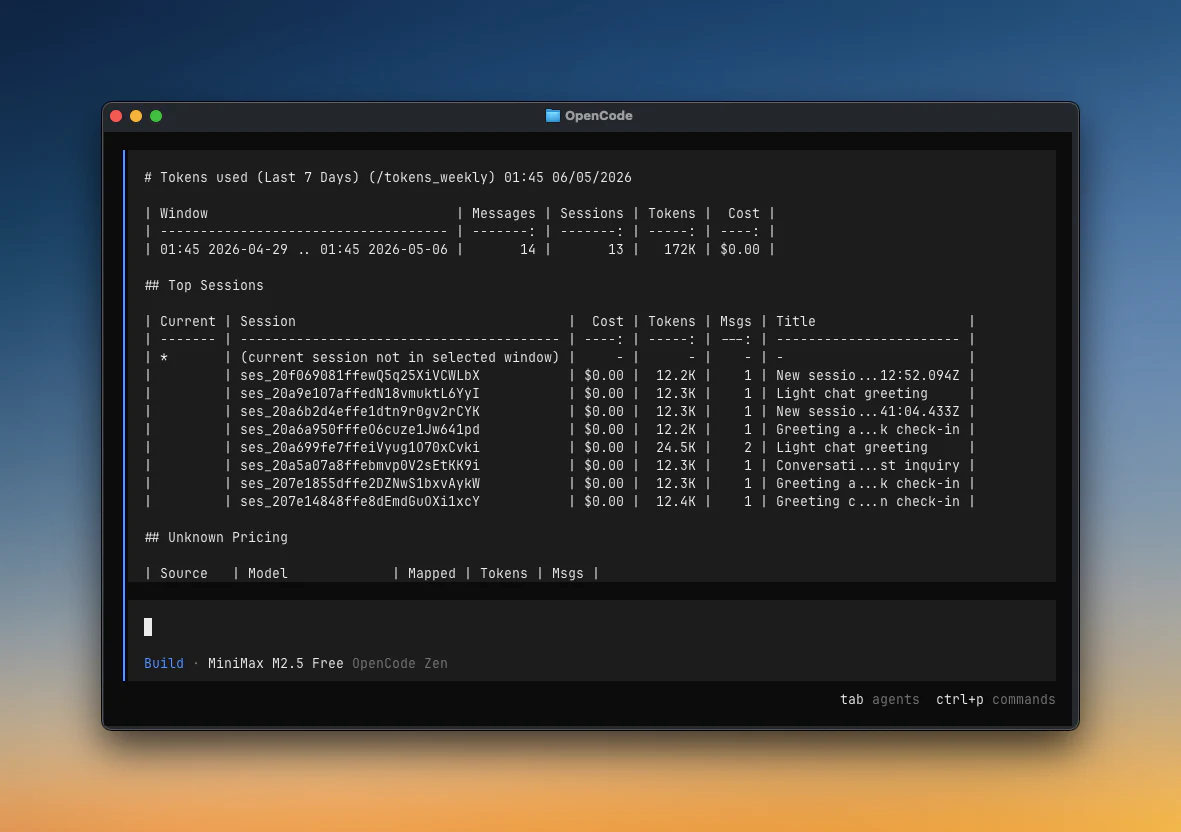
/tokens_todayand/tokens_weekly - Provider diagnostics for auth, quota sources, pricing, and bundled maintainer announcements
|
|
| Sidebar panel | Toast |
|
|
| Compact status line | /tokens_weekly report |
Use the installer when possible. For manual setup, use the same OpenCode config location you would pick in the installer:
- Project install: files live in your repo/worktree.
- Global install: files live in your OpenCode config directory, usually
~/.config/opencode. - If you set
OPENCODE_CONFIG_DIR, use that directory instead.
This enables providers, slash commands, terminal checks, and popup toasts. Add this to opencode.json or opencode.jsonc:
If you want the Sidebar panel, Compact status line, or maintainer announcement home notices, also add this to tui.json or tui.jsonc:
{
"$schema": "https://opencode.ai/tui.json",
"plugin": ["@slkiser/opencode-quota"],
}Create or edit opencode-quota/quota-toast.json next to the opencode.json / tui.json file above. For a project install, that means:
<your-repo>/opencode-quota/quota-toast.json
Start with this, then adjust the UI choices in the next section:
{
"enabledProviders": "auto",
"enableToast": true,
"tuiSidebarPanel": {
"enabled": true,
},
"tuiCompactStatus": {
"enabled": false,
},
"maintainerAnnouncements": {
"enabled": true,
"home": true,
},
}Tip
Run /quota_status to see the exact config paths OpenCode Quota loaded.
All UI surfaces use the same quota data. Put these settings in opencode-quota/quota-toast.json, not tui.json.
| UI surface | Config | Notes |
|---|---|---|
| Sidebar panel | tuiSidebarPanel.enabled: true |
Full Quota panel in OpenCode's session sidebar. Requires the TUI plugin entry above. |
| Toast | enableToast: true |
Popup toast after idle/question/compact events. Requires the server plugin entry above. |
| Compact status line | tuiCompactStatus.enabled: true |
Short text-only quota line at the home bottom and chat/session prompt locations, for example `Copilot 94% |
| Maintainer announcement notice | maintainerAnnouncements.enabled: true, maintainerAnnouncements.home: true |
Prefers the TUI home notice when the quota TUI plugin is configured. Without the TUI plugin, shows the same count-only notice once after the first visible quota toast. |
| Terminal/slash only | enableToast: false, tuiSidebarPanel.enabled: false, tuiCompactStatus.enabled: false, maintainerAnnouncements.enabled: false |
Keeps /quota, /quota_status, /quota_announcements, and terminal checks. |
Selecting Compact status line in the installer enables both compact surfaces by default. To keep compact status home-only, set tuiCompactStatus.sessionPrompt: false.
In the sidebar panel, click the Quota header to switch between the compact summary (▶ Quota) and the detailed all-windows view (▼ Quota). OpenCode remembers the last sidebar state for the plugin.
For more examples, see Common configuration. For every option, see Full configuration reference.
| Command | What it shows |
|---|---|
opencode-quota show |
Terminal quota-only quick glance |
/quota |
Detailed quota report |
/quota_status |
Config, provider, auth, pricing, enabled/home announcement config, source=bundled_only, network=false, and active/future/expired announcement counts |
/quota_announcements |
List active bundled maintainer notices |
/pricing_refresh |
Refresh local runtime pricing from models.dev |
/tokens_today |
Tokens used today |
/tokens_daily |
Tokens used in the last 24 hours |
/tokens_weekly |
Tokens used in the last 7 days |
/tokens_monthly |
Tokens used in the last 30 days, including pricing |
/tokens_all |
Tokens used across all local history |
/tokens_session |
Tokens used in the current session |
/tokens_session_all |
Current session plus descendant sessions |
/tokens_between |
Tokens used between YYYY-MM-DD YYYY-MM-DD |
Most providers work automatically. If a provider has a “Needs setup” link, open that setup note only if you use that provider.
| Provider | Setup | Quota source |
|---|---|---|
| Anthropic (Claude) | Needs setup | Local CLI or OAuth usage |
| GitHub Copilot | Usually automatic | Remote API |
| OpenAI | Automatic | Remote API |
| Cursor | Needs setup | Local estimation |
| Qwen Code | Needs setup | Local estimation |
| Alibaba Coding Plan | Automatic | Local estimation |
| MiniMax Coding Plan | Automatic | Remote API |
| MiniMax Coding Plan (CN) | Automatic | Remote API |
| Kimi Code | Automatic | Remote API |
| Chutes AI | Usually automatic | Remote API |
| Crof.ai | Manual env/config/auth | Remote API |
| Synthetic | Automatic | Remote API |
| Google Antigravity | Needs setup | Remote API |
| Gemini CLI | Needs setup | Remote API |
| Z.ai Coding Plan | Automatic | Remote API |
| Zhipu Coding Plan | Automatic | Remote API |
| NanoGPT | Usually automatic | Remote API |
| DeepSeek | Usually automatic | Remote API balance |
| OpenCode Go | Needs setup | Dashboard scraping |
Customize these settings in opencode-quota/quota-toast.json, next to the OpenCode config for your install scope.
Common locations:
- Project install:
<your-repo>/opencode-quota/quota-toast.json - Global install: usually
~/.config/opencode/opencode-quota/quota-toast.json - Custom config dir:
$OPENCODE_CONFIG_DIR/opencode-quota/quota-toast.json
If you are unsure, run /quota_status; it prints the config path it loaded.
Announcements are bundled only: no remote fetches, announcement telemetry, or persisted dismiss state. Use /quota_announcements to read active notices and /quota_status for counts/diagnostics. See Configure maintainer announcements below for options.
Choose providers explicitly
{
"enabledProviders": ["copilot", "openai", "google-gemini-cli"],
}Show all quota reset periods
{
"formatStyle": "allWindows",
}Show used percentages
{
"percentDisplayMode": "used",
}Turn off popup toasts
Keeps /quota, /quota_status, terminal checks, and any enabled UI surfaces.
{
"enableToast": false,
}Configure maintainer announcements
{
"maintainerAnnouncements": {
"enabled": true,
"home": true,
},
}Set enabled: false to disable automatic announcement surfaces. /quota_announcements lists active bundled notices when announcements are enabled.
Turn off the Sidebar panel
Useful when you want Compact status line only, toasts only, or slash commands only.
{
"tuiSidebarPanel": {
"enabled": false,
},
}Keep Compact status line on home only
Useful when you want the compact line on the home screen but not in the chat/session prompt area.
{
"tuiCompactStatus": {
"enabled": true,
"homeBottom": true,
"sessionPrompt": false,
},
}Increase provider request timeout
{
"requestTimeoutMs": 12000,
}Advanced: legacy config sync
By default, the installer writes quota settings only to opencode-quota/quota-toast.json. If you also want it to write the legacy OpenCode block, run:
npx @slkiser/opencode-quota init --sync-legacy-configThis is only for users who intentionally want experimental.quotaToast mirrored into opencode.json / opencode.jsonc.
Settings go in the same opencode-quota/quota-toast.json sidecar described above.
Existing experimental.quotaToast settings still work when no sidecar file exists. Quota settings do not live in tui.json.
All settings
| Option | Default | Meaning |
|---|---|---|
enabled |
true |
Master switch for quota collection and handled slash commands. When false, /quota, /quota_status, /pricing_refresh, and /tokens_* are handled as no-ops. |
enabledProviders |
"auto" |
Auto-detect providers, or set an explicit provider list. |
minIntervalMs |
300000 |
Minimum fetch interval between provider updates. |
requestTimeoutMs |
5000 |
Remote provider request timeout in milliseconds. |
formatStyle |
singleWindow |
Shared quota reset-period display for popup toasts and the Sidebar panel: singleWindow shows one reset period per provider; allWindows shows all reset periods per provider. Legacy classic/grouped aliases are still accepted. |
percentDisplayMode |
remaining |
Shared quota percentage meaning for popup toasts and the Sidebar panel: remaining shows quota left; used shows quota consumed. /quota keeps its existing remaining-percent output. |
onlyCurrentModel |
false |
Filter quota rows to the current model/provider when that session selection can be resolved. |
showSessionTokens |
true |
Show the Session input/output tokens section when session token data is available. When cached input is present, the section keeps the legacy in/out layout and appends cached input in parentheses next to the input amount. |
pricingSnapshot.source |
"auto" |
Token pricing snapshot selection for /tokens_*: auto, bundled, or runtime. |
pricingSnapshot.autoRefresh |
7 |
Refresh stale local pricing data after this many days. |
| Option | Default | Meaning |
|---|---|---|
enableToast |
true |
Show popup toasts. Disabling this does not disable /quota or UI surfaces. |
toastDurationMs |
9000 |
Toast duration in milliseconds. |
showOnIdle |
true |
Show a toast on the idle trigger. |
showOnQuestion |
true |
Show a toast after a question/assistant response. |
showOnCompact |
true |
Show a toast after session compaction. |
showOnBothFail |
true |
Show a fallback toast when providers attempted quota reads and all failed. |
layout.maxWidth |
50 |
Toast formatting width target. |
layout.narrowAt |
42 |
Toast compact-layout breakpoint. |
layout.tinyAt |
32 |
Toast tiny-layout breakpoint. |
debug |
false |
Append toast debug context when troubleshooting. |
| Option | Default | Meaning |
|---|---|---|
tuiSidebarPanel.enabled |
true |
Show the Sidebar Quota panel when the TUI plugin is installed. Click the panel header to toggle between compact summary and detailed all-windows views; OpenCode remembers the last state. |
tuiCompactStatus.enabled |
false |
Opt in to Compact status line UI surfaces. |
tuiCompactStatus.homeBottom |
true |
Show the Compact status line at the home bottom location. |
tuiCompactStatus.sessionPrompt |
true |
Show the Compact status line by wrapping the TUI session prompt. Disable this if you only want the home-bottom line. |
tuiCompactStatus.suppressWhenNativeProviderQuota |
true |
Hide the Compact status line when OpenCode exposes native provider-quota support. |
tuiCompactStatus.maxWidth |
96 |
Maximum Compact status line text width. |
| Option | Default | Meaning |
|---|---|---|
maintainerAnnouncements.enabled |
true |
Enable bundled maintainer announcements. |
maintainerAnnouncements.home |
true |
Show the count-only notice on TUI home when the quota TUI plugin is configured, or as a one-shot toast fallback after a visible quota toast when it is not. |
| Option | Default | Meaning |
|---|---|---|
anthropicBinaryPath |
"claude" |
Command/path used for local Claude CLI probing. |
googleModels |
["CLAUDE"] |
Google model keys to query: CLAUDE, G3PRO, G3FLASH, G3IMAGE. |
opencodeGoWindows |
["rolling", "weekly", "monthly"] |
OpenCode Go usage windows to display. |
alibabaCodingPlanTier |
"lite" |
Fallback Alibaba Coding Plan tier when auth does not include tier. |
cursorPlan |
"none" |
Cursor included API budget preset: none, pro, pro-plus, ultra. |
cursorIncludedApiUsd |
unset | Override Cursor monthly included API budget in USD. |
cursorBillingCycleStartDay |
unset | Local billing-cycle anchor day 1..28; when unset, Cursor usage resets on the local calendar month. |
Anthropic (Claude)
Install Claude Code, authenticate it, and make sure claude is on your PATH:
claude auth login
claude auth statusIf Claude lives at a custom path, set anthropicBinaryPath in opencode-quota/quota-toast.json.
Cursor
Use companion plugin @playwo/opencode-cursor-oauth. Add it before @slkiser/opencode-quota in opencode.json, then authenticate once:
opencode auth login --provider cursorQwen Code
Use companion plugin opencode-qwencode-auth. Add it before @slkiser/opencode-quota in opencode.json.
Google Antigravity
Use companion plugin opencode-antigravity-auth. Add it before @slkiser/opencode-quota in opencode.json.
Gemini CLI
Use companion plugin opencode-gemini-auth. Add it before @slkiser/opencode-quota in opencode.json, then authenticate Google once:
opencode auth login --provider googleIf you use manual provider selection, include google-gemini-cli in enabledProviders.
DeepSeek
DeepSeek shows the current on-demand account balance from GET https://api.deepseek.com/user/balance.
Use one of these trusted API-key sources:
export DEEPSEEK_API_KEY="your-api-key"Or put the key in trusted user/global OpenCode config, not repo-local config:
{
"provider": {
"deepseek": {
"options": { "apiKey": "{env:DEEPSEEK_API_KEY}" },
},
},
}If you use manual provider selection, include deepseek in enabledProviders.
OpenCode Go
OpenCode Go quota scrapes the dashboard and needs a workspace ID plus an auth cookie:
export OPENCODE_GO_WORKSPACE_ID="your-workspace-id"
export OPENCODE_GO_AUTH_COOKIE="your-auth-cookie"Use opencodeGoWindows to choose 5h, Weekly, and/or Monthly windows. Environment variables take precedence over the optional opencode-go.json file.
Start here when quota or token data looks wrong.
- Run
/quota_status. - Confirm the expected provider appears in the detected provider list.
- Confirm companion auth plugins are before
@slkiser/opencode-quotainopencode.json. - If token reports are empty, start OpenCode once so it creates
opencode.db, then run a session with model usage. - Use the provider-specific table below for the failing provider.
| Symptom | Try this |
|---|---|
/quota shows no providers |
Run /quota_status, then check provider detection and auth. |
| Sidebar panel does not appear | Confirm tui.json includes @slkiser/opencode-quota, restart OpenCode, and check tuiSidebarPanel.enabled. |
| Compact status line does not appear anywhere | Confirm tui.json includes @slkiser/opencode-quota, restart OpenCode, check tuiCompactStatus.enabled, and check whether tuiCompactStatus.suppressWhenNativeProviderQuota is hiding it because OpenCode exposes native provider-quota support. |
| Compact status appears on home but not in chat/session | Check tuiCompactStatus.sessionPrompt; set it to true to show the chat/session prompt line. |
| Popup toasts do not appear | Check enableToast, showOnIdle, showOnQuestion, and showOnCompact. |
| Announcement home notice does not appear | Confirm tui.json includes @slkiser/opencode-quota, restart OpenCode, then check maintainerAnnouncements.enabled, maintainerAnnouncements.home, and the active count in the maintainer_announcements section of /quota_status. |
| Token reports are empty | Start OpenCode once so opencode.db exists, then run a session with model usage. |
| Pricing looks stale | Run /pricing_refresh. |
Anthropic (Claude)
Run /quota_status and check the Anthropic section.
| Symptom | Fix |
|---|---|
claude not found |
Install Claude Code and make sure claude is on your PATH. |
| Claude is installed at a custom path | Set anthropicBinaryPath in opencode-quota/quota-toast.json. |
| Not authenticated | Run claude auth login, then confirm claude auth status works. |
| Auth works but no quota rows appear | Check quota_source and message in /quota_status; re-authenticate Claude if the OAuth credential fallback is missing or stale. |
| Provider not detected | Confirm OpenCode is configured to use the anthropic provider. |
GitHub Copilot
Run /quota_status and check copilot_quota_auth, billing_mode, billing_scope, and quota_api.
| Symptom | Fix |
|---|---|
| Personal quota missing | Confirm OpenCode Copilot auth works. The plugin can read OpenCode's Copilot OAuth token. |
| Business or Enterprise quota missing | Add copilot-quota-token.json in the OpenCode runtime config directory shown by opencode debug paths. |
| PAT config exists but quota fails | Fix copilot-quota-token.json; when present, it takes precedence over OAuth and does not silently fall back. |
| Enterprise usage missing | Use a classic PAT with the required billing access. Fine-grained PATs and GitHub App tokens are not supported for Enterprise premium usage. |
OpenAI
Run /quota_status and check the OpenAI auth source and token status.
| Symptom | Fix |
|---|---|
| OpenAI quota missing | Confirm OpenCode native OpenAI OAuth is present in auth.json. |
| Token expired | Re-run OpenCode's OpenAI auth flow. |
| Provider not detected | Confirm your OpenCode config uses the openai provider or a compatible OpenAI auth entry. |
Cursor
Run /quota_status and check the Cursor section.
| Symptom | Fix |
|---|---|
| Cursor not detected | Put @playwo/opencode-cursor-oauth before @slkiser/opencode-quota in opencode.json. |
| Cursor auth missing | Run opencode auth login --provider cursor. |
| Quota appears but no remaining percentage | Set cursorPlan or cursorIncludedApiUsd in opencode-quota/quota-toast.json. |
| Billing cycle looks wrong | Set cursorBillingCycleStartDay in opencode-quota/quota-toast.json to your local billing anchor day. |
| Unknown Cursor pricing | Run /pricing_refresh; if still unknown, check /quota_status for unknown model ids. |
Qwen Code
Run /quota_status and check qwen_oauth_source, qwen_local_plan, and the qwen_code live probe section.
| Symptom | Fix |
|---|---|
| Qwen not detected | Put opencode-qwencode-auth before @slkiser/opencode-quota in opencode.json. |
| Auth missing | Complete the Qwen companion plugin auth flow. |
| Counters do not move | Confirm the current model is qwen-code/*; Qwen quota is local request estimation for matching model usage. |
| Usage looks stale | Check the local state file path shown by /quota_status. |
Alibaba Coding Plan
Run /quota_status and check the Alibaba auth, resolved tier, state-file path, and alibaba_coding_plan live probe section.
| Symptom | Fix |
|---|---|
| API key not detected | Use ALIBABA_CODING_PLAN_API_KEY, ALIBABA_API_KEY, trusted user/global OpenCode config, or OpenCode auth. Repo-local provider secrets are ignored. |
| Wrong tier | Set alibabaCodingPlanTier to lite or pro in opencode-quota/quota-toast.json. |
| Counters do not move | Confirm the current model is alibaba/* or alibaba-cn/*. |
| Quota seems stale | Check the state-file path shown in /quota_status. |
MiniMax, Kimi, Chutes AI, Crof.ai, Synthetic, Z.ai, Zhipu, NanoGPT, and DeepSeek
These providers use trusted env vars, trusted user/global OpenCode config, or native OpenCode auth. Run /quota_status and check the provider-specific API-key diagnostics.
| Provider | Useful checks |
|---|---|
| MiniMax Coding Plan | Use MINIMAX_CODING_PLAN_API_KEY or MINIMAX_API_KEY for the international endpoint. Runtime/config ids like minimax and minimax-coding-plan use this provider. Repo-local provider secrets are ignored. |
| MiniMax Coding Plan (CN) | Use MINIMAX_CHINA_CODING_PLAN_API_KEY or trusted user/global OpenCode config under minimax-china-coding-plan, minimax-cn-coding-plan, minimax-cn, or minimax-china. Runtime id minimax-cn-coding-plan uses this provider. |
| Kimi Code | Use KIMI_API_KEY or KIMI_CODE_API_KEY; repo-local provider secrets are ignored. |
| Chutes AI | Use CHUTES_API_KEY, trusted user/global config, or OpenCode auth. |
| Crof.ai | Use CROF_API_KEY, CROFAI_API_KEY, trusted user/global config, or OpenCode auth. |
| Synthetic | Use SYNTHETIC_API_KEY, trusted user/global config, or OpenCode auth. |
| Z.ai Coding Plan | Use ZAI_API_KEY or ZAI_CODING_PLAN_API_KEY; malformed fallback auth is surfaced as an auth error. |
| Zhipu Coding Plan | Use ZHIPU_API_KEY or ZHIPU_CODING_PLAN_API_KEY; malformed fallback auth is surfaced as an auth error. |
| NanoGPT | Use NANOGPT_API_KEY, NANO_GPT_API_KEY, trusted user/global config, or OpenCode auth. |
| DeepSeek | Use DEEPSEEK_API_KEY, trusted user/global config under provider.deepseek.options.apiKey, or OpenCode auth. This provider shows balance only because DeepSeek does not expose a quota reset window. |
For security, repo-local opencode.json / opencode.jsonc is ignored for provider secrets in these integrations. Put secrets in environment variables or trusted user/global config. OpenCode auth fallbacks for API-key providers require { "type": "api", "key": "..." } entries.
Google Antigravity
Run /quota_status and check the google_antigravity section.
| Symptom | Fix |
|---|---|
| Companion missing | Put opencode-antigravity-auth before @slkiser/opencode-quota in opencode.json. |
| Accounts not found | Check the selected antigravity-accounts.json path shown by /quota_status. |
| Refresh tokens invalid | Re-authenticate with the companion plugin. |
| Provider returns no rows | Check live_probe, live_entry_*, and live_error_* in /quota_status. |
Gemini CLI
Run /quota_status and check the Gemini CLI live probe rows.
| Symptom | Fix |
|---|---|
| Companion missing | Put opencode-gemini-auth before @slkiser/opencode-quota in opencode.json. |
| Provider not enabled in manual mode | Include google-gemini-cli in enabledProviders in opencode-quota/quota-toast.json. |
| Auth missing | Run opencode auth login --provider google. |
| Project missing | Set provider.google.options.projectId, OPENCODE_GEMINI_PROJECT_ID, GOOGLE_CLOUD_PROJECT, or GOOGLE_CLOUD_PROJECT_ID. |
OpenCode Go
Run /quota_status and check the opencode_go section.
| Symptom | Fix |
|---|---|
| Config not detected | Set both OPENCODE_GO_WORKSPACE_ID and OPENCODE_GO_AUTH_COOKIE, then rerun /quota_status. |
| Incomplete config | workspaceId and authCookie must come from the same source. |
| Scrape returns no data | Refresh the browser auth cookie from opencode.ai. |
| Selected window missing | Check /quota_status for selected_windows and live_fetch_error; remove unavailable windows from opencodeGoWindows in opencode-quota/quota-toast.json or refresh the dashboard cookie. |
| Dashboard format changed | This integration scrapes the dashboard, so it can break if the dashboard markup changes. |
Token reports
Run /quota_status and check pricing snapshot health plus OpenCode database paths.
| Symptom | Fix |
|---|---|
/tokens_* is empty |
Start OpenCode once so it creates opencode.db, then run a session with model usage. |
| Pricing looks stale | Run /pricing_refresh. |
| Runtime pricing does not change output | Check pricingSnapshot.source in opencode-quota/quota-toast.json; bundled keeps packaged pricing active. |
| Cursor model has unknown pricing | Run /pricing_refresh; Cursor auto and composer* use bundled deterministic pricing. |
Thanks to everyone who has contributed to OpenCode Quota.
MIT
OpenCode Quota is not built by the OpenCode team and is not affiliated with OpenCode or any provider listed above.
{
  "$schema": "https://opencode.ai/config.json",
  "plugin": ["@slkiser/opencode-quota"],
}