


Roslyn-based analyzer to provide diagnostics of static fields and properties initialization and more.
- Flaky Initialization Analysis detects flaky initialization
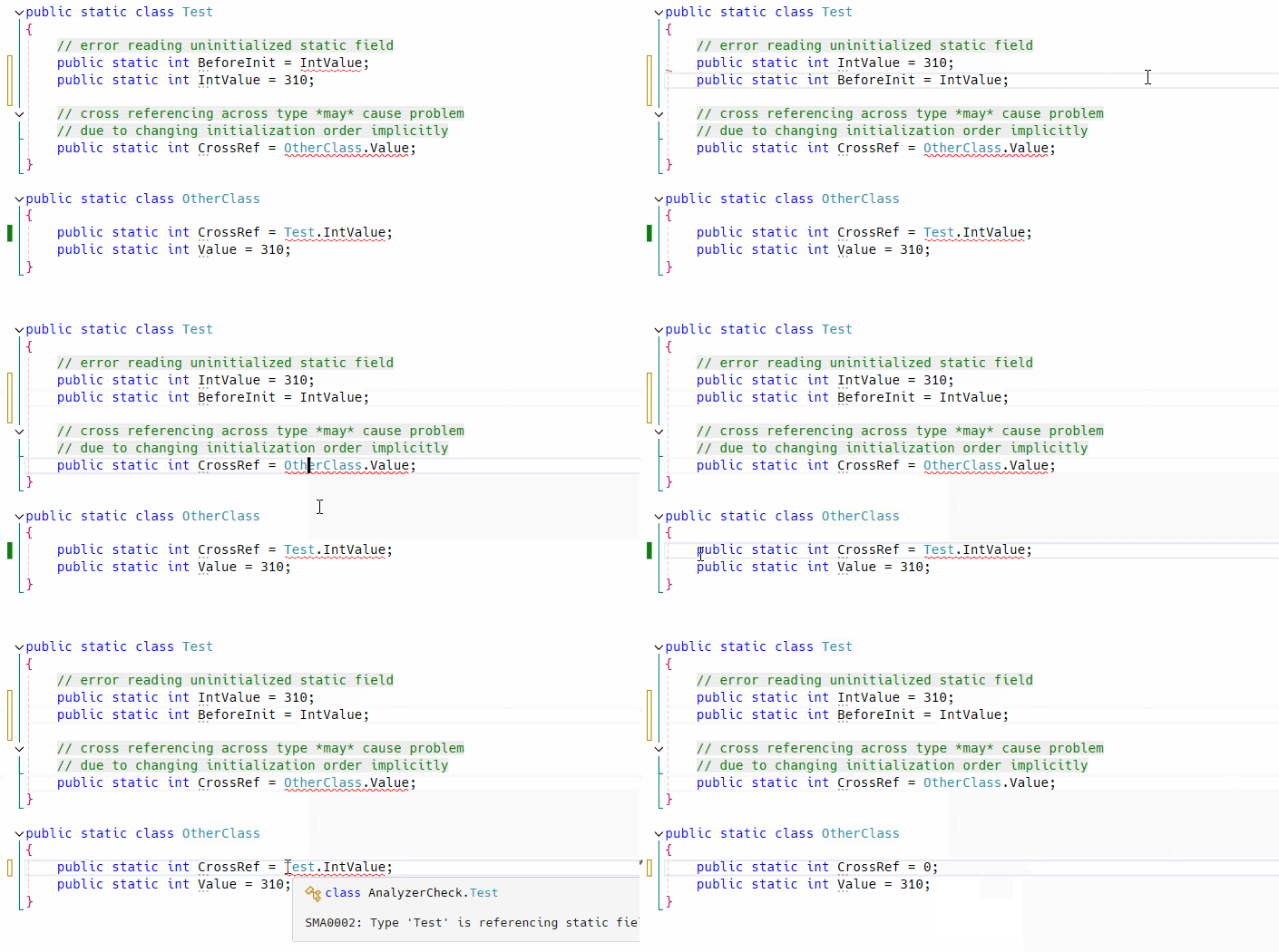
- Wrong order of static field and property declaration
- Partial type member reference across files
- Cross-Referencing Problem of static field across type
- Analysis for Code Review (Literal Argument Analysis)
- Immutable/Read-Only Variable Analysis detects assignment to locals/parameters and writable call-site argument passing
EnumType Analysis to prevent user-level value conversion & moreDisposableAnalysis to detect missing using statement- Async Context Analysis to detect missing await on
TaskorValueTask - Struct Analysis to detect parameterless constructor misuse and more
TSelfgeneric type argument & type constraint analysis- File header comment enforcement
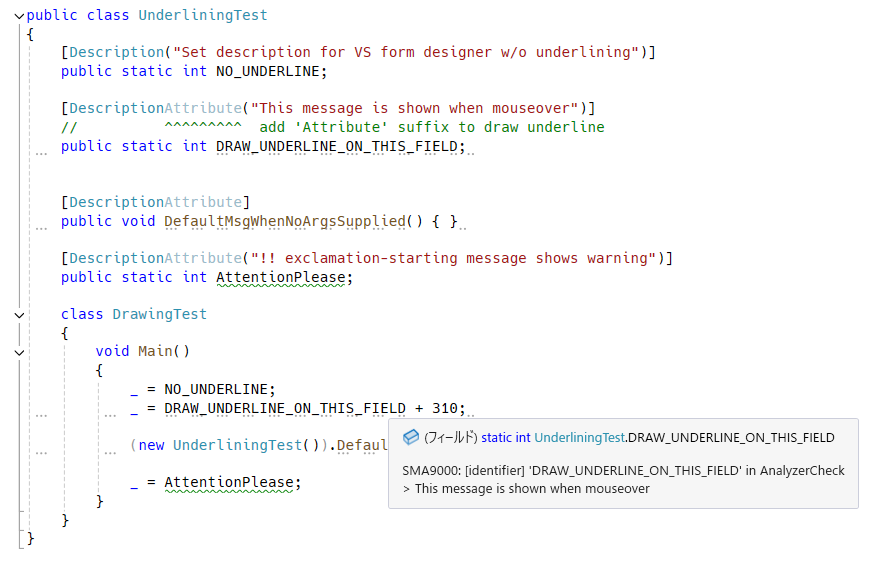
Annotating and underlining field, property or etc with custom message
Tip
Find out all diagnostic rules: RULES.md
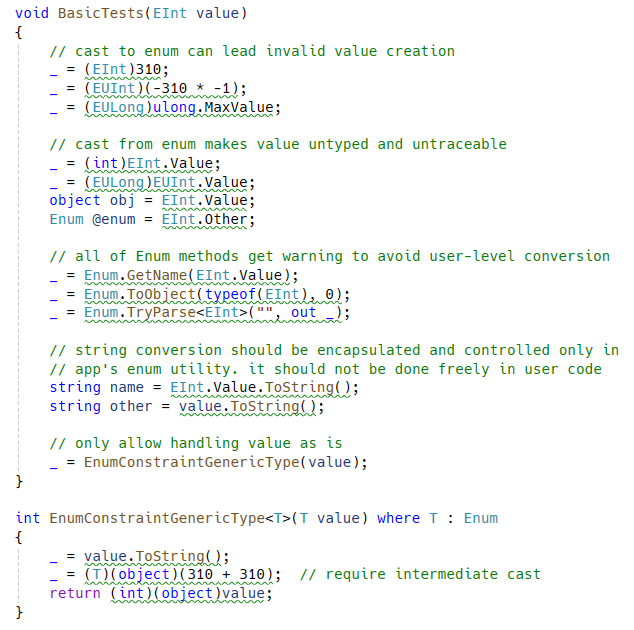
Restrict both cast from/to integer number! Disallow user-level enum value conversion completely!!
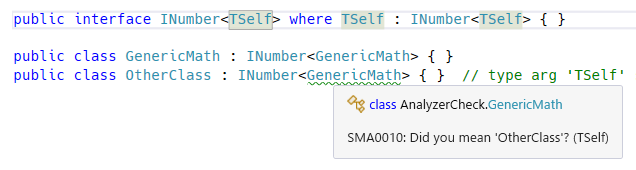
Analyze TSelf type argument mismatch for Curiously Recurring Template Pattern (CRTP).
Important
Underlining analyzer is obsolete: to enable it again, set the preprocessor symbol STMG_ENABLE_UNDERLINING_ANALYZER and rebuild.
Details
There is fancy extra feature to take your attention while coding in Visual Studio. No more need to use Obsolete attribute in case of annotating types, methods, fields and properties.
See the following section for details.
- NuGet
- https://www.nuget.org/packages/SatorImaging.StaticMemberAnalyzer
-
PM> Install-Package SatorImaging.StaticMemberAnalyzer
Analyzer is tested on Visual Studio 2022.
You could use this analyzer on older versions of Visual Studio. To do so, update Vsix project file by following instructions written in memo and build project.
This analyzer can be used with Unity 2020.2 or above. See the following page for detail.
It is a design bug makes all things complex. Not only that but also it causes initialization error only when meet a specific condition.
So it must be fixed even if app works correctly at a moment, to prevent simple but complicated potential bug which is hard to find in large code base by hand. As you know static fields will never report error when initialization failed!!
class A {
    public static int Value = B.Other;
    public static int Other = 310;
}

class B {
    public static int Other = 620;
    public static int Value = A.Other;  // will be '0' not '310'
}

public static class Test
{
    public static void Main()
    {
        System.Console.WriteLine(A.Value);  // 620
        System.Console.WriteLine(A.Other);  // 310
        System.Console.WriteLine(B.Value);  // 0   👈👈👈
        System.Console.WriteLine(B.Other);  // 620

        // when changing class member access order, it works correctly 🤣
        // see the following section for detailed explanation
        //System.Console.WriteLine(B.Value);  // 310  👈 correct!!
        //System.Console.WriteLine(B.Other);  // 620
        //System.Console.WriteLine(A.Value);  // 620
        //System.Console.WriteLine(A.Other);  // 310
    }
}
C# Compiler Initialization Sequence
A.Value = B.Other;- // 'B' initialization is started by member access
B.Other = 620;B.Value = A.Other;// BUG: B.Value will be 0 because reading uninitializedA.Other- // then, assign
B.Othervalue (620) toA.Value
A.Other = 310;// initialized here!! this value is not assigned to B.Value
When reading B value first, initialization order is changed and resulting value is also changed accordingly:
B.Other = 620;B.Value = A.Other;- // 'A' initialization is started by member access
A.Value = B.Other;// correct: B.Other is initialized before reading valueA.Other = 310;
Enum type handling is really headaching. To make enum operation under control, good to avoid user-level enum handling such as converting to integer or string, parse from string and etc.
This analyzer will help centerizing and encapsulating enum handling in app's central enum utility.
Tip
You can suppress by comment // Allow enum conversion; See Suppression Comment section for detail.
Helpful annotation and code fix for enum types which prevents modification of string representation by obfuscation tool.
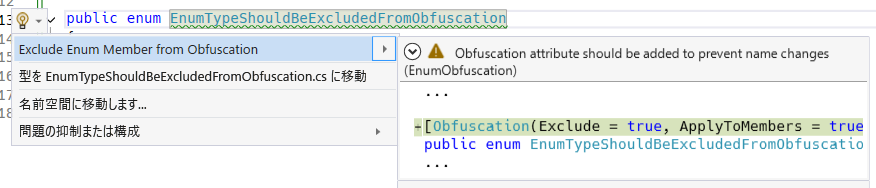
Note
Obfuscation attribute is from C# base library and it does NOT provide feature to obfuscate compiled assembly. It just provides configuration option to obfuscation tools which recognizing this attribute.
Important
To use this feature, set the preprocessor symbol STMG_ENABLE_KOTLIN_ENUM and rebuild.
Details
Analysis to help implementing Kotlin-style enum class.
Here are Enum-like type requirements:
MyEnumLike[]orReadOnlyMemory<MyEnumLike>field(s) exist- analyzer will check field initializer correctness if name is starting with
Entries(case-sensitive) or ending withentries(case-insensitive)
- analyzer will check field initializer correctness if name is starting with
sealedmodifier on typeprivateconstructor onlypublic staticmember calledEntriesexistspublic bool Equalsmethod should not be declared/overridden
public class EnumLike
//           ~~~~~~~~ WARN: no `sealed` modifier on type and public constructor exists
//                          * this warning appears only if type has member called 'Entries'
{
    public static readonly EnumLike A = new("A");
    public static readonly EnumLike B = new("B");

    public static ReadOnlySpan<EnumLike> Entries => EntriesAsMemory.Span;

    // 'Entries' must have all of 'public static readonly' fields in declared order
    static readonly EnumLike[] _entries = new[] { B, A };
    //                                    ~~~~~~~~~~~~~~ wrong order!!

    // 'ReadOnlyMemory<T>' can be used instead of array
    public static readonly ReadOnlyMemory<EnumLike> EntriesAsMemory = new(new[] { A, B });


    /* ===  Kotlin style enum template  === */

    static int AUTO_INCREMENT = 0;  // iota

    public readonly int Ordinal;
    public readonly string Name;

    private EnumLike(string name) { Ordinal = AUTO_INCREMENT++; Name = name; }

    public override string ToString()
    {
        const string SEP = ": ";
        Span<char> span = stackalloc char[Name.Length + 11 + SEP.Length];  // 11 for int.MinValue.ToString().Length

        Ordinal.TryFormat(span, out var written);
        SEP.AsSpan().CopyTo(span.Slice(written));
        written += SEP.Length;
        Name.AsSpan().CopyTo(span.Slice(written));
        written += Name.Length;

        return span.Slice(0, written).ToString();
    }
}
Benefits
Kotlin-like enum (algebraic data type) can prevent invalid value creation.
var invalid = Activator.CreateInstance(typeof(EnumLike));

if (EnumLike.A == invalid || EnumLike.B == invalid)
{
    // this code path won't be reached
    // each enum like entry is a class instance and ReferenceEquals match required
}
Unfortunately, use in switch statement is a bit weird.
var val = EnumLike.A;

switch (val)
{
    // pattern matching with case guard...!!
    case EnumLike when val == EnumLike.A:
        System.Console.WriteLine(val);
        break;

    case EnumLike when val == EnumLike.B:
        System.Console.WriteLine(val);
        break;
}

// this pattern generates same AOT compiled code
switch (val)
{
    // typeless case guard
    case {} when val == EnumLike.A:
        System.Console.WriteLine(val);
        break;

    case {} when val == EnumLike.B:
        System.Console.WriteLine(val);
        break;
}
var d = new Disposable();
//      ~~~~~~~~~~~~~~~~ no `using` statement found

d = (new object()) as IDisposable;
//  ~~~~~~~~~~~~~~~~~~~~~~~~~~~~~ cast from/to disposable
Analyzer won't show warning in the following condition:
- instance is created on
returnstatementreturn new Disposable();
- assign instance to field or property
m_field = new Disposable();
- cast between disposable types
var x = myDisposable as IDisposable;
Tip
You can suppress by comment // Don't dispose; See Suppression Comment section for detail.
Analyze if IDisposable members are correctly disposed of in the Dispose method.
- Target Member Types
- Instance fields
- Note: Properties and
IAsyncDisposableare not supported
- Target Method Discovery Order
Dispose(bool)public void Dispose()IDisposable.Dispose(explicit interface implementation)
Note
Types with disposable members must also implement the IDisposable interface.
Call the Dispose() method of the reported member within the class's disposal method.
class Test : IDisposable
{
    private MyDisposable _field = new();
//          ~~~~~~~~~~~~ WARN: undisposed member

    public void Dispose()
    {
        _field.Dispose();  // OK: now correctly disposed
    }
}Important
To use this feature, set the preprocessor symbol STMG_ENABLE_DISPOSABLE_ANALYZER_ATTRIBUTE and rebuild.
Details
To suppress analysis for specified types, declare attribute named DisposableAnalyzerSuppressor and add it to assembly.
[assembly: DisposableAnalyzerSuppressor(typeof(Task), typeof(Task<>))]  // Task and Task<T> are ignored by default

[Conditional("DEBUG"), AttributeUsage(AttributeTargets.Assembly, AllowMultiple = true)]
sealed class DisposableAnalyzerSuppressor : Attribute
{
    public DisposableAnalyzerSuppressor(params Type[] _) { }
}
Analyze if Task or ValueTask (including their generic versions) local variables are correctly awaited or returned on all code paths.
async Task Method()
{
    var t = Task.Run(...);
    //      ~~~~~~~~~~~~ Task is not awaited or returned
}
Tip
You can suppress by comment // Don't await; See Suppression Comment section for detail.
Literal arguments can be difficult to understand without IDE assistance, especially during code reviews in a web browser. Using named arguments or variables for literals makes the code self-documenting and easier to review.
Foo(true, 0);
//  ~~~~  ~ literal arguments are difficult to understand

Foo(ignoreErrors: true, timeoutSeconds: 0);
//  ^^^^^^^^^^^^        ^^^^^^^^^^^^^^
//  Now arguments are self-explanatory!
Note
string, System.Text, or System.IO methods and constructors are intentionally allowed. In addition, the first argument of type string or char can omit named argument. The first argument of type int can also omit named argument for method calls. Indexer arguments are also exempt from this analysis.
Note that null and default literals, and boolean expressions (including pattern matching, e.g., foo is not null or x == y) are NOT exempt from the named argument rule and must always be named, regardless of their position or the containing namespace.
(Known test framework methods are exempt from all checks)
All system primitive numbers, from sbyte to decimal, should be declared with an explicit type instead of var.
var integer = 1;
//  ~~~~~~~
var floating = 1;
//  ~~~~~~~~ reported: variable should be declared with an explicit number type
Expected:
long integer = 1;
double floating = 1;
Important
This analysis only targets var declarations and does not consider implicit conversions.
Null suppression operation should be fenced with 3 parentheses to improve visual attention and text-based traceability.
var x = foo!;
//      ~~~~ reported: null suppression operation should be fenced with 3 parentheses
Expected:
var x = (((foo)))!;Tip
Applying codefix by dotnet format analyzers --diagnostics SMA8002 unveils all null warning suppressions in code base.
After that, strongly recommended that safely suppressing them by using Debug.Assert(foo is not null); instead of ! operator, without introducing runtime overhead in Release build.
This analyzer helps keep local values and parameters immutable by flagging write operations.
Important
This analysis is disabled by default. To enable it, add the following to your .editorconfig file.
[*.cs]
dotnet_analyzer_diagnostic.category-ImmutableVariable.severity = warning
Note
Restarting the IDE may be required for .editorconfig changes to take effect.
Details
- Assignment
=??== ref- Deconstruction assignment:
(x, y) = .../(x, var y) = ...- Deconstruction declaration assignment is allowed:
var (x, y) = ...
- Deconstruction declaration assignment is allowed:
- Note: Assignment to
outmethod parameter is always allowed
- Increment and decrement
++x,x++,--x,x--
- Special handling for loop headers
- Allowed: Assignment and increment/decrement in
forloop header - Allowed: Simple assignment in
whileloop condition
- Allowed: Assignment and increment/decrement in
- Compound assignment
+=,-=,*=,/=,%=&=,|=,^=,<<=,>>=
- Property access
- Warn on property access unless:
- It's an auto-property.
- It's a getter-only property.
- The property or its getter is marked with the
readonlymodifier.
- Warn on property access unless:
- Method call
- Warn on instance method calls unless the method is marked with the
readonlymodifier. - Note: Reference type methods cannot have the
readonlymodifier and are always flagged.
- Warn on instance method calls unless the method is marked with the
- Argument handling
- Allowed: Method invocation and object creation (e.g.
Use(Create()),Use(new C())) - Allowed: Anonymous object and array creation (e.g.
Use(new { X = 1 }),Use(new[] { 1, 2 })) - Allowed: Lambda and anonymous method declarations (e.g.
Use(x => x),Use(delegate { })). Note that mutations within the function body are still analyzed and reported. - Allowed:
out var x/out T xdeclaration at call site - Allowed: Root local/parameter name starts with
mut_ - Type checks (
stringis treated as readonly struct)- Allowed:
IEnumerable,IEnumerable<T>andEnumtypes - Reference type argument (except string) is always reported
- Struct argument:
- Allowed: Callee parameter has
inmodifier - Allowed: Callee parameter has no modifier and struct is
readonly - Otherwise reported
- Allowed: Callee parameter has
- Allowed:
- Allowed: Method invocation and object creation (e.g.
class Demo
{
    readonly struct ReadOnlyS { }
    struct MutableS
    {
        public int AutoProp { get; set; }
        public int ReadOnlyProp => 0;
        public void MutableMethod() { }
        public readonly void ReadOnlyMethod() { }

        // Non-auto property with setter
        public int CustomProp { get => 0; set { } }
    }

    static object Create() => new object();
    static void UseRefType(object value) { }
    static void UseIn(in MutableS value) { }
    static void UseReadOnly(ReadOnlyS value) { }
    public int this[string key] => 0;
    public int this[object key] => 0;

    void Test(
        int param,
        int mut_param,
        MutableS s,
        ReadOnlyS rs,
        ref int refValue,
        out int result
    )
    {
        result = 0;  // Allowed: assignment to `out` parameter

        param += 1;      // Reported: parameter assignment
        mut_param += 1;  // Allowed: `mut_` prefix on parameter

        int foo = 0;
        foo = 1;     // Reported: local assignment
        foo++;       // Reported: local increment

        var (x, y) = (42, 310);  // Allowed: var (...) is allowed
        (x, y) = (42, 310);      // Reported: deconstruction assignment
        (x, var z) = (42, 310);  // Reported: mixed deconstruction causes error
                                    //           For Unity compatibility, `var z` also get error

        // Allowed: assignment in for-header
        int i;
        for (i = 0; i < 10; i++)
        {
            i += 0;  // Reported: not in for-header
        }

        // Allowed: assignment in while-header
        int read;
        while ((read = stream.Read(buffer, 0, buffer.Length)) > 0)
        {
            read = 0;  // Reported: not in while-header
        }

        int.TryParse("1", out var parsed);  // Allowed: out declaration at call site
        int.TryParse("1", out parsed);      // Reported: out overwrites variable

        int.TryParse("1", out var mut_parsed);
        int.TryParse("1", out mut_parsed);  // Allowed: `mut_` prefix

        int mut_counter = 0;
        mut_counter = 1;  // Allowed: `mut_` prefix

        string key = "A";
        object keyObj = new object();
        var indexer = new Demo();
        _ = indexer[key];     // Allowed: string is treated readonly-struct
        _ = indexer[keyObj];  // Reported: reference type indexer key
        indexer = new();      // Reported: local assignment (reference type)

        UseIn(s);                  // Allowed: callee parameter is `in`
        UseReadOnly(rs);           // Allowed: readonly struct with no modifier
        UseRefType(Create());      // Allowed: argument value is invocation
        UseRefType(new object());  // Allowed: argument value is object creation

        s.AutoProp = 1;       // Reported: parameter assignment
        _ = s.CustomProp;     // Reported: property access can change state
        _ = s.ReadOnlyProp;   // Allowed: getter-only or auto-property
        s.MutableMethod();    // Reported: method call can change state
        s.ReadOnlyMethod();   // Allowed: readonly method
    }
}
[!NOTE] Member access assignments are reported when rooted at local/parameter (e.g.
foo.Bar.Value = 1wherefoois local/parameter), but not when rooted at field.
Analyze the use of struct types to prevent common mistakes and performance issues.
- SMA0030: Invalid Struct Constructor
- Constructor has declared explicitly so should not use parameter-less one.
- SMA0031: Mutable Struct Field marked as Read-Only
- Mutable struct type should not be set to
readonlyfield.
- Mutable struct type should not be set to
- SMA0032: Implicit Boxing Conversion
- Implicit conversion from struct to reference type (including interface) causes boxing. Note that explicit casts are exempt from this analysis.
Tip
You can suppress implicit boxing analysis (SMA0032) by comment // Allow boxing; See Suppression Comment section for detail.
Important
Underlining analyzer is obsolete: to enable it again, set the preprocessor symbol STMG_ENABLE_UNDERLINING_ANALYZER and rebuild.
Details
There is optional feature to draw underline on selected types, fields, properties, generic type/method arguments and parameters of method, delegate and lambda function.
As of Visual Studio's UX design, Info severity diagnostic underlines are drawn only on a few leading chars, not drawn whole marked area. So for workaround, underline on keyword is dashed.
[!TIP]
!-starting message will add warning annotation on keyword instead of info diagnostic annotation.
To avoid dependency to this analyzer, required attribute for underlining is chosen from builtin System.ComponentModel assembly so that syntax is little bit weird.
Analyzer is checking identifier keyword in C# source code, not checking actual C# type. DescriptionAttribute in C# attribute syntax is the only keyword to draw underline. Omitting Attribute or adding namespace are not recognized.
[!TIP]
CategoryAttributecan be used instead ofDescriptionAttribute.By contrast from Description, CategoryAttribute draws underline only on exact type reference and constructors including
base(). Any inherited types, variables, fields and properties don't get underline.
using System.ComponentModel;

[DescriptionAttribute("Draw underline for IDE environment and show this message")]
//          ^^^^^^^^^ `Attribute` suffix is required to draw underline
public class WithUnderline
{
    [DescriptionAttribute]  // parameter-less will draw underline with default message
    public static void Method() { }
}

// C# language spec allows to omit `Attribute` suffix but when omitted, underline won't be drawn
// to avoid conflict with originally designed usage for VS form designer
[Description("No Underline")]
public class NoUnderline { }

// underline won't be drawn when namespace is specified
[System.ComponentModel.DescriptionAttribute("...")]
public static int Underline_Not_Drawn = 0;

// this code will draw underline. 'Trivia' is allowed to being added in attribute syntax
[ /**/  DescriptionAttribute   (   "Underline will be drawn" )   /* hello, world. */   ]
public static int Underline_Drawn = 310;There are 4 types of underline, line head, line leading, line end and keyword.
By default, static field analyzer will draw most verbose underline.
You can omit specific type of underline by using #pragma preprocessor directive or adding SuppressMessage attribute or etc.
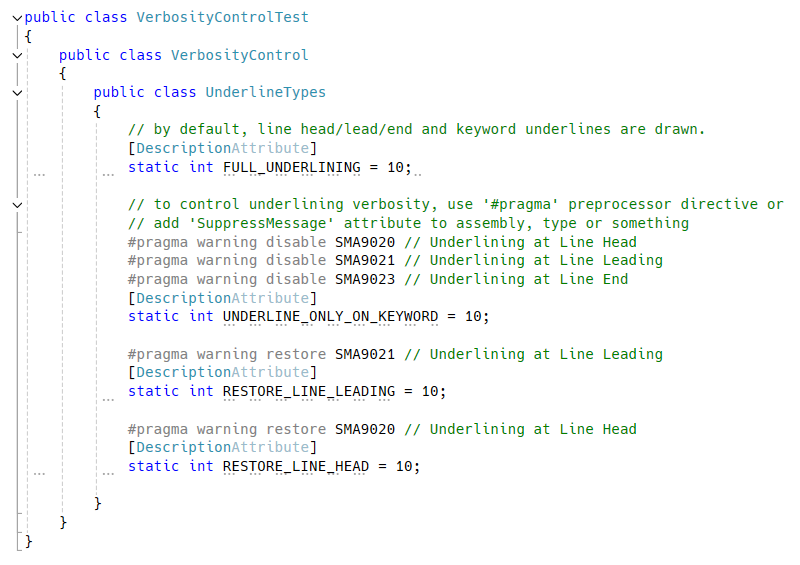
Underlining is achieved by using Description attribute designed for Visual Studio's visual designer, formerly known as form designer.
To remove unnecessary attribute from Unity build, add the following link.xml file in Unity project's Assets folder.
<linker>
    <assembly fullname="System.ComponentModel">
        <type fullname="System.ComponentModel.DescriptionAttribute" preserve="nothing"/>
    </assembly>
</linker>
Add a single-line comment starting with a specific string (case-insensitive but white space sensitive) immediately before the local variable declaration or discard assignment. Blank lines are ignored when searching for the suppression comment.
Note
This suppression is effective for initial local variable declarations and discard assignments. Regular assignments to existing named variables cannot be suppressed by comments.
Using a variable named _ (e.g., var _ = new Disposable();) is NOT a discard and will not be suppressed by the comment.
// Don't dispose
_ = new MyDisposable();

// Don't dispose: Multiple single line comments are allowed,
// but suppression comment must be the first.
var x = new MyDisposable();

// The following WON'T suppress because it's not the first comment line.
// (Blank lines are ignored when searching for the first comment)

// Don't dispose because...
var x = new MyDisposable();