##Introduction:
This is an ionic-datepicker bower component, which can be used in any Ionic framework's application.
##Prerequisites.
- node.js, bower and gulp.
##How to use:
- In your project repository install the ionic-datepicker using bower
bower install ionic-datepicker --save
This will install the latest version released.
- Then you can see the following directory structure see in your project folder
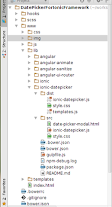
Give the path of style.css, templates.js and ionic-datepicker.js in your index.html file.
<link href="lib/ionic-datepicker/dist/style.css" rel="stylesheet">
<!-- path to ionic/angularjs js -->
<script src="lib/ionic-datepicker/dist/templates.js"></script>
<script src="lib/ionic-datepicker/dist/ionic-datepicker.js"></script>- In your application module inject the dependency
ionic-datepicker, in order to work with the ionic time picker
angular.module('mainModuleName', ['ionic', 'ionic-datepicker']){
//
}- Use the below format in your template's corresponding controller
$scope.currentDate = new Date();
$scope.title = "Custom Title";

$scope.datePickerCallback = function (val) {
	if(typeof(val)==='undefined'){
		console.log('Date not selected');
	}else{
		console.log('Selected date is : ', val);
	}
};
a) currentDate is the date object which we are passing to the ionic-datepicker.
b) datePickerCallback is the callback function which we have to pass to the ionic-datepicker. This function takes an argument which will return undefined if the user didnot selected any date. And returns a date object, if the user selects any date.
c) title is the string variable, which can be assigned to the datepicker modal's title.
- Then use the below format in your template / html file
<ionic-datepicker idate="currentDate" disablepreviousdates="true"  disablefuturedates="false" callback="datePickerCallback" disableddates="disabledDates" title="title">
	<button class="button button-block button-positive"> {{ currentDate | date:'dd - MMMM - yyyy' }} </button>
</ionic-datepicker>
a) ionic-datepicker is the directive, to which we can pass required vales.
b) idate takes date object. If we don't pass any value, the default value will be new Date().
c) disablepreviousdates takes true or false. true disables the past dates, and false doesn't.
c) disablefuturedates takes true or false. true disables the future dates, and false doesn't.
d) callback takes the callback function name which will be called once the date picker has been closed.
e) title takes a variable of string type. This will be displayed as a title to the datepicker modal. If this attribute is not present, then it will show 'Select Date' by default.
f) disableddates is an array of dates to disable the particular dates.
Example : In your controller you can define disabledDates as follows
$scope.disabledDates = [
	new Date(2015,7,10), //months are 0-based, this is August, 10th!
	new Date('Wednesday, August 12, 2015'), //Works with any valid Date formats like long format
	new Date("08-14-2015"), //Short format
	new Date(1439676000000) //UNIX format
];
##Screen Shots:
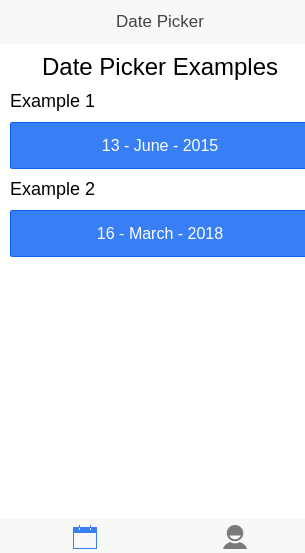
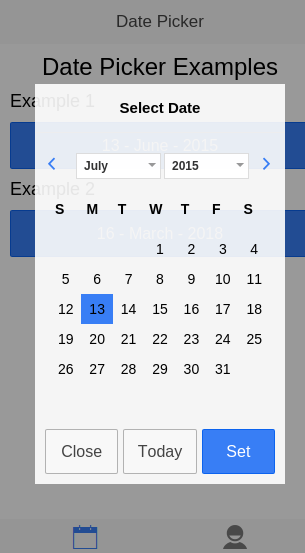
Once you are successfully done with the above steps, you should be able to see the below screen shots. I have used two buttons here.
The first screen shot shows only the buttons before clicking on them. Once you click on the button you should see the second screen shot.
##CSS Classes:


##Versions:
The whole date picker functionality has been implemented, and can be installed with bower install ionic-datepicker --save
Bug Fix. This is the latest version of ionic-datepicker component.
Bug Fix. If we don't pass the date to the time picker it will pick the todays date by default.
Disabling previous dates functionality added.
a) User can select the years and months using the dropdown.
b) A callback function is added.
Features
a) Disabling future dates functionality added. You may use it for selecting DOB.
b) Customised title text for datepicker modal's added.
BugFixes
a) Feature for disabling particular dates has been added.
b) CSS classes added for customisation.
##License: MIT
##Contact: gmail : rajeshwar.patlolla@gmail.com
github : https://github.com/rajeshwarpatlolla
twitter : https://twitter.com/rajeshwar_9032
facebook : https://www.facebook.com/rajeshwarpatlolla
paypal : rajeshwar.patlolla@gmail.com