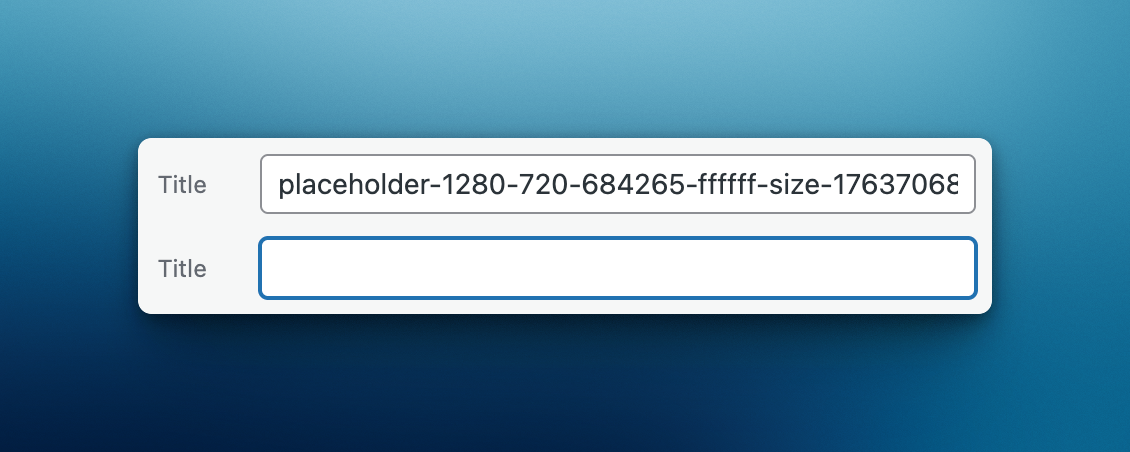
Clears the media title field on upload, instead of setting it to the slugified filename.
When you upload media to WordPress, the title field is automatically set to a slugified version of the filename. This often results in messy, unoptimized titles like "IMG-20240115-photo-final-v2" appearing in gallery captions, alt tags, or title attributes.
This plugin clears the title field for newly uploaded media, ensuring that if a title is displayed anywhere, it's one you've intentionally set yourself.
- Automatically clears the title field for new media uploads
- Bulk action to clear titles on existing media library items
- Lightweight with no settings page required
- Developer-friendly with filters
The plugin hooks into WordPress's wp_insert_attachment_data filter and clears the post_title field for new uploads before they are saved to the database.
- Upload the plugin files to the
/wp-content/plugins/runthings-empty-media-titledirectory, or install the plugin through the WordPress plugins screen directly. - Activate the plugin through the 'Plugins' screen in WordPress.
- That's it! New media uploads will now have an empty title field.
New uploads are cleared automatically. For existing media, you can use the bulk action in the Media Library to clear titles on selected items.
Yes! Use the runthings_emt_mime_types filter to limit which MIME types are affected. See the Filters section below.
Yes! Use the runthings_emt_skip filter to conditionally skip clearing the title. See the Filters section below.
Many themes and plugins display the media title in various places - gallery captions, lightbox overlays, or HTML title attributes. An auto-generated slugified filename like "DSC-0042-final-edit" looks unprofessional. With an empty title, you're in control of what gets displayed.
Skip clearing the title for specific attachments.
Parameters:
$skip(bool) - Whether to skip clearing the title. Default false.$data(array) - Attachment post data (slashed, sanitized, processed).$postarr(array) - Sanitized post data (not processed).$unsanitized_postarr(array) - Unsanitized post data.$update(bool) - Whether this is an update (always false for new uploads).
Example - Skip for specific user:
add_filter('runthings_emt_skip', function($skip, $data, $postarr) {
    if (get_current_user_id() === 1) {
        return true; // Admin keeps auto-generated titles
    }
    return $skip;
}, 10, 3);
Example - Skip if filename contains keyword:
add_filter('runthings_emt_skip', function($skip, $data, $postarr) {
    $filename = $postarr['post_title'] ?? '';
    if (strpos($filename, 'keep-title') !== false) {
        return true;
    }
    return $skip;
}, 10, 3);Filter which MIME types should have their title cleared. By default, all media types are affected.
Parameters:
$allowed_mime_types(array) - Array of MIME type patterns. Default[](all types).$attachment_mime_type(string) - The attachment's MIME type.$postarr(array) - Sanitized post data.
Example - Restrict to images only:
add_filter('runthings_emt_mime_types', function($allowed_mime_types) {
    return ['image'];
});
Example - Restrict to images and PDFs only:
add_filter('runthings_emt_mime_types', function($allowed_mime_types) {
    return ['image', 'application/pdf'];
});- Improved bulk action messages
- Add confirmation prompt to bulk edit list view
- Fixed nonce verification in bulk action processing
- Complete plugin refactor with namespaced class structure
- Added bulk action "Clear Media Title" to clear titles on existing media items
- Changed default from
['image']to[](all media types) - Added
runthings_emt_skipfilter for developer customization - Added
runthings_emt_mime_typesfilter to extend beyond images
- Initial release
This plugin is licensed under GPL v3 or later, and is free to use on personal and commercial projects.
Built by Matthew Harris of runthings.dev, copyright 2022-2026.
Visit runthings.dev for more WordPress plugins and resources.
Contribute or report issues at the GitHub repository.
Insert space by Xinh Studio from Noun Project (CC BY 3.0) - https://thenounproject.com/icon/insert-space-239543/
Image by David Khai from Noun Project (CC BY 3.0) - https://thenounproject.com/icon/image-661355/