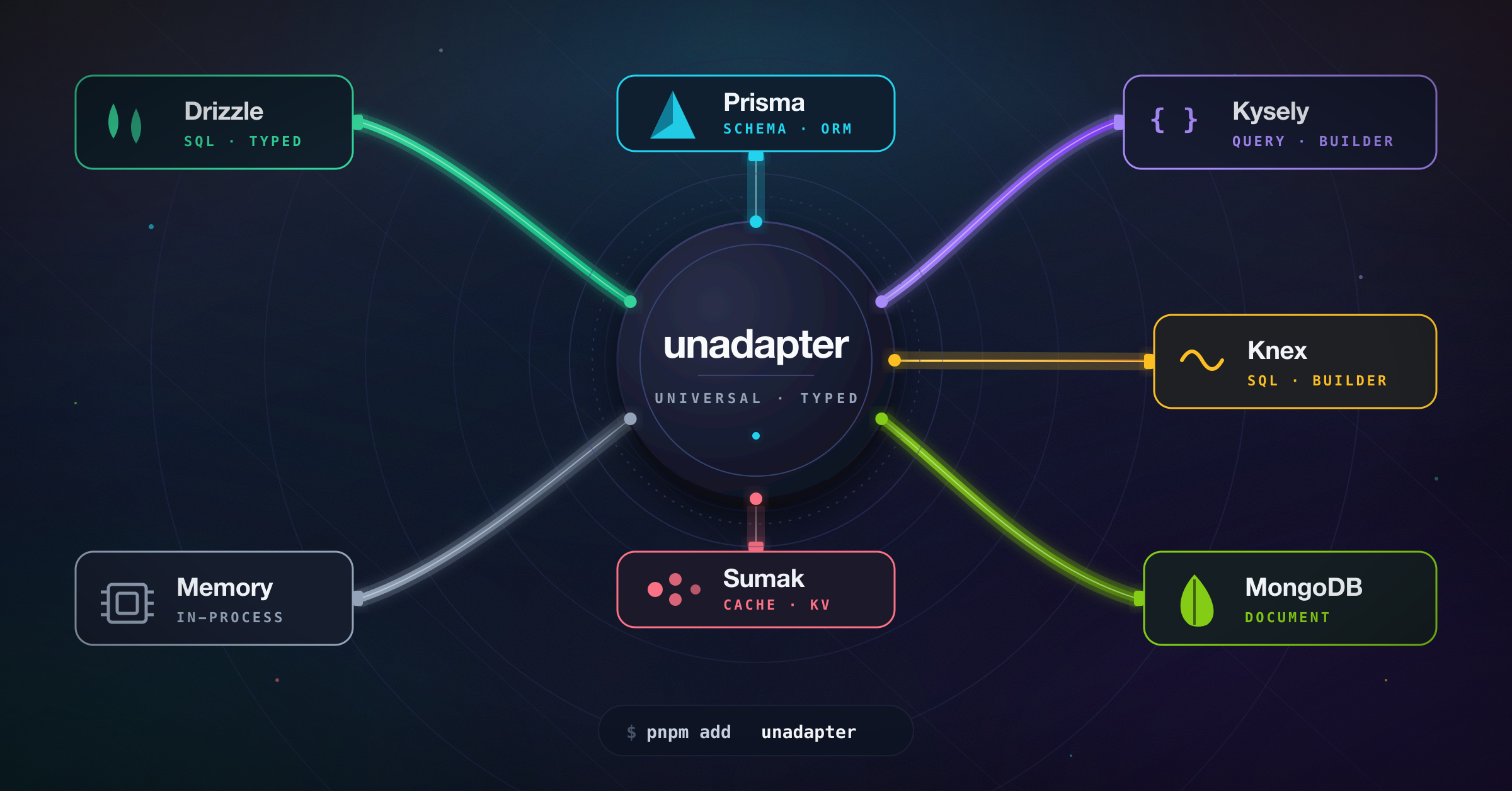
A universal adapter interface for connecting various databases and ORMs with a standardized API.





- 🔄 Standardized interface for common database operations (create, read, update, delete)
- 🛡️ Type-safe operations
- 🔍 Support for complex queries and transformations
- 🌐 Database-agnostic application code
- 🔄 Easy switching between different database providers
- 🗺️ Custom field mapping
- 📊 Support for various data types across different database systems
- 🏗️ Fully customizable schema definition
- Overview
- Installation
- Available Adapters
- Getting Started
- Migrations
- API Reference
- Contributing
- License
unadapter provides a consistent interface for database operations, allowing you to switch between different database solutions without changing your application code. This is particularly useful for applications that need database-agnostic operations or might need to switch database providers in the future.
🚧 Development Status
This project is based on the adapter architecture from better-auth and is being developed to provide a standalone, ESM-compatible adapter solution that can be used across various open-source projects.
- Initial adapter architecture
- Basic adapters implementation
- Comprehensive documentation
- Performance optimizations
- Additional adapter types
- Integration examples
- Complete abstraction from better-auth and compatibility with all software systems

# Using pnpm
pnpm add unadapter

# Using npm
npm install unadapter

# Using yarn
yarn add unadapter
You'll also need to install the specific database driver or ORM you plan to use.
| Adapter | Description | Status |
|---|---|---|
| Memory Adapter | In-memory adapter ideal for development and testing | ✅ Ready |
| Prisma Adapter | For Prisma ORM | ✅ Ready |
| MongoDB Adapter | For MongoDB | ✅ Ready |
| Drizzle Adapter | For Drizzle ORM | ✅ Ready |
| Kysely Adapter | For Kysely SQL query builder | ✅ Ready |
| Knex Adapter | For Knex SQL query builder | ✅ Ready |
| Sumak Adapter | For Sumak — type-safe, AST-first SQL query builder | ✅ Ready |
Basic Usage
import type { PluginSchema } from "unadapter/types"
import { createAdapter, createTable, mergePluginSchemas } from "unadapter"
import { memoryAdapter } from "unadapter/memory"

// Create an in-memory database for testing
const db = {
  user: [],
  session: [],
}

// Define a consistent options interface that can be reused
interface CustomOptions {
  appName?: string
  plugins?: {
    schema?: PluginSchema
  }[]
  user?: {
    fields?: {
      name?: string
      email?: string
      emailVerified?: string
      image?: string
      createdAt?: string
    }
  }
}

const tables = createTable<CustomOptions>((options) => {
  const { user, ...pluginTables } = mergePluginSchemas<CustomOptions>(options) || {}

  return {
    user: {
      modelName: "user",
      fields: {
        name: {
          type: "string",
          required: true,
          fieldName: options?.user?.fields?.name || "name",
          sortable: true,
        },
        email: {
          type: "string",
          unique: true,
          required: true,
          fieldName: options?.user?.fields?.email || "email",
          sortable: true,
        },
        emailVerified: {
          type: "boolean",
          defaultValue: () => false,
          required: true,
          fieldName: options?.user?.fields?.emailVerified || "emailVerified",
        },
        createdAt: {
          type: "date",
          defaultValue: () => new Date(),
          required: true,
          fieldName: options?.user?.fields?.createdAt || "createdAt",
        },
        updatedAt: {
          type: "date",
          defaultValue: () => new Date(),
          required: true,
          fieldName: options?.user?.fields?.updatedAt || "updatedAt",
        },
        ...user?.fields,
        ...options?.user?.fields,
      },
    },
  }
})

const adapter = createAdapter(tables, {
  database: memoryAdapter(db, {}),
  plugins: [], // Optional plugins
})

// Now you can use the adapter to perform database operations
const user = await adapter.create({
  model: "user",
  data: {
    name: "John Doe",
    email: "john@example.com",
    emailVerified: true,
    createdAt: new Date(),
    updatedAt: new Date(),
  },
})

// Find the user
const foundUsers = await adapter.findMany({
  model: "user",
  where: [
    {
      field: "email",
      value: "john@example.com",
      operator: "eq",
    },
  ],
})
Using Custom Schema and Plugins
import type { PluginSchema } from "unadapter/types"
import { createAdapter, createTable, mergePluginSchemas } from "unadapter"
import { memoryAdapter } from "unadapter/memory"

// Create an in-memory database for testing
const db = {
  users: [],
  products: [],
}

// Using the same pattern for CustomOptions
interface CustomOptions {
  appName?: string
  plugins?: {
    schema?: PluginSchema
  }[]
  user?: {
    fields?: {
      fullName?: string
      email?: string
      isActive?: string
    }
  }
  product?: {
    fields?: {
      title?: string
      price?: string
      ownerId?: string
    }
  }
}

const tables = createTable<CustomOptions>((options) => {
  const { user, product, ...pluginTables } = mergePluginSchemas<CustomOptions>(options) || {}

  return {
    user: {
      modelName: "users", // The actual table/collection name in your database
      fields: {
        fullName: {
          type: "string",
          required: true,
          fieldName: options?.user?.fields?.fullName || "full_name",
          sortable: true,
        },
        email: {
          type: "string",
          unique: true,
          required: true,
          fieldName: options?.user?.fields?.email || "email_address",
        },
        isActive: {
          type: "boolean",
          fieldName: options?.user?.fields?.isActive || "is_active",
          defaultValue: () => true,
        },
        createdAt: {
          type: "date",
          fieldName: "created_at",
          defaultValue: () => new Date(),
        },
        ...user?.fields,
        ...options?.user?.fields,
      },
    },
    product: {
      modelName: "products",
      fields: {
        title: {
          type: "string",
          required: true,
          fieldName: options?.product?.fields?.title || "title",
        },
        price: {
          type: "number",
          required: true,
          fieldName: options?.product?.fields?.price || "price",
        },
        ownerId: {
          type: "string",
          references: {
            model: "user",
            field: "id",
            onDelete: "cascade",
          },
          required: true,
          fieldName: options?.product?.fields?.ownerId || "owner_id",
        },
        ...product?.fields,
        ...options?.product?.fields,
      },
    },
  }
})

// User profile plugin schema
const userProfilePlugin = {
  schema: {
    user: {
      modelName: "user",
      fields: {
        bio: {
          type: "string",
          required: false,
          fieldName: "bio",
        },
        location: {
          type: "string",
          required: false,
          fieldName: "location",
        },
      },
    },
  },
}

const adapter = createAdapter(tables, {
  database: memoryAdapter(db, {}),
  plugins: [userProfilePlugin],
})

// Now you can use the adapter with your custom schema
const user = await adapter.create({
  model: "user",
  data: {
    fullName: "John Doe",
    email: "john@example.com",
    bio: "Software developer",
    location: "New York",
  },
})

// Create a product linked to the user
const product = await adapter.create({
  model: "product",
  data: {
    title: "Awesome Product",
    price: 99.99,
    ownerId: user.id,
  },
})MongoDB Adapter Example
import type { PluginSchema } from "unadapter/types"
import { createAdapter, createTable, mergePluginSchemas } from "unadapter"
import { MongoClient } from "mongodb"
import { mongodbAdapter } from "unadapter/mongodb"

// Create a database client
const client = new MongoClient("mongodb://localhost:27017")
await client.connect()
const db = client.db("myDatabase")

// Using the same pattern for CustomOptions
interface CustomOptions {
  appName?: string
  plugins?: {
    schema?: PluginSchema
  }[]
  user?: {
    fields?: {
      name?: string
      email?: string
      settings?: string
    }
  }
}

const tables = createTable<CustomOptions>((options) => {
  const { user, ...pluginTables } = mergePluginSchemas<CustomOptions>(options) || {}

  return {
    user: {
      modelName: "users",
      fields: {
        name: {
          type: "string",
          required: true,
          fieldName: options?.user?.fields?.name || "name",
        },
        email: {
          type: "string",
          required: true,
          unique: true,
          fieldName: options?.user?.fields?.email || "email",
        },
        settings: {
          type: "json",
          required: false,
          fieldName: options?.user?.fields?.settings || "settings",
        },
        createdAt: {
          type: "date",
          defaultValue: () => new Date(),
          fieldName: "createdAt",
        },
        ...user?.fields,
        ...options?.user?.fields,
      },
    },
  }
})

// Initialize the adapter
const adapter = createAdapter(tables, {
  database: mongodbAdapter(db, {
    useNumberId: false,
  }),
  plugins: [],
})

// Use the adapter
const user = await adapter.create({
  model: "user",
  data: {
    name: "Jane Doe",
    email: "jane@example.com",
    settings: { theme: "dark", notifications: true },
  },
})
Prisma Adapter Example
import type { PluginSchema } from "unadapter/types"
import { createAdapter, createTable, mergePluginSchemas } from "unadapter"
import { PrismaClient } from "@prisma/client"
import { prismaAdapter } from "unadapter/prisma"

// Initialize Prisma client
const prisma = new PrismaClient()

// Using the same pattern for CustomOptions
interface CustomOptions {
  appName?: string
  plugins?: {
    schema?: PluginSchema
  }[]
  user?: {
    fields?: {
      name?: string
      email?: string
      profile?: string
    }
  }
  post?: {
    fields?: {
      title?: string
      content?: string
      authorId?: string
    }
  }
}

const tables = createTable<CustomOptions>((options) => {
  const { user, post, ...pluginTables } = mergePluginSchemas<CustomOptions>(options) || {}

  return {
    user: {
      modelName: "User", // Match your Prisma model name (case-sensitive)
      fields: {
        name: {
          type: "string",
          required: true,
          fieldName: options?.user?.fields?.name || "name",
        },
        email: {
          type: "string",
          required: true,
          unique: true,
          fieldName: options?.user?.fields?.email || "email",
        },
        profile: {
          type: "json",
          required: false,
          fieldName: options?.user?.fields?.profile || "profile",
        },
        createdAt: {
          type: "date",
          defaultValue: () => new Date(),
          fieldName: "createdAt",
        },
        ...user?.fields,
        ...options?.user?.fields,
      },
    },
    post: {
      modelName: "Post",
      fields: {
        title: {
          type: "string",
          required: true,
          fieldName: options?.post?.fields?.title || "title",
        },
        content: {
          type: "string",
          required: false,
          fieldName: options?.post?.fields?.content || "content",
        },
        published: {
          type: "boolean",
          defaultValue: () => false,
          fieldName: "published",
        },
        authorId: {
          type: "string",
          references: {
            model: "user",
            field: "id",
            onDelete: "cascade",
          },
          required: true,
          fieldName: options?.post?.fields?.authorId || "authorId",
        },
        ...post?.fields,
        ...options?.post?.fields,
      },
    },
  }
})

// Initialize the adapter
const adapter = createAdapter(tables, {
  database: prismaAdapter(prisma, {
    provider: "postgresql",
    debugLogs: true,
    usePlural: false,
  }),
  plugins: [],
})

// Use the adapter
const user = await adapter.create({
  model: "user",
  data: {
    name: "John Smith",
    email: "john.smith@example.com",
    profile: { bio: "Software developer", location: "New York" },
  },
})
Drizzle Adapter Example
import type { PluginSchema } from "unadapter/types"
import { createAdapter, createTable, mergePluginSchemas } from "unadapter"
import { sql } from "drizzle-orm"
import { drizzle } from "drizzle-orm/node-postgres"
import { pgTable, text, timestamp, uuid, varchar } from "drizzle-orm/pg-core"
import { drizzleAdapter } from "unadapter/drizzle"
import "dotenv/config"

// Define your Drizzle schema
export const role = pgTable("role", {
  id: uuid("id")
    .primaryKey()
    .default(sql`gen_random_uuid()`),
  name: varchar("name", { length: 255 }).notNull(),
  key: varchar("key", { length: 255 }).notNull().unique(),
  type: varchar("type", { length: 255 }).notNull().default("user"),
  description: varchar("description", { length: 500 }).notNull(),
  userId: uuid("user_id").notNull(),
  permissions: text("permissions").notNull().default("0"),
  updatedAt: timestamp("updated_at")
    .notNull()
    .default(sql`now()`),
  createdAt: timestamp("created_at")
    .notNull()
    .default(sql`now()`),
})

// Using the same pattern for CustomOptions
interface CustomOptions {
  appName?: string
  plugins?: {
    schema?: PluginSchema
  }[]
  role?: {
    fields?: {
      name?: string
      description?: string
      key?: string
      permissions?: string
      userId?: string
    }
  }
}

const tables = createTable<CustomOptions>((options) => {
  const { user, role, ...pluginTables } = mergePluginSchemas<CustomOptions>(options) || {}

  return {
    role: {
      modelName: "role",
      fields: {
        name: {
          type: "string",
          required: true,
          fieldName: options?.role?.fields?.name || "name",
        },
        description: {
          type: "string",
          required: true,
          fieldName: options?.role?.fields?.description || "description",
        },
        key: {
          type: "string",
          required: true,
          fieldName: options?.role?.fields?.key || "key",
        },
        permissions: {
          type: "string",
          required: true,
          fieldName: options?.role?.fields?.permissions || "permissions",
        },
        userId: {
          type: "string",
          required: true,
          references: {
            model: "user",
            field: "id",
            onDelete: "cascade",
          },
          fieldName: options?.role?.fields?.userId || "user_id",
        },
        createdAt: {
          type: "date",
          required: true,
          defaultValue: new Date(),
        },
        updatedAt: {
          type: "date",
          required: true,
          defaultValue: new Date(),
        },
        ...role?.fields,
        ...options?.role?.fields,
      },
    },
  }
})

// Initialize the adapter with the Drizzle schema
const adapter = createAdapter(tables, {
  database: drizzleAdapter(drizzle(process.env.DATABASE_URL!), {
    provider: "pg",
    debugLogs: true,
    schema: {
      role,
    },
  }),
  plugins: [], // Optional plugins
})

// Use the adapter
const role = await adapter.create({
  model: "role",
  data: {
    name: "Test Role",
    description: "This is a test role",
    key: "test_role",
    permissions: "read,write",
    userId: "8eea9d01-6c73-4933-bb0f-811cb7d4a862",
    createdAt: new Date(),
    updatedAt: new Date(),
  },
})
Kysely Adapter Example
import type { PluginSchema } from "unadapter/types"
import { createAdapter, createTable, mergePluginSchemas } from "unadapter"
import { Kysely, PostgresDialect } from "kysely"
import pg from "pg"
import { kyselyAdapter } from "unadapter/kysely"

// Create PostgreSQL connection pool
const pool = new pg.Pool({
  host: "localhost",
  database: "mydatabase",
  user: "myuser",
  password: "mypassword",
})

// Initialize Kysely with PostgreSQL dialect
const db = new Kysely({
  dialect: new PostgresDialect({ pool }),
})

// Using the same pattern for CustomOptions
interface CustomOptions {
  appName?: string
  plugins?: {
    schema?: PluginSchema
  }[]
  user?: {
    fields?: {
      name?: string
      email?: string
      active?: string
      meta?: string
    }
  }
  article?: {
    fields?: {
      title?: string
      content?: string
      authorId?: string
    }
  }
}

const tables = createTable<CustomOptions>((options) => {
  const { user, article, ...pluginTables } = mergePluginSchemas<CustomOptions>(options) || {}

  return {
    user: {
      modelName: "users",
      fields: {
        name: {
          type: "string",
          required: true,
          fieldName: options?.user?.fields?.name || "name",
        },
        email: {
          type: "string",
          required: true,
          unique: true,
          fieldName: options?.user?.fields?.email || "email",
        },
        active: {
          type: "boolean",
          defaultValue: () => true,
          fieldName: options?.user?.fields?.active || "is_active",
        },
        meta: {
          type: "json",
          required: false,
          fieldName: options?.user?.fields?.meta || "meta_data",
        },
        createdAt: {
          type: "date",
          defaultValue: () => new Date(),
          fieldName: "created_at",
        },
        ...user?.fields,
        ...options?.user?.fields,
      },
    },
    article: {
      modelName: "articles",
      fields: {
        title: {
          type: "string",
          required: true,
          fieldName: options?.article?.fields?.title || "title",
        },
        content: {
          type: "string",
          required: true,
          fieldName: options?.article?.fields?.content || "content",
        },
        authorId: {
          type: "string",
          references: {
            model: "user",
            field: "id",
            onDelete: "cascade",
          },
          required: true,
          fieldName: options?.article?.fields?.authorId || "author_id",
        },
        tags: {
          type: "array",
          required: false,
          fieldName: "tags",
        },
        publishedAt: {
          type: "date",
          required: false,
          fieldName: "published_at",
        },
        ...article?.fields,
        ...options?.article?.fields,
      },
    },
  }
})

// Initialize the adapter
const adapter = createAdapter(tables, {
  database: kyselyAdapter(db, {
    defaultSchema: "public",
  }),
  plugins: [],
})

// Use the adapter
const user = await adapter.create({
  model: "user",
  data: {
    name: "Robert Chen",
    email: "robert@example.com",
    meta: { interests: ["programming", "reading"], location: "San Francisco" },
  },
})
Knex Adapter Example
import type { PluginSchema } from "unadapter/types"
import { createAdapter, createTable, mergePluginSchemas } from "unadapter"
import knex from "knex"
import { knexAdapter } from "unadapter/knex"

// Initialize a Knex instance for your dialect
const db = knex({
  client: "pg",
  connection: {
    host: "localhost",
    database: "mydatabase",
    user: "myuser",
    password: "mypassword",
  },
})

interface CustomOptions {
  appName?: string
  plugins?: {
    schema?: PluginSchema
  }[]
  user?: {
    fields?: {
      name?: string
      email?: string
    }
  }
}

const tables = createTable<CustomOptions>((options) => {
  const { user, ...pluginTables } = mergePluginSchemas<CustomOptions>(options) || {}

  return {
    user: {
      modelName: "user",
      fields: {
        name: {
          type: "string",
          required: true,
          fieldName: options?.user?.fields?.name || "name",
        },
        email: {
          type: "string",
          required: true,
          unique: true,
          fieldName: options?.user?.fields?.email || "email",
        },
        createdAt: {
          type: "date",
          defaultValue: () => new Date(),
          fieldName: "created_at",
        },
        ...user?.fields,
        ...options?.user?.fields,
      },
    },
  }
})

const adapter = createAdapter(tables, {
  database: knexAdapter(db, {
    type: "postgres", // "postgres" | "mysql" | "sqlite" | "mssql"
  }),
  plugins: [],
})

const user = await adapter.create({
  model: "user",
  data: {
    name: "Ada Lovelace",
    email: "ada@example.com",
  },
})
The Knex adapter ships its own migrator (uses knex.schema and dialect-specific
introspection), so you can drive migrations through getMigrations without a
separate Kysely setup:
import { getMigrations } from "unadapter/db"

await (await getMigrations({ database: knexAdapter(db, { type: "postgres" }), ... }, tables))
  .runMigrations()
Sumak Adapter Example
import type { PluginSchema } from "unadapter/types"
import { createAdapter, createTable, mergePluginSchemas } from "unadapter"
import { Pool } from "pg"
import { pgDialect, sumak } from "sumak"
import { pgDriver } from "sumak/drivers/pg"
import { sumakAdapter } from "unadapter/sumak"

// Create a sumak instance with an attached driver. Tables can be
// defined statically here (sumak's typed builders) or left empty when
// schema is purely runtime-driven via unadapter's TablesSchema.
const pool = new Pool({ connectionString: "postgres://user:pass@localhost/app" })
const db = sumak({
  dialect: pgDialect(),
  driver: pgDriver(pool),
  tables: {},
})

interface CustomOptions {
  appName?: string
  plugins?: { schema?: PluginSchema }[]
  user?: {
    fields?: {
      name?: string
      email?: string
    }
  }
}

const tables = createTable<CustomOptions>((options) => {
  const { user, ...pluginTables } = mergePluginSchemas<CustomOptions>(options) || {}
  return {
    user: {
      modelName: "user",
      fields: {
        name: {
          type: "string",
          required: true,
          fieldName: options?.user?.fields?.name || "name",
        },
        email: {
          type: "string",
          required: true,
          unique: true,
          fieldName: options?.user?.fields?.email || "email",
        },
        createdAt: {
          type: "date",
          defaultValue: () => new Date(),
          fieldName: "created_at",
        },
        ...user?.fields,
        ...options?.user?.fields,
      },
    },
  }
})

const adapter = createAdapter(tables, {
  database: sumakAdapter(db, {
    type: "postgres", // "postgres" | "mysql" | "sqlite" | "mssql"
  }),
  plugins: [],
})

const user = await adapter.create({
  model: "user",
  data: {
    name: "Ada Lovelace",
    email: "ada@example.com",
  },
})
The Sumak adapter ships its own migrator (uses db.schema DDL builders
introspect()), so you can drive migrations throughgetMigrations:
import { getMigrations } from "unadapter/db"

await (await getMigrations({ database: sumakAdapter(db, { type: "postgres" }), ... }, tables))
.runMigrations()getMigrations() is adapter-agnostic. Each adapter contributes its own
migrator that knows how to introspect the live database and emit DDL
using its native schema API:
| Adapter | Migrator | Notes |
|---|---|---|
| Kysely | ✅ | Backwards-compatible: also accepts a raw Dialect / pool / DB shape |
| Knex | ✅ | Uses knex.schema + information_schema / SQLite PRAGMA |
| Sumak | ✅ | Uses db.schema (DDL builders) + sumak's introspect() |
| Drizzle | ❌ | Use drizzle-kit for schema management |
| Prisma | ❌ | Use Prisma Migrate / prisma db push |
| MongoDB | n/a | Schemaless |
| Memory | n/a | No persistence layer |
Adapters that don't ship a migrator throw a clear error if you call
runMigrations(); you're expected to handle their schema with their
own native tooling.
import { getMigrations } from "unadapter/db"
import { knexAdapter } from "unadapter/knex"

const { runMigrations, toBeCreated, toBeAdded } = await getMigrations(
  { database: knexAdapter(db, { type: "postgres" }) },
  tables,
)

await runMigrations()Adapter Interface
All adapters implement the following interface:
interface Adapter {
  // Identifies which adapter implementation this is (e.g. "kysely", "knex").
  id: string

  // Create a new record
  create<T>(args: { model: string; data: Omit<T, "id">; select?: string[] }): Promise<T>

  // Find one record
  findOne<T>(args: { model: string; where: Where[]; select?: string[] }): Promise<T | null>

  // Find multiple records
  findMany<T>(args: {
    model: string
    where?: Where[]
    limit?: number
    sortBy?: { field: string; direction: "asc" | "desc" }
    offset?: number
    select?: string[]
  }): Promise<T[]>

  // Update a record
  update<T>(args: { model: string; where: Where[]; update: Partial<T> }): Promise<T | null>

  // Update multiple records — returns affected row count
  updateMany(args: { model: string; where: Where[]; update: Record<string, any> }): Promise<number>

  // Delete a record
  delete(args: { model: string; where: Where[] }): Promise<void>

  // Delete multiple records — returns affected row count
  deleteMany(args: { model: string; where: Where[] }): Promise<number>

  // Count records
  count(args: { model: string; where?: Where[] }): Promise<number>

  // Optional: run a callback inside a database transaction. Adapters
  // that don't support isolation get a no-op fallback that still
  // exposes the same surface.
  transaction?<R>(cb: (tx: Adapter) => Promise<R>): Promise<R>

  // Optional: build an adapter-native migrator (see Migrations).
  createMigrator?(): Promise<AdapterMigrator> | AdapterMigrator
}
Where Clause Interface
The Where interface is used for filtering records:
interface Where {
  field: string
  value?: any
  operator?:
    | "eq"
    | "ne"
    | "gt"
    | "gte"
    | "lt"
    | "lte"
    | "in"
    | "contains"
    | "starts_with"
    | "ends_with"
  connector?: "AND" | "OR"
}
Field Types and Attributes
When defining your schema, you can use the following field types and attributes:
type FieldType =
  | "string"
  | "number"
  | "boolean"
  | "date"
  | "json" // jsonb on Postgres, json on MySQL, text on SQLite
  | "string[]" // jsonb / text array
  | "number[]" // jsonb / text array
  | LiteralString[] // enum-style: e.g. ["pending", "active", "archived"]

interface FieldAttribute {
  type: FieldType

  // Whether this field is required (default: true)
  required?: boolean

  // Whether this field should be unique
  unique?: boolean

  // Whether to emit a database-level index (`<table>_<field>_idx`).
  // Combined with `unique` becomes CREATE UNIQUE INDEX.
  index?: boolean

  // For number fields, store as BIGINT instead of INTEGER.
  bigint?: boolean

  // Whether this field can be sorted (hints VARCHAR sizing on MySQL/MSSQL).
  sortable?: boolean

  // Whether the field should be returned to the client (used by toZodSchema).
  returned?: boolean

  // Whether the client may supply this field on input (used by toZodSchema).
  input?: boolean

  // The actual column/field name in the database.
  fieldName?: string

  // Default value used by the framework on insert. Plain values stay
  // caller-side; for `date` columns a function defaultValue maps to a
  // server-side `CURRENT_TIMESTAMP` default in DDL.
  defaultValue?: Primitive | (() => Primitive)

  // Reference to another model (for foreign keys).
  references?: {
    model: string
    field: string
    onDelete?: "no action" | "restrict" | "cascade" | "set null" | "set default"
  }

  // Custom transformations applied around adapter input/output.
  transform?: {
    input?: (value: any) => any | Promise<any>
    output?: (value: any) => any | Promise<any>
  }

  // Standard Schema-compatible validator (Zod, Valibot, ArkType, …).
  validator?: {
    input?: StandardSchemaLike
    output?: StandardSchemaLike
  }
}
ID Generation Strategies
advanced.database.generateId controls how primary keys are produced:
const adapter = createAdapter(tables, {
  database: kyselyAdapter(db, { type: "postgres" }),
  advanced: {
    database: {
      // Pick one of:
      // generateId: () => crypto.randomUUID(),  // function: caller-supplied
      // generateId: false,                      // let the DB auto-generate
      // generateId: "uuid",                     // PG: gen_random_uuid()
      // generateId: "serial",                   // PG: GENERATED BY DEFAULT AS IDENTITY
      // useNumberId: true,                      // legacy: integer auto-increment
    },
  },
})| Strategy | Type | Default produced by |
|---|---|---|
| (default) | string | crypto.randomUUID() in JS at insert time |
| function | string | The caller's function |
false |
(any) | Database column default |
"uuid" |
uuid / varchar(36) | PG gen_random_uuid() server default |
"serial" |
integer | PG GENERATED BY DEFAULT AS IDENTITY |
useNumberId: true |
integer | Dialect's auto-increment / serial |
Helpers (`unadapter/db`)
import {
  toZodSchema, // Build a Zod schema from a fields record
  convertToDB, // Map { logicalKey: value } → { fieldName: value }
  convertFromDB, // Inverse of convertToDB
  getMigrations, // Run / compile schema migrations
} from "unadapter/db"

// Schema → Zod (drops `returned: false` server-side, `input: false` client-side)
const schema = toZodSchema({ fields: tables.user.fields, isClientSide: true })
schema.parse({ name: "Ada", email: "ada@example.com" })

// fieldName-aware mapping for adapters that bypass createAdapterFactory
const dbRow = convertToDB(tables.user.fields, { name: "Ada", email: "ada@example.com" })
const logical = convertFromDB(tables.user.fields, dbRow)
import { createAdapterFactory } from "unadapter/create"
// Canonical name — `createAdapter` (factory form) is a deprecated alias.
export function myAdapter(db, config) {
return createAdapterFactory({
config: { adapterId: "my-adapter", supportsJSON: true, supportsDates: true },
adapter: ({ getFieldName, schema }) => ({
create: async ({ model, data }) => {
/* ... */
},
findOne: async ({ model, where }) => {
/* ... */
},
// ... rest of CustomAdapter contract
}),
})
}Transactions
Adapters that support isolation expose adapter.transaction(cb). Inside
the callback you receive a transactional adapter with the same surface
as the outer one. Adapters that can't isolate (memory, mongodb without
sessions) get a no-op fallback so you can write the same code path:
await adapter.transaction(async (tx) => {
  const user = await tx.create({ model: "user", data: { name: "Ada" } })
  await tx.create({ model: "audit", data: { userId: user.id, action: "signup" } })
})Contributions are welcome! Feel free to open issues or submit pull requests to help improve unadapter.
Development Setup
-
Clone the repository:
git clone https://github.com/productdevbook/unadapter.git cd unadapter -
Install dependencies:
pnpm install
-
Run tests:
pnpm test -
Build the project:
pnpm build
This project draws inspiration and core concepts from:
- better-auth - The original adapter architecture that inspired this project
See the LICENSE file for details.
unadapter is a work in progress. Stay tuned for updates!