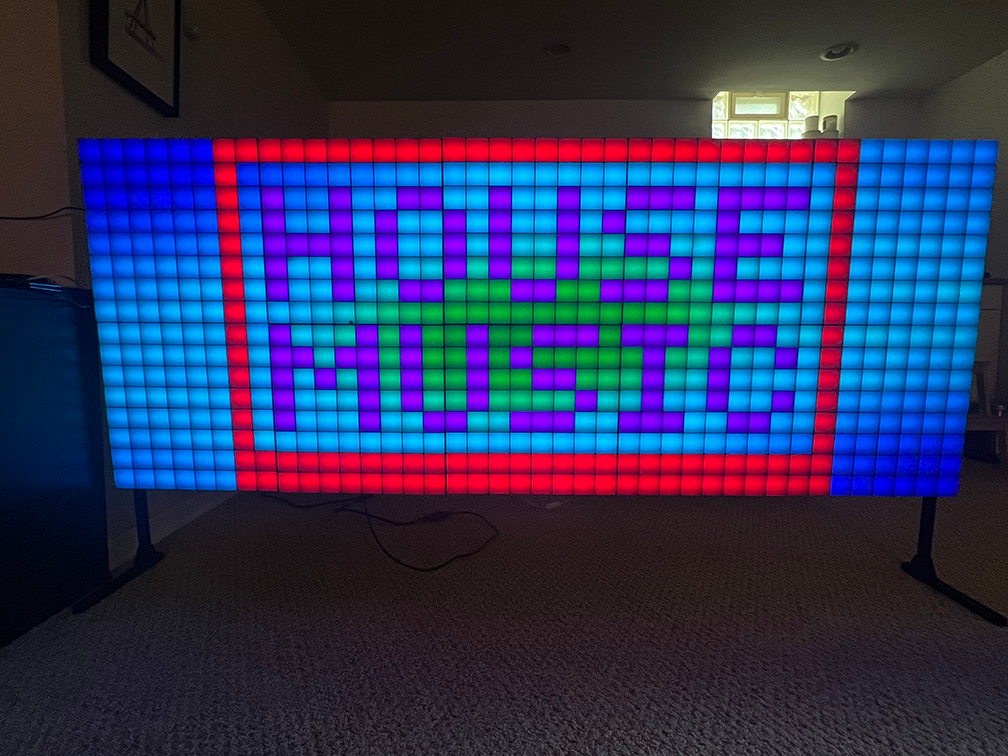
Authors: P. Gaskell & several LLMs... GitHub: pgaskell/led_matrix_control
Yeah, I vibecoded alot of it... It took less time and I didn't have to think as much, but it's not pretty... Documentation below too! does it make much sense?
A flexible, touch-enabled UI and toolkit for driving an LED wall or strip. Features:
- Real-time pattern engine with Pygame simulator + hardware output via WS2814/WS2811
- Modular “patterns” written in Python, each with up to 4 user-adjustable, modulatable parameters
- LFO & Audio-Envelope modulation sources (LFO1, LFO2, ENV_L (low-band RMS), ENV_H (high-band RMS))
- Patch system: save & recall up to 64 (or more, via paging) complete pattern + parameter + modulation snapshots
- Sprite editor for drawing 8×8…N×N frames or animated GIFs, with live LED preview
- Patch randomizer (cycle through saved patches every N beats)
- Gamma & white-balance calibration support for RGBW LEDs
- Requirements
- Installation
- Quick Start
- User Interface
- Pattern Selection
- Colormap & Sprite Dropdowns
- Sliders & Modulation Checkboxes
- LFO & Env Panels
- Patch Grid & Patching Controls
- Patterns
- Modulation Sources
- Patch System
- Sprite Editor
- pixilart.com
- Hardware Output
- Configuration & Calibration
- Extending & Contributing
- License
- Python 3.9+
- Pygame
- NumPy
- Pillow
- sounddevice (for audio envelopes)
spidevmodule (for direct SPI driving)
Install via:
sudo apt update
sudo apt install python3-pip python3-dev libopenblas-dev \
                 libfreetype6-dev libportmidi-dev libjpeg-dev \
                 libasound2-dev libatlas-base-dev
pip3 install pygame numpy pillow sounddevice spidev-
Clone the repo
git clone https://github.com/pgaskell/led_matrix_control.git cd led_matrix_control -
Create patches folder
mkdir -p patches
-
Run the UI
python3 touch_ui.py
-
Sprite editor (separate window):
python3 sprite_editor.py
- Pattern Mode: shows live simulator (or real LEDs)
- Patch Mode: shows 8×8 grid of saved patches; click to save/load/clear
- Tap Tempo: click TAP button to set global BPM via tap tempo
- Random Cycle: toggle RND and select beat‐interval to auto‐load saved patches
- Pattern Dropdown (top‐left): choose from any
patterns/*.pymodules - Colormap Dropdown: select built-in colormap (jet, viridis, custom VU-meter, …)
- Sprite Dropdown: overlay static PNG or animated GIF sprites in the center
- Up to 4 horizontal sliders per pattern (choose numeric params)
- Dropdowns for discrete options (e.g. BINS in VU pattern)
- Modulation Checkboxes beside each slider: enable LFO1, LFO2, ENV_L, ENV_H
- Two LFO panels (right side): waveform, depth, offset, mHz/quantized beat controls
- Two Envelope panels: threshold, gain, attack, release, mode (up/down/updown)
- Grid (8×8 slots) in Patch Mode: click to save, load, or clear patches
- Save / Clear toggles bottom-right; border turns red when active
- Toggle Patch/Pattern: square button shows miniature grid or pattern thumbnail
- Cycle Dropdown & RND button to auto‐cycle patches every N beats
All patterns live in patterns/. Each defines:
PARAMSdict of parameter metadata: default, min/max/step or discreteoptions,modulatableflagsPatternsubclass with arender(self, lfo_signals=None)method returning a flat list of RGBA tuples
Examples:
stripes.py: moving stripes, color & angle & speedcircles.py: expanding ripples, thickness & palette shiftvu_meter.py: VU-style bars from FFT bandsgame_of_life.py: Conway’s Game of Life with modulateable birth/death thresholds
Add new patterns by dropping your_pattern.py into patterns/. Follow the template in patterns/base.py.
-
LFO1 / LFO2: bi-polar oscillators (sine, square, triangle, saw), depth & offset, free or quantized to BPM
-
ENV_L / ENV_H: low-band & high-band RMS envelopes from your microphone input
- threshold, gain, attack/release, mode (up, down, up/down toggle)
-
Patterns subscribe to any modulatable param:
apply_modulation(base, meta, amt)→ scaled modulated value
- Snapshots of
(pattern, params, modulation flags, LFO_CONFIG, ENV_CONFIG)saved aspatches/patch_##.json - Thumbnails auto-generated from simulator at save time
- Recall restores entire state (including saved LFO/ENV panel settings)
You can page beyond 64 slots by extending the patch grid and paging controls in touch_ui.py.
Separate app sprite_editor.py:
- Draw pixel art on N×N canvas (16×16 or 24×24, or custom panel grid size)
- Pencil / Eraser / Clear / Frame Copy / Prev/Next frame controls
- Expanded 8×8 (or 10×8) color palette with pastel & grayscale rows
- Save as PNG or multi-frame GIF with disposal support
- Live LED output (optional): SPI push to your LED wall as you draw
-
Use to create PNGs or Animated GIFs with specific resolution.
Open the editor Go to https://www.pixilart.com and click Start Drawing, or navigate directly to the editor at /draw.
Set your dimensions In the New Drawing dialog, enter: Width: 16 Height: 16 (or 40 for a 16×40 canvas) Transparent if you want no backdrop, or pick a solid color.
-
Export a Static PNG in the Download pane and choose “1×” (native size)
-
You can build animated gifs as well
Toggle Onion Skin to ghost-view the previous frame below your cursor—great for smooth animations.
-
Export a GIF from Download pane, maintain resolution with “1×” (native size)
Abstracted in ws2814.py / rpi_ws281x:
-
Supports RGB → RGBW conversion (min-channel, luma, HSV-split methods)
-
Serpentine addressing for individual panels and full wall layouts
-
Configure panel dimensions via constants at the top of
touch_ui.py:PANEL_WIDTH, PANEL_HEIGHT = 8, 8 PANELS_X, PANELS_Y = 5, 2
-
Handles reset pulse and timing via SPI or PWM drivers
gamma.pyhelper for gamma‐correction & white balance- Tune gamma & scale curves for your LED type (e.g. 5050 RGBW)
- Global brightness slider (coming soon)
- Patterns: add new
patterns/*.pymodules - UI Controls: adjust
create_sliders()or panel classes intouch_ui.py - Sprite Tools: enhance
sprite_editor.pywith file browsers or extra drawing tools - Hardware Drivers: replace
WS2814backend for other LED chipsets
Please submit issues or pull requests on GitHub. Tests & examples welcome!
None whatsoever. your milage may vary