


Ultra‑fast / Ultra‑light / Ultra‑portable


A native C++ proof‑of‑concept browser focused on minimal overhead, cold‑start speed, and resource efficiency.
No multi‑process bloat, no background daemons, no gigabytes of RAM for a handful of tabs—just a lean renderer + native UI.
Download: Ultralight Web → Browser Releases Page | Status: Development / Experimental / Educational

- Why Ultralight?
- Project Philosophy & Goals
- Supported Platforms & Architectures
- Get the App
- Installation
- Features
- Recent Updates
- Tech Stack
- Build From Source
- ARM64 Build Notes
- JavaScript Bridge API
- Create Packages Locally
- CI / Automation
- Roadmap
- Troubleshooting
- Contributing
- Security & Privacy
- License
- Acknowledgements
- Disclaimer
Traditional browsers (and desktop web stacks like Electron / CEF) embed full, sandboxed operating systems (Chromium). They are powerful—but heavy. This project explores how far you can go by combining a lightweight GPU renderer with a native shell for a dramatically smaller footprint and near‑instant startup.
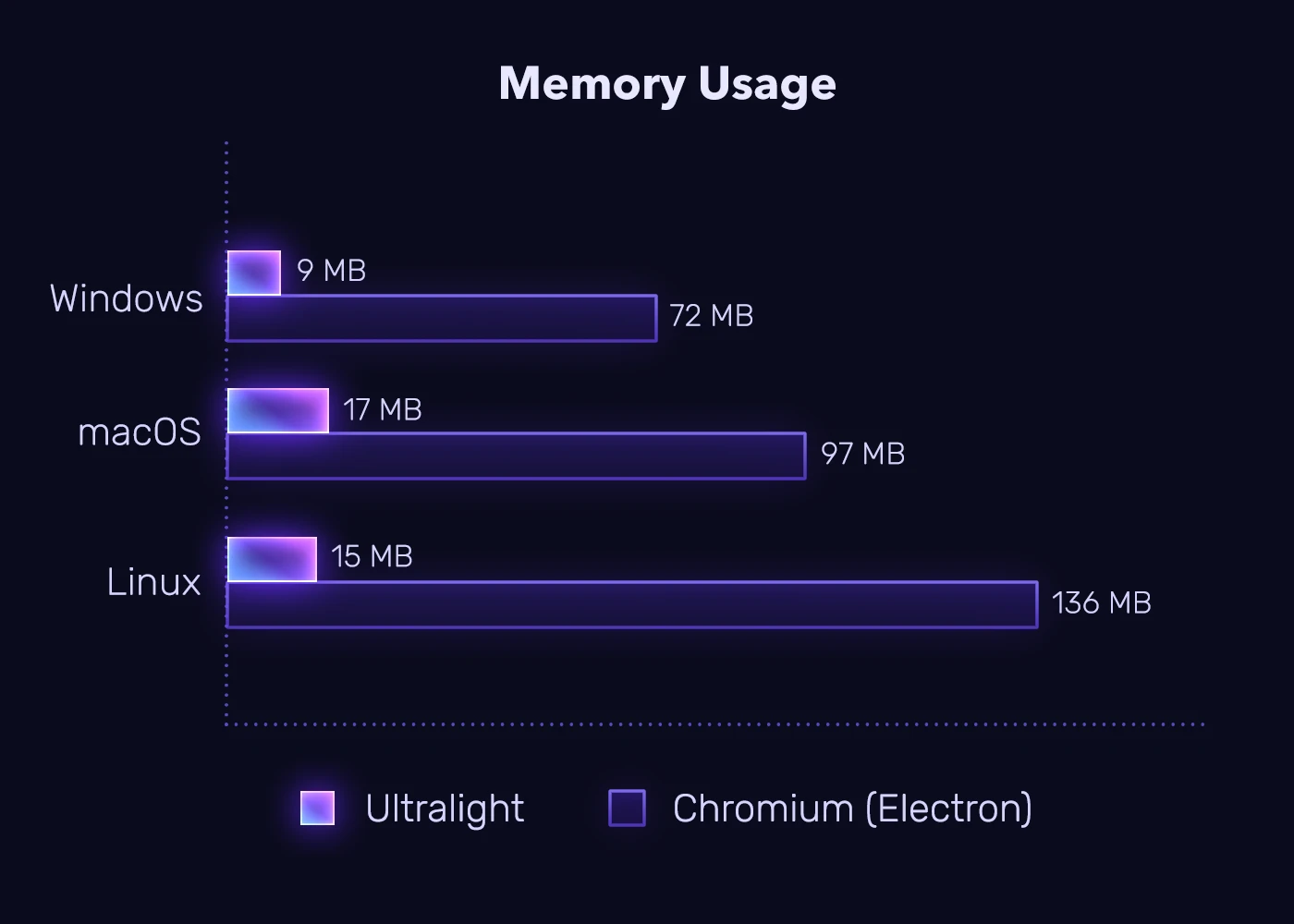
Result: lower memory pressure, near‑instant cold starts, smaller footprint, simple embedding, and much more.
| Feature | Ultralight (This Project) | Electron / CEF |
|---|---|---|
| Performance | ⚡ Up to 6× faster in simple page render ops | Chromium baseline CEF |
| Memory Usage | 🧠 ~1/10 RAM (no multi-process sandbox) | High (multi-process JS + GPU + Extensions) |
| Startup | 🚀 < 1s typical | 3–5s cold start |
| Disk Footprint | 📦 ~30–50 MB packaged | 1+ GB (runtime + Cache) |
| Rendering | 🎨 Lightweight GPU | Full Chromium CEF Stack |
| Architecture | 🧱 Native C++ + pixel buffer compositing | Node.js + Chromium + Interop Bridge |
Goals:
- Showcase minimal native browser shell design.
- Provide reference for Ultralight SDK Browser.
- Preliminary lightweight content / ad-block / tracking-block.
- Highlight performance vs conventional heavy frameworks.
| Platform | Architectures | CI Artifacts | Notes |
|---|---|---|---|
| Windows 10/11+ | x64 | Portable ZIP, optional NSIS installer | ARM64 SDK not yet published by Ultralight |
| macOS 12+ | x64, arm64 | TGZ, optional DMG | ARM64 auto‑detected when runner host is ARM64 |
| Linux (Ubuntu/Fedora etc.) | x64, arm64 | TGZ / DEB / RPM | ARM64 requires aarch64 runner; workflow automatically includes detection & fallback |
ARM64 archives are probed automatically when available in the base-sdk branch (eg: ultralight-free-sdk-<ver>-linux-arm64.7z, ...-mac-arm64.7z). Current public CI uses x64 runners; arm64 builds may require:
- Self‑hosted runner (Apple Silicon / aarch64 Linux)
- Future strategy matrix addition (see CI section)
Official tagged releases: 🎉 Ultralight Web → Browser Releases Page
Development (continuous) artifacts (latest successful dev workflow runs):
| Platform | Architectures | Packages | Latest Runs |
|---|---|---|---|
| Linux | x64, arm64* | TGZ, DEB, RPM | Open runs |
| macOS | x64, arm64 | TGZ, DMG | Open runs |
| Windows | x64 | ZIP (portable) / optional Installer | Open runs |
Notes:
- ✅ Linux AMD64 artifacts appear when an x64 runner is used or when
ULTRALIGHT_SDK_URLpoints to an AMD64 SDK. - ✅ Linux ARM64 artifacts appear when an aarch64 runner is used or when
ULTRALIGHT_SDK_URLpoints to an arm64 SDK. - ✅ Windows AMD64 artifacts appear when an aarch64 runner is used or when
ULTRALIGHT_SDK_URLpoints to an arm64 SDK. - ✅ macOS ARM64 artifacts are produced automatically when the CI runner is Apple Silicon.
- ✅ macOS AMD64 artifacts appear when an x64 runner is used or when
ULTRALIGHT_SDK_URLpoints to an AMD64 SDK. - 🕒 Windows ARM64 artifacts are not yet published by Ultralight [SOON™].
How to fetch artifacts:
- Open the workflow link for your platform/arch.
- Click the latest green run (success).
- Scroll to “Artifacts” (bottom) and download the desired archive.
🟦 Windows
Installer:
- Download
Ultralight-WebBrowser-Installer.exefrom Releases - Install it and get happy!
Portable:
- Download
cfrom Releases - Extract to any folder
- Run
Ultralight-WebBrowser.exe
Optional: Use the NSIS installer (*-Windows-Installer.exe) if available.
🍎 macOS
TGZ Archive:
tar -xzf Ultralight-WebBrowser-*.tar.gz
./Ultralight-WebBrowser
DMG Image:
- Mount the DMG
- Drag to Applications
- Right-click → Open (first launch, to bypass Gatekeeper)
🐧 Linux
Debian/Ubuntu (DEB):
sudo apt install ./Ultralight-WebBrowser-*.deb
ultralight-webbrowser
Fedora/RHEL (RPM):
sudo dnf install ./Ultralight-WebBrowser-*.rpm
ultralight-webbrowser
Portable (TGZ):
tar -xzf Ultralight-WebBrowser-*.tar.gz -C ~/.local/opt
~/.local/opt/UltralightWebBrowser/Ultralight-WebBrowser- GPU‑Accelerated Rendering – Powered by Ultralight core engine
- Low Memory Footprint – Single process shell architecture (~1/10 RAM vs. Electron)
- HTML5 / CSS3 / Modern JS Support – Full web standards compliance
- Multi‑Tab Interface – Chrome-style draggable tabs with smooth animations
- Navigation Controls – Back / Forward / Reload / Stop / Address bar
- Dynamic Page Indicators – Real-time title updates and loading states
- Responsive Resize – Fluid layout adaptation
- Lightweight Ad & Tracker Filtering
- Domain + substring + glob pattern matching
- Rule sources:
assets/blocklist.txt+ all.txtinassets/filters/ - Formats:
example.com,0.0.0.0 example.com,||example.com^,/ads.js,*://*/*analytics*.js - Always allowed:
file://,data: - Toggle via toolbar icon or Settings
- Requires SDK network interception capabilities
- Location Spoofing – Override geolocation with custom coordinates
- Configurable latitude/longitude values
- Preset city buttons (New York, London, Tokyo, Sydney, Paris)
- Per-site geolocation override via JavaScript injection
- Do Not Track (DNT) – Configurable header setting
- Clear History on Exit – Optional automatic cleanup
- Web Security Controls – JavaScript, cookies, storage permissions
- Modern Glassmorphic Design – Semi-transparent overlays with backdrop blur
- Dark Mode – Global theme toggle with persistent preferences
- Compact Tabs Mode – Space-saving layout (60px UI height, 12em tab width)
- Toolbar Icons – Quick access to Inspector, Downloads, AdBlock, Menu
- Bookmark System – Save favorite sites with toolbar star icon and bookmarks bar
- Bookmark Manager – Organize bookmarks with folder support and quick access
- Download Manager – Full-featured UI with progress tracking and notifications
- WebP to PNG conversion – Automatic conversion of downloaded WebP images
- Configurable download location prompts
- Download history and status tracking
- Settings Panel – Comprehensive configuration across 7+ categories:
- Appearance (Dark Mode, Vibrant Window, Transparent Toolbar, Compact Tabs)
- Privacy & Security (AdBlock, Trackers, JavaScript, Web Security, Cookies, DNT, History, Location Spoofing)
- Address Bar & Suggestions (Autocompletion, Favicons)
- Downloads (Badge, Auto-open Panel, Ask Location, WebP to PNG Conversion)
- Performance (Smooth Scrolling, Hardware Acceleration, Local Storage, Database)
- Accessibility (Reduce Motion, High Contrast, Caret Browsing)
- Developer (Remote Inspector, Performance Overlay)
- DRM Content (DRM WebView toggle for protected content)
- Settings Search – Quick search to find specific settings
- Auto-Save Settings – Automatic persistence of preference changes
- Custom User Agent – Configurable browser identification string
- Persistent Settings – JSON-based storage with runtime updates
- Context Menu – Right-click actions and shortcuts
- Keyboard Shortcuts – Customizable shortcut mapping system
- Favicon Support – Site icons in tabs and suggestions
- Autosuggestion – Intelligent URL/search completions with popular sites
- DRM WebView Subsystem – Platform-native WebView for DRM-protected content
- Windows: WebView2 (Edge/Chromium) integration
- macOS: Native WKWebView with Cocoa/WebKit frameworks
- Linux: WebKit2GTK integration
- Automatic Fallback – Seamless switching between Ultralight and native WebView
- DRM Status Indicators – Visual feedback for DRM content detection
- Per-Platform Optimization – Native framework integration for best performance
- JavaScript ↔ Native Bridge –
window.__ulAPI for deep integration - Local History API – In-memory browsing history (non-persistent by default)
- Shortcut Mapping – JSON-based keyboard shortcut configuration
- Debug Panel – Runtime settings inspection and diagnostics
- Location Spoofing – Override browser geolocation with custom coordinates
- Configurable latitude/longitude in Settings → Privacy
- Preset city buttons: New York, London, Tokyo, Sydney, Paris
- JavaScript geolocation API override for privacy protection
- WebP to PNG Conversion – Automatic conversion of downloaded WebP images
- Windows Imaging Component (WIC) based conversion
- Toggle in Settings → Downloads
- Preserves original filename with PNG extension
- Session Restore – Restore tabs and state from previous browsing session
- Password Manager – Secure credential storage and autofill
- Enhanced download manager with format conversion support
- Expanded settings catalog (30+ options)
- Improved privacy controls with geolocation override
- Dark Mode – Global theme toggle with persistent preferences
- Settings Panel – 26+ configurable options across 7 categories
- Download Manager – Full-featured UI with progress tracking
- ARM64 Support – Native builds for Apple Silicon and ARM Linux
- URL Suggestions – Intelligent autocompletion with popular sites
- Quick Inspector – Built-in development tools
- Keyboard Shortcuts – Customizable shortcut mapping system
Major feature sync bringing all development improvements to the stable branch.
- Dynamic compact tabs mode with live toggle
- No restart required for layout changes
- Improved tab reload and settings mutation handling
- Automatic saving of settings changes
- Toggle option for auto-save behavior
- Seamless preference persistence
- Configurable browser User-Agent string
- New UI handling for setting changes
- Enhanced request customization
- Fixed toolbar icon styles and transitions
- Improved download icon behavior
- Polished visual feedback
- NSIS path detection improvements
- PowerShell environment variable fixes
- Windows CI workflow enhancements
- DRM WebView Subsystem – Cross-platform native WebView integration
- Bookmark System – Full bookmark management with toolbar integration
- Settings Search – Quick-find functionality for settings panel
- CI/CD Improvements – Full ARM64 support for Linux and macOS
| Component | Technology |
|---|---|
| Renderer | Ultralight SDK |
| Language | C++17, Objective-C++ (macOS) |
| Window/Input | GLFW |
| Graphics | OpenGL 3.3 |
| Build System | CMake + CPack |
| CI/CD | GitHub Actions (x64 + ARM64) |
| DRM (Windows) | WebView2 (Edge/Chromium) |
| DRM (macOS) | WKWebView (Cocoa/WebKit) |
| DRM (Linux) | WebKit2GTK |
|
|
|
Common Issues
| Issue | Solution |
|---|---|
| Blank window | Verify OpenGL 3.3 support; check library files |
| Settings not loading | Check setup/settings.json exists and is valid JSON |
| AdBlock not working | Ensure SDK supports network interception |
| DRM not playing | Enable in Settings → DRM Content |
| DRM WebView crash (macOS) | Ensure Cocoa/WebKit frameworks available |
| DRM WebView crash (Linux) | Install libwebkit2gtk-4.1-dev |
| macOS Gatekeeper | Right-click → Open (first launch) |
| Bookmarks not saving | Check write permissions for storage directory |
Debug Tips
- Launch from terminal to see initialization logs
- Enable Performance Overlay in Settings → Developer
- Delete
setup/settings.jsonto reset to defaults - Check
assets/blocklist.txtfor filter syntax errors - Verify SDK presence in
data/orULTRALIGHT_SDK_ROOT
| Workflow | Platform | Features |
|---|---|---|
build-all.yml |
All | Meta-workflow (main badge) |
build-windows.yml |
Windows x64 | Optional NSIS installer |
build-macos.yml |
macOS x64 | Cocoa/WebKit linking |
build-macos-arm64.yml |
macOS ARM64 | Apple Silicon |
build-linux.yml |
Linux x64 | GTK3, WebKit2GTK |
build-linux-arm64.yml |
Linux ARM64 | Self-hosted/emulated |
| Variable | Purpose |
|---|---|
ULTRALIGHT_SDK_URL |
Override auto-detected SDK URL |
ULTRALIGHT_VERSION |
Override SDK version |
WEBBROWSER_VERSION |
App version label |
PACKAGE_GENERATORS |
CPack generators (TGZ;DEB;RPM) |
CREATE_INSTALLER |
Build NSIS installer (Windows) |
The DRM WebView subsystem provides native WebView integration for playing DRM-protected content (Netflix, Disney+, etc.) that cannot be rendered by the Ultralight engine.
- Detection: Browser detects DRM-protected content via content type or site rules
- Fallback: Automatically switches from Ultralight to native WebView
- Integration: Native WebView overlays the main window with proper z-ordering
- Return: User can switch back to Ultralight for regular browsing
| Platform | Native WebView | DRM Support | Notes |
|---|---|---|---|
| Windows | WebView2 (Edge/Chromium) | Widevine, PlayReady | Requires Edge runtime |
| macOS | WKWebView | FairPlay, Widevine | Native Cocoa/WebKit |
| Linux | WebKit2GTK | Limited | WebKit2GTK 4.1 preferred |
- Open Settings → DRM Content
- Toggle Enable DRM WebView
- Navigate to DRM-protected content
- Browser will automatically use native WebView when needed
- Windows: WebView2 SDK (auto-detected by CMake)
- macOS: Xcode with Cocoa/WebKit frameworks
- Linux:
libwebkit2gtk-4.1-devorlibwebkit2gtk-4.0-dev
🧩 JavaScript Bridge API
The window.__ul API is injected into the main frame for native integration:
// Navigation
__ul.navigate("https://example.com");
__ul.newTab("https://example.org");
__ul.back(); __ul.forward(); __ul.reload();

// Settings
const settings = __ul.getSettingsSnapshot();
__ul.updateSetting("enable_adblock", true);
__ul.saveSettings();

// Theme
__ul.toggleDarkMode();
if (__ul.isDarkModeEnabled()) { /* ... */ }

// History
const history = __ul.getHistory();
__ul.clearHistory();

// App Info
const info = __ul.getAppInfo();
// { name: "Ultralight WebBrowser", version: "1.4.0" }
🔐 DRM WebView System
For DRM-protected content (Netflix, Disney+, etc.):
| Platform | WebView | DRM Support |
|---|---|---|
| Windows | WebView2 | Widevine, PlayReady |
| macOS | WKWebView | FairPlay, Widevine |
| Linux | WebKit2GTK | Limited |
Enable: Settings → DRM Content → Enable DRM WebView
The DRM WebView subsystem provides native WebView integration for playing protected content that cannot be rendered by the Ultralight engine.
How It Works:
- Browser detects DRM-protected content via content type or site rules
- Automatically switches from Ultralight to native WebView
- Native WebView overlays the main window with proper z-ordering
- User can switch back to Ultralight for regular browsing
📍 Location Spoofing
Override the browser's geolocation API with custom coordinates for privacy protection.
Configuration:
- Open Settings → Privacy & Security
- Enable Location Spoofing
- Enter custom Latitude and Longitude values
- Or use preset city buttons: New York, London, Tokyo, Sydney, Paris
How It Works:
- Overrides
navigator.geolocation.getCurrentPosition() - Overrides
navigator.geolocation.watchPosition() - Returns spoofed coordinates to all web pages
- Does not affect actual device location
Preset Coordinates:
| City | Latitude | Longitude |
|---|---|---|
| New York | 40.7128 | -74.0060 |
| London | 51.5074 | -0.1278 |
| Tokyo | 35.6762 | 139.6503 |
| Sydney | -33.8688 | 151.2093 |
| Paris | 48.8566 | 2.3522 |
🛡️ Ad Blocking
Rules loaded from:
assets/blocklist.txtassets/filters/*.txt
Supported formats:
example.com
0.0.0.0 example.com
||example.com^
/ads.js
*://*/*analytics*.js
Always allowed: file://, data: URLs
Toggle via toolbar icon or Settings → Privacy → Enable AdBlock
⚙️ Settings Categories
| Category | Options |
|---|---|
| Appearance | Dark Mode, Vibrant Window, Transparent Toolbar, Compact Tabs |
| Privacy & Security | AdBlock, Tracker Blocking, JavaScript, Cookies, DNT, Clear History, Location Spoofing |
| Address Bar | Autocompletion, Favicons, Suggestions |
| Downloads | Badge, Auto-open Panel, Location Prompt, WebP to PNG Conversion |
| Performance | Smooth Scrolling, Hardware Acceleration, Local Storage |
| Accessibility | Reduce Motion, High Contrast, Caret Browsing |
| Developer | Remote Inspector, Performance Overlay |
| DRM Content | Enable DRM WebView |
⌨️ Keyboard Shortcuts
Shortcuts are customizable via assets/shortcuts.json:
| Action | Default Shortcut |
|---|---|
| New Tab | Ctrl+T |
| Close Tab | Ctrl+W |
| Reload | Ctrl+R / F5 |
| Back | Alt+Left |
| Forward | Alt+Right |
| Address Bar | Ctrl+L |
| Find | Ctrl+F |
| Settings | Ctrl+, |
| Developer Tools | F12 |
| Workflow | Platform | Features |
|---|---|---|
build-all.yml |
All | Meta-workflow (main badge) |
build-windows.yml |
Windows x64 | Optional NSIS installer |
build-macos.yml |
macOS x64 | Cocoa/WebKit linking |
build-macos-arm64.yml |
macOS ARM64 | Apple Silicon |
build-linux.yml |
Linux x64 | GTK3, WebKit2GTK |
build-linux-arm64.yml |
Linux ARM64 | Self-hosted/emulated |
| Variable | Purpose |
|---|---|
ULTRALIGHT_SDK_URL |
Override auto-detected SDK URL |
ULTRALIGHT_VERSION |
Override SDK version |
WEBBROWSER_VERSION |
App version label |
PACKAGE_GENERATORS |
CPack generators (TGZ;DEB;RPM) |
CREATE_INSTALLER |
Build NSIS installer (Windows) |
| Component | Technology |
|---|---|
| Renderer | Ultralight SDK |
| Language | C++17, Objective-C++ (macOS) |
| Window/Input | GLFW |
| Graphics | OpenGL 3.3 |
| Build System | CMake + CPack |
| CI/CD | GitHub Actions (x64 + ARM64) |
| DRM (Windows) | WebView2 (Edge/Chromium) |
| DRM (macOS) | WKWebView (Cocoa/WebKit) |
| DRM (Linux) | WebKit2GTK |
- Fork the repository
- Create feature branch:
git checkout -b feature/amazing-feature - Commit changes:
git commit -m "Add amazing feature" - Push:
git push origin feature/amazing-feature - Open a Pull Request
Guidelines:
- Keep PRs focused and small
- Include performance notes if relevant
- Add tests for core logic changes
- Follow existing code style
This project:
- Does NOT implement hardened sandboxing found in mainstream browsers
- Stores only ephemeral in-memory history (no disk persistence by default)
- Performs lightweight filtering—no advanced tracker heuristics
- Should not be used for security-critical tasks without further auditing
MIT License — see LICENSE for details.
- Ultralight — Lightweight HTML renderer
- GLFW — Cross-platform windowing
- Open-source community contributors
Made with ❤️ for Ultralight SDK by @ovsky