


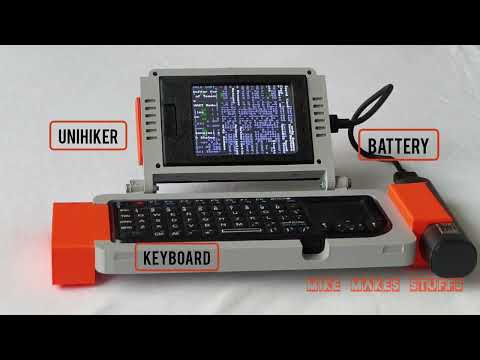
A compact cyberdeck-style terminal built on the UniHiker M10.
This project transforms the board into a fast, minimal Linux device that boots directly into a custom terminal and acts as a portable SSH control station for more powerful systems.


- Fast terminal boot (no GUI overhead)
- GUI toggle (switch between CLI and desktop)
- SSH control station (remote system management)
- Custom terminal themes (local vs SSH optimized)
- Live dashboard (tmux-based monitoring)
The UniHiker is not powerful enough to run heavy frameworks like ROS efficiently.
Instead of forcing it into a role it cannot handle, this project reimagines the device as a dedicated interface a lightweight terminal designed to control more powerful machines remotely.
- The system boots into a lightweight terminal environment
- Custom
.bashrchandles UI and behavior - Local terminal uses framebuffer colors (
setterm) - SSH sessions use ANSI color reset
- Tools like
tmuxcreate a multi-pane dashboard
sudo apt update
sudo apt install tmux htop bmon
Clone repo:
git clone https://github.com/migit/Unihiker-Terminal-Cyberdeck.git
cd unihiker-cyberdeck
Run setup:
sudo chmod +x scripts/a2r3
./scripts/a2r3
Toggle GUI:
gui-toggleLaunch dashboard:
deck_dashboardThis project includes a custom 3D-printed case designed for:
- Secure mounting of the UniHiker board
- Easy access to ports
- Improved ergonomics for handheld use
Download the STL files from here
- Portable SSH terminal
- Remote server management
- Embedded system debugging
- Network diagnostics tool
- Robot control interface (I have used it to control my mobile robot a2r3, so do not be suprised if you encounter this shell script name)
- Field deployment terminal
- Custom boot animation
- Expanded dashboard features
- 3D printed Sensor attachment modules (plug and play type)
This project is built on the UniHiker platform. No proprietary firmware or OS images are redistributed.
MIT License