
One day in the past, I decided that I wanted to be able to control my garage door with my phone so I built this.
First I had to figure out how to control the garage door. My garage door, as I'm sure many others, can be opened or closed by shorting 2 wires that provide power to the garage door opener button.
I also needed a way of knowing whether the door was open or closed.
Here is the circuit that I originally built for this project (this is no longer valid).
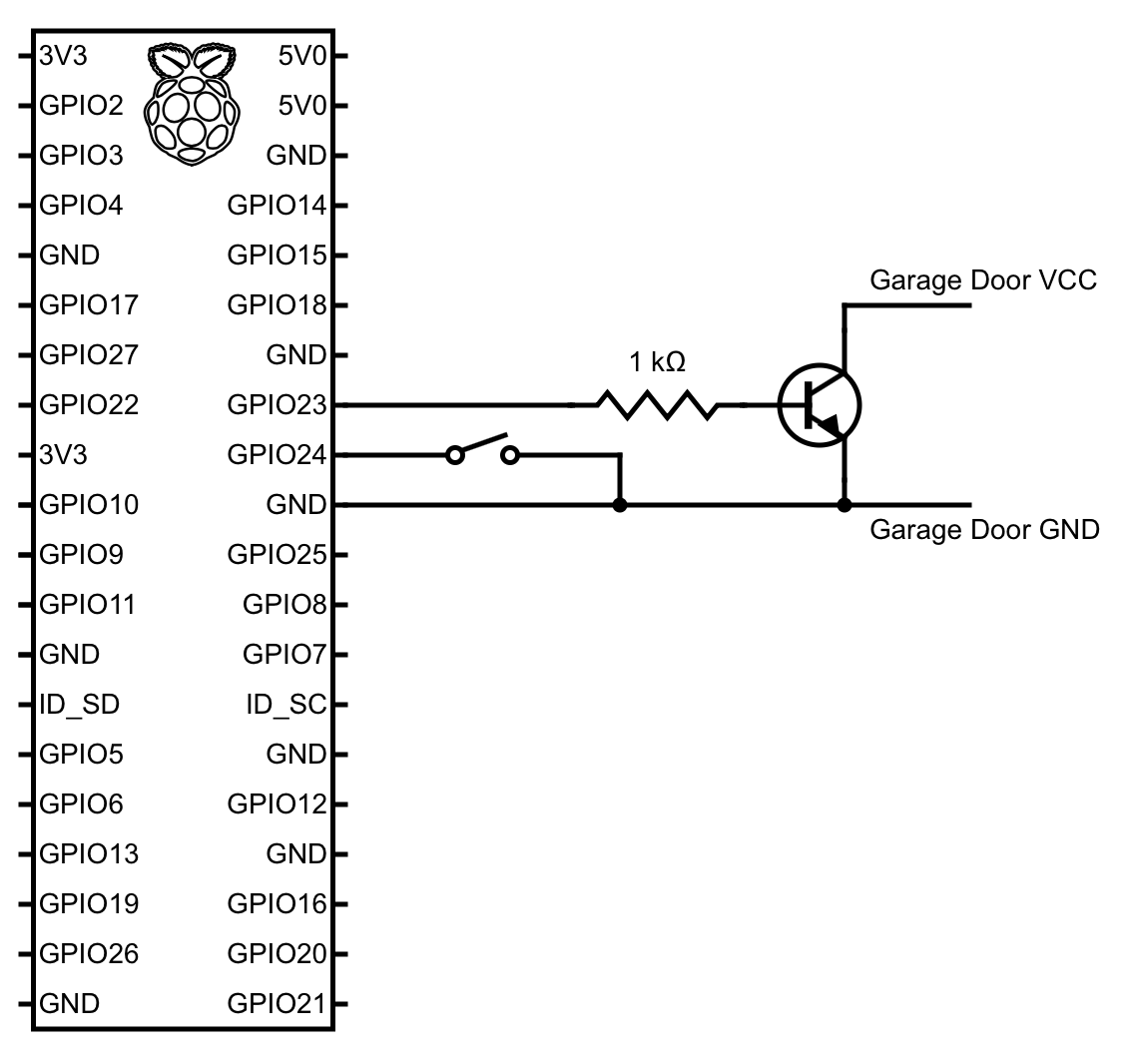
Using the transistor we can shortly short the 2 wires going into the garage door causing it to either open or close depending on the current position. If the garage door is either opening or closing, toggling it again causes it to stop wherever it is.
UPDATE: The transistor method isn't as reliable so I started using a relay which is much more reliable.
The toggle switch is attached to the garage door opener rail so that it was toggled when the garage door completely opens. This is needed to know the current state of the door.
UPDATE: The toggle switch doesn't work that great because the garage door doesn't open consistently to the smae spot so it ends up pushing the toggle switch. I started using an ultrasonic sensor that is much more reliable in seeing the garage door even when it is slightly off.
It takes about 12 seconds for my garage door to either open or close completely.
Lessons learned:
- It is better to use a Raspberry Pi with a wired connection because the response from the phone is much more reliable and quicker.
- It is better to use bash scripts over Python scripts because the state is checked often and the extra delay of running a Python script makes things much less snappy.
- Homebridge
- GarageCommand Homebridge plugin
- WiringPi
Here are the commands you can use to install everything you will need if you are running Raspbian Lite.
sudo apt install npm
sudo npm install -g homebridge
npm install -g homebridge-garagedoor-command
sudo apt install wiringpi
This is the configuration for the GarageCommand Homebridge plugin/accessory that goes in the ~/.homebridge/config.json file.
{
    "accessory": "GarageCommand",
    "name": "Garage Door",
    "open": "~/GarageDoorControl/control.sh open",
    "close": "~/GarageDoorControl/control.sh close",
    "state": "~/GarageDoorControl/control.sh state",
    "status_update_delay": 12,
    "poll_state_delay": "2"
}
To run Homebridge and correctly setup the GPIO pins on boot type crontab -e and add the following lines:
@reboot /usr/bin/python3 /home/pi/GarageDoorControl/distance.py
@reboot /home/pi/GarageDoorControl/control.sh setup
@reboot /usr/local/bin/homebridge