[SILO-821] feat: add gitlab issue sync docs #388
Conversation


|
You have run out of free Bugbot PR reviews for this billing cycle. This will reset on January 20. To receive reviews on all of your PRs, visit the Cursor dashboard to activate Pro and start your 14-day free trial. |

|
The latest updates on your projects. Learn more about Vercel for GitHub.
|


📝 WalkthroughWalkthroughDocumentation updates clarify GitHub integration sync behavior, reframing unidirectional sync as a mode and updating the States field to indicate bidirectional capability. GitLab integration docs add a new "Sync issues" section detailing project-level issue synchronization configuration and synced data types, though the section appears duplicated in the file. Changes
Estimated code review effort🎯 2 (Simple) | ⏱️ ~10 minutes Poem
Pre-merge checks✅ Passed checks (3 passed)
Thanks for using CodeRabbit! It's free for OSS, and your support helps us grow. If you like it, consider giving us a shout-out. Comment |

|
Linked to Plane Work Item(s) This comment was auto-generated by Plane |
![coderabbitai[bot]](https://avatars.githubusercontent.com/in/347564?s=60&v=4)

There was a problem hiding this comment.
Actionable comments posted: 3
🤖 Fix all issues with AI Agents
In @docs/integrations/gitlab.mdx:
- Around line 174-201: The images in the "Add project work item sync" section
use GitHub asset paths; replace the two occurrences of
"integrations/github/sync-project-github.webp" and
"integrations/github/sync-direction.webp" with the corresponding GitLab asset
paths (e.g., "integrations/gitlab/sync-project-gitlab.webp" and
"integrations/gitlab/sync-direction.webp") in docs/integrations/gitlab.mdx,
verify the GitLab screenshots exist at those locations, and update any related
alt/description text if needed to reflect GitLab UI.
- Around line 203-217: The images in the "Sync issues to Plane" GitLab section
reference GitHub assets; update the three image src paths so they point to the
GitLab assets instead of GitHub by replacing
`integrations/github/add-plane-label.webp`,
`integrations/github/synced-issue-from-github.webp`, and
`integrations/github/creates-plane-issue.webp` with the corresponding
`integrations/gitlab/...` filenames (e.g.,
`integrations/gitlab/add-plane-label.webp`,
`integrations/gitlab/synced-issue-from-gitlab.webp`,
`integrations/gitlab/creates-plane-issue.webp`) so the visuals match the GitLab
instructions.
- Around line 219-232: The images and alt text in the "Sync work items to
GitLab" block incorrectly reference GitHub; update the first image tag src from
"integrations/github/add-github-label.webp" to
"integrations/gitlab/add-gitlab-label.webp" and change its alt text from "Add
github label" to "Add gitlab label", and update the second image tag src from
"integrations/github/create-gitlab-issue.webp" to
"integrations/gitlab/create-gitlab-issue.webp" (ensure the alt text matches the
GitLab context, e.g., "Creates issue in GitLab").
🧹 Nitpick comments (1)
docs/integrations/gitlab.mdx (1)
224-224: Consider varying the phrasing for readability.The phrase "want to sync" is used similarly on line 208. While clear and correct, you could add variety:
🔎 Optional refinement
-1. In your Plane project, add the `gitlab` label to any work item you want to sync.
+1. In your Plane project, add the `gitlab` label to any work item you wish to sync to GitLab.
Based on static analysis hints.
📜 Review details
Configuration used: defaults
Review profile: CHILL
Plan: Pro
📒 Files selected for processing (2)
docs/integrations/github.mdxdocs/integrations/gitlab.mdx
🧰 Additional context used
🪛 LanguageTool
docs/integrations/gitlab.mdx
[style] ~224-~224: You have already used this phrasing in nearby sentences. Consider replacing it to add variety to your writing.
Context: ...the gitlab label to any work item you want to sync. 
🔇 Additional comments (4)
docs/integrations/github.mdx (2)
197-199: Documentation clarity improved.The updated warning text is more explicit about the overwrite behavior in unidirectional mode and provides clear guidance on enabling bidirectional sync. This improves user understanding of the sync modes.
209-209: This change is verified as intentional and accurate.The States field documentation has been consistently updated across both GitHub and GitLab integration docs to reflect bidirectional sync. Both integrations now document States as "Both ways" with the explanation "Updates in either platform reflect in the other." This aligns with the explicit feature documentation in lines 182-183, which states: "With bidirectional sync enabled, state changes in Plane work items will also update the GitHub issue status (open/closed)." The PR's focus on GitLab docs includes coordinating this documentation update across both integrations.
docs/integrations/gitlab.mdx (2)
170-266: Flag inconsistency with AI-generated summary.The AI summary mentions that the "Sync issues" section appears duplicated in the file, but only one instance is visible in the provided code. Please verify whether duplicate content exists elsewhere in the file.
233-266: Well-documented sync behavior and properties.The "How issue syncing works" and "What gets synced?" sections provide clear, comprehensive information about sync mechanics. The warning about unidirectional sync overwriting data is appropriately placed, and the property table clearly documents sync directions.
| ### Add project work item sync | ||
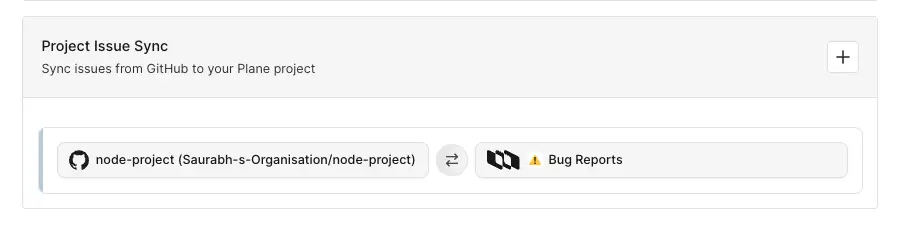
| Once GitLab is connected to Plane, workspace admins can link GitLab Projects with Plane projects. | ||
|
|
||
| 1. Navigate to the **Project Issue Sync** section under **Integrations**. | ||
| 2. Click the (+) button to create a new sync mapping. | ||
|
|
||
|  | ||
| 3. In the modal that appears, configure the following: | ||
| 1. **Plane project** | ||
| Select the Plane project you want to sync with. | ||
| 2. **GitLab Project** | ||
| Choose the GitLab Project to connect. | ||
| 3. **Project issue sync** | ||
| Map GitLab issue states to Plane states: | ||
| - Issue Open → Select a Plane state (e.g., Todo) | ||
| - Issue Closed → Select a Plane state (e.g., Done) | ||
| 4. **Select issue sync direction** | ||
| Choose how issues should sync: | ||
| - Unidirectional → Sync issues from GitLab to Plane only. | ||
| :::warning | ||
| This will overwrite Plane work item content with GitLab issue data. | ||
| ::: | ||
| - Bidirectional → Sync issues both ways between GitLab and Plane. | ||
|
|
||
| 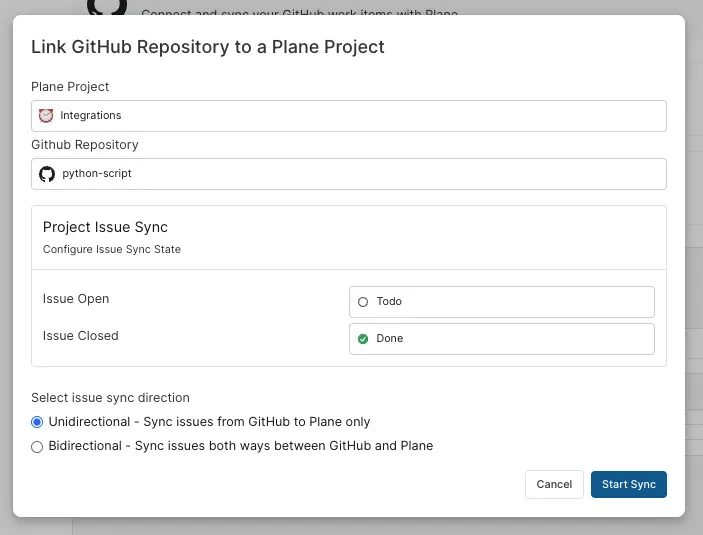 | ||
| 5. Click **Start Sync**. | ||
|
|
||
| All configured project issue syncs will appear in a list where you can edit or remove them as needed. |
There was a problem hiding this comment.
Incorrect image URLs point to GitHub instead of GitLab.
Multiple image references in this section use GitHub paths instead of GitLab paths:
- Line 180:
integrations/github/sync-project-github.webp - Line 198:
integrations/github/sync-direction.webp
Users reading GitLab documentation will see GitHub UI screenshots, which is confusing and incorrect.
🔎 Proposed fix
- 
+ - 
+ Ensure the corresponding GitLab screenshots exist at these paths before merging.
🤖 Prompt for AI Agents
In @docs/integrations/gitlab.mdx around lines 174 - 201, The images in the "Add
project work item sync" section use GitHub asset paths; replace the two
occurrences of "integrations/github/sync-project-github.webp" and
"integrations/github/sync-direction.webp" with the corresponding GitLab asset
paths (e.g., "integrations/gitlab/sync-project-gitlab.webp" and
"integrations/gitlab/sync-direction.webp") in docs/integrations/gitlab.mdx,
verify the GitLab screenshots exist at those locations, and update any related
alt/description text if needed to reflect GitLab UI.
| ### Sync issues to Plane | ||
| After configuring project work item sync, you can link existing GitLab issues into your Plane project. | ||
|
|
||
| #### GitLab → Plane | ||
|
|
||
| 1. In your GitLab project, add the `Plane` label to any issue you want to sync. | ||
|
|
||
| 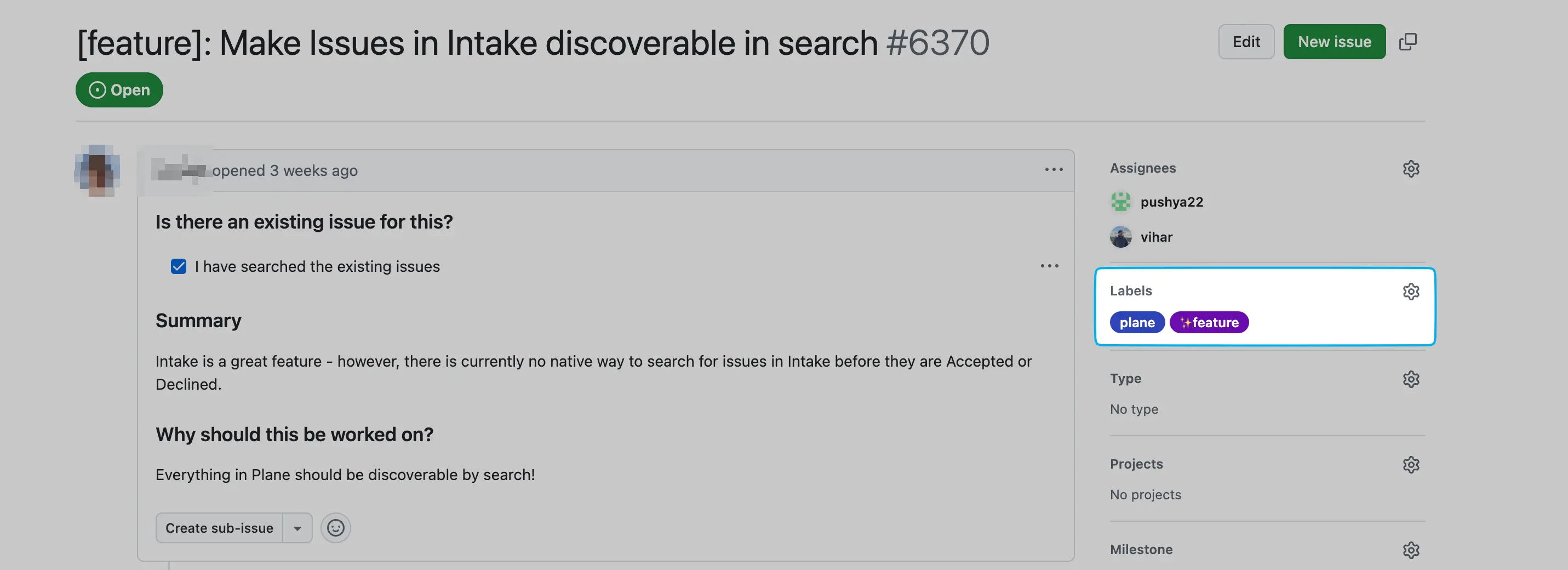 | ||
| 2. The issue will automatically be created as a work item in the linked Plane project. | ||
| 3. Plane posts a comment on the GitLab issue with a link to the newly created work item, confirming the connection. | ||
|
|
||
| 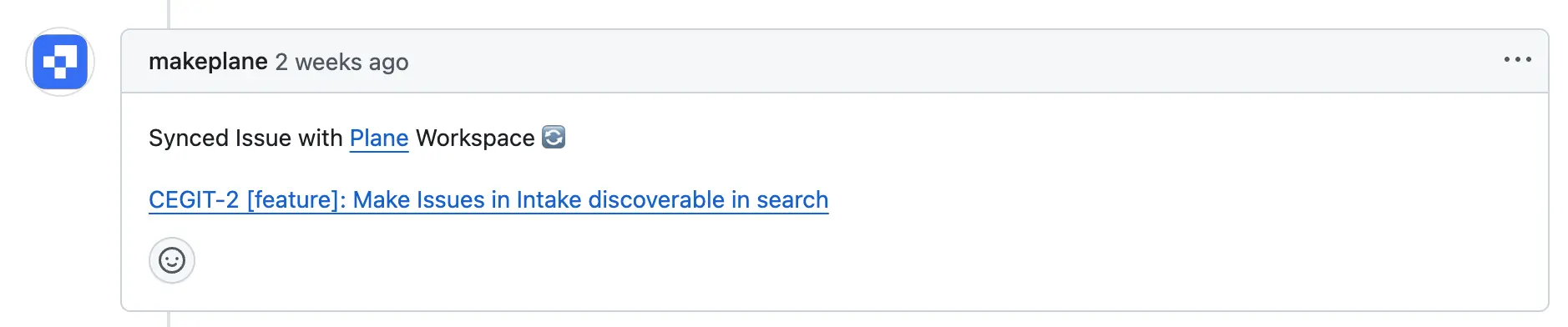 | ||
| 4. The work item in Plane will include a link back to the original GitLab issue. | ||
|
|
||
| 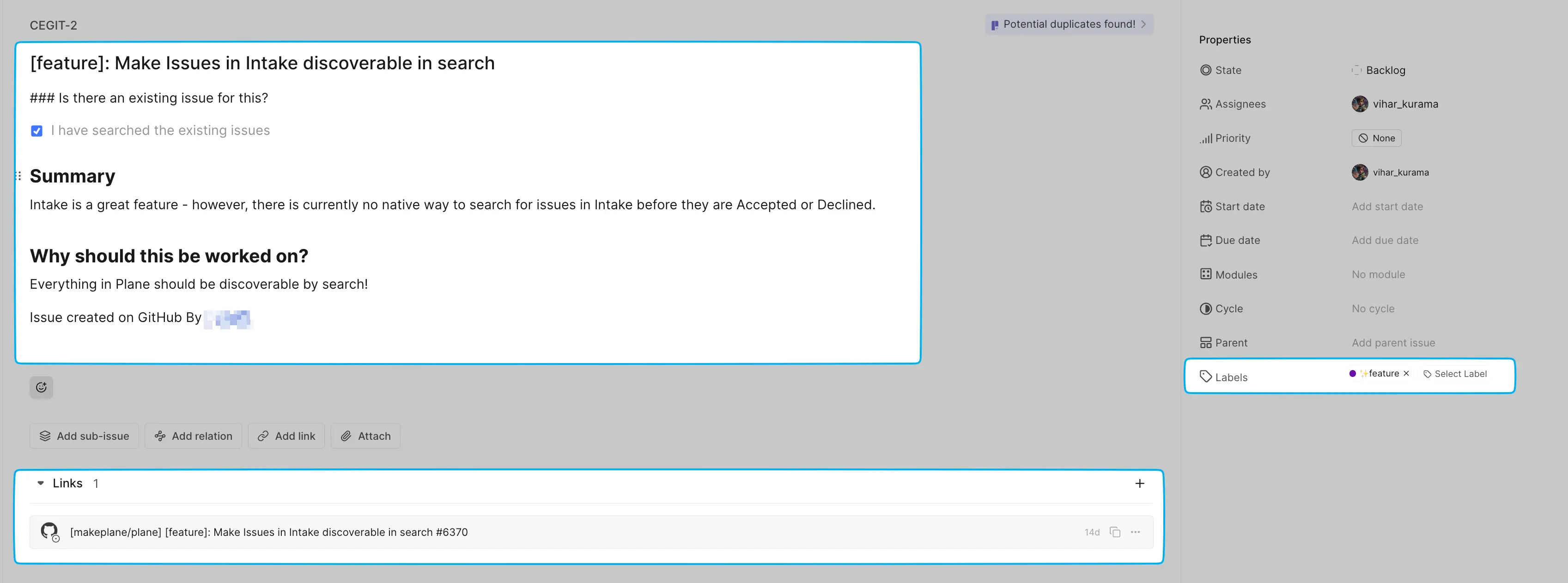 |
There was a problem hiding this comment.
Incorrect image URLs point to GitHub instead of GitLab.
Multiple image references continue to use GitHub paths:
- Line 210:
integrations/github/add-plane-label.webp - Line 214:
integrations/github/synced-issue-from-github.webp - Line 217:
integrations/github/creates-plane-issue.webp
🔎 Proposed fix
- 
+ - 
+ - 
+ 📝 Committable suggestion
‼️ IMPORTANT
Carefully review the code before committing. Ensure that it accurately replaces the highlighted code, contains no missing lines, and has no issues with indentation. Thoroughly test & benchmark the code to ensure it meets the requirements.
| ### Sync issues to Plane | |
| After configuring project work item sync, you can link existing GitLab issues into your Plane project. | |
| #### GitLab → Plane | |
| 1. In your GitLab project, add the `Plane` label to any issue you want to sync. | |
|  | |
| 2. The issue will automatically be created as a work item in the linked Plane project. | |
| 3. Plane posts a comment on the GitLab issue with a link to the newly created work item, confirming the connection. | |
|  | |
| 4. The work item in Plane will include a link back to the original GitLab issue. | |
|  | |
| ### Sync issues to Plane | |
| After configuring project work item sync, you can link existing GitLab issues into your Plane project. | |
| #### GitLab → Plane | |
| 1. In your GitLab project, add the `Plane` label to any issue you want to sync. | |
|  | |
| 2. The issue will automatically be created as a work item in the linked Plane project. | |
| 3. Plane posts a comment on the GitLab issue with a link to the newly created work item, confirming the connection. | |
|  | |
| 4. The work item in Plane will include a link back to the original GitLab issue. | |
|  |
🤖 Prompt for AI Agents
In @docs/integrations/gitlab.mdx around lines 203 - 217, The images in the "Sync
issues to Plane" GitLab section reference GitHub assets; update the three image
src paths so they point to the GitLab assets instead of GitHub by replacing
`integrations/github/add-plane-label.webp`,
`integrations/github/synced-issue-from-github.webp`, and
`integrations/github/creates-plane-issue.webp` with the corresponding
`integrations/gitlab/...` filenames (e.g.,
`integrations/gitlab/add-plane-label.webp`,
`integrations/gitlab/synced-issue-from-gitlab.webp`,
`integrations/gitlab/creates-plane-issue.webp`) so the visuals match the GitLab
instructions.
| ### Sync work items to GitLab | ||
| If you have existing work items in Plane that you want to sync to GitLab, you can do so using labels. | ||
|
|
||
| #### Plane → GitLab | ||
|
|
||
| 1. In your Plane project, add the `gitlab` label to any work item you want to sync. | ||
|
|
||
| 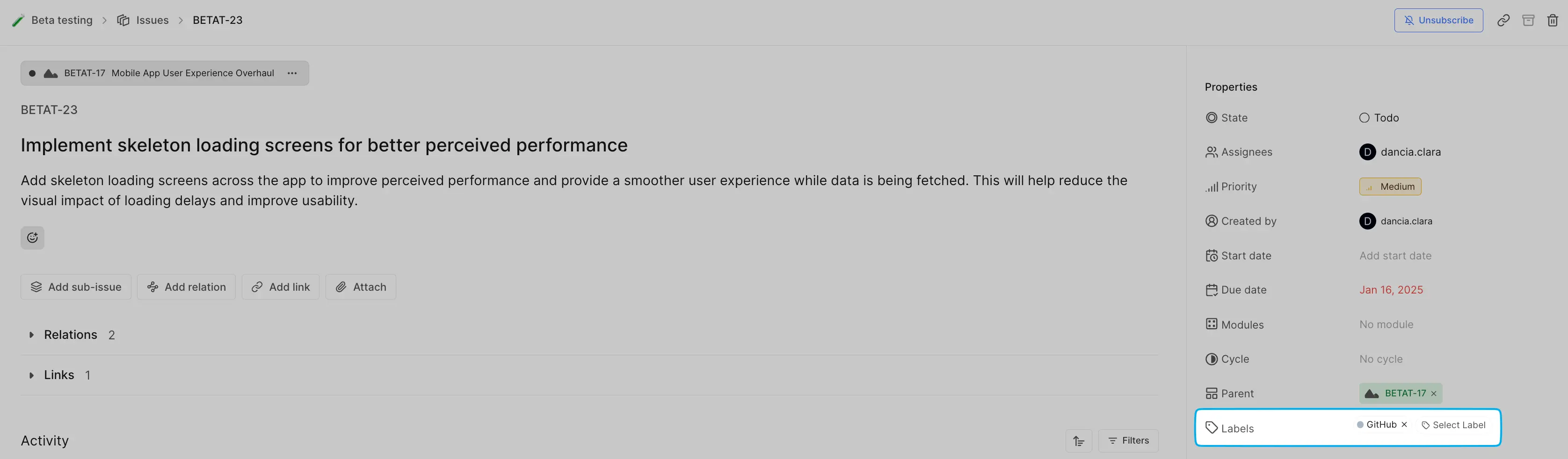 | ||
| 2. A new issue will automatically be created in the linked GitLab project. | ||
|
|
||
|  | ||
| 3. The GitLab issue will be linked back to the Plane work item. | ||
| 4. Future updates will sync according to your configured sync direction (unidirectional or bidirectional). | ||
|
|
There was a problem hiding this comment.
Incorrect image URLs and alt text reference GitHub instead of GitLab.
Two more incorrect references:
- Line 226: Both URL path (
integrations/github/add-github-label.webp) and alt text (Add github label) incorrectly reference GitHub - Line 229: URL path references GitHub (
integrations/github/create-gitlab-issue.webp)
🔎 Proposed fix
- 
+ - 
+ 🧰 Tools
🪛 LanguageTool
[style] ~224-~224: You have already used this phrasing in nearby sentences. Consider replacing it to add variety to your writing.
Context: ...the gitlab label to any work item you want to sync. 
🤖 Prompt for AI Agents
In @docs/integrations/gitlab.mdx around lines 219 - 232, The images and alt text
in the "Sync work items to GitLab" block incorrectly reference GitHub; update
the first image tag src from "integrations/github/add-github-label.webp" to
"integrations/gitlab/add-gitlab-label.webp" and change its alt text from "Add
github label" to "Add gitlab label", and update the second image tag src from
"integrations/github/create-gitlab-issue.webp" to
"integrations/gitlab/create-gitlab-issue.webp" (ensure the alt text matches the
GitLab context, e.g., "Creates issue in GitLab").

Description
Type of Change
Screenshots and Media (if applicable)
Test Scenarios
References
Summary by CodeRabbit
✏️ Tip: You can customize this high-level summary in your review settings.