Skip to content

A minimal Linux that runs as a coreboot or LinuxBoot ROM payload to provide a secure, flexible boot environment for laptops, workstations and servers.

License

Notifications You must be signed in to change notification settings

linuxboot/heads

Folders and files

NameName
Last commit message
Last commit date

Latest commit


History

3,262 Commits


Repository files navigation

Heads booting on an x230

Heads: the other side of TAILS

Heads is a configuration for laptops and servers that tries to bring more security to commodity hardware. Among its goals are:

  • Use free software on the boot path
  • Move the root of trust into hardware (or at least the ROM bootblock)
  • Measure and attest to the state of the firmware
  • Measure and verify all filesystems

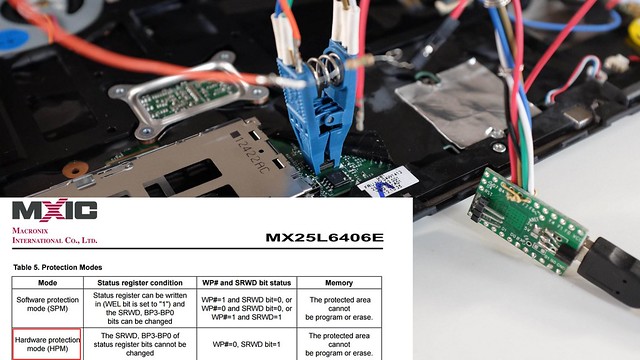
Flashing Heads into the boot ROM

NOTE: It is a work in progress and not yet ready for non-technical users. If you're interested in contributing, please get in touch. Installation requires disassembly of your laptop or server, external SPI flash programmers, possible risk of destruction and significant frustration.

More information is available in the 33C3 presentation of building "Slightly more secure systems".

Documentation

Please refer to Heads-wiki for your Heads' documentation needs.

Contributing

We welcome contributions to the Heads project! Before contributing, please read our Contributing Guidelines for information on how to get started, submit issues, and propose changes.

Building heads with prebuilt and versioned docker images

Heads now builds with Nix built docker images since #1661.

The short path to build Heads is to do what CircleCI would do (./docker_repro.sh under heads git cloned directory):

Note: ./docker_repro.sh is the canonical, reproducible way to build and test Heads. The docker_local_dev.sh helper is intended for developers who need to modify the local image built from flake.nix/flake.lock and is not recommended for general testing.

Important: the supported and tested workflow uses the provided Docker wrappers (./docker_repro.sh, ./docker_local_dev.sh, or ./docker_latest.sh). Host-side installation of QEMU, swtpm, or other QEMU-related tooling is unnecessary for the standard workflow and is not part of the tested configuration. Only advanced or edge-case workflows may require installing those tools on the host (see targets/qemu.md for guidance).

The Docker images produced by our Nix build include QEMU (qemu-system-x86_64), swtpm / libtpms, canokey-qemu (a virtual OpenPGP smartcard), and other userspace tooling required to build and test QEMU boards. If you use ./docker_repro.sh you only need Docker on the host (for example, docker-ce). For KVM acceleration the host must expose /dev/kvm (load kvm_intel / kvm_amd as appropriate); our wrapper scripts mount /dev/kvm automatically when it exists.

If you plan to manage disk images or use qemu-img snapshots on the host (outside containers), install the qemu-utils package locally (which provides qemu-img).

Inspecting and cleaning local Docker images

# List local images
docker images

# Inspect a specific image (IDs, digests, repo tags)
docker image inspect <image>

# Remove a specific image
docker rmi <image>

# Remove all local images (destructive)
docker rmi -f $(docker images -aq)

# Remove unused images/containers/networks/build cache (destructive)
docker system prune -a --volumes

Note: you may need to prefix commands with sudo depending on your Docker setup.

QEMU disk snapshots with qemu-img

If you manage qcow2 disk images on the host, qemu-img can create, list, restore, and delete snapshots. These examples assume a qcow2 disk image:

# Create a snapshot
qemu-img snapshot -c clean root.qcow2

# List snapshots
qemu-img snapshot -l root.qcow2

# Restore (apply) a snapshot
qemu-img snapshot -a clean root.qcow2

# Delete a snapshot
qemu-img snapshot -d clean root.qcow2

# Optional: create an overlay backed by a base image
qemu-img create -f qcow2 -b base.qcow2 overlay.qcow2

If you prefer to run these inside the container, prefix with ./docker_repro.sh (for example, ./docker_repro.sh qemu-img snapshot -l root.qcow2).

If you do not specify USB_TOKEN when running QEMU targets, the container will use the included canokey-qemu virtual token by default; set USB_TOKEN (or use hostbus/hostport/vendorid,productid) to forward a hardware token instead.

Docker wrapper helper reference

Each wrapper now shows its own focused help (only the variables it actually uses). For the complete environment reference, run docker/common.sh directly:

# Wrapper-specific help
./docker_repro.sh --help
./docker_latest.sh --help
./docker_local_dev.sh --help

# Full environment variable reference (shared helper)
./docker/common.sh

The shared helper documents all supported environment variables (opt-ins and opt-outs) and defaults. Wrapper help is intentionally narrower so it only lists variables relevant to that wrapper.

Wrapper options & environment variables

All wrapper scripts (./docker_repro.sh, ./docker_latest.sh, ./docker_local_dev.sh):

  • HEADS_MAINTAINER_DOCKER_IMAGE — override the canonical maintainer's Docker image repository (default: tlaurion/heads-dev-env). Use this for local testing or if you maintain a fork. Example: export HEADS_MAINTAINER_DOCKER_IMAGE="myuser/heads-dev-env". This affects reproducibility checks and default image references across all Docker wrapper scripts.

  • HEADS_CHECK_REPRODUCIBILITY_REMOTE — specify which remote image to compare against when verifying reproducibility (default: ${HEADS_MAINTAINER_DOCKER_IMAGE}:latest). Use this to test against a specific tagged version instead of :latest.

    # Compare against a specific version
    export HEADS_CHECK_REPRODUCIBILITY_REMOTE="tlaurion/heads-dev-env:v0.2.7"
    HEADS_CHECK_REPRODUCIBILITY=1 ./docker_local_dev.sh
  • HEADS_DISABLE_USB=1 — disable automatic USB passthrough and the automatic USB cleanup (default: 0).

  • HEADS_X11_XAUTH=1 — force mounting your ${HOME}/.Xauthority into the container for X11 authentication. When set the helper will bypass programmatic Xauthority generation and mount your ${HOME}/.Xauthority (if present); if the file is missing the helper will warn and will not attempt automatic cookie creation (GUI may fail).

./docker_local_dev.sh:

  • HEADS_SKIP_DOCKER_REBUILD=1 — skip automatically rebuilding the local image when flake.nix/flake.lock are dirty

  • HEADS_CHECK_REPRODUCIBILITY=1recommended for verifying reproducible builds. After building/loading the local image, automatically compares its digest with the published maintainer image to verify reproducibility. Requires network access. By default compares against ${HEADS_MAINTAINER_DOCKER_IMAGE}:latest. Use HEADS_CHECK_REPRODUCIBILITY_REMOTE to specify a different tag (e.g., v0.2.7). See the "Verifying reproducibility" section below for detailed examples and expected outputs.

  • HEADS_AUTO_INSTALL_NIX=1 — automatically attempt to download the Nix single-user installer when nix is missing (interactive prompt suppressed). For supply-chain safety the helper will download the installer to a temporary file and print its SHA256; it will NOT execute the installer automatically unless the downloaded installer matches a pinned hash. The helper will also attempt to detect the installer version heuristically (when possible) and suggest the canonical releases URL (for example https://releases.nixos.org/nix/nix-2.33.2/install.sha256) so you can fetch the published sha and compare. To verify:

    • Preferred: pin a release version (recommended): set HEADS_NIX_INSTALLER_VERSION to a release (for example nix-2.33.2). The helper will fetch https://releases.nixos.org/nix/${HEADS_NIX_INSTALLER_VERSION}/install and install.sha256 and show both checksums for you to compare. To auto-run in trusted automation, set HEADS_NIX_INSTALLER_SHA256 to the expected sha256 as well.

    • Or compute-and-pin locally: run ./docker/fetch_nix_installer.sh --version nix-2.33.2 (or --url) to download the installer and print its sha256, then set HEADS_NIX_INSTALLER_SHA256 to that value for automation.

    Otherwise verify the downloaded installer manually and run it yourself: sh /path/to/installer --no-daemon.

  • HEADS_AUTO_ENABLE_FLAKES=1 — automatically enable flakes by writing experimental-features = nix-command flakes to $HOME/.config/nix/nix.conf (interactive prompt suppressed)

  • HEADS_MIN_DISK_GB — minimum free disk space in GB required on /nix (or / if /nix missing) for building (default: 50)

  • HEADS_SKIP_DISK_CHECK=1 — skip the preflight disk-space check

  • HEADS_ALLOW_UNPINNED_LATEST=1 — when set, bypass the interactive warning that using :latest in ./docker_latest.sh is a supply-chain risk (otherwise :latest requires confirmation unless DOCKER_LATEST_DIGEST is set or the wrapper can fall back to DOCKER_REPRO_DIGEST for the maintainer image)

  • DOCKER_REPRO_DIGEST — pin the image used by ./docker_repro.sh to an immutable digest: tlaurion/heads-dev-env@<digest> (recommended for reproducible and secure builds). Note: DOCKER_REPRO_DIGEST is consumed by ./docker_repro.sh (via resolve_docker_image in docker/common.sh) and is the canonical way to pin the repro image for reproducible builds.

For details about selecting or forwarding a physical USB token to QEMU (handled by the USB_TOKEN make variable), see targets/qemu.md.

Note: when USB passthrough is active the wrappers will detect processes that may be holding a USB token (for example scdaemon or pcscd). The wrapper will warn and, on interactive shells, give a 3s abort window before attempting to kill those processes to free the token. Set HEADS_DISABLE_USB=1 to opt out of this automatic cleanup.

Example: HEADS_DISABLE_USB=1 ./docker_repro.sh make BOARD=qemu-coreboot-fbwhiptail-tpm2 run

Using Nix local dev environment / building docker images with Nix

Under QubesOS?

Build docker from nix develop layer locally

Set up Nix and flakes

  • If you don't already have Nix, install it:
    • [ -d /nix ] || sh <(curl -L https://nixos.org/nix/install) --no-daemon
    • . /home/user/.nix-profile/etc/profile.d/nix.sh
  • Enable flake support in nix
    • mkdir -p ~/.config/nix
    • echo 'experimental-features = nix-command flakes' >>~/.config/nix/nix.conf

Notes on automation and requirements:

  • The ./docker_local_dev.sh helper will attempt to ensure Nix and flakes are available when you run it interactively. If Nix is missing it can optionally install it for you and prompt to enable flakes; set HEADS_AUTO_INSTALL_NIX=1 / HEADS_AUTO_ENABLE_FLAKES=1 to suppress prompts.
  • Building the Docker image and populating /nix can require significant disk space — we recommend at least 50 GB free on /nix (or / if /nix is not present). Adjust via HEADS_MIN_DISK_GB or skip the check with HEADS_SKIP_DISK_CHECK=1.
  • The Nix installer requires a downloader; either curl or wget must be available on the host. The helper will guide you to install one if neither is present.
  • For reproducible builds prefer ./docker_repro.sh; ./docker_local_dev.sh is intended for development and will rebuild the local image when flake.nix/flake.lock are dirty (unless HEADS_SKIP_DOCKER_REBUILD=1).

Build image

  • Have docker and Nix installed

  • Build nix developer local environment with flakes locked to specified versions

    • Manual: nix --print-build-logs --verbose build .#dockerImage && docker load < result
    • Helper: ./docker_local_dev.sh will perform a conditional rebuild when flake.nix/flake.lock are dirty (unless HEADS_SKIP_DOCKER_REBUILD=1).

Using ./docker_local_dev.sh

  • ./docker_local_dev.sh is a developer helper that ensures a local Nix-based Docker image (linuxboot/heads:dev-env) is available for interactive development. It performs a few preflight checks and interactive prompts to make the process easier:
    • Ensures nix is installed and flakes are enabled; if missing it will prompt to install Nix and enable flakes. Set HEADS_AUTO_INSTALL_NIX=1 and/or HEADS_AUTO_ENABLE_FLAKES=1 to suppress prompts and proceed automatically.
    • Requires either curl or wget to fetch the Nix installer; if neither is present the script will print how to install one and abort.
    • Checks disk space on /nix (or / if /nix is absent); default minimum is 50 GB (HEADS_MIN_DISK_GB=50) — override or skip the check with HEADS_SKIP_DISK_CHECK=1.
    • If flake.nix or flake.lock are dirty (uncommitted changes), the helper will rebuild the local Docker image. To intentionally trigger a rebuild, make and keep changes to flake.nix (for example update an input or a harmless comment) or update flake.lock, then run ./docker_local_dev.sh; the helper detects the dirty flake files and will rebuild automatically. To avoid an automatic rebuild, commit or stash your changes or set HEADS_SKIP_DOCKER_REBUILD=1 to disable the check.

On some hardened OSes, you may encounter problems with ptrace.

       > proot error: ptrace(TRACEME): Operation not permitted

The most likely reason is that your kernel.yama.ptrace_scope variable is too high and doesn't allow docker+nix to run properly. You'll need to set kernel.yama.ptrace_scope to 1 while you build the heads binary.

sudo sysctl kernel.yama.ptrace_scope #show you the actual value, probably 2 or 3
sudo sysctl -w kernel.yama.ptrace_scope=1 #setup the value to let nix+docker run properly

(don't forget to put back the value you had after finishing build head)

Done!

Your local docker image "linuxboot/heads:dev-env" is ready to use, reproducible for the specific Heads commit used to build it, and will produce ROMs reproducible for that Heads commit ID.

Jump into nix develop created docker image for interactive workflow

There are three helpers designed for different use cases:

Script Use Case Reproducibility When to Use
./docker_repro.sh Canonical reproducible builds Pinned to immutable digest All users & maintainers: Standard way to build Heads; matches CircleCI exactly; use for releases and critical builds
./docker_local_dev.sh Developer customization Local build may differ if flake changes Developers only: Rebuilds from local flake.nix/flake.lock when dirty; useful for testing flake changes; use HEADS_CHECK_REPRODUCIBILITY=1 to verify against published version
./docker_latest.sh Convenience Defaults to reproducible digest; may be unpinned if no digest is available Testing/convenience: Uses latest published image; by default falls back to the reproducible digest (DOCKER_REPRO_DIGEST) when available (no confirmation needed). Runs unpinned only when no digest is configured, in which case it requires confirmation unless HEADS_ALLOW_UNPINNED_LATEST=1 or DOCKER_LATEST_DIGEST is set.

Recommendation by role:

  • End users & QA: Use ./docker_repro.sh for all builds (ensures reproducibility and security)
  • Developers: Use ./docker_local_dev.sh when iterating on the build system or Nix flake, but verify reproducibility with HEADS_CHECK_REPRODUCIBILITY=1 before committing
  • Maintainers: Use ./docker_repro.sh for official releases; use the maintenance workflow in Maintenance notes on docker image when updating the Docker image base version

Examples:

Use ./docker_repro.sh for canonical, reproducible builds:

./docker_repro.sh make BOARD=x230-hotp-maximized
./docker_repro.sh make BOARD=qemu-coreboot-fbwhiptail-tpm2 run

Use ./docker_local_dev.sh when developing with the Nix flake (verify reproducibility before committing):

# Modify flake.nix for testing
./docker_local_dev.sh make BOARD=nitropad-nv41

# Before committing, verify the build is reproducible
HEADS_CHECK_REPRODUCIBILITY=1 ./docker_local_dev.sh make BOARD=nitropad-nv41

If you are already inside the container interactively, run make BOARD=board_name as usual.

One such useful example is to build and test qemu board roms and test them through qemu/kvm/swtpm provided in the docker image. Please refer to qemu documentation for more information.

Eg:

./docker_repro.sh make BOARD=qemu-coreboot-fbwhiptail-tpm2 # Build rom, export public key to emulated usb storage from qemu runtime
./docker_repro.sh make BOARD=qemu-coreboot-fbwhiptail-tpm2 PUBKEY_ASC=~/pubkey.asc inject_gpg # Inject pubkey into rom image
./docker_repro.sh make BOARD=qemu-coreboot-fbwhiptail-tpm2 USB_TOKEN=Nitrokey3NFC PUBKEY_ASC=~/pubkey.asc ROOT_DISK_IMG=~/qemu-disks/debian-9.cow2 INSTALL_IMG=~/Downloads/debian-9.13.0-amd64-xfce-CD-1.iso run # Install

Alternatively, you can use locally built docker image to build a board ROM image in a single call but do not expect reproducible builds if not using versioned docker images as per CircleCI as per usage of ./docker_repro.sh

Eg: ./docker_local_dev.sh make BOARD=nitropad-nv41

Building with the published Docker image (recommended for reproducible builds)

The canonical, reproducible way to build Heads is to use ./docker_repro.sh, which automatically pulls the pinned Docker image digest from docker/DOCKER_REPRO_DIGEST and ensures your builds match the CI environment exactly.

For users:

./docker_repro.sh make BOARD=x230-hotp-maximized
./docker_repro.sh make BOARD=qemu-coreboot-fbwhiptail-tpm2 run

This will:

  1. Resolve the canonical image digest from docker/DOCKER_REPRO_DIGEST (immutable, pinned to a specific version)
  2. Pull the image if not present locally
  3. Execute your build inside that exact Docker environment
  4. Guarantee reproducibility: your ROM output will match official CircleCI builds for that commit

About the published image:

  • Repository: tlaurion/heads-dev-env on Docker Hub is the maintainer's canonical image (configurable via HEADS_MAINTAINER_DOCKER_IMAGE)
  • Versioning: Tagged with version numbers (e.g., v0.2.7) for stability; :latest is mutable and not recommended
  • Pinning: The repository file docker/DOCKER_REPRO_DIGEST pins an immutable digest (tlaurion/heads-dev-env@sha256:...) to ensure reproducibility
  • Trust: As long as flake.nix and flake.lock are not modified locally, your build will produce identical digests, confirming integrity
  • Fork/Override: To use a different image repository (e.g., for testing or forks), set HEADS_MAINTAINER_DOCKER_IMAGE="youruser/your-image" before running any Docker wrapper script

Pinning the reproducible image

  • DOCKER_REPRO_DIGEST — pin the image used by ./docker_repro.sh to an immutable digest: tlaurion/heads-dev-env@<digest>. This environment variable (or the repository file docker/DOCKER_REPRO_DIGEST) is consumed by ./docker_repro.sh via resolve_docker_image(); pinning ensures reproducible builds and mitigates supply-chain risk from mutable :latest tags.
./docker_repro.sh make BOARD=x230-hotp-maximized
./docker_repro.sh make BOARD=nitropad-nv41

Verifying reproducibility of locally-built Docker images

Best practice: Verify that your locally-built Docker image is reproducible by comparing its digest with the published maintainer image.

The Heads project maintains the canonical tlaurion/heads-dev-env Docker image on Docker Hub (configurable via HEADS_MAINTAINER_DOCKER_IMAGE environment variable for forks or testing). As long as you do not modify flake.nix or flake.lock, your locally-built image should produce an identical digest to the published image, demonstrating that your build is fully reproducible.

Quick reference

Scenario Command
Check against latest maintainer image HEADS_CHECK_REPRODUCIBILITY=1 ./docker_local_dev.sh
Check against specific version tag HEADS_CHECK_REPRODUCIBILITY=1 HEADS_CHECK_REPRODUCIBILITY_REMOTE="tlaurion/heads-dev-env:v0.2.7" ./docker_local_dev.sh
Check fork maintainer's image HEADS_MAINTAINER_DOCKER_IMAGE="youruser/heads-dev-env" HEADS_CHECK_REPRODUCIBILITY=1 ./docker_local_dev.sh
Standalone check (any time) ./docker/check_reproducibility.sh linuxboot/heads:dev-env tlaurion/heads-dev-env:v0.2.7

Prerequisites

You have either:

  • Built a local Docker image with ./docker_local_dev.sh (produces linuxboot/heads:dev-env), or
  • Built from nix build .#dockerImage (results in result symlink loadable via docker load)

Check reproducibility

Method 1: Automated check during build (recommended)

Enable reproducibility verification automatically during your build with HEADS_CHECK_REPRODUCIBILITY=1:

# Verify against the default (maintainer's :latest image)
HEADS_CHECK_REPRODUCIBILITY=1 ./docker_local_dev.sh

# Example output when digests MATCH (reproducible build):
# === Reproducibility Check ===
# Local image  (linuxboot/heads:dev-env): sha256:5f890f3d1b6b57f9e567191695df003a2ee880f084f5dfe7a5633e3e8f937479
# Remote image (tlaurion/heads-dev-env:latest): sha256:5f890f3d1b6b57f9e567191695df003a2ee880f084f5dfe7a5633e3e8f937479
# ✓ MATCH: Local build is reproducible!

To test against a specific version tag instead of :latest:

HEADS_CHECK_REPRODUCIBILITY=1 \
  HEADS_CHECK_REPRODUCIBILITY_REMOTE="tlaurion/heads-dev-env:v0.2.7" \
  ./docker_local_dev.sh

# Example output when digests DIFFER (expected for different versions):
# === Reproducibility Check ===
# Local image  (linuxboot/heads:dev-env): sha256:5f890f3d1b6b57f9e567191695df003a2ee880f084f5dfe7a5633e3e8f937479
# Remote image (tlaurion/heads-dev-env:v0.2.6): sha256:75af4c816a4a92ebdd0030c2e56ebf23c066858e08145ec1cc64a9e750a0031d
# ✗ MISMATCH: Local build differs from remote
#   (This is expected if Nix/flake.lock versions differ or if uncommitted changes exist)

Note: Docker images can have two different identifiers: a local image ID and a registry manifest digest. If a local image has no RepoDigests entry, the reproducibility check will compare image IDs (and may pull the remote tag) instead of manifest digests to avoid false mismatches. This can happen for locally built images that have not been pulled from a registry.

Method 2: Standalone reproducibility check

Use the provided reproducibility checker script to compare hashes at any time:

# Compare your local dev image with a published version
./docker/check_reproducibility.sh linuxboot/heads:dev-env tlaurion/heads-dev-env:v0.2.7

# Output (example of a match):
# ✓ SUCCESS: Digests match!
#   Your local build is reproducible and identical to tlaurion/heads-dev-env:v0.2.7

Method 3: Manual digest inspection

Manually inspect the digest:

# Get the digest of your local image (after docker load)
docker inspect --format='{{.Id}}' linuxboot/heads:dev-env
# Output: sha256:8ae7744cc8b4ff0e959aa6dfeeb40dbd40d20ac6fa1f7071dd21ec0c2d0f9f41

# Compare with the published image (will pull if needed)
docker pull tlaurion/heads-dev-env:v0.2.7
docker inspect --format='{{.Id}}' tlaurion/heads-dev-env:v0.2.7
# Output: sha256:8ae7744cc8b4ff0e959aa6dfeeb40dbd40d20ac6fa1f7071dd21ec0c2d0f9f41

When digests should match

Digests match → Your build is reproducible and trustworthy; matches the maintainer's published image for that Nix snapshot.

Your locally-built image will produce an identical digest to the published image when:

  • flake.nix and flake.lock are not modified (i.e., repository is clean relative to these files)
  • The same Nix version and dependencies are used
  • Build runs on the same Nix store state

Digests differ → Expected in these cases:

  • You have uncommitted changes in flake.nix or flake.lock
  • Different Nix version or Nix dependencies resolved differently on your system
  • Using a different nixpkgs version than the locked one in flake.lock

Trust model

The tlaurion/heads-dev-env image on Docker Hub is the maintainer's canonical build and serves as the source of truth for reproducibility. By verifying that your locally-built image produces the same digest as the published v0.2.7 (or current version), you confirm:

  1. No tampering: Your build environment has not been compromised
  2. Reproducibility: The Heads build system is deterministic for your specific Nix snapshot
  3. Auditability: You can map your build back to a specific published, reviewed version

Recommendation: Always pin to a specific version tag (e.g., tlaurion/heads-dev-env:v0.2.7) rather than :latest, and verify the digest matches the published value before using it for critical builds.

Maintenance notes on docker image

To update the Docker image to a new version (e.g., vx.y.z), follow these steps. This ensures reproducible builds with immutable digests.

# Set variables
docker_version="vx.y.z"
docker_hub_repo="tlaurion/heads-dev-env"

# Update pinned packages to latest if needed, modify flake.nix as required
nix flake update

# Commit flake changes
git add flake.nix flake.lock
git commit --signoff -m "Bump nix develop based docker image to $docker_version"

# Verify reproducibility: ensure the local build matches (no further changes to flake files)
nix develop --ignore-environment --command true

# Build the new Docker image
nix build .#dockerImage
docker load < result

# Verify you can extract the digest (for fully reproducible builds, flake.nix/flake.lock must be committed)
docker inspect --format='{{.Id}}' linuxboot/heads:dev-env

# Tag the image with the new version
docker tag linuxboot/heads:dev-env "$docker_hub_repo:$docker_version"

# Push the new version to Docker Hub (requires push access)
docker push "$docker_hub_repo:$docker_version"

# Capture the digest of the pushed image (use --yes to auto-pull)
new_digest=$(./docker/get_digest.sh -y "$docker_hub_repo:$docker_version" | tail -n1)
prev_digest=$(grep '^[^#]' docker/DOCKER_REPRO_DIGEST | head -n1)

# Update the digest in the repository file
sed -i "s|$prev_digest|$new_digest|" docker/DOCKER_REPRO_DIGEST

# Update the version comment in the repository file
sed -i "s|# Version: .*|# Version: $docker_version|" docker/DOCKER_REPRO_DIGEST

# Update .circleci/config.yml to use the new digest and add version comments
# The first -e removes existing "# Docker image" comment lines. The second -e inserts a
# fresh "# Docker image: $docker_hub_repo:$docker_version" comment immediately above the
# matching "- image: $docker_hub_repo@<digest>" line while preserving indentation.
sed -i -e "/^[[:space:]]*# Docker image: /d" -e "/^[[:space:]]*- image: ${docker_hub_repo//\//\\/}@/ s|^\([[:space:]]*\)\(- image: ${docker_hub_repo//\//\\/}@\)|\\1# Docker image: $docker_hub_repo:$docker_version\n\\1\\2|" .circleci/config.yml

# Commit the digest and config changes
git add docker/DOCKER_REPRO_DIGEST .circleci/config.yml
git commit --signoff -m "Pin docker image to digest for $docker_version"

# Push the branch and create a PR for testing with CircleCI
git push origin docker/squash-docker-changes

# After PR is merged and tested:
# Tag the tested version as latest (optional; use with caution, prefer explicit versioning)
# docker tag "$docker_hub_repo:$docker_version" "$docker_hub_repo:latest"
# docker push "$docker_hub_repo:latest"

Maintainer checklist:

  1. Reproducibility: Before pushing, verify nix build .#dockerImage produces a deterministic result (flake.nix and flake.lock must be committed and clean).
  2. Digest verification: After pushing, use ./docker/check_reproducibility.sh to verify local and remote digests match, confirming the build is reproducible.
  3. Supply chain: Pin the digest in docker/DOCKER_REPRO_DIGEST and .circleci/config.yml to ensure all builds reference an immutable, auditable image.
  4. Documentation: Update the version comment in docker/DOCKER_REPRO_DIGEST so users know which image version is pinned.
  5. User migration: When releasing a new version, communicate the new digest and version to users via release notes.

For forks and alternate maintainers: If you maintain a fork or want to test with a different Docker image repository, set HEADS_MAINTAINER_DOCKER_IMAGE before running any wrapper script:

# Example: use your own Docker image repository
export HEADS_MAINTAINER_DOCKER_IMAGE="youruser/heads-dev-env"

# Now all scripts will reference your repository
./docker_local_dev.sh make BOARD=x230
HEADS_CHECK_REPRODUCIBILITY=1 ./docker_local_dev.sh

# Reproducibility check will compare against youruser/heads-dev-env:latest
# resolve_docker_image will use youruser/heads-dev-env as the base image

Maintenance tip: The repository file docker/DOCKER_REPRO_DIGEST pins the canonical reproducible image used by ./docker_repro.sh, ensuring immutable, secure builds.

Acceptable formats include sha256:<64-hex>, sha256-<64-hex> (normalized to sha256:<hex>), or just <64-hex> (normalized to sha256:<hex>). The helper will normalize these formats and produce an image reference like tlaurion/heads-dev-env@sha256:<hex>.

If you need to pin the convenience ./docker_latest.sh wrapper, set the DOCKER_LATEST_DIGEST environment variable locally; we do not maintain a docker/DOCKER_LATEST_DIGEST file in the repository because 'latest' is a user-level convenience and should be explicitly chosen. When DOCKER_LATEST_DIGEST is unset, ./docker_latest.sh may fall back to DOCKER_REPRO_DIGEST only when the base image matches the maintainer repo; otherwise it will prompt before using an unpinned :latest unless HEADS_ALLOW_UNPINNED_LATEST=1 is set in the environment.

Example: obtain the immutable digest for a published image and use it to force docker_latest.sh to use an immutable image:

# 1) Obtain the digest for a published image (exact repo:name:tag form is required)
#
# Tip: inspect tags on Docker Hub: https://hub.docker.com/layers/tlaurion/heads-dev-env/
# Click a tag to see details (Content type, Digest (sha256:...), Size, Last updated).
# Use the shown tag name with docker pull, e.g.:
#   docker pull tlaurion/heads-dev-env:v0.2.7
#
# Example: pull the image and then obtain its digest locally
#   docker pull tlaurion/heads-dev-env:v0.2.7
#   ./docker/get_digest.sh tlaurion/heads-dev-env:v0.2.7
#
# Or: query the registry for the digest and optionally pull it when prompted
#   ./docker/get_digest.sh tlaurion/heads-dev-env:v0.2.7
#   (the script will show the remote digest and ask if you want to pull the image to create a local repo@digest)
#
# Use -y to auto-pull and return the digest in one go:
#   ./docker/get_digest.sh -y tlaurion/heads-dev-env:v0.2.7

./docker/get_digest.sh tlaurion/heads-dev-env:v0.2.7
# Output (example): tlaurion/heads-dev-env@sha256:50a9110c...\nsha256:50a9110c...

# 2) If the image is not present locally, the helper will offer to pull it so a local repo@digest is available.
#    Use '-y' / '--yes' to skip the interactive prompt and pull automatically.
./docker/get_digest.sh -y tlaurion/heads-dev-env:latest

# 3) Export the raw digest into the env var expected by the wrapper
export DOCKER_LATEST_DIGEST=$(./docker/get_digest.sh tlaurion/heads-dev-env:latest | tail -n1)

# 4) Run the convenience wrapper using the pinned digest
DOCKER_LATEST_DIGEST=$DOCKER_LATEST_DIGEST ./docker_latest.sh make BOARD=qemu-coreboot-fbwhiptail-tpm2

Note: when a digest is discovered, helpers print a concise summary to help auditing, for example:

  Image: tlaurion/heads-dev-env@sha256:50a9...
  Digest: sha256:50a9...
  Resolved from: local|registry API|env|file
  Tip: export DOCKER_LATEST_DIGEST=sha256:50a9...

This makes it easy to copy/pin digests or verify provenance.

If you want to change what `./docker_latest.sh` uses as the "latest" image:
- For a temporary override: run `./docker/pin-and-run.sh <repo:tag> -- ./docker_latest.sh <command>` to run the wrapper pinned to a specific digest.
- To set a local convenience env: `export DOCKER_LATEST_DIGEST=$(./docker/get_digest.sh tlaurion/heads-dev-env:vX.Y.Z | tail -n1)`.
- To change the canonical fallback used by the project: edit `docker/DOCKER_REPRO_DIGEST` with the desired digest and commit the change.

# Convenience: helper to obtain a digest and run a wrapper pinned to that digest
# Example: obtains digest and runs the 'latest' wrapper pinned to that digest (explicit wrapper is recommended)
./docker/pin-and-run.sh tlaurion/heads-dev-env:v0.2.7 -- ./docker_latest.sh make BOARD=qemu-coreboot-fbwhiptail-tpm2
# Auto-pull and run (non-interactive)
./docker/pin-and-run.sh -y tlaurion/heads-dev-env:v0.2.7 -- ./docker_latest.sh make BOARD=qemu-coreboot-fbwhiptail-tpm2

# Shortcut: omit the wrapper and just provide the command — the helper will use the default './docker_latest.sh'
./docker/pin-and-run.sh tlaurion/heads-dev-env:v0.2.7 -- make BOARD=qemu-coreboot-fbwhiptail-tpm2

# Explicit wrapper flag: use -w/--wrapper to avoid ambiguity
./docker/pin-and-run.sh -w ./docker_repro.sh tlaurion/heads-dev-env:v0.2.7 -- make BOARD=qemu-coreboot-fbwhiptail-tpm2

Alternative (manual) commands without the helper script:

docker pull tlaurion/heads-dev-env:latest
# prints full repo@digest (if available)
docker inspect --format='{{index .RepoDigests 0}}' tlaurion/heads-dev-env:latest
# to get only the digest portion:
docker inspect --format='{{index .RepoDigests 0}}' tlaurion/heads-dev-env:latest | cut -d'@' -f2

Notes: some registries or Docker versions may require docker manifest inspect or skopeo inspect to obtain an authoritative digest; the helper script tries docker inspect first, then docker manifest inspect when available.

Update the appropriate file after publishing a new image to keep the repo in sync.

Notes:

  • Local builds can use ":latest" tag, which will use latest tested successful CircleCI run
  • To reproduce CircleCI results, make sure to use the same versioned tag declared under .circleci/config.yml's "image:"

General notes on reproducible builds

In order to build reproducible firmware images, Heads builds a specific version of gcc and uses it to compile the Linux kernel and various tools that go into the initrd. Unfortunately this means the first step is a little slow since it will clone the musl-cross-make tree and build gcc...

Once that is done, the top level Makefile will handle most of the remaining details -- it downloads the various packages, verifies the hashes, applies Heads specific patches, configures and builds them with the cross compiler, and then copies the necessary parts into the initrd directory.

There are still dependencies on the build system's coreutils in /bin and /usr/bin/, but any problems should be detectable if you end up with a different hash than the official builds.

The various components that are downloaded are in the ./modules directory and include:

We also recommend installing Qubes OS, although there Heads can kexec into any Linux or multiboot kernel.

Notes:

  • Building coreboot's cross compilers can take a while. Luckily this is only done once.
  • Builds are finally reproducible! The reproduciblebuilds tag tracks any regressions.
  • Currently only tested in QEMU, the Thinkpad x230, Librem series and the Chell Chromebook. ** Xen does not work in QEMU. Signing, HOTP, and TOTP do work; see below.
  • Building for the Lenovo X220 requires binary blobs to be placed in the blobs/x220/ folder. See the readme.md file in that folder
  • Building for the Librem 13 v2/v3 or Librem 15 v3/v4 requires binary blobs to be placed in the blobs/librem_skl folder. See the readme.md file in that folder

QEMU:

OS booting can be tested in QEMU using a software TPM. HOTP can be tested by forwarding a USB token from the host to the guest.

For more information and setup instructions, refer to the qemu documentation.

coreboot console messages

The coreboot console messages are stored in the CBMEM region and can be read by the Linux payload with the cbmem --console | less command. There is lots of interesting data about the state of the system.

About

A minimal Linux that runs as a coreboot or LinuxBoot ROM payload to provide a secure, flexible boot environment for laptops, workstations and servers.

Topics

Resources

License

Contributing

Stars

Watchers

Forks

Sponsor this project

  •  

Packages

No packages published

Contributors 69