This project is a simplified version of the Linux shell, developed as part of a group school project.
The aim of this project is to create a shell capable of interpreting and executing simple commands, similar to those found in Linux-based operating systems.
The shell is a program that takes commands from the keyboard via the terminal, and gives them to the operating system to perform. documentation shell.
-
GCC Language standard gnu89
-
Ubuntu 20.04 LTS
-
And minimal understanding of C language


Step 1: Clone the repo
$ git clone https://github.com/jydzip/holbertonschool-simple_shell.gitStep 2: Change directory to holbertonschool-simple_shell:
$ cd holbertonschool-simple_shellStep 3: install GCC to Ubuntu 20.04 LTS
$ sudo apt update
$ sudo apt install build-essential$ gcc -Wall -Werror -Wextra -pedantic -std=gnu89 *.c -o hshRun the shell
$ ./hshOption 1: Type the command "exit"
$ exit
Option 2: Press on Ctrl+D


| File name | Description |
|---|---|
| main.c | Main File, loop of the prompt |
| split_line.c | Split input of the shell in tokens |
| path.c | Retrieve and check the PATH and command exist |
| shell.c | Execute the command |
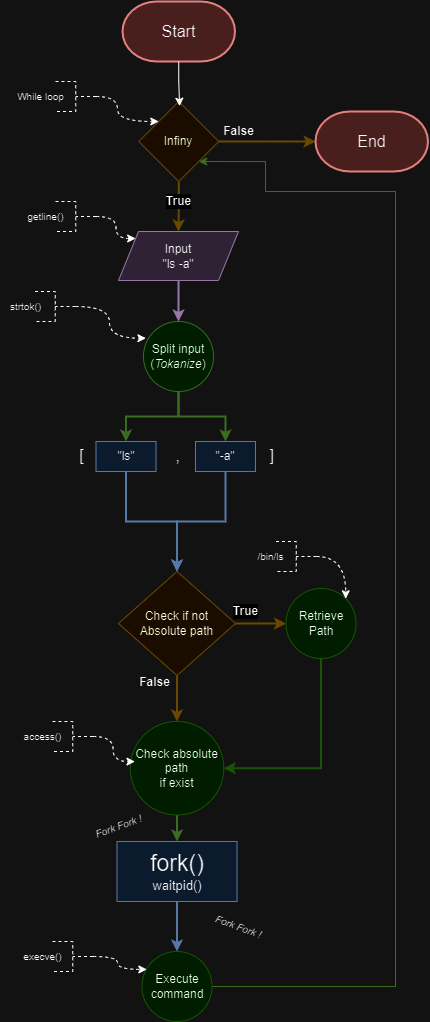
- access (
man 2 access) - execve (
man 2 execve) - exit (
man 3 exit) - fflush (
man 3 fflush) - fork (
man 2 fork) - free (
man 3 free) - getline (
man 3 getline) - isatty (
man 3 isatty) - malloc (
man 3 malloc) - printf (
man 3 printf) - fprintf (
man 3 fprintf) - strtok (
man 3 strtok) - waitpid (
man 2 waitpid)
This project is being developed in collaboration with other students as part of a team effort. Any additional contribution is welcome.
This project was carried out by Youssoup, Jeremy and Marc as part of for Holberton School.