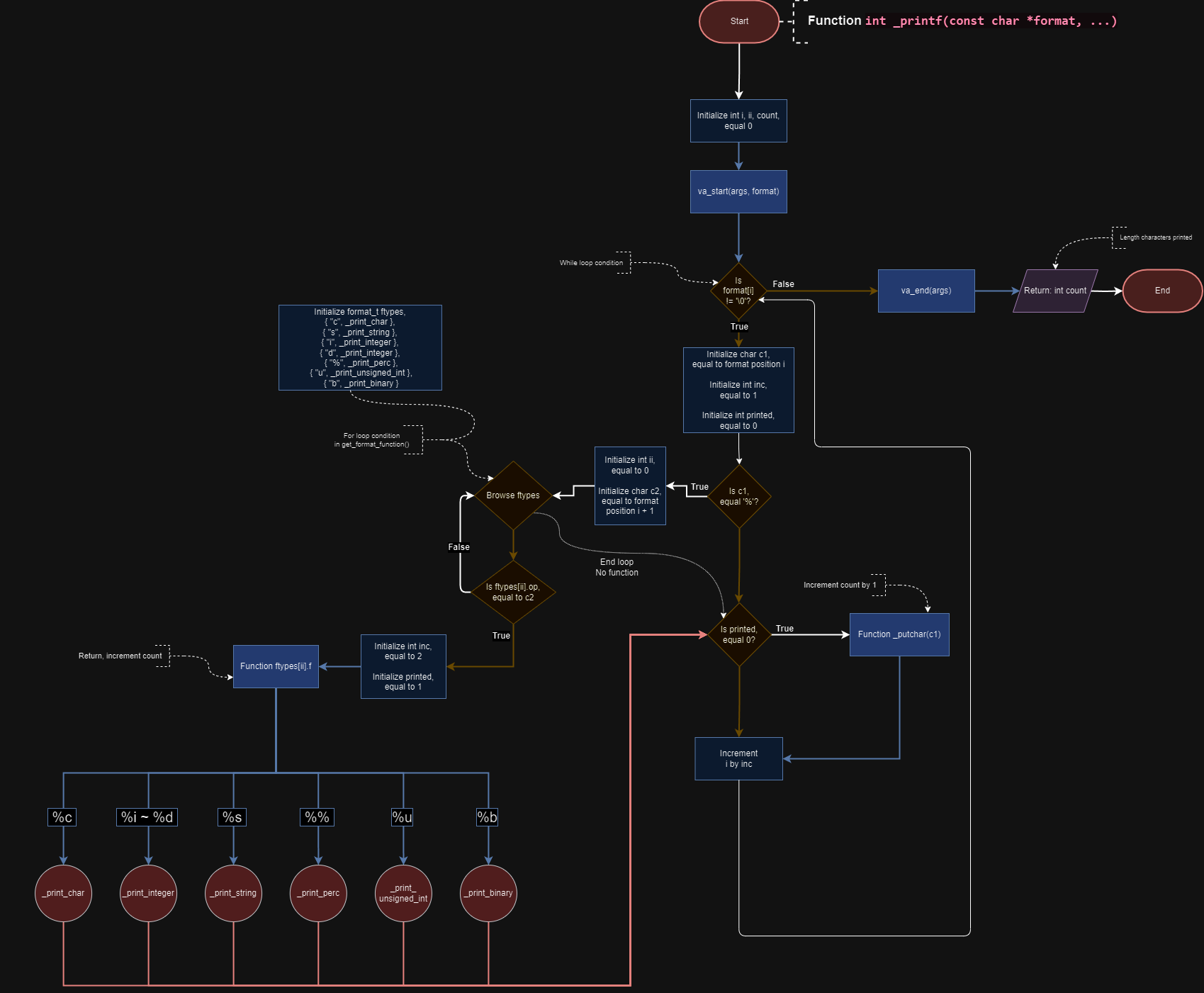
In this project, we are creating a function called _printf().
This function formats a character string and returns it to the terminal output. When the function completes correctly, it returns the number of characters printed.
It works like the function printf() on the <stdio.h> library.
- Ubuntu
20.04 LTS - GCC Language standard
gnu89
Installation gcc
$ sudo apt install build-essential$ git clone https://github.com/jydzip/holbertonschool-printf.git
$ cd holbertonschool-printf$ gcc -Wall -Werror -Wextra -pedantic -std=gnu89 -Wno-format *.c -o _printf
$ ./_printf| Function name | Description | Format |
|---|---|---|
| _print_char | Print a single character | %c |
| _print_string | Print a string of characters | %s |
| _print_integer | Print an integer | %i |
| _print_perc | Print a percentage | %% |
| _print_unsigned_integer | Print a unsigned integer | %u |
| _print_binary | Print a integer converted to binary | %b |
Exemple of main.c for use _printf()
#include "main.h"

int main() {
    int number = 10;
    int number2 = 105;
    char character = 'A';
    char string[] = "Hello, world!";
    int len;

    len = _printf("Display string : %s\n", string);
    _printf("Length of string displayed : %d\n", len);
    _printf("Display integer : %d\n", number);
    _printf("Display character : %c\n", character);
    _printf("Display percentage : %%\n");
    _printf("Display unsigned int : %u\n", number);
    _printf("Display binary : %b\n", number2);

    return (0);
}Display string : Hello, world!
Length of string displayed : 31
Display integer : 10
Display character : A
Display percentage : %
Display unsigned int : 10
Display binary : 1101001To run tests, use the main.c of the Usage/Examples part.
And run the command:
$ ./main_tests.sh