




A powerful forensic analysis tool for Parquet files, Apache Iceberg tables, and Delta Lake tables. Available as both a terminal TUI and a browser-based web interface — inspect file structure, metadata, row groups, column statistics, and table evolution.
- Deep File Inspection - Comprehensive metadata extraction using PyArrow
- Row Group Analysis - Examine distribution, compression, and statistics
- Column Profiling - Profile data using GizmoSQL (DuckDB over Arrow Flight SQL)
- Data Sampling - Preview and filter data with column selection
- Directory Scanning - Recursively discover and inspect Parquet files
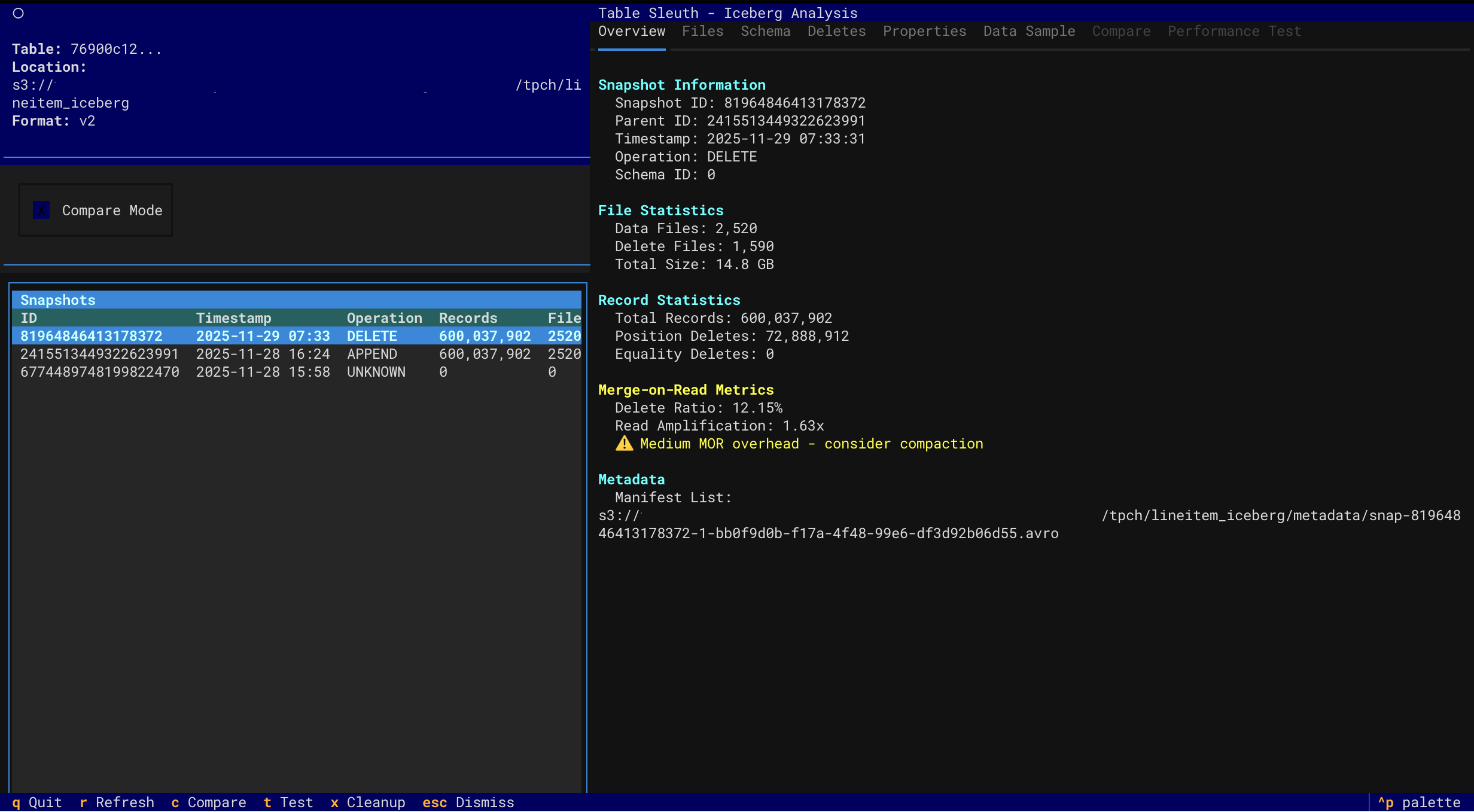
- Snapshot Navigation - Browse table history and metadata evolution
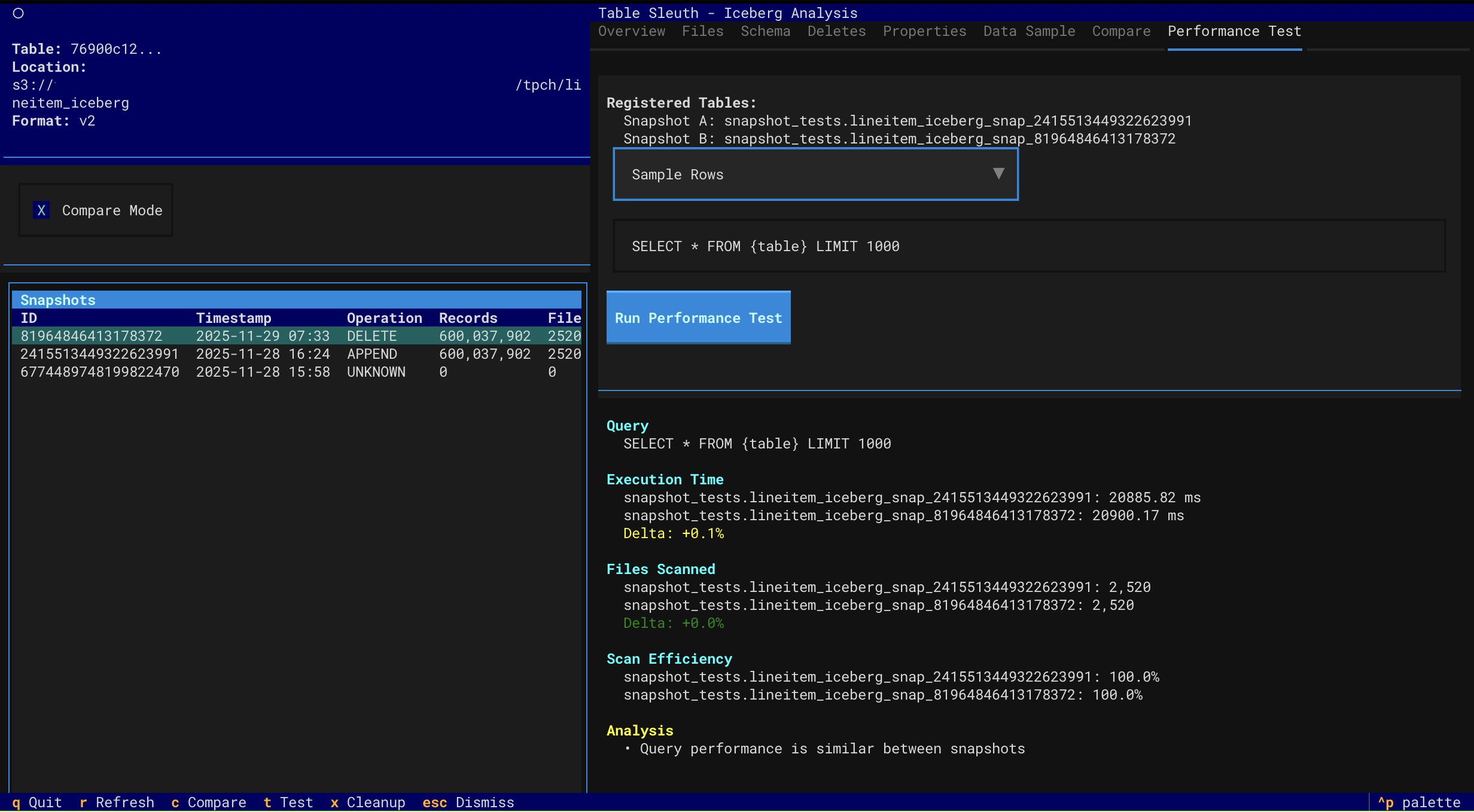
- Performance Testing - Compare query performance across snapshots with comprehensive analysis
- Multi-factor performance attribution (data volume, MOR overhead, scan efficiency)
- Accurate MOR overhead detection with read amplification metrics
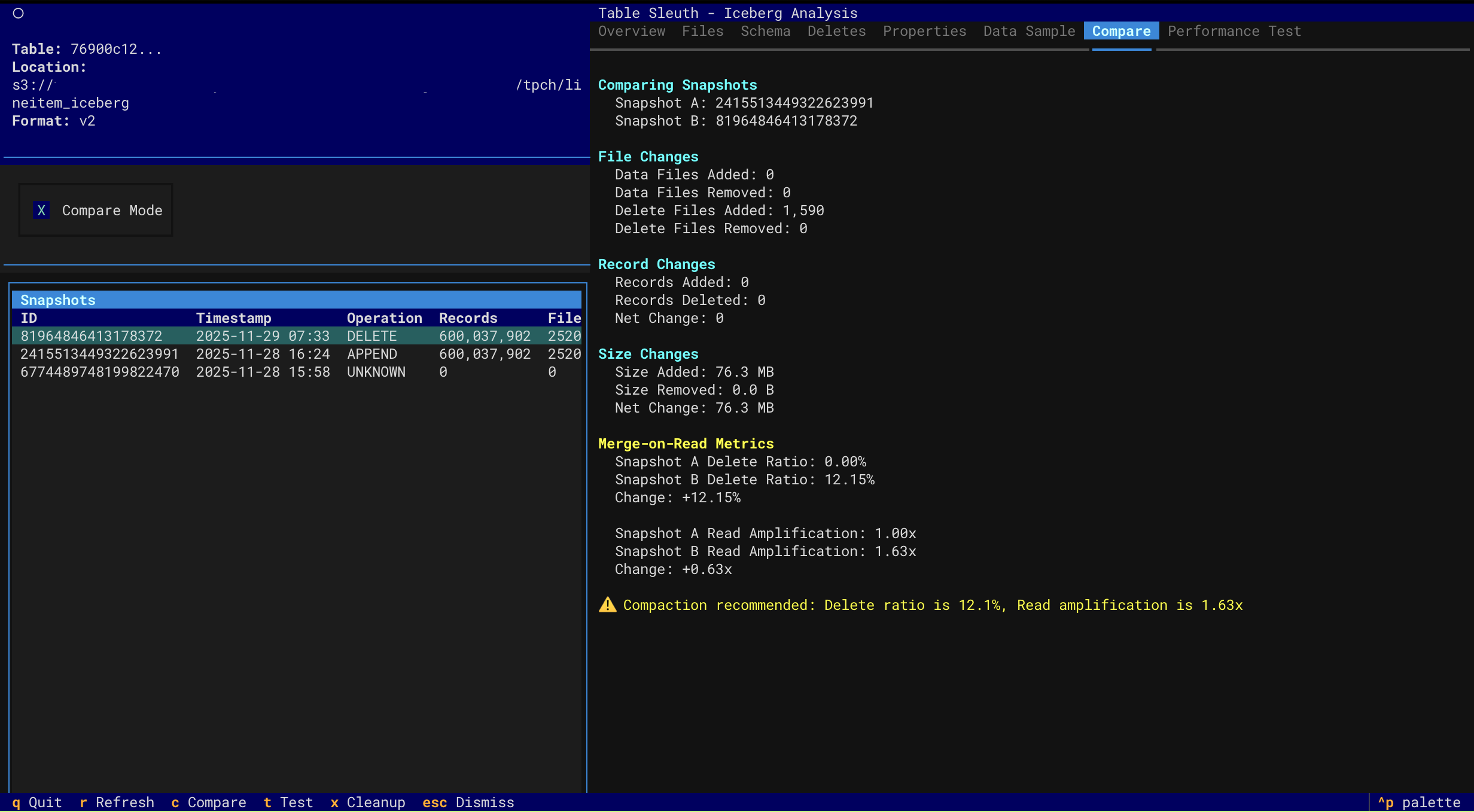
- Order-agnostic comparison (works regardless of snapshot chronology)
- Actionable compaction recommendations with specific thresholds
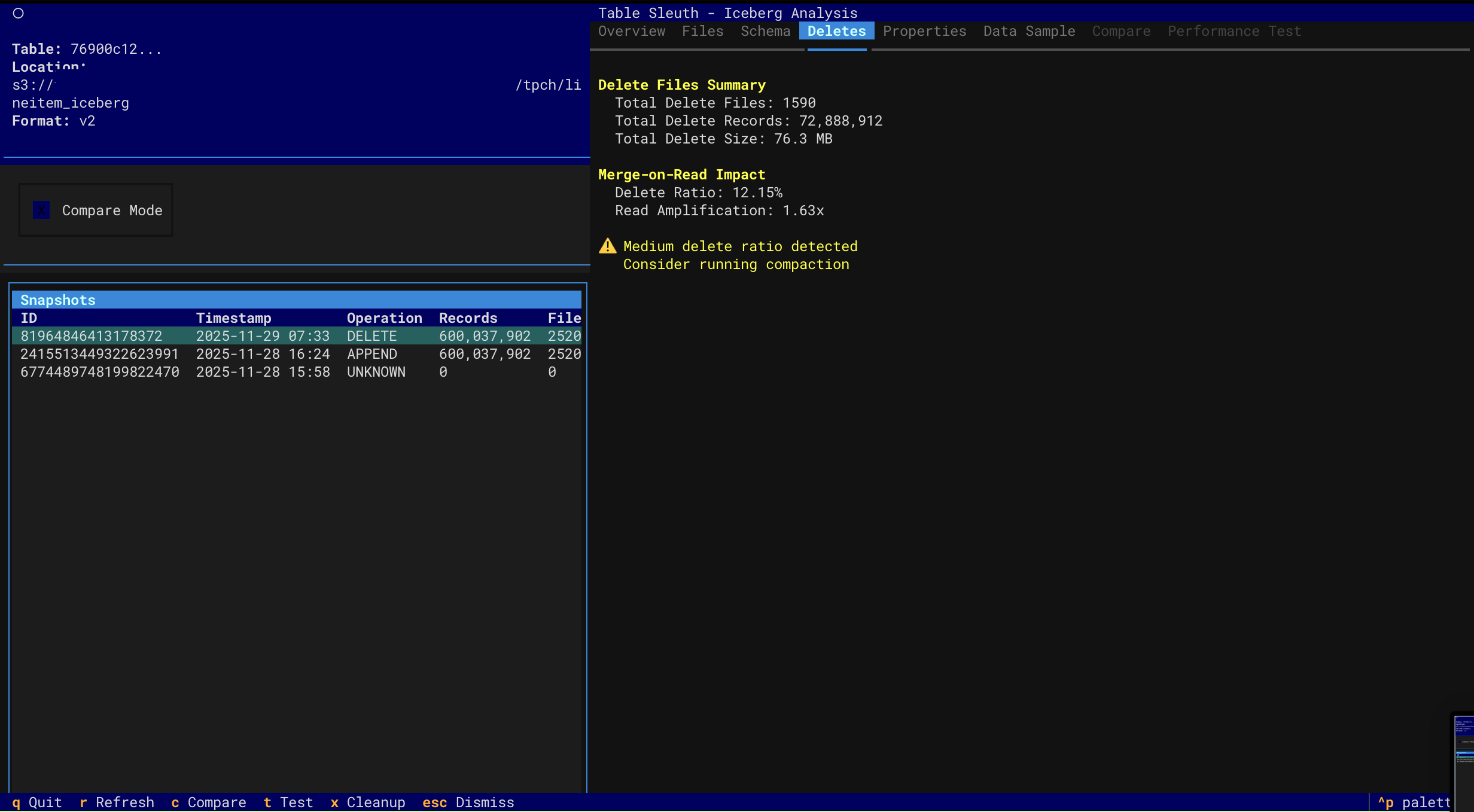
- Delete File Inspection - Analyze MOR (Merge-on-Read) delete files and read amplification
- Schema Evolution - Track schema changes over time
- Catalog Support - Local SQLite, AWS Glue, and AWS S3 Tables
- Version History - Navigate through Delta table versions and time travel
- File Size Analysis - Identify small file problems and optimization opportunities
- Storage Waste - Track tombstoned files and reclaimable storage
- DML Forensics - Analyze MERGE, UPDATE, DELETE operations and rewrite amplification
- Z-Order Effectiveness - Monitor data skipping and clustering degradation
- Checkpoint Health - Assess transaction log health and maintenance needs
- Optimization Recommendations - Get prioritized suggestions for OPTIMIZE, VACUUM, and ZORDER
- Interactive TUI - Keyboard-driven navigation with rich visualizations
- Browser-Based Web UI - FastAPI + Next.js interface launched with
tablesleuth web(v0.6.0+) - Multi-Source Support - Local files, S3, Iceberg catalogs, and Delta tables
- Performance Optimized - Async operations, caching, and lazy loading
|
File Structure & Schema
|
Row Group Analysis
|
|
Data Sample View
|
Column Profiling
|
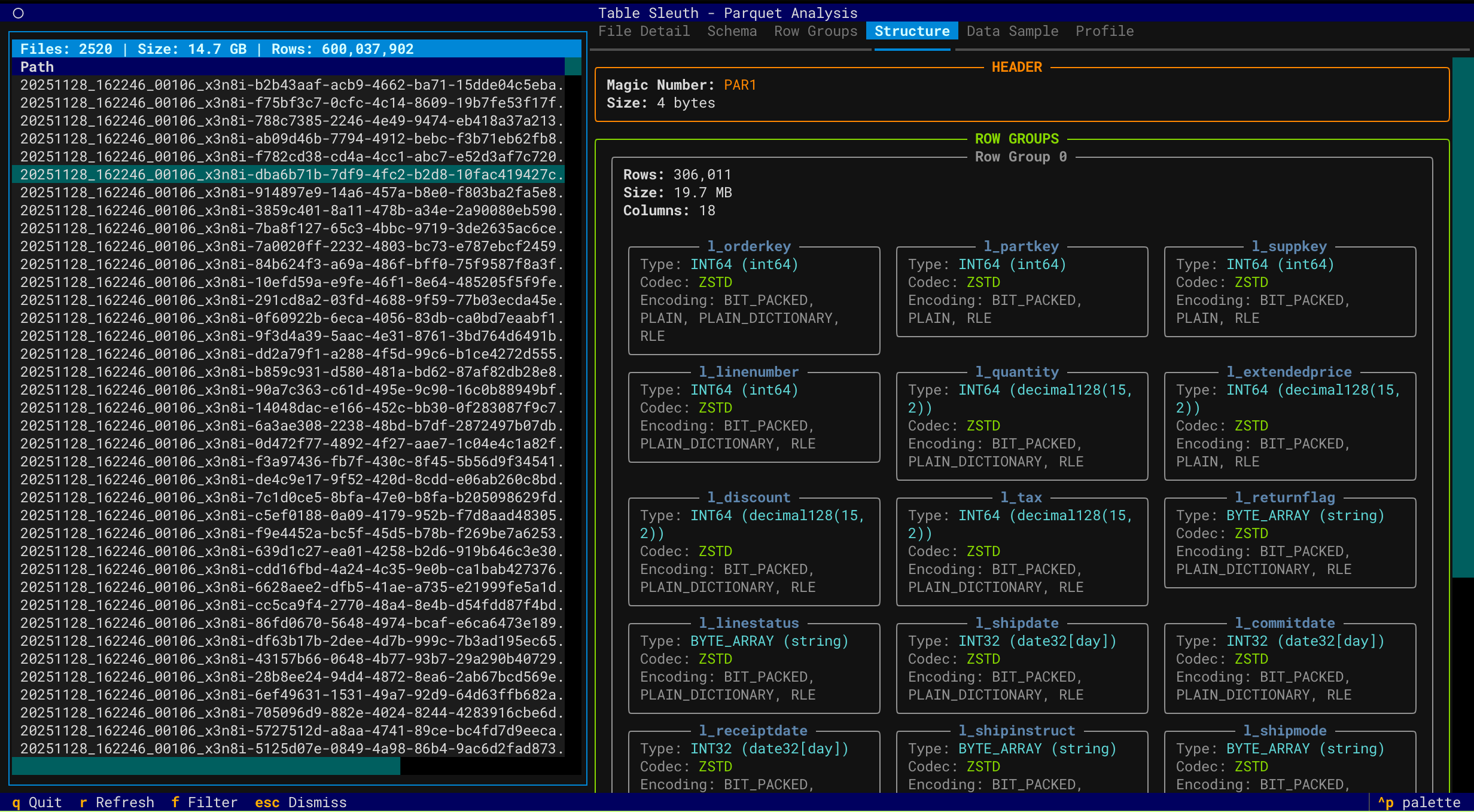
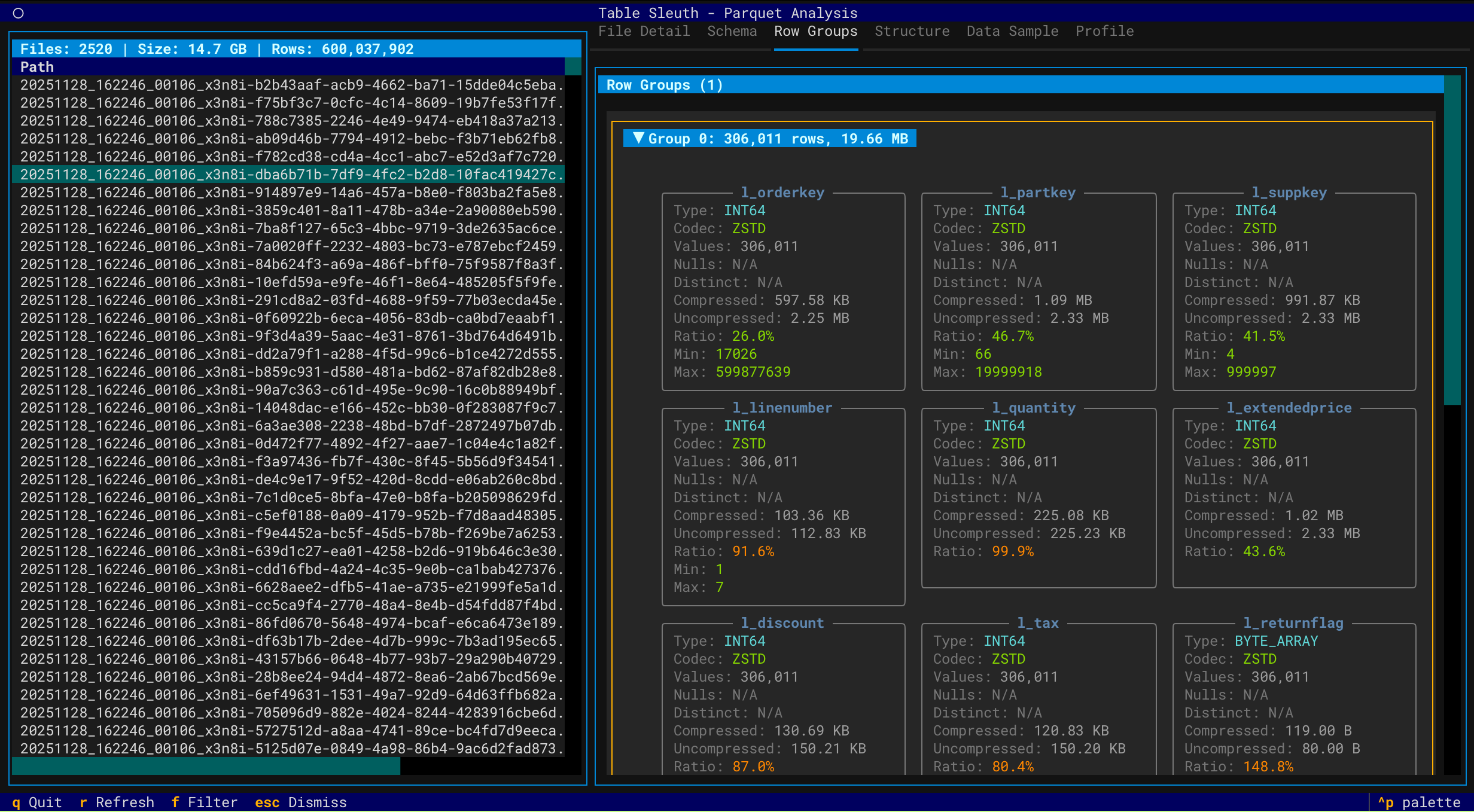
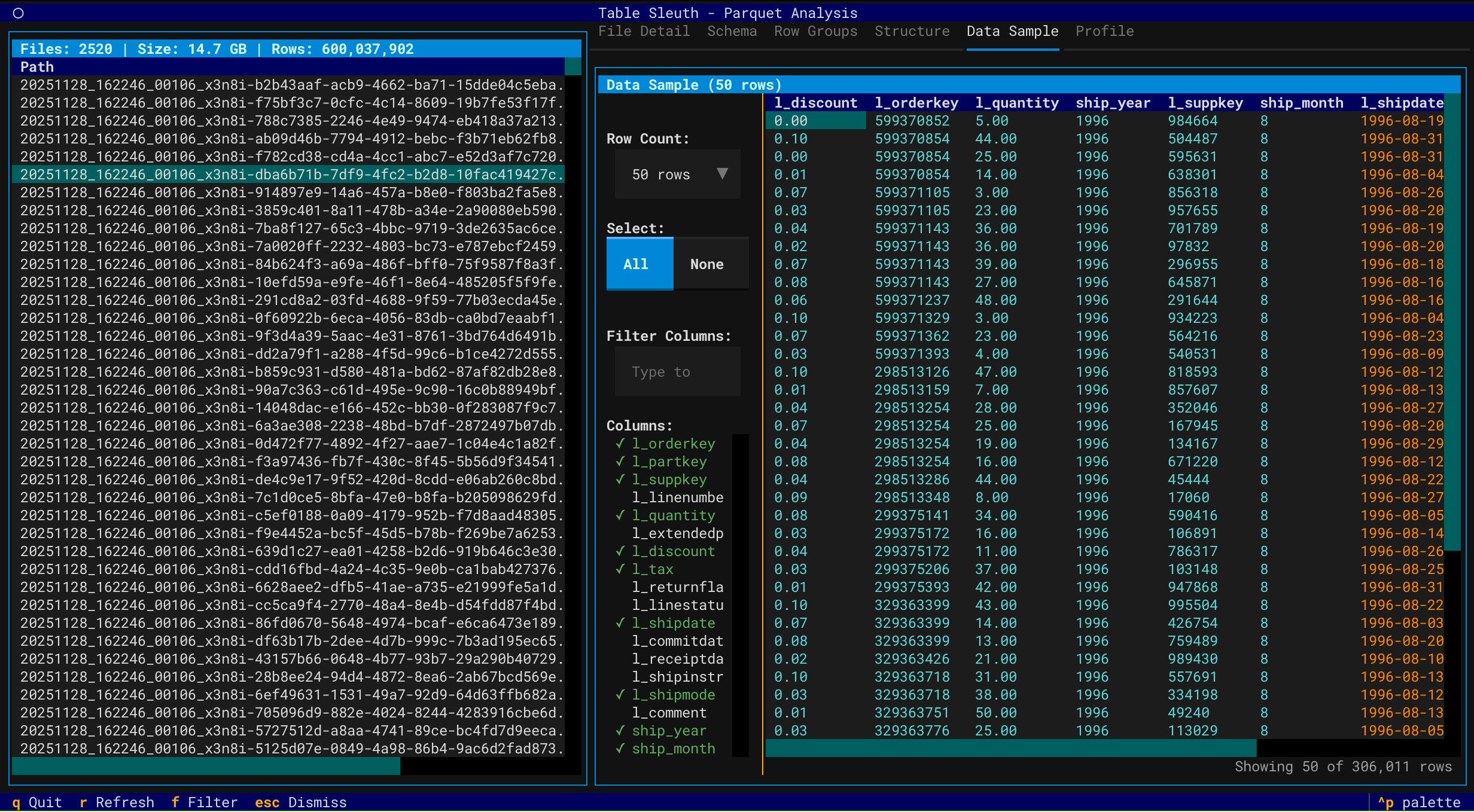
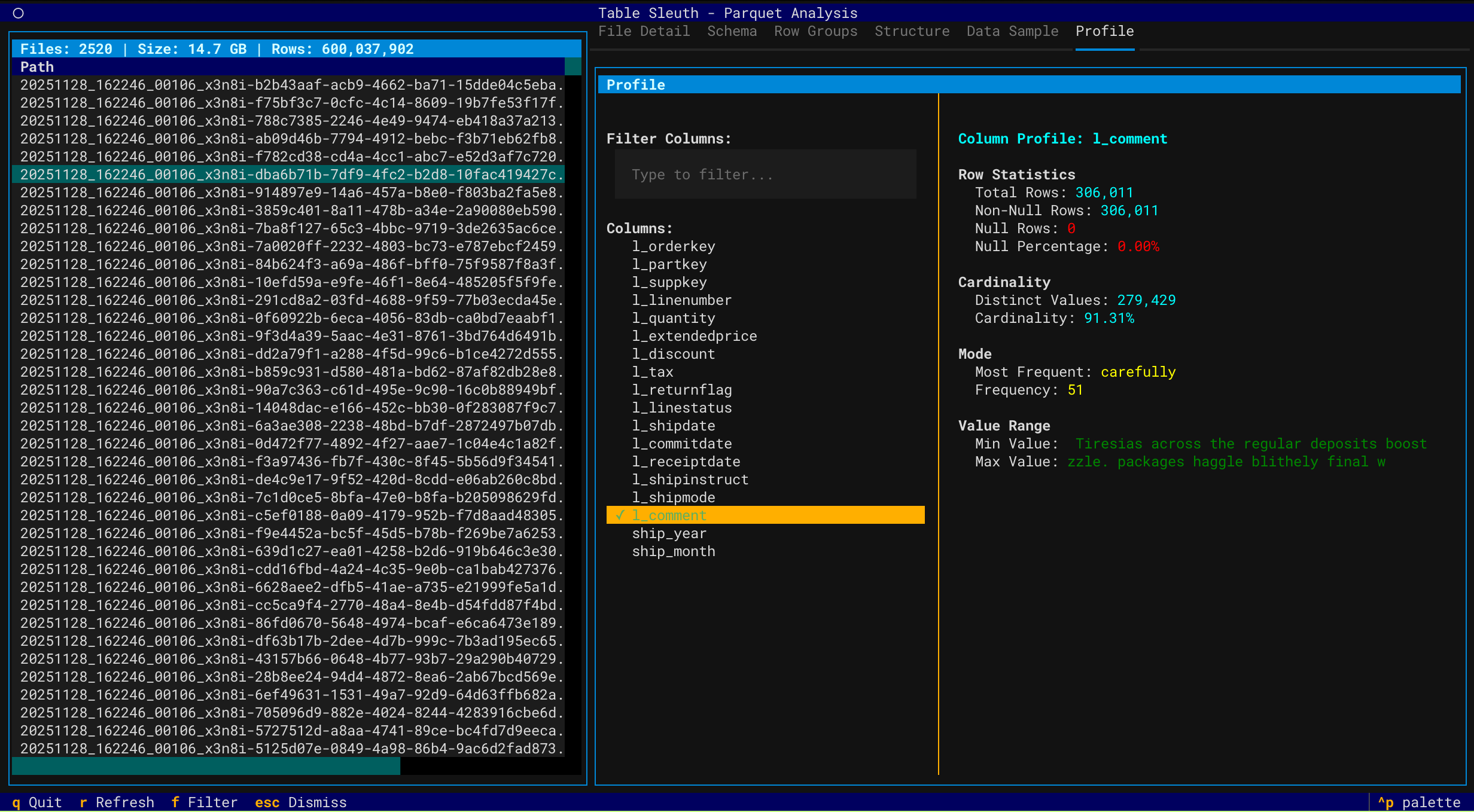
|
Snapshot Overview
|
Performance Testing
|
|
Delete Files (MOR)
|
Snapshot Comparison
|
# Install with uv (recommended)
uv sync

# Inspect a Parquet file (TUI)
tablesleuth parquet data/file.parquet

# Inspect a directory (recursive)
tablesleuth parquet data/warehouse/

# Inspect an Iceberg table (TUI)
tablesleuth iceberg --catalog local --table db.table

# Launch the browser-based web UI (v0.6.0+)
pip install tablesleuth[web]
tablesleuth web  # opens http://localhost:8000

# Inspect AWS S3 Tables (using ARN with parquet command)
tablesleuth parquet "arn:aws:s3tables:us-east-2:123456789012:bucket/my-bucket/table/db.table"
📚 Documentation:
- Quick Start Guide - Get started with examples
- Setup Guide - Complete installation and configuration
- User Guide - Comprehensive usage documentation
Requirements: Python 3.13+ and uv
# Install from PyPI (TUI only)
pip install tablesleuth

# Install with web UI support (v0.6.0+)
pip install tablesleuth[web]

# Or install from source
git clone https://github.com/jamesbconner/TableSleuth
cd TableSleuth
uv sync                    # TUI only
uv sync --extra web        # include web UI dependencies

# Verify installation
tablesleuth --version

# Initialize configuration files
tablesleuth init
See TABLESLEUTH_SETUP.md for detailed setup including AWS, GizmoSQL, and catalog configuration.
# 1. Initialize configuration (first time only)
tablesleuth init

# 2. Edit configuration files
#    - tablesleuth.toml (main config)
#    - .pyiceberg.yaml (catalog config)

# 3. Verify configuration
tablesleuth config-check

# 4. Start inspecting files
tablesleuth parquet data/file.parquet# Initialize configuration files with interactive prompts
tablesleuth init
# Check configuration and test connections
tablesleuth config-check
tablesleuth config-check -v # Verbose outputtablesleuth.toml - Main configuration:
[catalog]
default = "local"  # Default Iceberg catalog

[gizmosql]
uri = "grpc+tls://localhost:31337"
username = "gizmosql_username"
password = "gizmosql_password"
tls_skip_verify = true
Configuration Priority:
- Environment variables (
TABLESLEUTH_*) - Local config files (
./tablesleuth.toml,./.pyiceberg.yaml) - Home config files (
~/tablesleuth.toml,~/.pyiceberg.yaml) - Built-in defaults
Configure PyIceberg in .pyiceberg.yaml:
catalog:
  local:
    type: sql
    uri: sqlite:////path/to/catalog.db
    warehouse: file:///path/to/warehouse
For detailed configuration:
- Setup Guide - All catalog types and AWS configuration
- GizmoSQL Deployment - Profiling backend setup
# Configuration management
tablesleuth init                    # Initialize config files
tablesleuth init --force            # Overwrite existing config files
tablesleuth config-check            # Validate configuration
tablesleuth config-check -v         # Detailed validation
tablesleuth config-check --with-gizmosql  # Include GizmoSQL connection test

# Web UI (v0.6.0+, requires tablesleuth[web])
tablesleuth web                     # Launch browser UI at localhost:8000
tablesleuth web --host 0.0.0.0 --port 9000  # Custom host/port

# Inspect Parquet files
tablesleuth parquet file.parquet
tablesleuth parquet directory/
tablesleuth parquet s3://bucket/path/file.parquet
tablesleuth parquet file.parquet -v  # Verbose mode

# Inspect Parquet files from Iceberg tables (discovers data files)
tablesleuth parquet --catalog local table.name
tablesleuth parquet --catalog glue --region us-east-2 db.table

# Inspect S3 Tables (use parquet command with ARN)
tablesleuth parquet "arn:aws:s3tables:region:account:bucket/name/table/db.table"

# Inspect Iceberg tables
tablesleuth iceberg --catalog local --table db.table
tablesleuth iceberg /path/to/metadata.json
tablesleuth iceberg s3://bucket/warehouse/table/metadata/metadata.json
tablesleuth iceberg --catalog local --table db.table -v  # Verbose mode

# Inspect Delta Lake tables
tablesleuth delta path/to/delta/table
tablesleuth delta s3://bucket/path/to/delta/table
tablesleuth delta path/to/delta/table --version 5  # Time travel to version 5
tablesleuth delta s3://bucket/table/ --storage-option AWS_REGION=us-west-2
tablesleuth delta path/to/delta/table -v # Verbose mode| Key | Action |
|---|---|
q |
Quit |
r |
Refresh |
f |
Filter columns |
Tab |
Switch tabs |
↑/↓ |
Navigate |
Enter |
Select |
See User Guide for complete keyboard shortcuts and features.
Deploy TableSleuth to AWS EC2 with production-ready infrastructure using AWS CDK (Cloud Development Kit):
cd resources/aws-cdk

# Set required environment variables
export SSH_ALLOWED_CIDR="$(curl -s ifconfig.me)/32"  # Your IP for SSH access
export GIZMOSQL_USERNAME="admin"
export GIZMOSQL_PASSWORD="secure-password"

# Deploy to dev environment
cdk deploy -c environment=dev
Key Features:
- Infrastructure as Code - Version-controlled, reviewable infrastructure changes
- Security Best Practices - Least-privilege IAM, EBS encryption, VPC Flow Logs
- Multi-Environment - Separate dev/staging/prod configurations via CDK context
- Automated Setup - GizmoSQL service, PyIceberg Glue integration, and TableSleuth pre-installed
- Change Preview - Review infrastructure changes before deployment with
cdk diff
What's Included:
- EC2 instance with TableSleuth and GizmoSQL pre-configured
- IAM role with S3, Glue, and S3 Tables permissions
- Security group with SSH access from your IP
- Systemd service for GizmoSQL (auto-starts on boot)
- Complete PyIceberg configuration for AWS Glue catalog
Documentation:
- CDK README - Complete deployment guide
- CDK Quick Start - Deploy in 10 minutes
- Future Improvements - Planned enhancements
Enable column profiling and performance testing with GizmoSQL (DuckDB over Arrow Flight SQL).
Quick Setup:
# Install GizmoSQL (macOS ARM64 example)
curl -L https://github.com/gizmodata/gizmosql/releases/download/v1.12.10/gizmosql_cli_macos_arm64.zip \
  | sudo unzip -o -d /usr/local/bin -

# Start server
gizmosql_server -U username -P password -Q \
  -I "install aws; install httpfs; install iceberg; load aws; load httpfs; load iceberg; CREATE SECRET (TYPE s3, PROVIDER credential_chain);" \
  -T ~/.certs/cert0.pem ~/.certs/cert0.key
Note: The -I initialization commands install DuckDB extensions for AWS/S3/Glue access. For alternative S3 authentication methods, see the DuckDB S3 API documentation.
See GizmoSQL Deployment Guide for complete setup and EC2 deployment.
TableSleuth uses a layered architecture:
- CLI Layer - Click-based commands with auto-discovery; includes
tablesleuth web(v0.6.0+) - TUI Layer - Textual-based terminal interface with rich visualizations
- Web API Layer - FastAPI REST backend serving a Next.js static frontend (v0.6.0+)
- Service Layer - Business logic for file inspection, profiling, and discovery
- Integration Layer - PyArrow for Parquet, PyIceberg for tables, GizmoSQL for profiling
See Architecture Guide for detailed technical documentation.
# Install with dev dependencies
uv sync --all-extras

# Run tests
pytest

# Run quality checks
uv run pre-commit run --all-files

# Type checking
mypy src/

# Web UI development (two terminals)
make dev-api        # FastAPI at localhost:8000
make dev-web        # Next.js dev server at localhost:3000
See Development Setup for complete development environment setup.
- Quick Start - Examples and common workflows
- Setup Guide - Installation and configuration
- User Guide - Complete feature documentation
- CDK Deployment - Production-ready AWS infrastructure
- CDK Quick Start - Deploy in 10 minutes
- Performance Profiling - Query performance analysis
- GizmoSQL Deployment - Profiling backend setup
- Web UI Development - Building and running the browser interface
- Development Setup - Dev environment and workflows
- Architecture - System design and technical details
- Developer Guide - API reference and contributing
- 🌐 Browser-Based Web UI - New
tablesleuth webcommand launches a FastAPI + Next.js interface- Full Parquet, Iceberg, Delta Lake, and GizmoSQL analysis in the browser
- Optional install:
pip install tablesleuth[web] - Hot-reload development mode (
make dev-api/make dev-web) - Pre-built static export bundled in the wheel (no Node.js needed for end users)
- 📊 GizmoSQL Snapshot Comparison API -
/gizmosql/compareendpoint for head-to-head snapshot analysis- MOR breakdown: per-type file counts, row counts, and bytes (data vs. delete files)
- Metadata-based scan stats sourced directly from Iceberg snapshot summary fields
rows_scanneddefinition: total-records + position-deletes + equality-deletes (physical reads)
- 🔧 Iceberg Metadata Patching - New
patched_iceberg_metadata()context manager- Fixes DuckDB
current-snapshot-iddelete-file bleed when querying older snapshots - Fixes DuckDB rejection of uppercase
PARQUETformat strings in delete manifests
- Fixes DuckDB
- 📦 Dependency Upgrades - All core libraries updated to latest versions
- pyiceberg 0.11.0+, deltalake 1.4.2+, textual 0.86.2+, pyarrow 23.0.0+
- 🚀 AWS CDK Infrastructure - Production-ready CDK implementation for EC2 deployment
- Replaces legacy boto3 scripts with infrastructure-as-code approach
- Follows AWS CDK best practices (least-privilege IAM, EBS encryption, VPC Flow Logs)
- Multi-environment support (dev, staging, prod) with context-based configuration
- Type-safe configuration using dataclasses and environment variables
- Automated GizmoSQL service setup with systemd
- Complete PyIceberg Glue integration out-of-the-box
- See resources/aws-cdk/README.md for details
- 🔍 Enhanced Iceberg Performance Analysis - Better multi-factor performance comparison
- Order-agnostic analysis (works regardless of snapshot chronology)
- Multi-factor attribution: data volume, file counts, MOR overhead, delete ratios, scan efficiency
- Accurate MOR overhead detection (only when delete files actually exist)
- Read amplification metrics and compaction recommendations
- Detailed contributing factors with specific metrics and percentages
- 🔒 Enhanced Security - Improved IAM permissions and encryption
- 📚 Consolidated Documentation - Streamlined deployment guides and removed legacy content
- 🚀 AWS CDK Infrastructure - Production-ready CDK implementation for EC2 deployment
- Replaces legacy boto3 scripts with infrastructure-as-code approach
- Follows AWS CDK best practices (least-privilege IAM, EBS encryption, VPC Flow Logs)
- Multi-environment support (dev, staging, prod) with context-based configuration
- Type-safe configuration using dataclasses and environment variables
- Automated GizmoSQL service setup with systemd
- Complete PyIceberg Glue integration out-of-the-box
- See resources/aws-cdk/README.md for details
- 🔍 Enhanced Iceberg Performance Analysis - Better multi-factor performance comparison
- Order-agnostic analysis (works regardless of snapshot chronology)
- Multi-factor attribution: data volume, file counts, MOR overhead, delete ratios, scan efficiency
- Accurate MOR overhead detection (only when delete files actually exist)
- Read amplification metrics and compaction recommendations
- Detailed contributing factors with specific metrics and percentages
- 🔒 Enhanced Security - Improved IAM permissions and encryption
- 📚 Consolidated Documentation - Streamlined deployment guides and removed legacy content
- 🎉 Delta Lake Support - Full Delta table inspection and forensics
- Version history navigation and time travel
- File size analysis and small file detection
- Storage waste tracking (tombstoned files)
- DML forensics (MERGE, UPDATE, DELETE operations)
- Z-Order effectiveness monitoring
- Checkpoint health assessment
- Optimization recommendations
- 🎉 Available on PyPI! Install with
pip install tablesleuth - 🔄 Package renamed to
tablesleuthfor consistency - 🤖 Automated CI/CD with GitHub Actions
- 📦 Enhanced PyPI metadata and publishing workflow
- 🐛 Bug fixes and stability improvements
- 🎉 PyPI release
- 🔄 Package renamed to
tablesleuth - 🤖 Automated CI/CD with GitHub Actions
- 📦 Enhanced PyPI metadata and publishing workflow
- ✅ Parquet file inspection (local and S3)
- ✅ Iceberg snapshot navigation and analysis
- ✅ Delete file inspection and MOR forensics
- ✅ Snapshot comparison and performance testing
- ✅ Column profiling with GizmoSQL
- ✅ AWS Glue and S3 Tables catalog support
- ✅ Interactive TUI with rich visualizations
- ✅ Delta Lake version history and forensics
- ✅ Storage waste analysis and optimization recommendations
- ✅ DML operation forensics and rewrite amplification tracking
- Apache Hudi support
- Schema evolution visualization
- Export capabilities (JSON, CSV reports)
- REST catalog support
- Advanced partition analysis
Contributions welcome! See Developer Guide and Development Setup.
Apache 2.0 License - See LICENSE for details.
- Issues & Features: GitHub Issues
- Documentation: See docs/ directory
- Changelog: CHANGELOG.md