📦 Generate a changelog as part of the npm version command.
- Use
npm version [patch|minor|major]to create a release - Your editor will open with a generated
CHANGES.mdfile - When you're done writing the release notes, save and close the editor to continue
- To abort the release, remove the heading with the new version number
$ npm install @studio/changes --save-devAdd this to your package.json:
{
  "scripts": {
    "preversion": "npm test",
    "version": "changes",
    "postversion": "git push --follow-tags && npm publish"
  },
  "devDependencies": {
    "@studio/changes": "^1.0.0"
  }
}
The scripts can also be added with changes --init, if they do not exist yet:
$ node_modules/.bin/changes --initOr with npx:
$ npx changes --initIf the "version" script already exists, this has no effect. Existing file indentation style will be preserved.
--help,-h: Display a help message.--file,-f: Specify the name of the changelog file. Defaults toCHANGES.md.--init: Add version lifecycle scripts topackage.json.
Configure your preferred editor with the $EDITOR environment variable.
If the current version in your package.json is already in the changelog, the
changes command aborts and shows the unreleased commits. Preview the release
notes for the next release like this:
$ node_modules/.bin/changesOr with npx:
$ npx changes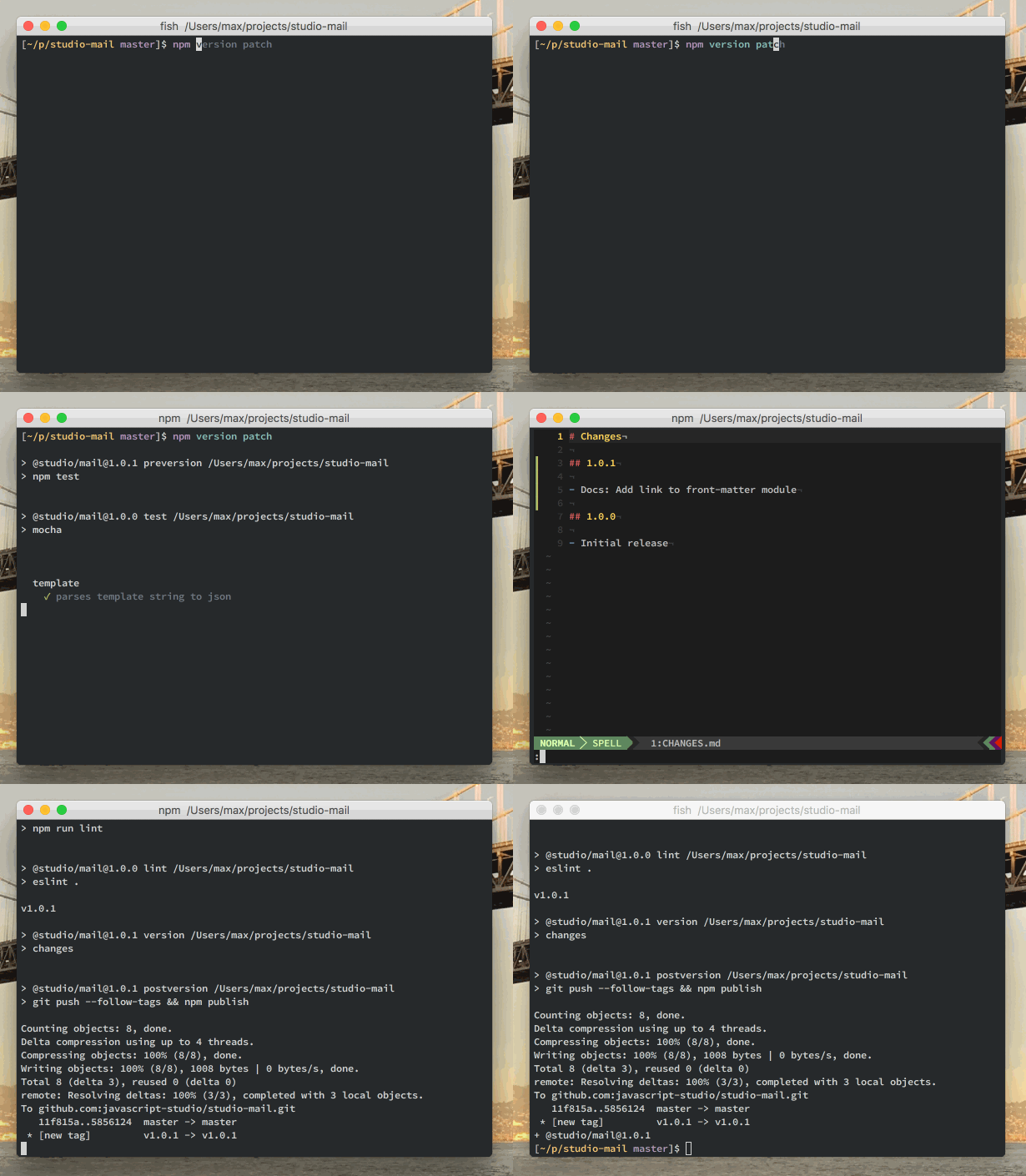
MIT
Made with ❤️ on 🌍