

CCRelay is a VSCode extension with a built-in API proxy server that allows you to seamlessly switch between different AI providers without losing conversation context. It is designed to work with Claude Code, Claude Cowork, and OpenAI Codex (among other Anthropic- and OpenAI-compatible clients)—see Client integrations.
Website: https://ccrelay.inflab.org
- Core Features
- Requirements
- Installation
- Quick Start
- Client integrations
- Usage Guide
- Configuration
- API Endpoints
- Commands
- Development
- File Locations
- License
- Built-in API Proxy Server: Runs a local HTTP server (default:
http://127.0.0.1:7575) that proxies requests to different AI providers - Multi-Instance Coordination: Leader/Follower mode for multiple VSCode windows - only one instance runs the server
- WebSocket Sync: Real-time provider synchronization between Leader and Followers via WebSocket
- Status Bar Indicator: Shows current provider, role (Leader/Follower), and server status
- Quick Provider Switching: Click the status bar or use commands to switch providers
- Provider Modes:
passthrough- Preserves original authentication headers for official APIinject- Injects provider-specific API Key
- Model Mapping: Automatically translates Claude model names to provider-specific models with wildcard support (e.g.,
claude-*→glm-4.7) - Vision Model Mapping: Separate model mapping for visual/multimodal requests (
vlModelMap) - OpenAI Format Conversion (LLM router): Accepts Anthropic, OpenAI Chat Completions, and OpenAI Responses (
/v1/responses); converts when the inbound wire does not match the provider (Chat/Responses are hubbed through Chat Completions for cross-provider routing) - Request Logging: Optional SQLite/PostgreSQL request/response logging with Web UI viewer
- Concurrency Control: Built-in request queue and concurrency limits to prevent API overload
- Auto-start: Automatically starts the proxy server when VSCode launches
- Client integrations: Use the same proxy with Claude Code, Claude Cowork (Anthropic wire), and Codex (OpenAI wire +
~/.codex/config.toml); see Client integrations
- VSCode version 1.80.0 or higher
- Node.js (for development)
- Download the latest
.vsixfile - In VSCode, press
Cmd+Shift+P(macOS) orCtrl+Shift+P(Windows/Linux) - Type
Extensions: Install from VSIX... - Select the downloaded
.vsixfile
# Clone the repository
git clone https://github.com/inflaborg/ccrelay.git
cd ccrelay

# Install dependencies
npm install

# Build the extension
npm run build

# Package VSIX
npm run package# Install dependencies
npm install
# Compile
npm run compile
# Press F5 in VSCode to open Extension Development Host windowCCRelay uses a YAML configuration file (~/.ccrelay/config.yaml by default). The file is auto-created with defaults on first launch.
Edit the config file to add your providers:
providers:
  glm:
    name: "Z.AI-GLM-5"
    baseUrl: "https://api.z.ai/api/anthropic"
    mode: "inject"
    apiKey: "${GLM_API_KEY}"  # Supports environment variables
    modelMap:
      - pattern: "claude-opus-*"
        model: "glm-5"
      - pattern: "claude-sonnet-*"
        model: "glm-5"
      - pattern: "claude-haiku-*"
        model: "glm-4.7"
    enabled: true

defaultProvider: "glm"Set environment variables for Claude Code in ~/.claude/settings.json (an env object). The recommended path is a persistent file config—not VS Code workspace settings or ad‑hoc steps in the CCRelay extension. See Claude Code for a full env example, or use the Web dashboard Client configuration to write the same keys.
- Click the CCRelay icon in the VSCode status bar at the bottom
- Or use Command Palette:
CCRelay: Switch Provider
Claude Code, Claude Cowork, and OpenAI Codex are first-class target clients. CCRelay exposes an Anthropic-compatible API (/v1/messages, …) and an OpenAI-compatible API (/v1/chat/completions, GET /v1/models, POST /v1/responses, …) on the same port (default 7575). Point them at the same host and port as in ~/.ccrelay/config.yaml (default: http://127.0.0.1:7575).
| Client | Wire | How to use CCRelay |
|---|---|---|
| Claude Code | Anthropic | Set ANTHROPIC_BASE_URL (and optional ANTHROPIC_DEFAULT_*_MODEL keys) in ~/.claude/settings.json → env — see Claude Code |
| Claude Cowork | Anthropic | Configure the app’s API / Anthropic base URL to the same CCRelay origin (e.g. http://127.0.0.1:7575) so traffic goes through the proxy |
| Codex (OpenAI Codex CLI) | OpenAI | Register CCRelay as a model provider in ~/.codex/config.toml (see example below) |
Persistent settings (~/.claude/settings.json) — recommended
Add an env object so every Claude Code session points at CCRelay. ANTHROPIC_AUTH_TOKEN can be a placeholder when CCRelay’s current provider is inject mode (CCRelay adds the real upstream key); adjust if your setup requires a real token. You do not need ANTHROPIC_DEFAULT_*_MODEL here if you are happy with CCRelay’s modelMap only—the Web dashboard can append those keys optionally (see below).
{
  "env": {
    "ANTHROPIC_AUTH_TOKEN": "ccrelay_apikey_placehold_do_not_need_to_setup_here",
    "ANTHROPIC_BASE_URL": "http://localhost:7575",
    "API_TIMEOUT_MS": "3000000",
    "CLAUDE_CODE_DISABLE_NONESSENTIAL_TRAFFIC": 1
  }
}
Optional — per-tier default model names Claude Code will request (ANTHROPIC_DEFAULT_OPUS_MODEL, ANTHROPIC_DEFAULT_SONNET_MODEL, ANTHROPIC_DEFAULT_HAIKU_MODEL). CCRelay usually maps claude-* via modelMap without these. The dashboard’s Client configuration → Configure default models uses the suggested values below; you can change them in the UI.
If your settings.json already has other top-level keys, merge the "env" block in (or extend env with these keys) instead of replacing the whole file.
Example env with optional default model names (same suggestions as the web UI):
{
  "env": {
    "ANTHROPIC_AUTH_TOKEN": "ccrelay_apikey_placehold_do_not_need_to_setup_here",
    "ANTHROPIC_BASE_URL": "http://localhost:7575",
    "API_TIMEOUT_MS": "3000000",
    "CLAUDE_CODE_DISABLE_NONESSENTIAL_TRAFFIC": 1,
    "ANTHROPIC_DEFAULT_OPUS_MODEL": "claude-opus-4-7",
    "ANTHROPIC_DEFAULT_SONNET_MODEL": "claude-sonnet-4-6",
    "ANTHROPIC_DEFAULT_HAIKU_MODEL": "claude-haiku-4-5"
  }
}
http://127.0.0.1:7575 and http://localhost:7575 are interchangeable for a local CCRelay bind.
Optional (shell only, not persistent) — quick test without editing ~/.claude/settings.json:
export ANTHROPIC_BASE_URL=http://127.0.0.1:7575
claude
For day-to-day use, prefer the ~/.claude/settings.json env block above.
Point Claude Cowork at the same Anthropic base URL as Claude Code: your CCRelay server root (e.g. http://127.0.0.1:7575), not the upstream provider URL. Switch models and backends in the CCRelay VSCode extension or config.yaml as usual.
Codex can use CCRelay by defining a custom provider whose base_url targets CCRelay’s OpenAI-compatible base path (/v1 on the same host as the proxy).
Example (adjust model to one your current CCRelay provider maps, e.g. via modelMap):
# ~/.codex/config.toml
model = "glm-5-turbo"
model_provider = "ccrelay"

[model_providers.ccrelay]
name = "CCRelay"
base_url = "http://localhost:7575/v1"base_urlmust include the/v1prefix so Codex callshttp://localhost:7575/v1/...on the proxy.- Ensure CCRelay is running (VSCode extension) and the selected provider in CCRelay matches the model routing you need.
- Install and enable the extension
- The config file (
~/.ccrelay/config.yaml) is auto-created with defaults - Edit the config file to add your providers
- The server will auto-start (configurable via
server.autoStartin config) - Click the status bar to switch providers or access the menu
When multiple VSCode windows are open:
- One instance becomes the Leader and runs the HTTP server
- Other instances become Followers and connect to the Leader via WebSocket
- Leader broadcasts provider changes to all Followers in real-time
- Followers can request provider switches through the Leader
- If the Leader closes, a Follower automatically becomes the new Leader
- Status bar shows your role:
$(broadcast)for Leader,$(radio-tower)for Follower
- Preserves original authentication headers
- Used for official Claude API with OAuth sessions
- No API key required
- Replaces authentication with provider-specific API Key
- Requires API key configuration
- Supports GLM, OpenRouter, and other Claude-compatible APIs
Supports wildcard pattern matching for model names using array format:
modelMap:
  - pattern: "claude-opus-*"
    model: "glm-5"
  - pattern: "claude-sonnet-*"
    model: "glm-4.7"
  - pattern: "claude-haiku-*"
    model: "glm-4.5"
Vision Model Mapping: For requests containing images, you can configure vlModelMap separately:
modelMap:
  - pattern: "claude-*"
    model: "text-model"
vlModelMap:
  - pattern: "claude-*"
model: "vision-model"📋 Feature Note: CCRelay can accept Anthropic, OpenAI Chat Completions, and OpenAI Responses (
/v1/responses) entry points. Conversion is applied when the inbound wire format does not match the provider’sproviderType(Chat/Responses are both mapped via a Chat Completions hub when talking to OpenAI-compatible or Anthropic upstreams). When client and upstream are the same family, traffic is passed through (aside frommodelMapand auth).
Inbound API surfaces (paths)
| Path | Method | Client format |
|---|---|---|
/v1/messages, /messages |
POST | Anthropic Messages |
/v1/messages/count_tokens |
POST | Anthropic |
/v1/chat/completions |
POST | OpenAI Chat Completions |
/v1/responses |
POST | OpenAI Responses API (create) |
/v1/models |
GET | OpenAI models list |
routing.proxy in config.yaml should include the paths you use (defaults include the rows above).
Conversion rules
- Client Anthropic + provider
providerType: openai: request A→O, response O→A (same as before). - Client OpenAI (chat) + provider
providerType: anthropic: request O→A, response A→O. - Client OpenAI Responses + any provider: request is converted to Chat Completions, then to Anthropic if needed; response is converted back to the Responses JSON shape. Hosted-only tools (e.g. web search, MCP) are stripped in v1.
- Same family on both sides (e.g. chat +
openaiprovider): no format conversion (only model name mapping, etc.).
OpenAI Chat Completions path (openaiChatCompletionsPath, optional)
When converting to OpenAI Chat Completions (Anthropic → OpenAI, or Responses → Chat as a hub), CCRelay appends a path to baseUrl. The default is /chat/completions (no extra /v1 segment in the path). If your baseUrl already ends with a version segment (e.g. https://api.z.ai/api/coding/paas/v4) and the upstream expects .../v4/chat/completions rather than .../v4/v1/chat/completions, leave the default or set openaiChatCompletionsPath: "/chat/completions" explicitly. If your gateway expects the full OpenAI-style segment (e.g. baseUrl is only the host root), set openaiChatCompletionsPath: "/v1/chat/completions".
Limitations (first iteration)
- Cross-protocol streaming to the upstream is not supported (requests are forced to
stream: falsefor conversion). If the client still sendsstream: trueonPOST /v1/responses(e.g. OpenAI Codex), CCRelay synthesizes a small SSE withresponse.created/response.completed/[DONE]so the client SDK can finish; the model output is not token-streamed, only delivered in the finalresponse.completedpayload. - If the upstream still returns an SSE response where conversion is required, CCRelay returns a clear error.
- Responses API (v1):
previous_response_id,conversation, and OpenAI-hosted tools are not fully supported; use chat-style function tools when possible.
Example: OpenAI-compatible provider (Gemini)
gemini:
  name: "Gemini"
  baseUrl: "https://generativelanguage.googleapis.com/v1beta/openai"
  providerType: "openai"
  mode: "inject"
  apiKey: "${GEMINI_API_KEY}"
  modelMap:
    - pattern: "claude-*"
      model: "gemini-2.5-pro"
GET /v1/models (modelsListFormat, optional, default auto)
There is no request body, so CCRelay cannot infer whether the client expects an OpenAI- or Anthropic-shaped list. Per provider, modelsListFormat controls the inbound client surface for this route and the synthetic list when the upstream returns an error:
auto(default): matchproviderType—same wire as the upstream for successful responses (no unnecessary conversion), and the corresponding list shape for fallback.openai: treat the client as OpenAI (e.g. force OpenAI-shaped list when using an OpenAI HTTP client against an Anthropic upstream).anthropic: treat the client as Anthropic.
If you previously relied on OpenAI-shaped /v1/models against an Anthropic provider, set modelsListFormat: openai (or use the Web dashboard GET /v1/models wire field).
GET /v1/models is proxied to the current provider; on upstream error, a minimal list is built from modelMap in the chosen format.
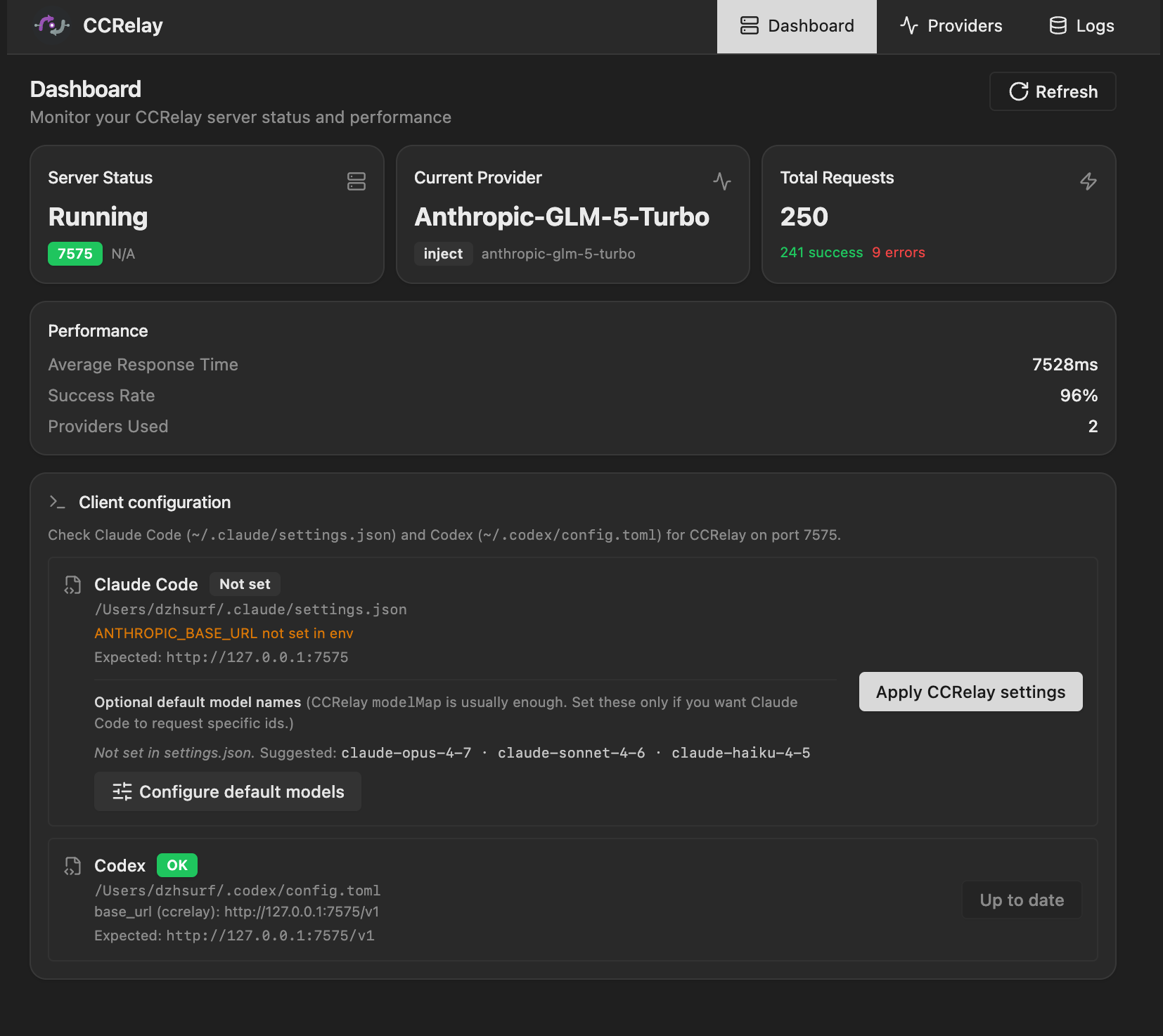
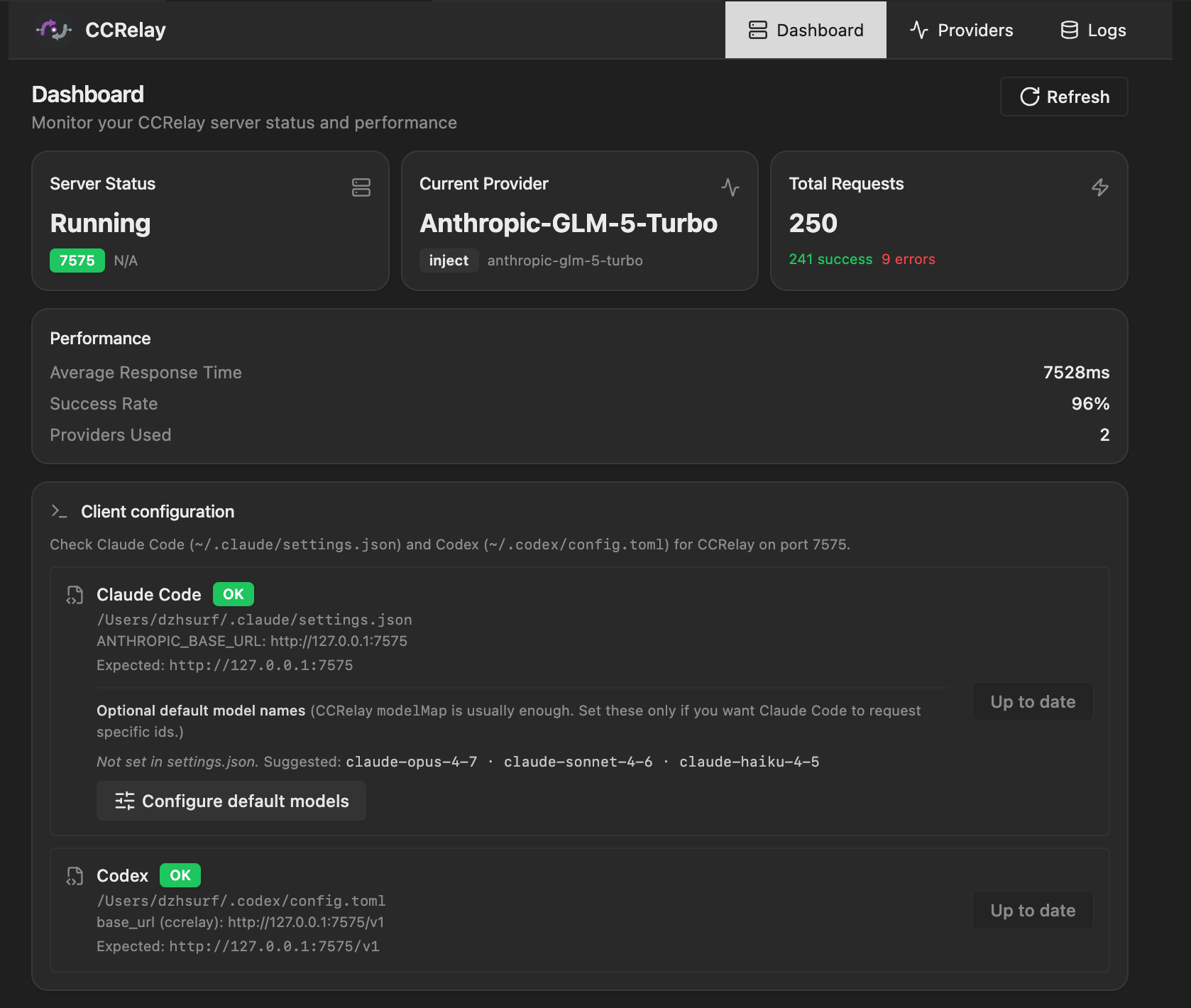
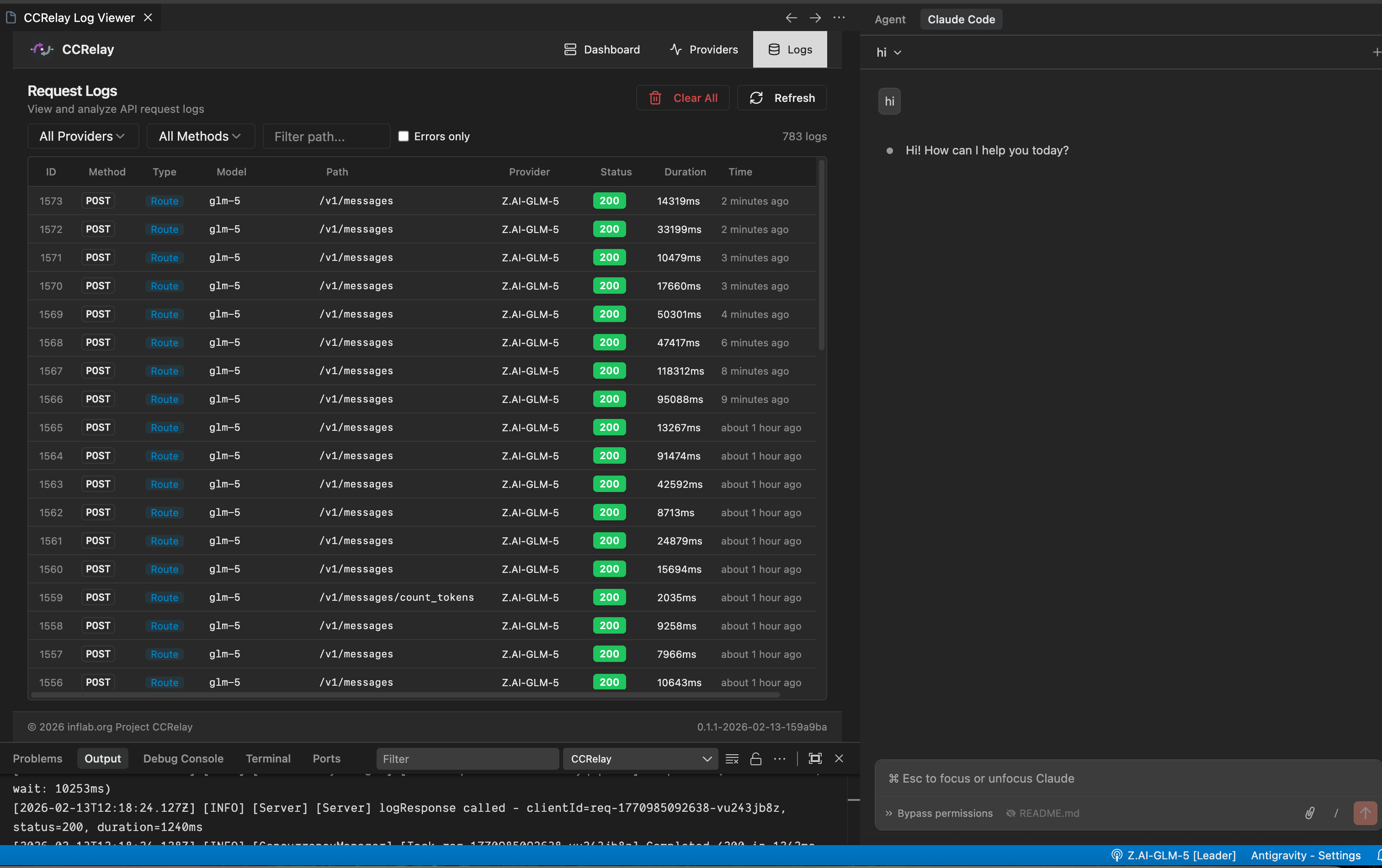
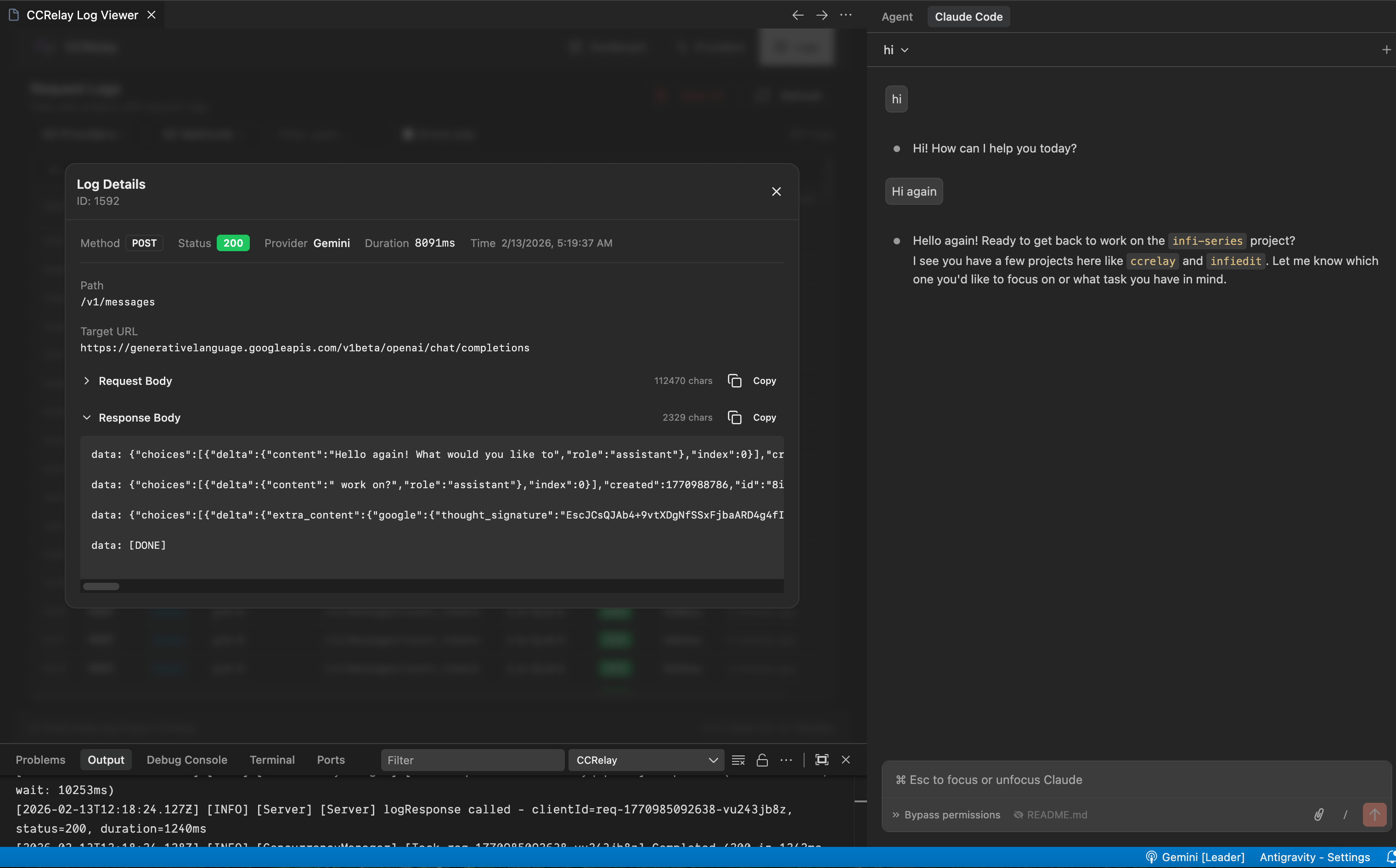
CCRelay has a built-in Web UI dashboard that provides:
- Dashboard: Server status, current provider, request statistics
- Client configuration (optional): Set Claude Code’s
~/.claude/settings.jsonenvfrom the UI (e.g.ANTHROPIC_BASE_URL,ANTHROPIC_AUTH_TOKENplaceholder) and, if needed, per-tierANTHROPIC_DEFAULT_*_MODEL— see Claude Code. - Providers: View and switch providers
- Logs: Request/response log viewer (requires enabling log storage)
Client configuration in the Web UI (same flows as the dashboard’s Client configuration / Configure default models actions):
Logs in the Web UI:
Access methods:
- Command Palette:
CCRelay: Open Dashboard - Browser:
http://127.0.0.1:7575/ccrelay/
CCRelay uses a YAML configuration file (~/.ccrelay/config.yaml by default). The file is auto-created with defaults on first launch.
| Setting | Default | Description |
|---|---|---|
ccrelay.configPath |
~/.ccrelay/config.yaml |
Path to the YAML configuration file |
| Setting | Default | Description |
|---|---|---|
server.port |
7575 |
Proxy server port |
server.host |
127.0.0.1 |
Bind address |
server.autoStart |
true |
Auto-start server when extension loads |
| Setting | Default | Description |
|---|---|---|
defaultProvider |
official |
Default provider ID |
providers |
{...} |
Provider configurations |
Each provider supports:
name- Display namebaseUrl- API base URLopenaiChatCompletionsPath(optional) - Path for OpenAI Chat Completions when converting to that API (default:/chat/completions; use/v1/chat/completionsif your base URL does not include a version prefix)modelsListFormat(optional) -auto|openai|anthropic— wire forGET /v1/models(defaultautomatchesproviderType)mode-passthroughorinjectproviderType-anthropic(default) oropenaiapiKey- API key (inject mode, supports${ENV_VAR}environment variables)authHeader- Authorization header name (default:authorization)modelMap- Model name mappings (array of{pattern, model}, supports wildcards)vlModelMap- Vision model mappings (for multimodal requests)headers- Custom request headersenabled- Whether enabled (default:true)
| Setting | Default | Description |
|---|---|---|
routing.proxy |
["/v1/messages", "/messages", "/v1/chat/completions", "/v1/models", "/v1/responses"] |
Paths routed to current provider |
routing.passthrough |
["/v1/users/*", "/v1/organizations/*"] |
Paths always going to official API |
routing.block |
[{path: "/api/event_logging/*", ...}] |
Paths returning custom response in inject mode |
routing.openaiBlock |
[{path: "/v1/messages/count_tokens", ...}] |
Block patterns for OpenAI providers |
| Setting | Default | Description |
|---|---|---|
concurrency.enabled |
true |
Enable concurrency queue |
concurrency.maxWorkers |
3 |
Maximum concurrent workers |
concurrency.maxQueueSize |
100 |
Maximum queue size (0 = unlimited) |
concurrency.requestTimeout |
60 |
Request timeout in queue (seconds, 0 = unlimited) |
concurrency.routes |
[] |
Per-route queue configuration |
| Setting | Default | Description |
|---|---|---|
logging.enabled |
false |
Enable request log storage |
logging.database.type |
sqlite |
Database type (sqlite or postgres) |
SQLite Configuration:
| Setting | Default | Description |
|---|---|---|
logging.database.path |
"" |
Database file path (empty = ~/.ccrelay/logs.db) |
PostgreSQL Configuration:
| Setting | Default | Description |
|---|---|---|
logging.database.host |
localhost |
Server host |
logging.database.port |
5432 |
Server port |
logging.database.name |
ccrelay |
Database name |
logging.database.user |
"" |
Username |
logging.database.password |
"" |
Password (supports ${ENV_VAR}) |
logging.database.ssl |
false |
Enable SSL connection |
# CCRelay Configuration
# Docs: https://github.com/inflaborg/ccrelay#configuration

# ==================== Server Configuration ====================
server:
  port: 7575                    # Proxy server port
  host: "127.0.0.1"             # Bind address
  autoStart: true               # Auto-start server when extension loads

# ==================== Provider Configuration ====================
providers:
  official:
    name: "Claude Official"
    baseUrl: "https://api.anthropic.com"
    mode: "passthrough"         # passthrough | inject
    providerType: "anthropic"   # anthropic | openai
    enabled: true

  glm:
    name: "Z.AI-GLM-5"
    baseUrl: "https://api.z.ai/api/anthropic"
    mode: "inject"
    apiKey: "${GLM_API_KEY}"    # Supports environment variables
    authHeader: "authorization"
    modelMap:
      - pattern: "claude-opus-*"
        model: "glm-5"
      - pattern: "claude-sonnet-*"
        model: "glm-5"
      - pattern: "claude-haiku-*"
        model: "glm-4.7"
    enabled: true

  gemini:
    name: "Gemini"
    baseUrl: "https://generativelanguage.googleapis.com/v1beta/openai"
    providerType: "openai"
    mode: "inject"
    apiKey: "${GEMINI_API_KEY}"
    modelMap:
      - pattern: "claude-*"
        model: "gemini-2.5-pro"
    enabled: true

# Default provider ID
defaultProvider: "official"

# ==================== Routing Configuration ====================
routing:
  # Proxy routes: Forward to current provider
  proxy:
    - "/v1/messages"
    - "/messages"

  # Passthrough routes: Always go to official API
  passthrough:
    - "/v1/users/*"
    - "/v1/organizations/*"

  # Block routes (inject mode): Return custom response
  block:
    - path: "/api/event_logging/*"
      response: ""
      code: 200

  # OpenAI format block routes
  openaiBlock:
    - path: "/v1/messages/count_tokens"
      response: '{"input_tokens": 0}'
      code: 200

# ==================== Concurrency Control ====================
concurrency:
  enabled: true                 # Enable concurrency queue
  maxWorkers: 3                 # Maximum concurrent workers
  maxQueueSize: 100             # Maximum queue size (0=unlimited)
  requestTimeout: 60            # Request timeout in queue (seconds)

  # Per-route queue configuration
  routes:
    - pattern: "/v1/messages/count_tokens"
      name: "count_tokens"
      maxWorkers: 30
      maxQueueSize: 1000

# ==================== Logging Storage ====================
logging:
  enabled: true                 # Enable request log storage

  database:
    type: "sqlite"              # sqlite | postgres
    path: ""                    # Empty = ~/.ccrelay/logs.db

    # PostgreSQL configuration
    # type: "postgres"
    # host: "localhost"
    # port: 5432
    # name: "ccrelay"
    # user: ""
    # password: "${POSTGRES_PASSWORD}"
# ssl: falseNote: YAML config supports both
camelCaseandsnake_casekeys.
The proxy server exposes management endpoints at /ccrelay/:
| Endpoint | Method | Description |
|---|---|---|
/ccrelay/api/status |
GET | Get current proxy status |
/ccrelay/api/providers |
GET | List all available providers |
/ccrelay/api/switch/{id} |
GET | Switch to a provider by ID |
/ccrelay/api/switch |
POST | Switch provider (JSON body) |
/ccrelay/api/queue |
GET | Get queue statistics |
/ccrelay/api/logs |
GET | Get request logs (when logging enabled) |
/ccrelay/ws |
WebSocket | Real-time sync for Followers |
/ccrelay/ |
GET | Web UI dashboard |
All other requests are proxied to the current provider.
| Command | ID | Description |
|---|---|---|
| CCRelay: Show Menu | ccrelay.showMenu |
Show main menu |
| CCRelay: Switch Provider | ccrelay.switchProvider |
Open provider picker |
| CCRelay: Start Server | ccrelay.startServer |
Manually start the server |
| CCRelay: Stop Server | ccrelay.stopServer |
Stop the server |
| CCRelay: Open Settings | ccrelay.openSettings |
Open extension settings |
| CCRelay: Show Logs | ccrelay.showLogs |
View output logs |
| CCRelay: Clear Logs | ccrelay.clearLogs |
Clear output logs |
| CCRelay: Open Dashboard | ccrelay.openWebUI |
Open dashboard panel |
# Compile TypeScript
npm run compile

# Watch for changes and recompile
npm run watch

# Run ESLint
npm run lint

# Auto-fix lint issues
npm run lint:fix

# Format code
npm run format

# Run unit tests
npm run test

# Run integration tests
npm run test:integration

# Run all tests
npm run test:all

# Run tests with coverage
npm run test:coverage

# Build VSIX package
npm run package

# Development build
npm run build:dev

# Production build
npm run build:prodccrelay/
├── src/
│ ├── extension.ts # Extension entry point
│ ├── api/ # API endpoint handlers
│ ├── config/ # Configuration management
│ ├── converter/ # Anthropic ↔ OpenAI format conversion
│ ├── database/ # Database drivers (SQLite/PostgreSQL)
│ ├── queue/ # Concurrency control and request queue
│ ├── server/ # HTTP server and routing
│ ├── types/ # TypeScript type definitions
│ ├── utils/ # Utility functions
│ └── vscode/ # VSCode integration (status bar, log viewer)
├── web/ # Web UI (React + Vite)
├── tests/ # Test files
└── assets/ # Extension assets
| File | Location | Description |
|---|---|---|
| YAML Config | ~/.ccrelay/config.yaml |
Main configuration file (auto-created) |
| Log database | ~/.ccrelay/logs.db |
Request/response logs (when enabled) |
Issues and Pull Requests are welcome!
This project is 100% AI-generated code. Special thanks to:
- Claude Code - The AI coding assistant that wrote all the code
- GLM - GLM models (glm-4.7, later glm-5) served as the backend provider
Copyright (c) 2026 inflab.org