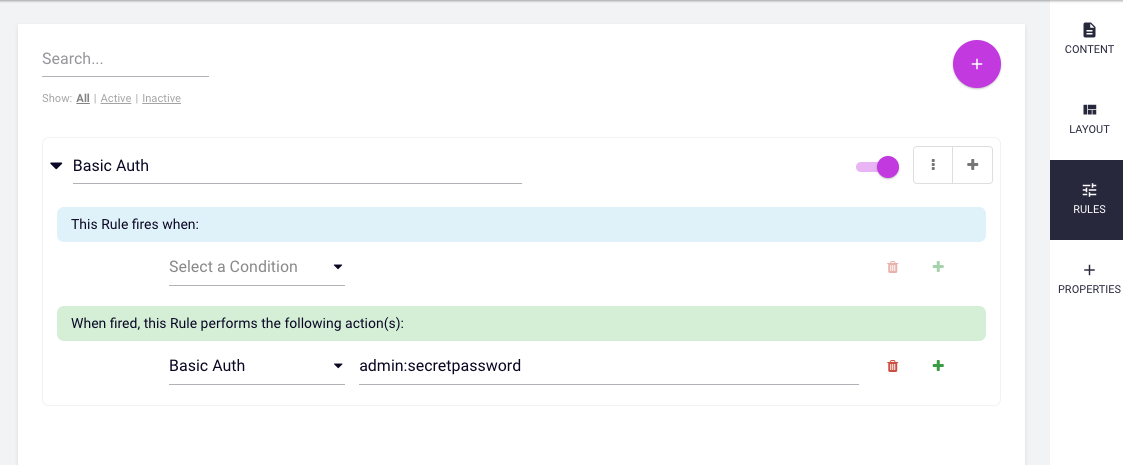
There are times when you just want to add a simple basic authenitcation to a page or subpages or a site. This plugin adds a rules engine actionlet that can provide basic authentication for front end pages and content. It takes one string as an arguement - the user name and password separated by a colon, e.g: username:password
To install all you need to do is build the JAR. to do this run
./gradlew jar
This will build two jars in the build/libs directory: a bundle fragment (in order to expose needed 3rd party libraries from dotCMS) and the plugin jar
-
To install this bundle:
Copy the bundle jar files inside the Felix OSGI container (dotCMS/felix/load).
OR
Upload the bundle jars files using the dotCMS UI (CMS Admin->Dynamic Plugins->Upload Plugin).
-
To uninstall this bundle:
Remove the bundle jars files from the Felix OSGI container (dotCMS/felix/load).
OR
Undeploy the bundle jars using the dotCMS UI (CMS Admin->Dynamic Plugins->Undeploy).
Once the plugin is installed, then :
- Go to the Rule Engine portlet
- Add or modify a rule - you do not need a condition
- Add this BasicAuth actionlet and type the
username:passwordas the parameter - Activate the rule