A lightweight (5.1kb) fully-typed wrapper over webgl2 with no dependenices.
You'll need to know WebGL concepts, but won't have to think about binding attribute pointers and uniforms. The main primitives are designed to be as flexible as possible, while abstracting away a lot of the boilerplate.
npm install gleasy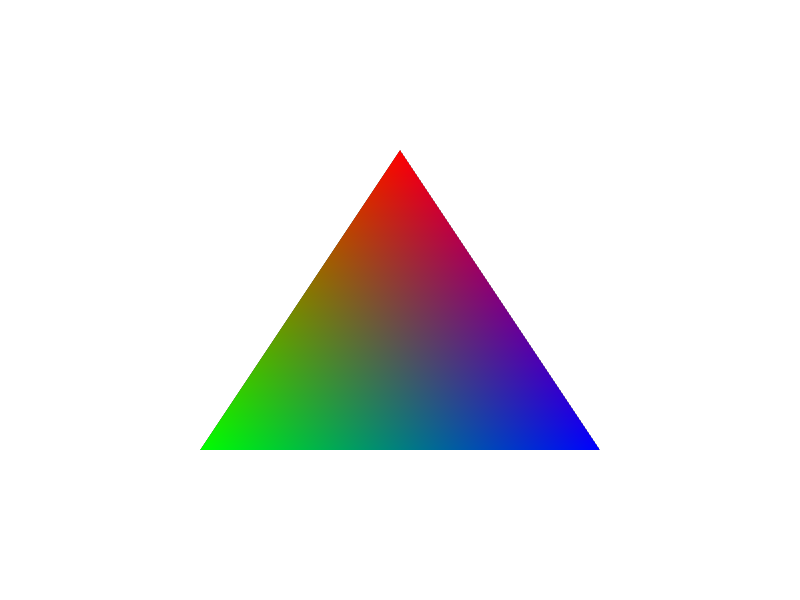
import { Shader, VertexBuffer, VAO, setGLViewport } from 'gleasy'

// get your canvas, gl context, and set the viewport size
const canvas = document.getElementById('canvas')
const gl = canvas.getContext('webgl2')
setGLViewport(gl, canvas)

// create your shader program
const vertex = `
   #version 300 es
   in vec3 aPosition;
   in vec3 aColor;
   out vec3 vColor;
   void main() {
      gl_Position = vec4(aPosition, 1.0);
      vColor = aColor;
   }
`
const frag = `
   #version 300 es
   precision highp float;
   in vec3 vColor;
   out vec4 outColor;
   void main() {
      outColor = vec4(vColor, 1.0);
   }
`

const shader = new Shader(gl, vertex, frag)

// triangle position and colour vertices
const buffer = new VertexBuffer(gl, [
    // xyz            // rgb
    0.0,  0.5, 0.0,   1.0, 0.0, 0.0,
   -0.5, -0.5, 0.0,   0.0, 1.0, 0.0,
    0.5, -0.5, 0.0,   0.0, 0.0, 1.0
])

// describe the vertex buffer layout
const vao = new VAO(gl, shader, {
   buffer,
   layout: {
      aPosition: { type: 'vec3' },
      aColor: { type: 'vec3' },
   }
})

// use the shader
shader.use()

// bind and draw the vertex array object
vao.bind()
vao.draw()
See the examples in examples/basic-usage.
Create a shader with fully-typed uniforms and setters.
In your vertex shader:
#version 300 es
uniform vec3 uPos;
uniform mat3 uTransformMatrix;
void main() {
   gl_Position = vec4(uTransformMatrix * uPos, 1.)
}
In your program:
// describe uniforms to get type hints
type Uniforms = {
   uPos: 'vec3'
   uTransformMatrix: 'mat3'
}

// set initial values
const shader = new Shader<Uniforms>(gl, vertexSrc, fragmentSrc, {
   uPos: [0, 0, 0],
   uTransformMatrix: [
      1, 0, 0,
      0, 1, 0,
      0, 0, 1
   ]
})

// update uniform values later
shader.uniforms.uTransformMatrix = [...transformMatrix]

// before the draw call
shader.use()Shaders support the full range of GL uniform types:
float vec2 vec3 vec4 int ivec2 ivec3 ivec4 uint uvec2 uvec3 uvec4 bool bvec2 bvec3 bvec4 mat2 mat3 mat4 mat2x3 mat2x4 mat3x2 mat3x4 mat4x2 mat4x3 sampler2D samplerCube
Example glsl:
#version 300 es
uniform float uTime;
uniform vec2 uPos;
uniform vec3 uColor;
uniform mat3 uMatrix;
uniform sampler2D uTex;
uniform samplerCube uCubeMap;
uniform vec3 uLightColors[4];
...more

// supports structs too
struct Light {
    vec3 position;
    vec3 color;
    float radius;
    float intensity;
};

// and arrays of structs
uniform Light uLight[4];
The type object passed into the Shader<UniformType>(...) also supports setting array lengths, e.g. float[], or with a specified length float[3]
type Uniforms {
   uTime: 'float'
   uPos: 'vec2'
   uColor: 'vec3'
   uMatrix: 'mat3'
   uTex: 'sampler2D'
   uCubeMap: 'samplerCube'
   uColorsArray: 'vec3[4]'
   uLights: Array<{
      pos: 'vec3'
      color: 'vec3'
      radius: 'float'
   }>
   ...
}

const shader = new Shader<Uniforms>(gl, vertex, fragment, {
   uTime, // number
   uPos, // number[2]
   uColor, // number[3]
   uMatrix, // number[9]
   uTex, uCubeMap// number
   uColorsArray, // number[12]

   // { pos: number[3], color: number[3], radius: number }[]
   uLights: [{ pos, color, radius }],
   ...
})Supports interleaved data and multiple buffers. You can use TypedArrays directly, or default to using Float32Array when a standard array is passed in.
import { VertexBuffer } from 'gleasy'

// interleaved float 32s
const vertices = new VertexBuffer(gl, Float32Array([
   // x,y,z         // r,g,b
   0.0,  0.5, 0.0,  1.0, 0.0, 0.0,
  -0.5, -0.5, 0.0,  0.0, 1.0, 0.0,
   0.5, -0.5, 0.0,  0.0, 0.0, 1.0
]))

// multiple buffers
const position = new VertexBuffer(gl, [
   0.0,  0.5, 0.0,
  -0.5, -0.5, 0.0,
   0.5, -0.5, 0.0,
])

const color = new VertexBuffer(gl, [
   1.0, 0.0, 0.0,
   0.0, 1.0, 0.0,
   0.0, 0.0, 1.0
])

// unsigned ints with Uint8Array
const id = new VertexBuffer(gl, new Uint8Array([
   0, 0, 0,
   1, 1, 1,
   2, 2, 2
]))
Other typed arrays can generally be used for integer types in your shader (uint, int, uvec3, ivec3, etc), or for using smaller data types when casting to normalized values:
Int8Array, Int16Array, Int32Array, Uint8Array, Uint16Array, Uint32Array, Uint8ClampedArray.
Describe your buffer layout to get automatic attribute binding from the shader program:
const vertices = new VertexBuffer(gl,[0,0,0, 1,0,0, ...])
const shader = new Shader(gl, vertex, fragment)

// describe the vertex attribute layout using the
// attribute names in your shader (e.g. aPosition, aColor)
const vao = new VAO(gl, shader, {
   buffer: vertices,
   layout: {
      aPosition: { type: 'vec3' },
      aColor: { type:'vec3' }
   }
})

// use the shader
shader.use()

// bind and draw the VAO
vao.bind()
vao.draw()
The layout definition supports attributes from separate buffers:
// set a separate buffer for each attribute
const vao = new VAO(gl, shader, {
   layout: {
      aPosition: { type: 'vec3', buffer: position },
      aColor: { type:'vec3', buffer: color }
   }
})
Attribute locations can be specified manually using layout(location = 0) in your shader program, and location: 0 in the attribute definition:
#version 300 es
layout(location = 0) in vec3 aPosition;
layout(location = 1) in vec3 aColor;
out vec3 vColor;
void main() {
   gl_Position = vec4(aPosition, 1.0);
   vColor = aColor;
}
// no need to pass in a shader
const vao = new VAO(gl, {
buffer: position, // default buffer
layout: [
{ type: 'vec3', location: 0 }, // default buffer, location 0
{ type: 'vec3', location: 1, buffer: color } // color buffer, location 1
]
})Integer values can be normalized with normalize: true:
// signed integers normalize to the -1 to 1 range
const position = new VertexBuffer(gl, new Int8Array([
	0, 127, 0,   -127, -127, 0,   127, -127, 0
]))

// unsigned integers normalize to 0–1
const color = new VertexBuffer(gl, new Uint8Array([
   255, 0, 0,   0, 255, 0,   0, 0, 255
]))

const vao = new VAO(gl, shader, {
   layout: {
      aPosition: { type: 'vec3', buffer: position, normalize: true },
      aColor: { type:'vec3', buffer: color, normalize: true }
   }
})
Use instancing with step:
const vao = new VAO(gl, shader, {
   layout: {
      // change position every vertex
      aPosition: { type: 'vec3', buffer: position },
      // advance colour every 3 instances
      aColor: { type:'vec3', buffer: color, step: 3 }
   }
})Indexes can be used to draw parts of your vertex buffers or reuse vertices multiple times in your geometry:
import { VertexIndex } from 'gleasy'

// create a vertex buffer
const vertices = new VertexBuffer(gl, array)

// create your index, only drawing the first 3 vertices (0, 1, 2)
const index = new VertexIndex(gl, new Uint16Array([0, 1, 2]))

shader.use()

// bind and draw the index
index.bind()
index.draw()
VertexIndex can also be used with typed arrays:
Uint8Array, Uint16Array, Uint32Array, Uint8ClampedArray.
A standard array type will default to a 16-bit unsigned int array (Uint16Array).
An index can also be saved in a VAO:
const vao = new VAO(gl, {
   index, // include an index
   buffer,
   layout: {
      aPos: { type: 'vec3' },
   }
})

// only need to bind the vao
vao.bind()
index.draw()Create a texture from an image:
import { Texture } from 'gleasy'
// create a texture from an image
// (making sure the image has already loaded)
const texture = new Texture(gl, image, {
   flip:true, // flip vertical
})

// bind to texture location 0
texture.bind(0)

// set texture location in uniform
type Uniforms = { tex: 'sampler2D' }
const shader = new Shader<Uniforms>(gl, vertex, fragment, { tex:0 })

shader.use()
vao.bind()
vao.draw()| Option | Default | Description |
|---|---|---|
flip |
false |
Flip the image vertically |
repeat |
false |
Repeat sampling |
repeatMirror |
false |
Repeat sampling but mirrored |
mipmaps |
false |
Generate and use mipmaps |
interpolate |
true |
Interpolate (nearest-neighbour filtering) |
interpolateMips |
true |
Interpolate between mipmap levels |
In the fragment shader:
#version 300 es
precision highp float;
uniform sampler2D tex;
in vec2 uv;
out vec4 fragColor;

void main() {
   fragColor = texture(tex, uv);
}
import { Texture, FrameBuffer } from 'gleasy'
// create a texture to use use as the framebuffer
const texture = new Texture(gl)
const frame = new FrameBuffer(gl, texture)

// render first pass into framebuffer
shader.use()
frame.bind()
vao.draw()

// unbind frame, render to canvas element
frame.unbind()

// render second pass, samping the framebuffer texture
shader2.use()
texture.bind(0)
quad.draw() The GL viewport should match the canvas, set this with:
import { setGLViewport } from 'gleasy'
const gl = canvas.getContext('webgl2')
setGLViewport(gl, canvas)Attribute layouts can also be described directly on the VertexBuffer and used in draw calls directly, if you don't want to use a VAO.
In your vertex shader:
layout(location=0) in vec3 aPosition;
layout(location=1) in vec3 aColor;
In your program:
const vertices = new VertexBuffer(gl, array)

// describe the vertex attribute layout
// using attribute locations
vertices.setLayout([
   { type: 'vec3', location: 0 },
   { type: 'vec3', location: 1 },
])

// create and use a shader
shader.use()

// explicit call to bind layout
vertices.bindLayout()

// draw directly from vertices
vertices.bind()
vertices.draw()- Fully typed uniform buffer objects and std140 layouts
- Transform buffers for use in simulations
- Shader includes
- Some fun examples
Open to contributions!