
Run any program or open any folder with TrustedInstaller privileges using the "Send to" context menu.
- Opens any file with its default associated program.
- Supports running executables (.exe), installers (.msi), batch files (.bat), registry files (.reg), etc.
- Supports shortcuts (.lnk) whose target is
cmd.exewith custom arguments. - Sending a folder to SendToTI opens it in Windows Explorer running as TrustedInstaller.
- Extract the downloaded archive.
- Right-click
install.batand select Run as administrator.
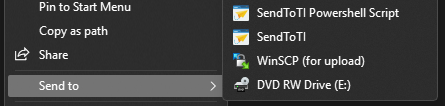
After installation, two entries will appear in the right-click "Send to" context menu for files and folders:
- SendToTI – Runs/elevates the selected item with TrustedInstaller privileges.
- SendToTI Powershell Script – Dedicated option for PowerShell scripts (.ps1 files).
- This tool relies on
wsudo.exeto acquire TrustedInstaller privileges. - By default,
SendToTI.exelooks forwsudo.exein the same directory. - If
wsudo.exeis deleted from the SendToTI folder,SendToTI.exewill automatically search forwsudo.exein directories listed in the system's PATH environment variable.
Running processes or opening Explorer as TrustedInstaller grants the highest level of system privileges in Windows. This can allow modifications to protected system files and may cause irreversible damage if misused (e.g., breaking Windows updates or stability). Use with extreme caution, only when necessary, and always back up important data first.