

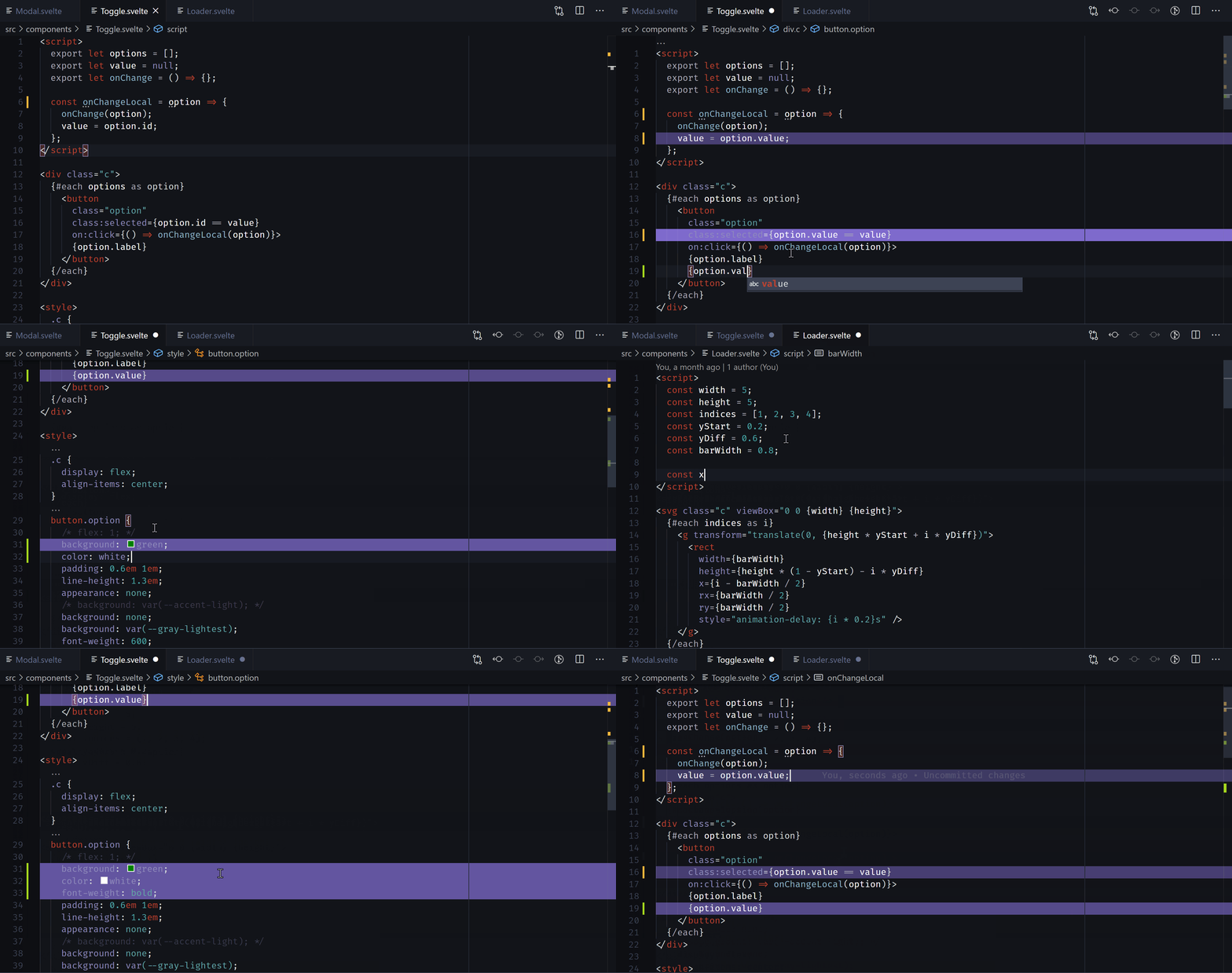
Keep your place when jumping between a different parts of your code. This is a VSCode extension that will highlight lines as you edit them, fading as you move away.
Jump between lines using ctrl+alt+left and ctrl+alt+right.
This extension allows the following settings:
-
footsteps.highlightColorDefault:
"rgb(153, 128, 250)"The color of the highlighted trail (in rgb format). I'd recommend keeping this subtle - black (
rgb(0, 0, 0)) if you have a dark theme and white (rgb(255, 255, 255)) if you have a light theme. -
footsteps.highlightColorMaxOpacityDefault:
0.4The maximum opacity for line highlights (
0-1) - higher number means a more opaque highlight. -
footsteps.doHighlightChangesDefault:
trueWhether or not to add line highlights. If this is
false, it will still allow navigation between chunks. -
footsteps.doHighlightOnClickDefault:
falseWhether or not to add highlights when you click on a line. This is useful if you want to store a place while navigating around the code.
-
footsteps.doHighlightCurrentlyFocusedChunkDefault:
falseWhether or not to highlight the actively focused chunk. It can be distracting to highlight the code you're actively working on, so this is off by default.
-
footsteps.doHighlightEmptyLinesDefault:
trueWhether or not to highlight changed lines that are empty. Some may find this distracting.
-
footsteps.doHighlightInactiveEditorsDefault:
falseWhether or not to highlight lines in inactive editors. For example, if you have two files open, and you're editing one, this will highlight the lines in the other file.
-
footsteps.maxNumberOfChangesToRememberDefault:
6The number of changes to save in history
-
footsteps.maxNumberOfChangesToHighlightDefault:
10The number of changes to highlight. A lower number drops off more quickly.
-
footsteps.minDistanceFromCursorToHighlightDefault:
3The minimum distance from the cursor to highlight a line. This is to prevent distracting highlights when you're actively working on a line.
-
footsteps.clearChangesOnFileSaveDefault: false
Whether or not to clear changes in a file when you save it.
This extension doesn't have any default commands, to prevent from clashing with your setup. Bind your own keybindings to these commands:
-
footsteps.skipBackSkip back in footsteps. Default:
ctrl+alt+left -
footsteps.skipForwardsSkip forwards in footsteps. Default:
ctrl+alt+right -
footsteps.skipBackSameFileSkip back in footsteps (stay in the same file)
-
footsteps.skipForwardsSameFileSkip forwards in footsteps (stay in the same file)
-
footsteps.skipBackDifferentFileSkip back in footsteps (skip between files)
-
footsteps.skipForwardsDifferentFileSkip forwards in footsteps (skip between files)
-
footsteps.clearChangesWithinFileClear all changes within file (useful when you've edited the whole file)
-
footsteps.onClearProjectChangesClear all changes within project
-
footsteps.toggleHighlightingLinesToggle the
footsteps.doHighlightChangessetting: whether or not we are highlighting lines
I'd love suggestions on how to improve the extension (feature requests) or code suggestions.
Licensed under the MIT License.