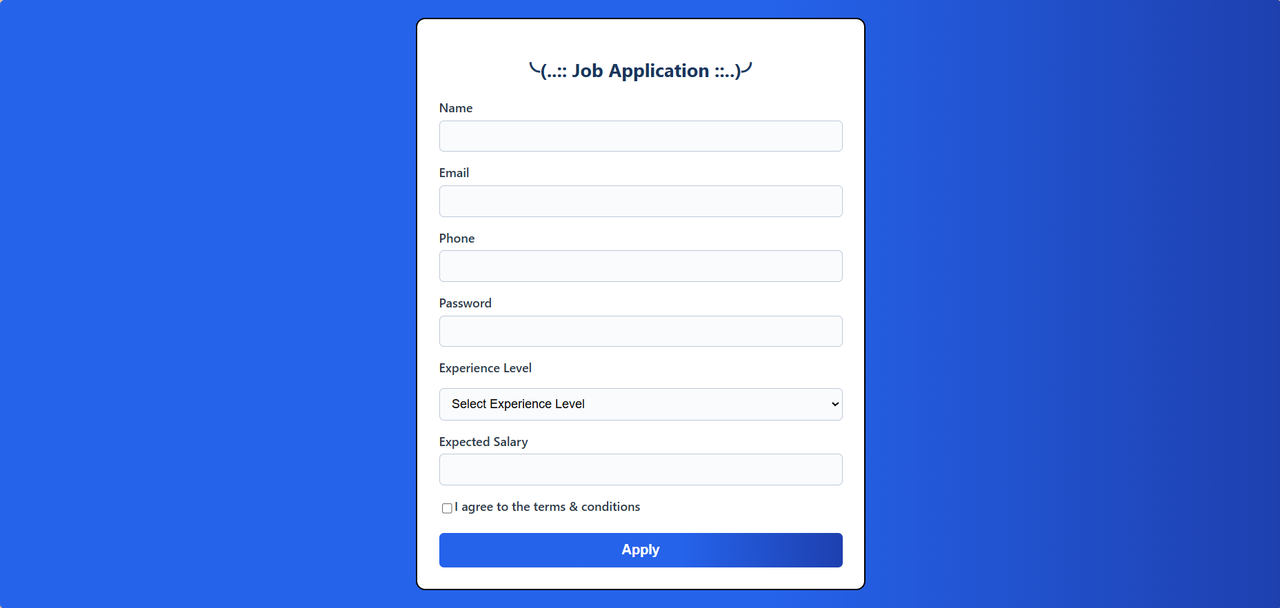
Create a job application form based on the provided sample design Include fields for:
- Name
- Phone
- Password (for account creation)
- Experience Level (dropdown)
- Expected Salary
- Terms & conditions checkbox
- Include styles for focus states and validation feedback
- Create classes for highlighting focused fields and validation states
- Use a professional color scheme suitable for job applications
- Style the form attractively with a professional theme
- All fields must be filled
- Name: Minimum 3 letters
- Email: Must be a valid email format
- Phone: Exactly 11 digits
- Password: Must contain at least one uppercase, one lowercase, one digit
- Experience Level: Must select one option from dropdown
- Entry Level (0-2 years)
- Mid Level (3-5 years)
- Senior Level (6-10 years)
- Executive (10+ years)
- Expected Salary: Must be a positive number
- Show validation errors using
alert()events
- Focus Highlighting: Use
addEventListenerto add a CSS class that highlights the focused input field with a distinct border color or background - Real-time Validation Feedback: Use
addEventListenerto add/remove CSS classes that show validation status (valid/invalid) as the user types. Highlight in red if a field has errors and doesn't pass validation.
Mid Lab Task 3/
├── View/
│   └── task_3_form.html
├── CSS/
│   └── task_3_style.css
└── JS/
    └── task_3_valid.js
- Name: At least 3 characters, letters only
- Email: Valid email format
- Phone: Exactly 11 digits
- Password: At least 8 characters with uppercase, lowercase, and digit
- Experience Level: One option must be selected
- Expected Salary: Must be a positive number
- Terms & Conditions: Must be checked
2 hours
- Push your completed work to GitHub
- Create a new repository named 'WT Lab Task 3'
- Show all git commands from repo initialization to pushing
Main Form View
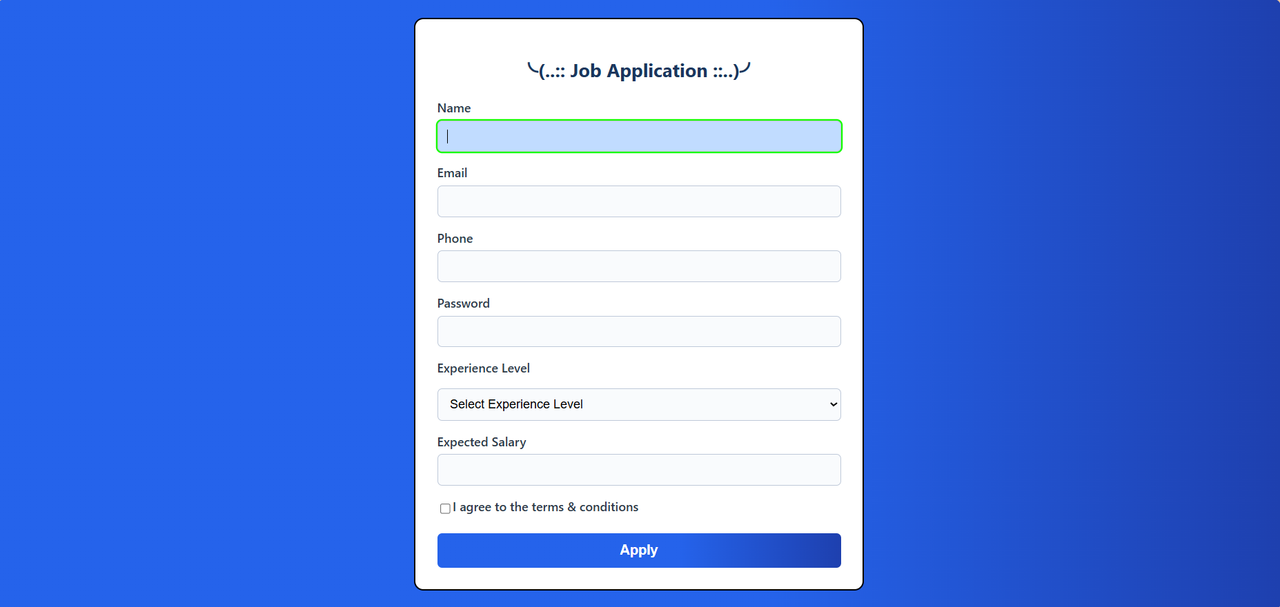
Focus Highlighting
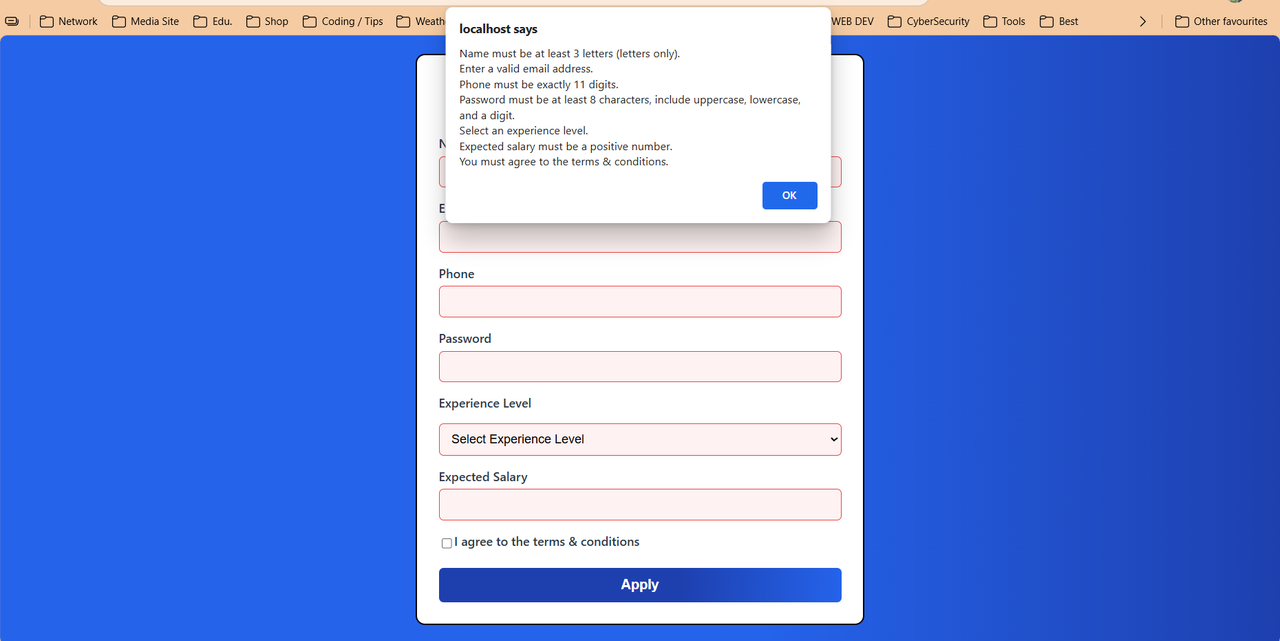
Validation Failed States
This project implements a comprehensive job application form with advanced JavaScript validation, real-time feedback, and professional styling. The form includes client-side validation, focus highlighting, and dynamic UI feedback to enhance user experience.
- ✅ Name input field
- ✅ Email input field
- ✅ Phone number input field
- ✅ Password input field (for account creation)
- ✅ Experience Level dropdown with 4 options
- ✅ Expected Salary input field
- ✅ Terms & Conditions checkbox
- ✅ Professional styling and layout
- ✅ Professional color scheme suitable for job applications
- ✅ Focus state highlighting with distinct visual feedback
- ✅ Validation state classes (valid/invalid)
- ✅ Responsive form container with gradient background
- ✅ Modern border-radius and shadow effects
- ✅ Hover effects on submit button
- ✅ Name: Minimum 3 characters, letters and spaces only
- ✅ Email: Valid email format validation
- ✅ Phone: Exactly 11 digits
- ✅ Password: Minimum 8 characters with uppercase, lowercase, and digit
- ✅ Experience Level: Must select one option from dropdown
- ✅ Expected Salary: Must be a positive number
- ✅ Terms & Conditions: Must be checked
- ✅ Real-time validation feedback as user types
- ✅ Form submission validation with alert messages
- ✅ Focus highlighting using
addEventListener - ✅ Real-time validation feedback with CSS class manipulation
- ✅ Dynamic border colors and backgrounds for validation states
- ✅ Event-driven validation on input, change, and submit events
MID_LAB/
├── View/
│   └── task_3_form.html     # Main HTML form
├── CSS/
│   └── task_3_style.css     # Styling and validation classes
├── JS/
│   └── task_3_valid.js      # Validation logic and DOM manipulation
└── README.md                # Project documentation
- Real-time validation: Provides immediate feedback as users type
- Pattern matching: Uses regex for robust input validation
- Visual feedback: Color-coded validation states (green for valid, red for invalid)
- Error accumulation: Collects all validation errors for comprehensive feedback
- Focus highlighting: Focused fields get distinctive styling
- Professional design: Modern gradient backgrounds and clean typography
- Responsive layout: Form adapts to different screen sizes
- Intuitive feedback: Clear visual indicators for form state
- Event-driven architecture: Uses addEventListener for all interactions
- Modular validation: Separate validation functions for each field
- CSS class manipulation: Dynamic styling based on validation state
- Form submission handling: Prevents submission with validation errors
- Primary: Blue gradient (#2563eb to #1e40af)
- Success: Green (#10b981) for valid inputs
- Error: Red (#ef4444) for invalid inputs
- Focus: Bright green (#15ff00) for focused fields
- Background: White (#fff) form container on gradient background
- Font Family: Segoe UI for modern, clean appearance
- Responsive sizing: Appropriate font sizes for different elements
- Color hierarchy: Dark colors for primary text, blue for headings
// Name: Letters and spaces, minimum 3 characters
/^[A-Za-z ]{3,}$/

// Email: Standard email format
/^[\w.-]+@[\w-]+\.[A-Za-z]{2,}$/

// Phone: Exactly 11 digits
/^\d{11}$/

// Password: 8+ chars with uppercase, lowercase, and digit
/^(?=.*[a-z])(?=.*[A-Z])(?=.*\d).{8,}$/- Entry Level (0-2 years)
- Mid Level (3-5 years)
- Senior Level (6-10 years)
- Executive (10+ years)
- Modern web browser (Chrome, Firefox, Safari, Edge)
- Basic understanding of HTML, CSS, and JavaScript
-
Clone the repository
git clone https://github.com/SagarBiswas-MultiHAT/WT_MID_LAB.git cd WT_MID_LAB -
Open the project
- Navigate to the project directory
- Open
View/task_3_form.htmlin your web browser - Or use a local server for best results
-
For development with local server
# Using Python
python -m http.server 8000

# Using Node.js
npx serve .

# Using PHP (if using XAMPP)
# Place in htdocs folder and access via localhost
-
Fill out the form fields:
- Enter your full name (minimum 3 letters)
- Provide a valid email address
- Enter an 11-digit phone number
- Create a secure password (8+ chars with mixed case and numbers)
- Select your experience level from dropdown
- Enter expected salary (positive number)
- Check the terms & conditions checkbox
-
Real-time feedback:
- Fields turn green when valid
- Fields turn red when invalid
- Focused fields have distinctive highlighting
-
Form submission:
- Click "Apply" to submit
- Any validation errors will be displayed in an alert
- All fields must be valid to submit successfully
-
Name Validation
- ✅ Valid: "John Doe", "Alice Smith"
- ❌ Invalid: "Jo", "123", "John123"
-
Email Validation
- ✅ Valid: "user@domain.com", "test.email@company.org"
- ❌ Invalid: "invalid-email", "user@", "@domain.com"
-
Phone Validation
- ✅ Valid: "01234567890"
- ❌ Invalid: "123456789", "12345678901", "abc1234567"
-
Password Validation
- ✅ Valid: "Password123", "SecurePass1"
- ❌ Invalid: "password", "PASSWORD", "Pass123"
- ✅ HTML form creation with various input types
- ✅ CSS styling with focus states and validation feedback
- ✅ JavaScript event handling and DOM manipulation
- ✅ Regular expression pattern matching
- ✅ Real-time form validation
- ✅ User experience design principles
- ✅ Professional web development practices
# Initialize repository
git init

# Add all files
git add .

# Initial commit
git commit -m "Initial commit: Job application form with validation"

# Add remote origin
git remote add origin https://github.com/SagarBiswas-MultiHAT/WT_MID_LAB.git

# Push to GitHub
git push -u origin main# Check status
git status
# Add changes
git add .
# Commit changes
git commit -m "Add feature: real-time validation feedback"
# Push changes
git push origin main- Clean code structure: Well-organized and commented
- Separation of concerns: HTML, CSS, and JS in separate files
- Reusable functions: Modular validation functions
- Event-driven design: Proper event listener implementation
- Error handling: Comprehensive validation error collection
- Add password strength indicator
- Implement file upload for resume
- Add form progress indicator
- Include accessibility improvements (ARIA labels)
- Add animation transitions for validation states
- Implement form data persistence with localStorage
Sagar Biswas
- GitHub: @SagarBiswas-MultiHAT
- Repository: WT_MID_LAB
- Course: Web Technology
- Lab: Mid Lab Task 3
- Time Allocated: 2 hours
- Completion Status: ✅ Completed
- Key Milestones:
- HTML form structure: ✅
- CSS styling and validation classes: ✅
- JavaScript validation logic: ✅
- Real-time feedback implementation: ✅
- Testing and refinement: ✅
This project is created for educational purposes as part of the Web Technology course curriculum.