




中文 README · About · Getting Started · Result Objects · API Response Cookbook · Architecture · Examples Showcase · Public API · Locale Policy · Changelog · Migration Notes
ExcelAlchemy is a schema-driven Python library for Excel import and export workflows. It turns Pydantic models into typed workbook contracts: generate templates, validate uploads, map failures back to rows and cells, and produce locale-aware result workbooks.
This repository is also a design artifact.
It documents a series of deliberate engineering choices: src/ layout, Pydantic v2 migration, pandas removal,
pluggable storage, uv-based workflows, and locale-aware workbook output.
The current stable release is 2.2.7, which continues the ExcelAlchemy 2.x line with stronger API-facing result payloads, a more complete FastAPI reference app, harder install-time smoke verification, and more consistent codec diagnostics.
- Build Excel templates directly from typed Pydantic schemas
- Validate uploaded workbooks and write failures back to rows and cells
- Keep storage pluggable through
ExcelStorage - Render workbook-facing text in
zh-CNoren - Stay lightweight at runtime with
openpyxlinstead of pandas - Protect behavior with contract tests,
ruff, andpyright
| Template | Import Result |
|---|---|
 |
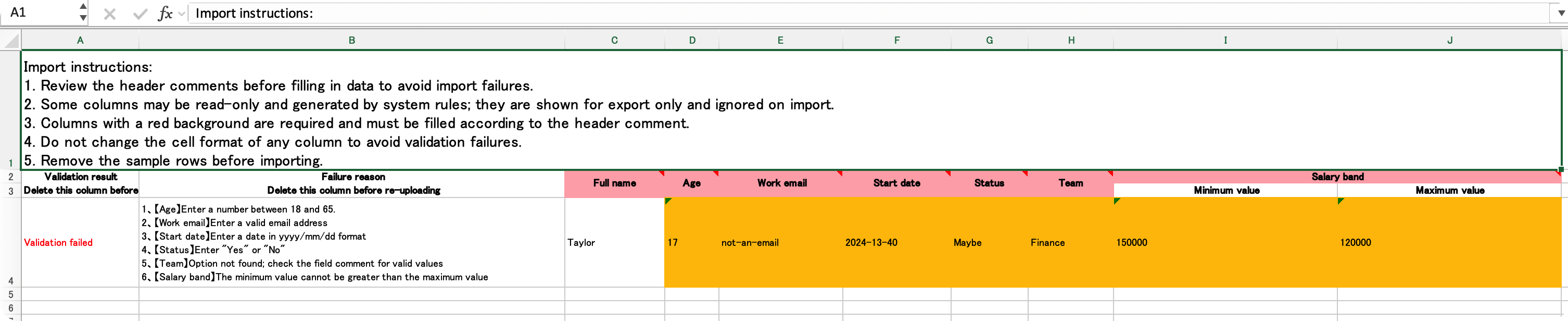 |
from pydantic import BaseModel

from excelalchemy import ExcelAlchemy, FieldMeta, ImporterConfig, Number, String


class Importer(BaseModel):
    age: Number = FieldMeta(label='Age', order=1)
    name: String = FieldMeta(label='Name', order=2)


alchemy = ExcelAlchemy(ImporterConfig(Importer, locale='en'))
template = alchemy.download_template_artifact(filename='people-template.xlsx')

excel_bytes = template.as_bytes()
template_data_url = template.as_data_url() # compatibility path for older browser integrationsfrom typing import Annotated
from pydantic import BaseModel, Field
from excelalchemy import Email, ExcelAlchemy, ExcelMeta, ImporterConfig
class Importer(BaseModel):
email: Annotated[
Email,
Field(min_length=10),
ExcelMeta(label='Email', order=1, hint='Use your work email'),
]
alchemy = ExcelAlchemy(ImporterConfig(Importer, locale='en'))
template = alchemy.download_template_artifact(filename='people-template.xlsx')For browser downloads, prefer template.as_bytes() with a Blob, or return the bytes from your backend with
Content-Disposition: attachment. A top-level navigation to a long data: URL is less reliable in modern browsers.
- A library for building Excel workflows from typed schemas.
- A reference implementation of “facade outside, focused components inside”.
- A portfolio project that emphasizes architecture, migration strategy, and maintainability.
- Not a general spreadsheet analysis library.
- Not a pandas-first data wrangling tool.
- Not a GUI spreadsheet editor.
- Not a fully generic forms framework.
Many internal systems still receive business data through Excel. The painful part is rarely “reading a file”; it is keeping templates, validation rules, row-level error reporting, and backend integration consistent across projects.
ExcelAlchemy treats Excel as a typed contract:
- the model defines the shape
- field metadata defines the workbook experience
- import execution is separated from parsing
- storage is an interchangeable strategy, not a hard-coded implementation
ExcelAlchemy exposes a small public surface and delegates the real work to internal components.
flowchart TD
    A[ExcelAlchemy Facade]
    A --> B[ExcelSchemaLayout]
    A --> C[ExcelHeaderParser / Validator]
    A --> D[RowAggregator]
    A --> E[ImportExecutor]
    A --> F[ExcelRenderer / writer.py]
    A --> G[ExcelStorage Protocol]

    G --> H[MinioStorageGateway]
    G --> I[Custom Storage]

    B --> J[FieldMeta / FieldMetaInfo]
    E --> K[Pydantic Adapter]
    F --> L[i18n Display Messages]
    E --> M[Runtime Error Messages]
See the full breakdown in docs/architecture.md.
flowchart LR
    A[Pydantic model + FieldMeta] --> B[ExcelAlchemy facade]
    B --> C[Template rendering]
    B --> D[Worksheet parsing]
    D --> E[Header validation]
    D --> F[Row aggregation]
    F --> G[Import executor]
    G --> H[Import result workbook]
    C --> I[Workbook for users]
    H --> I
This repository is guided by explicit design principles rather than accidental convenience. The full mapping is in ABOUT.md; the short version is:
- Schema first.
- Explicit metadata over implicit conventions.
- Composition over monoliths.
- Adapters at integration boundaries.
- Protocols over concrete backends.
- Progressive modernization over one-shot rewrites.
- Runtime simplicity over hidden magic.
- User-facing clarity over clever internals.
- Tests should protect behavior, not implementation accidents.
- Migration-friendly seams are part of the design.
pip install ExcelAlchemyIf you want the built-in Minio backend:
pip install "ExcelAlchemy[minio]"Practical examples live in the repository:
examples/annotated_schema.pyexamples/employee_import_workflow.pyexamples/create_or_update_import.pyexamples/date_and_range_fields.pyexamples/selection_fields.pyexamples/custom_storage.pyexamples/export_workflow.pyexamples/minio_storage.pyexamples/fastapi_upload.pyexamples/fastapi_reference/README.mdexamples/README.md
If you want the recommended reading order, start with
examples/README.md.
If you want a single page that combines screenshots, representative workflows,
and captured outputs, see
docs/examples-showcase.md.
Selected fixed outputs from the examples are generated by
scripts/generate_example_output_assets.py.
Import workflow output:
Employee import workflow completed
Result: SUCCESS
Success rows: 1
Failed rows: 0
Result workbook URL: None
Created rows: 1
Uploaded artifacts: []
Export workflow output:
Export workflow completed
Artifact filename: employees-export.xlsx
Artifact bytes: 6893
Upload URL: memory://employees-export-upload.xlsx
Uploaded objects: ['employees-export-upload.xlsx']
Full captured outputs:
files/example-outputs/employee-import-workflow.txtfiles/example-outputs/create-or-update-import.txtfiles/example-outputs/export-workflow.txtfiles/example-outputs/date-and-range-fields.txtfiles/example-outputs/selection-fields.txtfiles/example-outputs/custom-storage.txtfiles/example-outputs/annotated-schema.txtfiles/example-outputs/fastapi-reference.txt
If you want to know which modules are stable public entry points versus
compatibility shims or internal modules, see
docs/public-api.md.
When you inspect import-run state from the facade, prefer the clearer 2.2 names:
alchemy.worksheet_tablealchemy.header_tablealchemy.cell_error_mapalchemy.row_error_map
The older aliases:
alchemy.dfalchemy.header_dfalchemy.cell_errorsalchemy.row_errors
still work in the 2.x line as compatibility paths, but new application code should use the clearer names above.
Import failures are now easier to inspect programmatically.
alchemy.cell_error_mapalchemy.row_error_map
Both containers remain dict-like for 2.x compatibility, but they also expose clearer helper methods for application code and API handlers:
at(...)messages_at(...)messages_for_row(...)numbered_messages_for_row(...)flatten()to_dict()to_api_payload()
This makes it easier to:
- build frontend-friendly validation responses
- render row-level and cell-level failure summaries
- keep workbook feedback and API feedback aligned
Common field types also provide more business-oriented validation wording. For example:
- date fields now mention the expected date format
- date range and number range fields now mention the expected combined input
- email, phone number, and URL fields now include example formats
- selection, organization, and staff fields now mention that values must come from the configured options
locale affects workbook-facing display text such as:
- header hint text
- column comments
- result workbook column titles
- row validation status labels
The public locale policy is documented in docs/locale.md. In short:
- runtime exceptions are standardized in English
- workbook display locales currently support
zh-CNanden - workbook display defaults to
zh-CNfor the 2.x line
from excelalchemy import ExcelAlchemy, FieldMeta, ImporterConfig, Number, String
from pydantic import BaseModel


class Importer(BaseModel):
    age: Number = FieldMeta(label='Age', order=1)
    name: String = FieldMeta(label='Name', order=2)


zh_template = ExcelAlchemy(ImporterConfig(Importer, locale='zh-CN')).download_template_artifact()
en_template = ExcelAlchemy(ImporterConfig(Importer, locale='en')).download_template_artifact()
The same locale also controls import result workbooks:
alchemy = ExcelAlchemy(
    ImporterConfig(
        Importer,
        creator=create_func,
        storage=storage,
        locale='en',
    )
)
result = await alchemy.import_data("people.xlsx", "people-result.xlsx")
Storage is modeled as a protocol, not a product decision.
from excelalchemy import ExcelAlchemy, ExcelStorage, ExporterConfig, UrlStr
from excelalchemy.core.table import WorksheetTable


class InMemoryExcelStorage(ExcelStorage):
    def read_excel_table(self, input_excel_name: str, *, skiprows: int, sheet_name: str) -> WorksheetTable:
        ...

    def upload_excel(self, output_name: str, content_with_prefix: str) -> UrlStr:
        ...


alchemy = ExcelAlchemy(ExporterConfig(Importer, storage=InMemoryExcelStorage()))
Use the built-in Minio implementation when you want it, but the library no longer requires Minio to define its architecture.
ExcelAlchemy uses openpyxl plus an internal WorksheetTable abstraction.
WorksheetTable is intentionally narrow and only models the operations the core
workflow needs; it is not a pandas-compatible public table layer.
The project was not using pandas for analysis, joins, or vectorized computation; it was mostly using it as a transport layer.
Removing pandas:
- simplified installation
- removed the
numpydependency chain - made behavior more explicit
- better aligned the code with the actual problem domain
The project used to lean on Pydantic internals more directly. That becomes fragile during major-version upgrades. Now the design is:
FieldMetaowns Excel metadata- the Pydantic adapter reads model structure
- the adapter does not own the domain semantics
This is what made the Pydantic v2 migration practical without rewriting the public API.
The public object should stay small.
The internal object graph can evolve.
ExcelAlchemy is the facade; parsing, rendering, execution, storage, and schema layout are delegated to separate collaborators.
Excel workflows should not be locked to Minio, S3, or any one persistence strategy.
ExcelStorage keeps the boundary stable while allowing object storage, local filesystem adapters, in-memory test doubles,
and custom infrastructure integrations to share the same import/export contract.
This repository intentionally records its evolution:
src/layout migration- CI and release modernization
- Pydantic metadata decoupling
- Pydantic v2 migration
- Python 3.12-3.14 modernization
- internal architecture split
- pandas removal
- storage abstraction
- i18n foundation and locale-aware workbook text
These are not incidental refactors; they are the story of the codebase. See ABOUT.md for the migration rationale behind each step.
The short version:
| Topic | v1-style risk | Current v2 design |
|---|---|---|
| Field access | Tight coupling to __fields__ / ModelField |
Adapter over model_fields |
| Metadata ownership | Excel metadata mixed with validation internals | FieldMetaInfo is a compatibility facade over layered Excel metadata |
| Validation integration | Deep reliance on internals | Adapter + explicit runtime validation |
| Upgrade path | Brittle | Layered |
More detail is documented in ABOUT.md.
- README.md: product + design overview
- README_cn.md: Chinese usage-oriented guide
- ABOUT.md: engineering rationale and evolution notes
- docs/architecture.md: component map and boundaries
The project uses uv for local development and CI.
uv sync --extra development
uv run pre-commit install
uv run ruff check .
uv run pyright
uv run pytest --cov=excelalchemy --cov-report=term-missing:skip-covered tests
uv buildMIT. See LICENSE.