


q3dweb is a lightweight 3D point cloud viewer for the browser and VS Code. It is designed to make point cloud data easy to view, share, and inspect without a heavy desktop setup.
It is a WebGL (Three.js) port of q3dviewer.
- Runs directly in the browser with no dedicated viewer install.
- Also works as a VS Code extension.
- Supports three viewer modes:
cloud_viewer,film_maker, andrealtime_viewer. - Accepts URL query parameters for remote point clouds and realtime ROS configuration.
- Automatically down-samples very large point clouds to fit the available memory budget.
- Supports mouse, keyboard, and mobile touch controls.
- Can overlay georeferenced LAS and LAZ data on map tiles.
- PCD
- PLY
- LAS
- LAZ
- E57
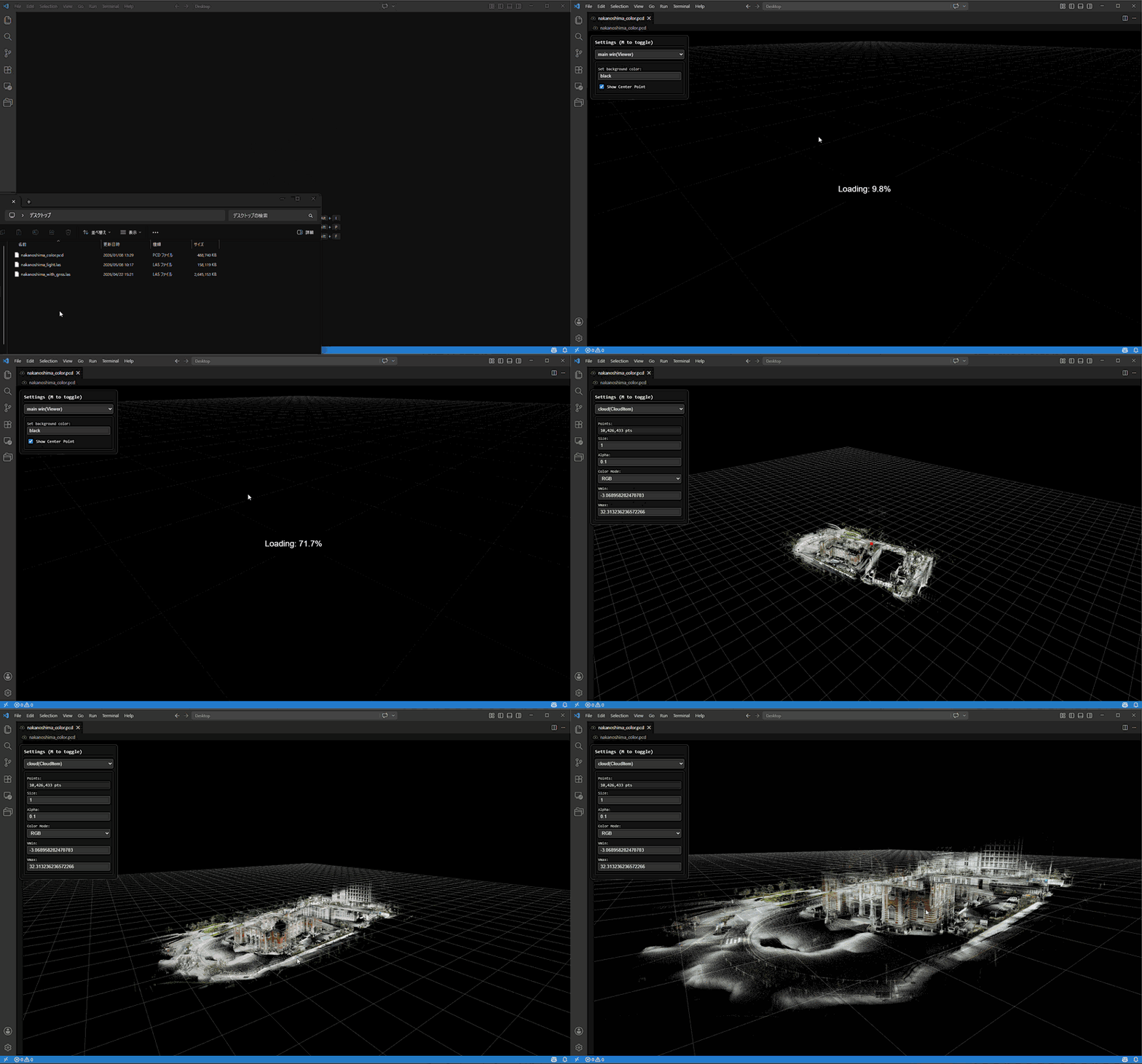
Open the URL below in a browser.
https://Panasonic-Advanced-Technology.github.io/q3dweb
The default mode is cloud_viewer. You can also open a specific viewer mode directly with the mode query parameter.
https://Panasonic-Advanced-Technology.github.io/q3dweb/?mode=cloud
https://Panasonic-Advanced-Technology.github.io/q3dweb/?mode=film_maker
https://Panasonic-Advanced-Technology.github.io/q3dweb/?mode=realtime
- Search for
q3dviewerin the VS Code Extensions view and install it.

- Open a supported point cloud file in VS Code and q3dweb will launch.
- Use the
Viewer Modeselector at the top of the settings panel to switch betweencloud_viewer,film_maker, andrealtime_viewer.
The settings panel starts with a Viewer Mode selector.
| UI Label | URL mode value |
Purpose |
|---|---|---|
cloud_viewer |
cloud |
Open local or remote point cloud files and inspect them interactively. |
film_maker |
film_maker |
Create key frames, preview camera motion, and export recordings. |
realtime_viewer |
realtime |
Subscribe to ROS data through rosbridge and render PointCloud2 streams in realtime. |
After you load a point cloud, you can inspect it with the mouse and keyboard.
| Input | Action |
|---|---|
| Right drag | Rotate |
| Left drag | Pan |
| Mouse wheel | Zoom |
| W / A / S / D / Z / X | Move the camera |
| Ctrl + Left Click | Measure the distance between two points |
| Ctrl + Right Click | Reset measurement points |
| M | Toggle the settings menu |
Space (film_maker mode) |
Add a key frame from the current camera position |
Delete (film_maker mode) |
Delete the current key frame |
| Input | Action |
|---|---|
| One-finger drag | Pan |
| Two-finger pinch | Zoom |
| Two-finger vertical parallel drag | Pitch rotation |
| Two-finger twist | Yaw rotation |
On primary touch devices, distance measurement shortcuts are disabled so touch gestures can be used without conflicts.
cloud_viewer is the default mode. You can:
- Drag and drop
.pcd,.ply,.las,.laz, or.e57files. - Open a remote point cloud by URL.
- Tune point rendering from the settings panel or URL parameters.
- Let q3dweb automatically down-sample very large files when needed.
Use ?mode=cloud with any of the parameters below. Canonical names are shown here; several compatibility aliases are also accepted.
| Parameter | Meaning |
|---|---|
cloudUrl |
Remote point cloud URL. Accepts .pcd, .ply, .las, .laz, or .e57. |
filename |
Optional filename hint when the URL does not end with a supported extension. |
maxPoints |
Optional visual point budget. |
pointSize |
Point size. |
pointType |
PIXEL, SQUARE, or SPHERE (case-insensitive aliases such as pixel, square, sphere also work). |
alpha |
Point opacity in the range 0.0 to 1.0. |
colorMode |
I, RGB, or FLAT (aliases such as intensity, rgb, flat also work). |
vmin / vmax |
Intensity range used by intensity color mode. |
backgroundColor |
Background color, for example #0b1020. |
showCenter |
Whether to show the red orbit center marker. Accepts true / false, 1 / 0, yes / no, on / off. |
Example:
https://Panasonic-Advanced-Technology.github.io/q3dweb/?mode=cloud&cloudUrl=https://example.com/sample.laz&filename=sample.laz&pointType=sphere&pointSize=3&colorMode=rgb&backgroundColor=%230b1020&showCenter=false
If a LAS or LAZ file includes coordinate reference system information, q3dweb can read it and overlay the point cloud on map tiles.
The following map sources are available by default.
- OpenStreetMap
- GSI Standard Map
- GSI Pale Map
- GSI Seamless Aerial Photo
- GSI Blank Map

realtime_viewer connects to a rosbridge WebSocket and consumes:
sensor_msgs/PointCloud2for the live point cloud topicnav_msgs/Odometryfor the odometry topic
To use it interactively:
- Switch
Viewer Modetorealtime_viewer. - Enter the ROS Bridge URL, Cloud Topic, Odom Topic, and point budgets.
- Click
Connect.
You can also configure it entirely from the URL.
Use ?mode=realtime with the following parameters.
| Parameter | Meaning |
|---|---|
ros |
rosbridge WebSocket URL such as ws://localhost:9090 or wss://robot.example.com/rosbridge. |
cloudTopic |
PointCloud2 topic name. |
odomTopic |
Odometry topic name. |
maxPointsPerScan |
Max decoded points kept from each scan. |
maxAccumulatedPoints |
Max accumulated points kept in the map. |
Canonical parameter names are shown above. q3dweb also accepts aliases such as rosbridgeUrl, topic, odom, scanPoints, and maxPoints.
Example:
https://Panasonic-Advanced-Technology.github.io/q3dweb/?mode=realtime&ros=ws://localhost:9090&cloudTopic=/cloud_registered&odomTopic=/odometry&maxPointsPerScan=3200&maxAccumulatedPoints=1200000
If you open q3dweb from an https:// origin, most browsers require a secure WebSocket endpoint (wss://).
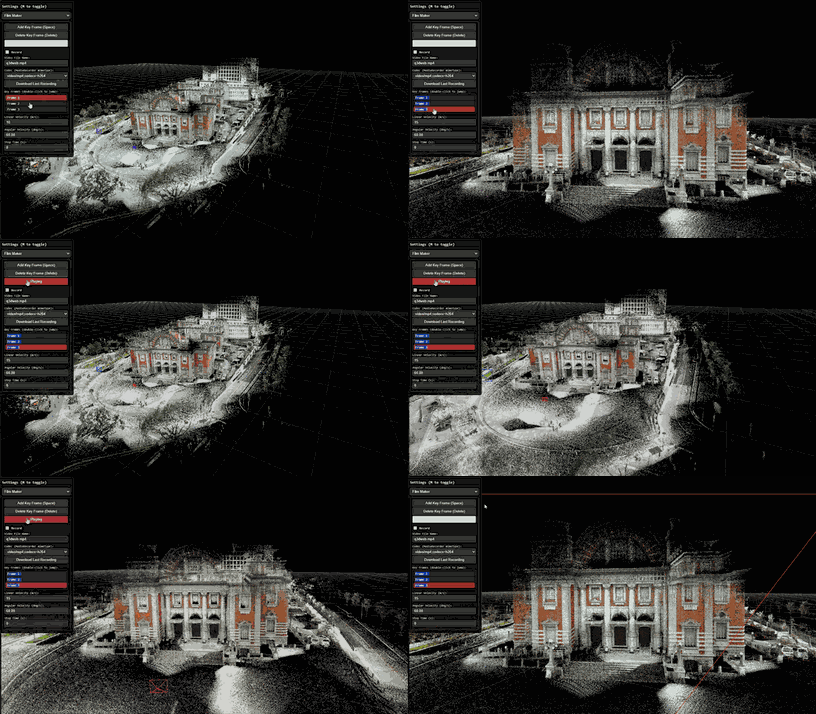
q3dweb also includes a Film Maker workflow for creating camera fly-throughs. Switch Viewer Mode to film_maker, save camera positions as key frames, and preview the interpolated camera motion.
You can then record and download the playback as a video file. The default setting targets MP4/H.264 when the browser supports it and otherwise falls back to another MediaRecorder-compatible format.
You can measure distance by holding Control and left-clicking.
If you click multiple times, you can also measure the total length.
Press Control and right-click to undo.

q3dweb is published on GitHub under the MIT License. You can freely inspect, modify, and build it locally.
If you want to work on it locally, install the required packages and build it with the commands below.
git clone https://github.com/Panasonic-Advanced-Technology/q3dweb.git
cd q3dweb
npm install
cd extension && npm install && cd ..# Start the dev server
npm run dev
# Build a production bundle
npm run build
# Preview the production bundle locally
npm run preview -- --host 127.0.0.1 --port 4173# Build the extension (viewer build + extension compile)
npm run build:extension
# Create a VSIX package
npm run package:extension# Unit tests
npm run test:unit:ci
# End-to-end tests
npm run test:e2e:ciOnce the VSIX package is generated, choose Install from VSIX in the VS Code Extensions view and select the generated file.
q3dweb is an ongoing effort to bring the strengths of q3dviewer to the browser and VS Code. The goal is to make point cloud viewing easier to distribute, easier to share, and easier to try.
The project is still evolving, but it is already useful for everyday inspection of point cloud data. Feedback and feature requests are welcome.
- Source code
- Documentation
This project is released under the MIT License.
For the list of third-party libraries and external services used by this project, see THIRD_PARTY_NOTICES.md.
In particular, viewers that display map tiles require the following attributions.
- OpenStreetMap tiles: © OpenStreetMap contributors (License)
- GSI tiles: Source: GSI Tiles (GSI Maps) (Terms of use)
The bundled laz-perf WASM module for LAZ decoding is distributed under the Apache License 2.0. See THIRD_PARTY_NOTICES.md for details.