Black-box network analysis from PCAP captures — no prior knowledge of the network required
Features • Quick Start • Usage • Documentation


TracePcap is a self-hosted PCAP analysis workbench designed for situations where you work from the traffic itself — with no prior knowledge of the network. Upload one or more PCAP captures and the tool characterises devices, maps topology, reconstructs sessions, tracks changes over time, and generates AI-powered narratives — all derived purely from observed traffic.
This makes it well-suited for:
- Network audits and third-party assessments — handed a PCAP with no documentation; build the picture from scratch
- Incident response — incomplete network records; reconstruct what happened from packet evidence
- Penetration test reconnaissance — map an unknown or scarcely-documented network from captured traffic
- Research and education — explore any capture without needing context about the environment
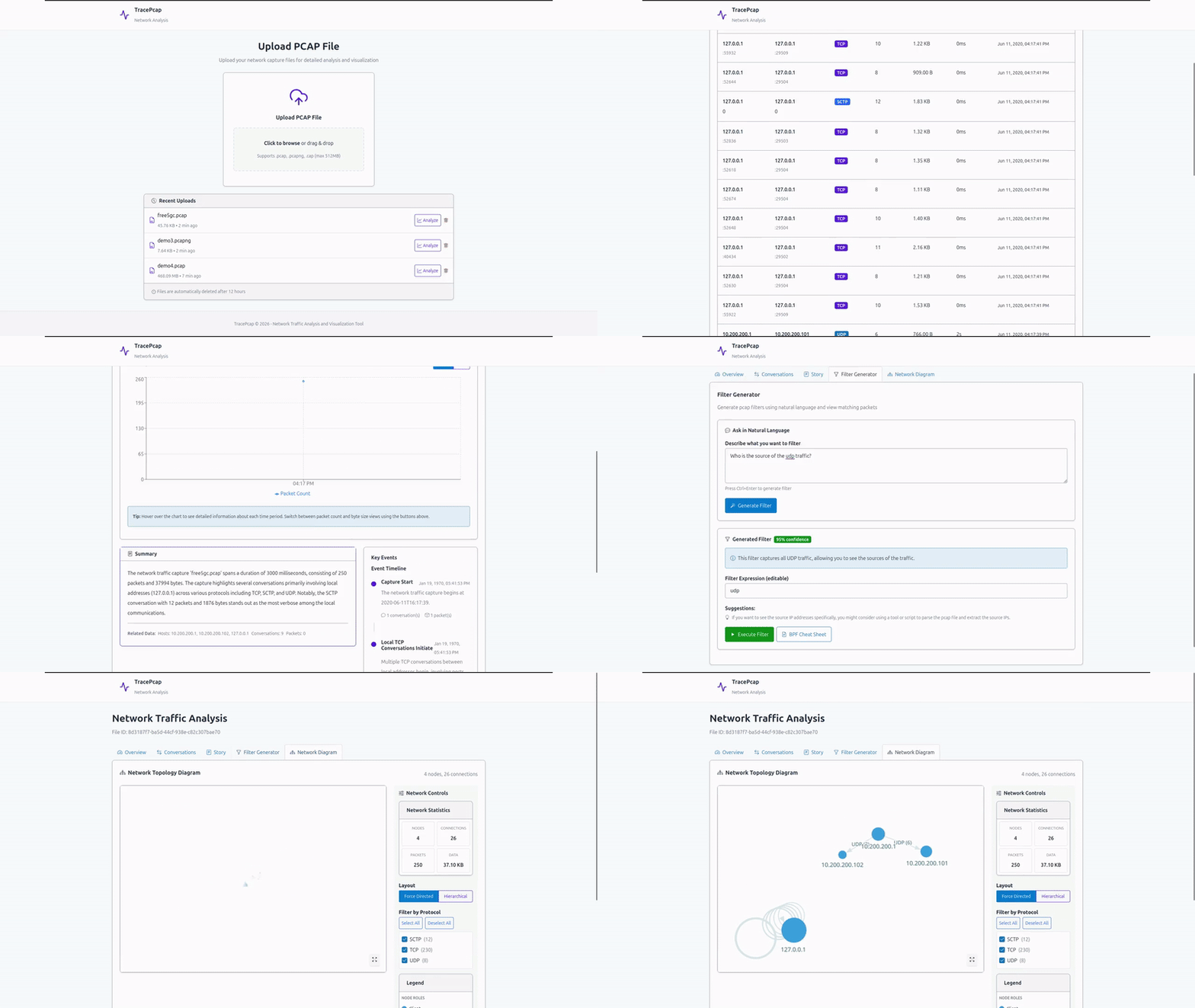
| Feature | Description |
|---|---|
| PCAP Upload & Management | Upload and manage PCAP/PCAPNG/CAP files (max 512MB) with MinIO object storage; duplicate detection and configurable upload limits |
| Network Visualization | Interactive network topology using React Flow + ELK layout with a rich filter panel (IP, port, device type, protocol, risk), fullscreen toggle, layout controls, and clickable node detail panels |
| nDPI Security Detection | Deep packet inspection via nDPI v5: application identification, traffic categories, risk/alert flags, JA3/JA3S TLS fingerprints, SNI extraction, and TLS certificate metadata per conversation |
| Conversation Tracking | Paginated conversation list with advanced filtering (IP, port, protocol, app, risk, custom rules, device type, country, payload pattern), multi-column sorting, column picker, and bulk PCAP export |
| Session Reconstruction | TCP/UDP application-layer payload decoding with a hex+ASCII viewer for inspecting raw packet payloads |
| File Extraction | HTTP object extraction and raw TCP/UDP stream extraction; automatic MIME type detection; bulk download |
| Geolocation & Device Classification | Country/ASN enrichment for external IPs; automatic device-type inference (Router, Server, IoT, Mobile, Laptop/Desktop) from traffic behaviour and manufacturer data |
| MAC Manufacturer Lookup | Wireshark OUI database integration for vendor identification from MAC addresses |
| Timeline Analysis | Chronological traffic visualization with configurable time granularity and protocol breakdown |
| AI Filter Generator | LLM-powered Wireshark/tcpdump filter generation from natural language queries with confidence scores and packet-level results |
| Story Mode | AI-generated narrative reconstruction of network activities with an interactive LLM Q&A chat, custom context input, and story timeline |
| Network Monitor | Load multiple PCAPs as ordered snapshots to track device, IP, protocol, and topology changes over time — useful for repeated audits or ongoing capture sessions |
| Subnet Detection & Labelling | Infer subnet structure from traffic patterns or define CIDRs manually; group observed IPs by subnet across all snapshots |
| Node Role Annotation | Annotate any IP or device with a role label (e.g. "SCADA Controller", "Historian"); AI-suggested from traffic signals, human-confirmable |
| Custom Signature Rules | YAML-based detection rules matched against IP, CIDR, port, JA3, hostname, app, and protocol fields; live-reloaded without restart |
| Export Options | PDF report (with live topology capture), per-conversation PCAP, bulk PCAP export, and CSV export |
| Real-time Processing | Asynchronous analysis with detailed progress tracking |
| Multi-protocol Support | TCP, UDP, ICMP, and application-layer protocols including TLS, HTTP, DNS, QUIC, and L2 protocols (ARP, STP, LLDP, CDP) |
| Software | Version | Purpose |
|---|---|---|
| Docker | Latest | Container runtime |
| Docker Compose | Latest | Multi-container orchestration |
| LLM Server | Any OpenAI-compatible API | AI features (e.g., LM Studio, Ollama, OpenAI) |
Minimum Hardware:
- RAM: 4GB (8GB+ recommended)
- Storage: 10GB (for database, PCAP files, and object storage)
1. Clone and setup:
git clone https://github.com/NotYuSheng/TracePcap.git
cd TracePcap
cp .env.example .env
2. Configure .env:
# Upload Configuration
MAX_UPLOAD_SIZE_BYTES=536870912  # 512MB default

# Nginx Port Configuration
NGINX_PORT=80  # Change if port 80 is already in use

# LLM Configuration (Local LLM Server)
LLM_API_BASE_URL=http://localhost:1234/v1
LLM_API_KEY=
LLM_MODEL=Qwen2.5-14B-Coder-Instruct
LLM_TEMPERATURE=0.7
LLM_MAX_TOKENS=2000
3. Start the application:
docker compose up -d4. Access TracePcap:
Open http://localhost:80 in your browser.
Note: First startup may take a minute while PostgreSQL and MinIO initialise. AI features require a running LLM server pointed to by
LLM_API_BASE_URL; all other features work without it.
- Upload — Drag-and-drop a PCAP/PCAPNG file; optionally enable nDPI analysis and file extraction
- Analyze — File is processed asynchronously; a progress view shows each analysis stage
- Overview — Review detected applications, protocols, risk alerts, and custom signature matches
- Visualize — Explore the interactive network topology with filters, layout controls, and node detail panels
- Conversations — Review flows with advanced filtering, session reconstruction, and payload inspection
- Story Mode — Read the AI-generated narrative and ask follow-up questions via LLM chat
- Extracted Files — Browse and download files recovered from HTTP responses and raw streams
- Generate Filters — Use AI to create Wireshark/tcpdump filters from natural language
- Export — Download a PDF report, per-conversation or bulk PCAP, or CSV
The Network Monitor lets you build a picture of an unknown network from multiple captures taken at different points in time — and track how it changes between them.
- Create a Network — Give the network a name (e.g. "Client Site — Building A")
- Add Snapshots — Upload PCAPs in capture order; each becomes a snapshot ordered by capture time
- Review the Diagram — Click any snapshot filename to open the network diagram; changed nodes are highlighted by severity
- Track Drift — Device, IP, protocol, and VPN changes are detected automatically between consecutive snapshots
- Define Subnets — Use "Detect Subnets" to infer CIDR blocks from traffic, or add them manually; IPs are then grouped by subnet in the IP Addresses panel
- Annotate Nodes — Click any IP or device to assign a role label; use "Suggest with AI" to auto-generate one from traffic signals
- Correlate Events — Log real-world events (maintenance windows, incidents) to correlate with observed network changes
- Generate Insights — Use the AI insights panel to get a narrative explanation of all changes across snapshots
PCAP, PCAPNG, CAP (max 512MB default, configurable via MAX_UPLOAD_SIZE_BYTES)
The Monitor is designed for black-box analysis — it assumes you know nothing about the network upfront and builds understanding from the traffic itself:
- No prior knowledge needed — subnet structure, device roles, and topology are all inferred from observed traffic
- Snapshots, not agents — there is no persistent sensor; you feed in PCAPs and the tool compares them
- Bottom-up inventory — devices and IPs are discovered from ARP, MAC addresses, and IP conversations; not imported from a CMDB
- Inference over assumption — device types, manufacturers, and roles are estimated from traffic patterns and can be confirmed or corrected by the analyst
- Change detection without a baseline — the first snapshot becomes the implicit baseline; every subsequent snapshot is compared against the one before it
This is intentionally different from a blue team SIEM or EDR: there is no always-on agent, no rule engine with predefined baselines, and no assumption that you have network documentation. The tool is most useful when you are the one trying to produce that documentation.
Changes are compared between consecutive snapshots (ordered by capture time):
| Severity | Event Type | Description |
|---|---|---|
| CRITICAL | IP_MAC_DRIFT |
An IP is now claimed by a different MAC — possible ARP spoofing or device swap |
| CRITICAL | GATEWAY_CHANGE |
Default gateway IP changed between snapshots |
| WARNING | MAC_ADDED |
A new MAC address appeared — new device on the network |
| WARNING | IP_MAC_DRIFT |
A known MAC moved to a new IP — possible DHCP drift |
| INFO | PROTOCOL_ADDED |
A new layer-7 protocol appeared |
| INFO | APP_ADDED |
A new application name appeared |
| INFO | ASN_CHANGE |
The top external peer shifted ISP/ASN |
| INFO | VPN_DRIFT |
VPN usage appeared or disappeared |
| Component | Technology |
|---|---|
| Backend | Spring Boot 3.2.1, Java 21, Maven, Lombok, MapStruct |
| Frontend | React 19, Vite, TypeScript, SGDS React |
| Visualization | React Flow + ELK (network topology), Recharts, D3.js |
| Reverse Proxy | Nginx |
| Packet Parsing | tshark / Wireshark, nDPI v5 (deep packet inspection) |
| Database | PostgreSQL 15 with Flyway migrations |
| Object Storage | MinIO (S3-compatible) |
| Containerization | Docker, Docker Compose |
| API Documentation | SpringDoc OpenAPI (Swagger UI) |
Full documentation is available at https://notyusheng.github.io/TracePcap.
API documentation is also available via Swagger UI at http://localhost:80/swagger-ui.html when the application is running.
# All services
docker compose logs -f

# Specific service
docker compose logs -f tracepcap-backend
docker compose logs -f postgres
docker compose logs -f miniodocker compose restart
docker compose restart tracepcap-backend# Backup database
docker exec tracepcap-postgres pg_dump -U tracepcap_user tracepcap > backup.sql
# Backup MinIO data (PCAP files)
docker exec tracepcap-minio mc mirror minio/tracepcap-files ./backup-pcaps/
# Backup all volumes
sudo tar -czf tracepcap_backup.tar.gz /var/lib/docker/volumes/tracepcap_*docker exec -it tracepcap-postgres psql -U tracepcap_user tracepcapNavigate to http://localhost:9001 and login with minioadmin / minioadmin.
Navigate to http://localhost:80/swagger-ui.html to explore the API interactively.
TracePcap is designed for self-hosted deployment.
For environments without internet access:
On an internet-connected machine:
Windows users: These scripts require a Bash shell. Use Git Bash or WSL — not CMD or PowerShell.
# Pull all third-party images, build local images, and save everything as .tar files
bash scripts/pull-and-save-images.sh
Transfer to the offline machine: the generated images/ directory, docker-compose.offline.yml, scripts/load-images.sh, and your configured .env.
On the offline machine:
bash scripts/load-images.sh
docker compose -f docker-compose.offline.yml up -d
The offline compose file defaults
LLM_API_BASE_URLtohttp://localhost:1234/v1(LM Studio). Configure a locally-hosted LLM before starting if you want AI features.
Production hardening:
- Change default MinIO credentials in
docker-compose.yml - Update PostgreSQL password
- Configure reverse proxy with SSL/TLS
- Adjust
MAX_UPLOAD_SIZE_BYTESbased on your needs - Add an authentication layer for multi-user deployments
- Local Processing: All PCAP analysis runs on your server — packet data never leaves your infrastructure
- Offline-capable: GeoIP uses a bundled DB-IP MMDB as fallback; LLM queries use a configurable local endpoint
- No Authentication by default: Add an authentication layer before exposing to multiple users
- Object Storage: MinIO provides S3-compatible secure file storage; not exposed outside the Docker network
TracePcap supports user-defined detection rules matched against every conversation after nDPI analysis. Matched rule names appear as colour-coded badges in the Conversations tab and Overview.
signatures:
  - name: rule_name_shown_in_ui   # shown as a badge
    description: Human-readable description
    severity: low                  # low | medium | high | critical
    match:
      ip: "203.0.113.42"           # exact match against srcIp OR dstIp
Rules fire when all specified match fields are satisfied. All fields are optional.
| Field | Type | Description | Example |
|---|---|---|---|
ip |
string | Exact match against srcIp or dstIp | "203.0.113.42" |
cidr |
string | CIDR range match against srcIp or dstIp | "10.0.0.0/8" |
srcPort |
number | Exact source port | 67 |
dstPort |
number | Exact destination port | 4444 |
ja3 |
string | Exact JA3S fingerprint hash | "82f0d8a75fa483d1cfe4b7085b784d7e" |
hostname |
string | Exact or wildcard SNI hostname — *.evil.com matches any subdomain |
"*.evil.com" |
app |
string | Case-insensitive nDPI application name | "Telegram", "TOR" |
protocol |
string | Case-insensitive transport protocol | "TCP", "UDP" |
Click Custom Detection Rules in the navbar to open the built-in YAML editor. Changes take effect on the next analysis run — no restart required.
A full set of demo rules covering every match field is in signatures.sample.yml. The script sample-files/gen_demo.py generates a PCAP that triggers all 12 rules.
The sample-files/ directory contains example PCAPs:
atm_capture1.cap— ATM network traffic samplefree5gc.pcap— 5G core network traffic sampledemo_all_rules.pcap— Triggers all 12 custom signature demo rulesmonitor_large/— 8 weekly snapshots of a simulated 550-node office network for testing the Network Monitor
This project is licensed under the MIT License. See LICENSE for details.