


Clone Sweeper is an automated GitHub repository analytics tool that collects clone traffic data and renders high-quality SVG dashboards for use in READMEs, profiles, or documentation. It also includes an interactive GitHub Pages frontend.
Each run produces five artifacts (SVGs and JSON):
- stats.svg — Summary Card (Top Repos)
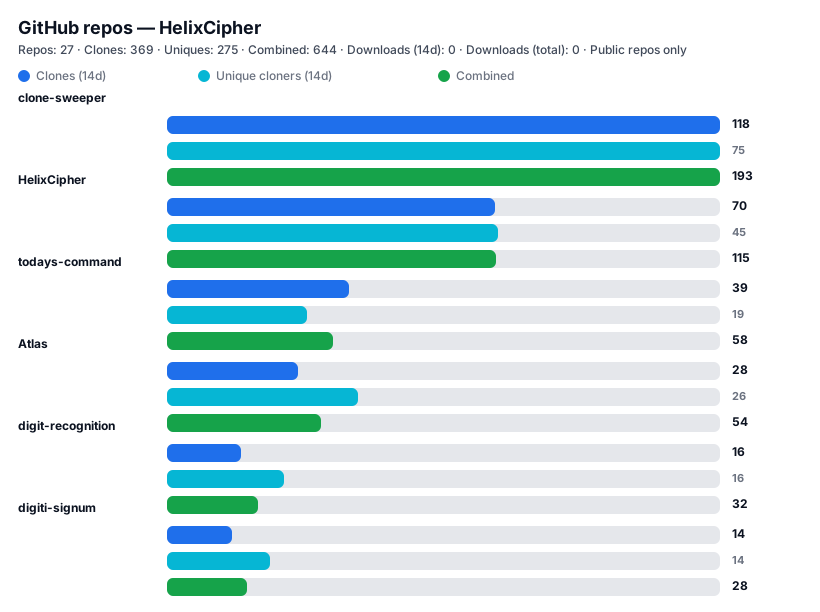
A compact visual overview of your most-cloned repositories.
For each repo, it shows three stacked bar sections:
-
Clones (top bar)
-
Unique cloners (middle bar)
-
Combined (bottom bar = clones + unique cloners)
Each metric is scaled independently so smaller values remain visible.
-
Total repositories
-
Total clones
-
Total unique cloners
-
Total reported clones
-
Downloads (14d)
-
Downloads (total)
-
Public-only vs private mode indicator
- repo_clones.svg — Full Repository Table
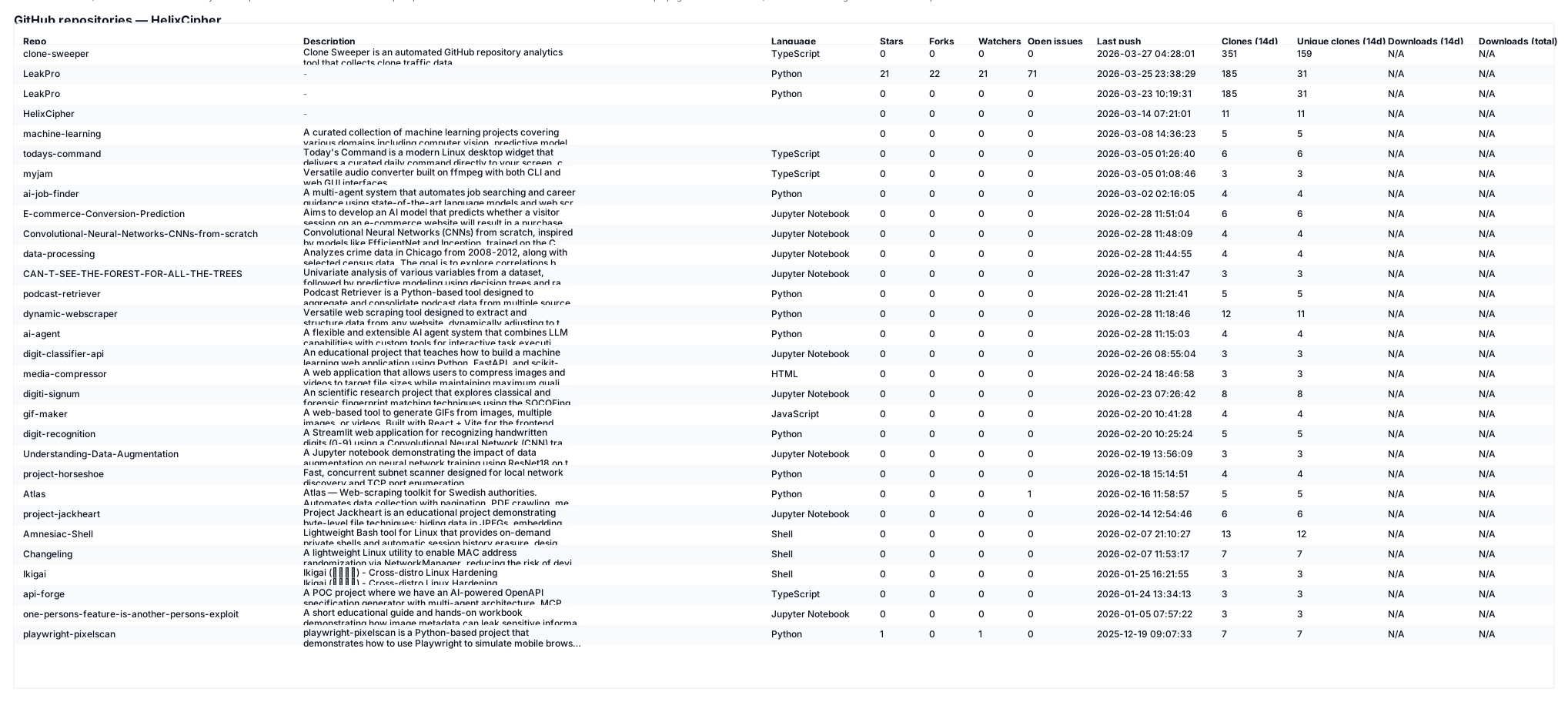
including:
-
Repository name
-
Description (wrapped to two lines)
-
Language
-
Stars, forks, watchers
-
Open issues
-
Last push timestamp
-
Clone count (last ~14 days)
-
Unique cloners (last ~14 days)
-
Downloads (14d) — downloads from release assets in the last 14 days
-
Downloads (total) — total downloads from all release assets
Missing traffic data is clearly shown as N/A.
Note: history.svg is deprecated. Use the interactive GitHub Pages frontend to view historical trends.
-
Builds accuracy over time with repeated runs
-
Enables correct monthly / yearly aggregation (no overlap)
GitHub’s traffic API only exposes ~14 days of data. Clone Sweeper solves this by persisting daily snapshots.
Runs automatically via GitHub Actions (cron + manual dispatch). Safe defaults: public repos only. Private repos are opt—in.
-
SVG rendering is done with Jinja2 templates — easier to maintain and style.
-
stats.svg now displays three stacked bar rows per repo:
-
top bar — total clones (14d)
-
middle bar — unique cloners (14d)
-
bottom bar — Total Reported Clones (clones + uniques)
-
SQLite-based persistent history
-
Branch strategy (main vs history-db)
-
Download tracking — tracks downloads from release assets (requires published releases)
-
Added
.gitignoreto prevent accidental commits of sensitive files
Clone Sweeper maintains a local SQLite database:
history.db
Schema (simplified):
repo_name | day | clone_count | unique_clones | download_count
-
One row per repo per day
-
Insert-or-replace semantics
-
Deleted repos are automatically pruned
This design:
-
Avoids overlapping 14-day windows
-
Enables accurate aggregation
-
Keeps data compact (years of daily data remain small)
Branch Purpose
main SVG artifacts (stats.svg, repo_clones.svg) and JSON files (stats.json, repo_clones.json, history.json)
history-db history.db only (force-pushed, compact)
This prevents repository bloat while keeping history durable.
-
Database is state, not history
-
Prevents unbounded repo growth
-
Clean separation of concerns
This guide walks you through setting up Clone Sweeper to display your own repository analytics on GitHub Pages.
-
A GitHub account
-
A Personal Access Token (PAT) with
reposcope -
Basic familiarity with GitHub
-
Click the "Fork" button in the top-right corner.
-
Select your GitHub account as the destination.
-
Wait for the fork to complete.
-
In your forked repository, go to Settings → Pages.
-
Under "Build and deployment", find "Source".
-
Select GitHub Actions (not "Deploy from a branch").
-
GitHub Pages is now configured to use the workflow.
-
Go to Settings → Secrets and variables → Actions.
-
Click "New repository secret".
-
Name:
TOKEN. -
Secret: Your Personal Access Token (PAT).
-
To create one: Settings → Developer settings → Personal access tokens → Tokens (classic).
-
Select the
reposcope.
-
-
Click "Add secret".
There are two workflows available:
This runs the Python script AND builds/deploys the frontend:
-
Go to Actions → Deploy to GitHub Pages.
-
Click "Run workflow".
-
Select the main branch.
-
Click "Run workflow".
-
Wait for the workflow to complete (check the run for progress).
This only runs the Python script to update data (for using SVGs in your profile README):
-
Go to Actions → Update repo stats.
-
Click "Run workflow".
-
Select the main branch.
-
Click "Run workflow".
Once the workflow completes:
-
Go to Settings → Pages.
-
Look for the "GitHub Pages" section.
-
Find your site URL (usually:
https://yourusername.github.io/clone-sweeper/). -
Click the link to view your dashboard.
The dashboard will automatically fetch data from your repository - no configuration needed.
-
The Python script (
clone_sweeper.py) detects your GitHub username automatically. -
It fetches clone/download statistics for all your public repositories.
-
It generates JSON files (stats.json, repo_clones.json, history.json).
-
The JSON files are pushed to your main branch.
-
The frontend fetches these JSON files and displays them.
-
The deploy-pages.yml workflow builds and deploys the frontend to GitHub Pages.
The default path is /clone-sweeper/. To change it:
- Edit
frontend/vite.config.ts- change line 6:base: "/your-custom-path/",
- Commit and run the deploy workflow again
-
Go to Actions → Deploy to GitHub Pages.
-
Click "Run workflow".
-
Check "Include private repositories".
-
Run the workflow.
Note: Your TOKEN must have access to the private repos.
-
Ensure the workflow has run at least once to generate the JSON files.
-
Check that GitHub Pages is enabled and set to "GitHub Actions".
-
Verify the TOKEN secret exists in Settings → Secrets and variables → Actions.
-
Ensure the TOKEN has the
reposcope.
-
This is normal for repos with no traffic.
-
Clone data only appears for repos that have been cloned.
-
GitHub traffic data is delayed and approximate.
-
Requires repeated runs for long-term accuracy.
-
Private repo data requires explicit opt-in.
-
Download counts require published releases with downloadable assets.
-
Create a repo (or use this one).
-
Add repository secret TOKEN (see Secrets & permissions).
-
Trigger the workflow (Actions -> Update repo stats -> Run workflow) or run locally.
# install deps
pip install -r requirements.txt

# quick local run (public-only, no push)
python clone_sweeper.py

# run and push generated files back to the repo (requires TOKEN secret or local env var)
export TOKEN="ghp_xxx"         # real PAT if you want clone stats or private repos
python clone_sweeper.py --push

# include private repos (opt-in)
python clone_sweeper.py --include-private --push
# or
export INCLUDE_PRIVATE=true
python clone_sweeper.py --push-
The script auto-detects the GitHub owner in this order:
-
--owner CLI arg
-
GITHUB_REPOSITORY env (set by Actions)
-
TOKEN via /user API
-
local git remote origin URL
-
-
It lists repos, optionally filters out private repos (default: exclude), and calls GitHub's traffic API for clones.
To have downloads tracked and displayed:
-
Go to one of your repos.
-
Click Releases tab -> Create a new release.
-
Upload a file/asset (e.g., a compiled binary, installer, or documentation PDF).
-
Publish the release.
-
When someone downloads that specific file, GitHub tracks it.
Important notes about downloads:
-
GitHub only tracks downloads for release assets (files attached to releases).
-
ZIP downloads from the repo's main page (Download ZIP button) are NOT tracked.
-
Each asset download is counted individually.
-
Download counts are cumulative (not time-windowed like clones).
-
N/A in the table means either:
-
The repo has no releases.
-
Releases exist but have no downloadable assets.
-
Insufficient permissions to read release data.
-
Add this line to your profile README to embed the compact card:
### Compact card:
The workflow in .github/workflows/update—stats.yml:
-
checks out the repo (persist—credentials: false),
-
sets minimal git identity for commits,
-
installs dependencies,
-
runs python clone_sweeper.py --push.
It expects the repository secret TOKEN. To keep private repos excluded by default the workflow sets:
env:
  TOKEN: ${{ secrets.TOKEN }}
  INCLUDE_PRIVATE: "false"   # change to "true" OR add ——include—private to the run command
  GITHUB_REPOSITORY: ${{ github.repository }}
-
change the run command to python clone_sweeper.py --include—private --push, OR
-
set INCLUDE_PRIVATE: "true" in the job env.
-
The script uses the env var TOKEN by default.
-
To see clone counts (even for public repos) you must use a real Personal Access Token (PAT). A fake token will not work.
-
Recommended PAT scopes (classic token):
repo (required to read traffic/clones and to access private repos)
-
Never commit your PAT to source control.
-
Store it in repo Settings → Secrets → Actions as TOKEN.
-
Avoid printing secret values in logs.
-
Go to GitHub Settings → Developer settings → Personal access tokens → Tokens (classic).
-
Click "Generate new token (classic)".
-
Give it a descriptive name (e.g., "Clone Sweeper").
-
Select the repo scope (this grants full control of private repositories).
-
Set expiration (consider "No expiration" or 90 days).
-
Click "Generate token".
-
Copy the token — it won't be shown again.
-
Go to your repository → Settings → Secrets and variables → Actions.
-
Click "New repository secret".
-
Name:
TOKEN. -
Secret: paste your PAT.
-
Click "Add secret".
The workflow will now have access to the token and can fetch clone statistics.
-
--owner — explicitly set the GitHub owner (overrides detection).
-
--push — commit & push stats.svg, repo_clones.svg, stats.json, repo_clones.json, and history.json back to the repo.
-
--include—private — opt—in to include private repos (requires a PAT owned by the repo owner with repo scope).
-
--token—env — change the token env var name (default: TOKEN).
-
Default behavior = public repos only and clone columns will show N/A if the token is missing or lacks permission to access clone data.
-
Cause: token missing, misnamed secret, or token lacks repo scope / not owner.
-
Fix: add a valid PAT as TOKEN in the repository secrets with repo scope. Confirm the workflow step has env: TOKEN: ${{ secrets.TOKEN }}.
-
Occurs when git commit runs in CI without git config.
-
Fix: workflow already sets git config user.email "actions@github.com" and git config user.name "github—actions[bot]". Locally, run the same or set your global config.
-
Means remote has commits you don’t have locally (GitHub may have added README/license).
-
Fix options:
-
If starting fresh: git push --force—with—lease (replaces remote history).
-
If you want to retain remote initial commit: git pull origin main --allow—unrelated—histories then resolve and push.
- Clone stats are a sliding window (GitHub reports ~last 14 days). The script captures what GitHub returns at runtime. If you want historical trends, enable --push so snapshots are saved to history/ and accumulate over time.
The script sleeps briefly between per-repo API calls. If you have many repos you may hit rate limits; use an authenticated PAT and consider increasing the throttle delay.
- The workflow must pass the secret to the step running the script; ensure env: TOKEN: ${{ secrets.TOKEN }} is present on the step that runs the Python script.
This project is licensed under the Creative Commons Attribution 4.0 International (CC BY 4.0) license.
You are free to use, share, copy, modify, and redistribute this material for any purpose (including commercial use), provided that proper attribution is given.
Any reuse, redistribution, or derivative work must include:
- The creator’s name:
HelixCipher - A link to the original repository:
https://github.com/HelixCipher/clone—sweeper - An indication of whether changes were made
- A reference to the license (CC BY 4.0)
This work is based on Clone Sweeper by
HelixCipher.
Original source: https://github.com/HelixCipher/clone—sweeper Licensed under the Creative Commons Attribution 4.0 International (CC BY 4.0).
You may place this attribution in a README, documentation, credits section, or other visible location appropriate to the medium.
Full license text: https://creativecommons.org/licenses/by/4.0/
This project is provided “as—is”. The author accepts no responsibility for how this material is used. There is no warranty or guarantee that the scripts are safe, secure, or appropriate for any particular purpose. Use at your own risk.
see DISCLAIMER.md for full terms. Use at your own risk.