Welcome to the Fast Response Connection (FRC) ecosystem. FRC is a next-generation distributed AI execution platform and scripting language.
What started as a simple declarative language (.frcl) has evolved through 9 levels of complexity into a full-scale, cloud-native, distributed AI network capable of executing models securely across global regional nodes.
This repository serves as the master monorepo for the entire FRC project. It contains every layer of the architecture: from the lightweight language parser to the production Kubernetes cluster setup.
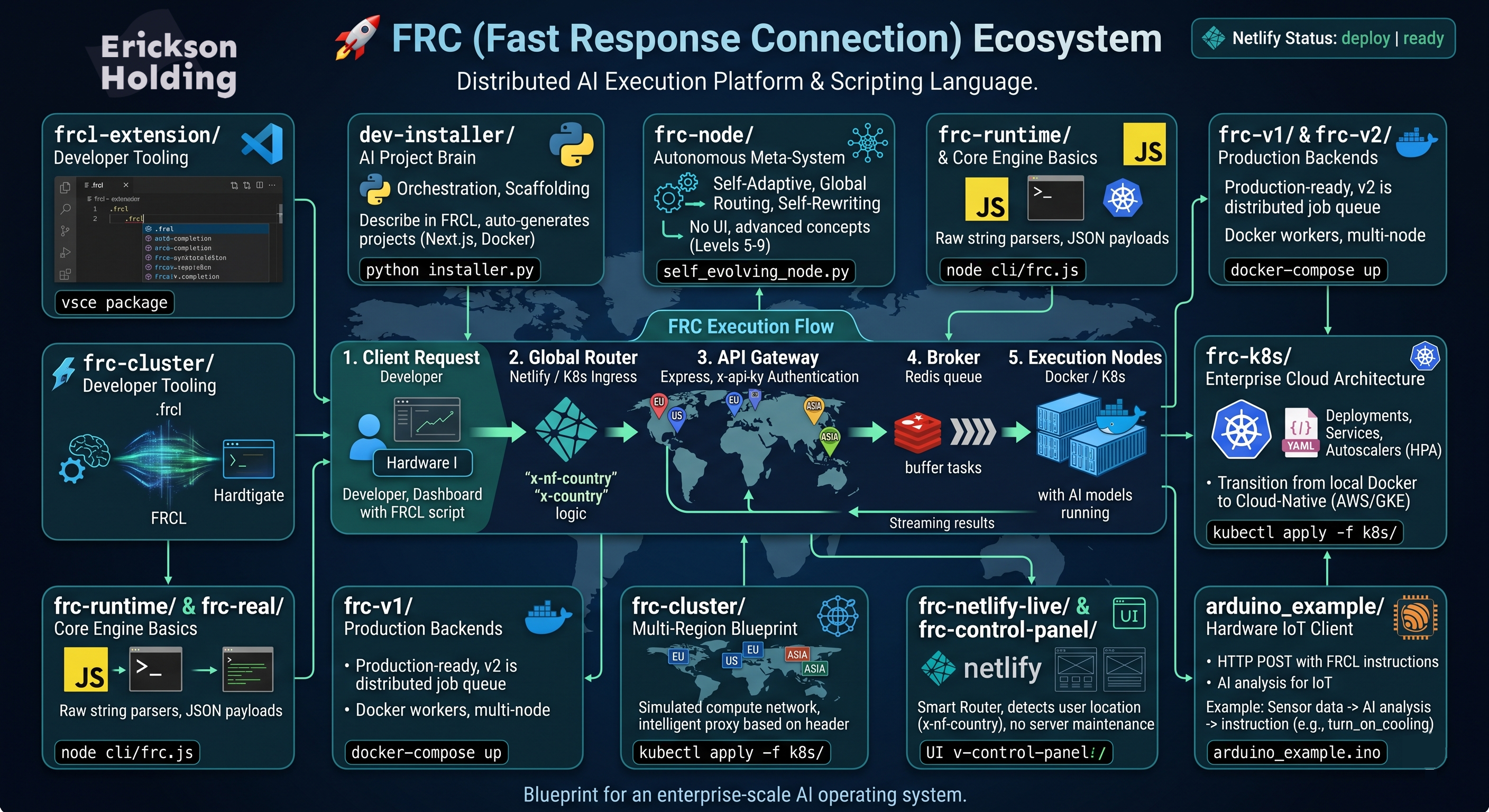
At its core, FRC solves the problem of decentralized AI execution. Instead of building monolithic AI apps, FRC allows developers to write simple, declarative scripts (using the FRCL language) that instruct a network to:
- Parse the intent.
- Route the task to the nearest global node (EU, US, ASIA).
- Queue the task asynchronously using Redis.
- Execute the AI model and stream the result back to the client.
Here is a thorough explanation of every component folder in this repository, why it exists, and how to use it.
- What it is: A Visual Studio Code extension.
- Why it exists: FRC has its own language syntax (
.frcl). To make the developer experience seamless, this extension provides native syntax highlighting, intelligent auto-completion, and colorization for.frclfiles inside VS Code. - What you can do: Compile it using
vsce packageand install the.vsixfile into your IDE to get proper FRC code styling.
- What it is: A Python-based orchestration and scaffolding tool.
- Why it exists: This represents "Level 4" of the system—an autonomous project generator. Instead of manually setting up Next.js or Docker projects, you describe what you want in FRCL, and this Python engine scaffolds the entire project.
- What you can do: Run
python installer.pyto auto-generate full-stack applications.
- What it is: A theoretical Python implementation of the advanced concepts (Levels 5 through 9).
- Why it exists: It explores how FRC functions as a "living" system without a UI. It includes logic for
Self-Adaptive Nodes(auto-healing),Global Routing(zero-trust security), andSelf-Rewritingarchitectures where the system writes its own deployment code based on server stress. - What you can do: Explore files like
self_evolving_node.pyto study autonomous system architectures and self-scaling mathematical models.
- What it is: The earliest, foundational JavaScript implementations of the FRC execution engine.
- Why it exists: To bridge the gap between the
.frclscript and the actual machine execution. It contains the raw string parsers that extract instructions likeuse model models5and turn them into JSON payloads. - What you can do: Run the CLI (
node cli/frc.js) to parse raw text files locally.
- What it is: Grounded, production-ready backend architectures using Node.js, Express, and Redis.
- Why it exists: This translates the theoretical routing into real software engineering.
v1is a simple monolithic API and worker.v2is the Production System. It introducesx-api-keyauthentication, an Express API Gateway, and a Redis Job Queue. The gateway pushes tasks to Redis, and multi-node Docker workers pull jobs off the queue asynchronously.
- What you can do:
cd frc-v2and rundocker-compose upto launch a fully distributed job queue and worker cluster on your local machine.
- What it is: A simulated global compute network using Docker Compose.
- Why it exists: It proves that FRC can scale globally. It launches an API Gateway alongside three independent regional nodes (
node-eu,node-us,node-asia). - What you can do: Send a request to the Gateway with a header
x-country: US, and watch the Gateway intelligently proxy the request specifically to the US Node container.
- What it is: A comprehensive suite of Kubernetes configuration manifests (
.yaml). - Why it exists: To transition FRC from "local Docker" to a real Cloud-Native platform (like AWS EKS or Google GKE). It includes Deployments, Services, an Ingress router, and Horizontal Pod Autoscalers (HPA).
- What you can do: Apply this directly to a Kubernetes cluster (
kubectl apply -f k8s/) to spin up auto-scaling regional nodes that react to real-time CPU utilization.
- What it is: The Global Control Panel built on Netlify Serverless Edge Functions.
- Why it exists: Because running the heavy AI compute directly on the frontend is inefficient. The Netlify app serves purely as a Smart Router and UI. It uses Netlify's native IP/Geo-headers (
x-nf-country) to instantly detect where the user is located, and forwards the payload to the nearest externalfrc.systemscluster. - What you can do: Push this to Netlify to instantly deploy a globally distributed Edge Router with zero server maintenance.
- What it is: C++ hardware logic for microcontrollers like the ESP32 and Arduino boards.
- Why FRC makes IoT better: Traditional hardware requires complex backend logic, heavy MQTT brokers, or tight coupling to a specific cloud provider to process AI logic. FRC abstracts all of this. An Arduino board simply makes a lightweight HTTP
POSTrequest containing FRCL instructions, and the FRC cloud network instantly parses it, routes it globally, executes the AI model, and returns a clean JSON response. - How developers can use it for testing: Developers can flash
arduino_example.inoonto an ESP32, connect it to WiFi, and immediately see live responses fromfrc.systemsin their Serial Monitor. This provides a zero-friction playground to test latency and AI model outputs on real physical devices. - Using it in your own apps: You can directly embed this HTTP architecture into smart home sensors, robotics, or industrial monitoring tools. For example, a temperature sensor could send raw data to an FRC node, where an AI model analyzes it and returns an instruction (e.g., "turn_on_cooling") directly to the microcontroller.
The FRC CLI interfaces with the self-modifying ecosystem.
# Execute model globally
frc run models5

# Trigger Level 9 Singularity Loop (Self-Rewriting Ecosystem)
frc singularity

# View dynamic ecosystem map
frc nodesNo matter which folder you are looking at, the systemic logic of FRC remains uniform:
- Client Request: A developer, dashboard, or hardware device sends FRCL script instructions.
- Global Router (Netlify / Ingress): Evaluates user location and traffic.
- API Gateway (Express): Authenticates API keys and secures the payload.
- Broker (Redis): Buffers the tasks to prevent system crashes during high traffic.
- Execution Nodes (Docker / K8s): Asynchronously grabs the job, runs the AI model, and returns the result.
This repository is the complete blueprint for an enterprise-scale AI operating system.