- https://cps-lab-jeju.github.io
- jekyll을 이용하고, blog 테마로는 Hydejack를 적용했습니다.
- git clone
레포주소 - 클론 받은 경로로 이동
- 명령어
gem install bundler실행 - 명령어
gem install jekyll실행 - 명령어
bundle install1 실행 - 해당 레포지토리 프로젝트의
_config.yml파일에서 theme을 다음과 같이 수정한다.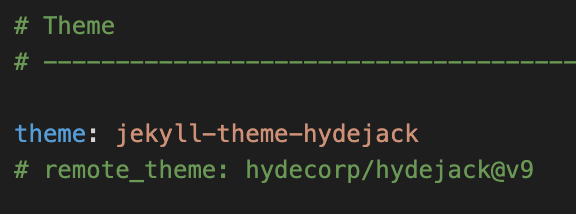
- Run
bundle exec jekyll serve - 브라우저에 http://localhost:4000 링크 입력 접속
- git push 전에 _config.yml 파일에서 theme을 기존 값으로 돌려주세요. 로컬에서 확인할 때만 4번을 다시 진행하시면 됩니다.
블로그의 url은 폴더 구조와 관련이 있습니다. 즉, 폴더 외에 글을 작성하는 경우에 따로 폴더를 만들어서 등록이나 index.html을 작성해야합니다. 새로운 메뉴를 추가할 때 공식 가이드를 참고하세요.
또한, 글을 2023-02-03-post-title.md 와 같이 날짜로 시작해야 작성일을 인식할 수 있습니다. 마크다운 내부 포맷의 경우 기존 파일을 참고하세요!
Footnotes
-
Requires Bundler. Install with
gem install bundler. ↩