[1.1.4] Unsolvable Input Axes message after migrating project to CC #35

Description

Hello,
I migrated a world project with the Creator Companion to the new system.
It contained CyanEmu, and as expected got overriden by the ClientSim install.
I've applied the project settings as told by ClientSim before testing, but when I press Play, I get this message:
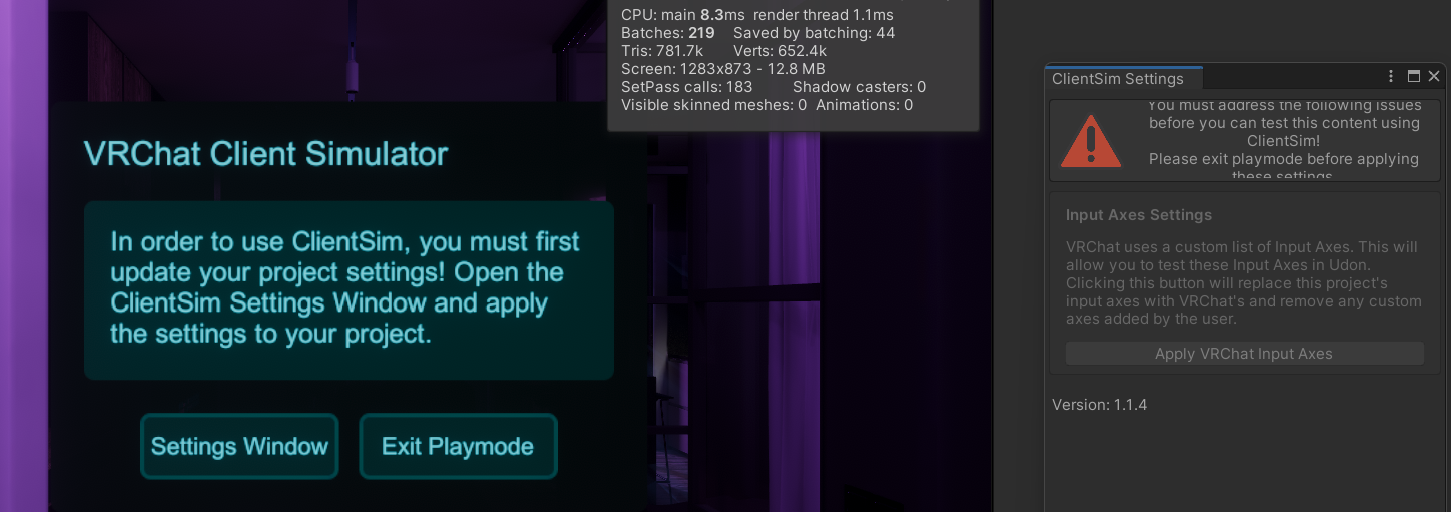
When I exit Play mode and I click the ClientSim Settings window, its menu goes back to normal, without even having to click the auto-solving button.
This message comes up everytime I enter Play mode, and I can't get rid of it.
I have no info, warning or error log about this issue, so I have no way of knowing what causes it.
ClientSim works normally on a fresh project.
EDIT: I run Unity as admin, I also tried reinstaling/reimporting the ClientSim package, I tried version 1.1.3, to no avail. I've compared Input Axes between my project and a new one and there is no difference.