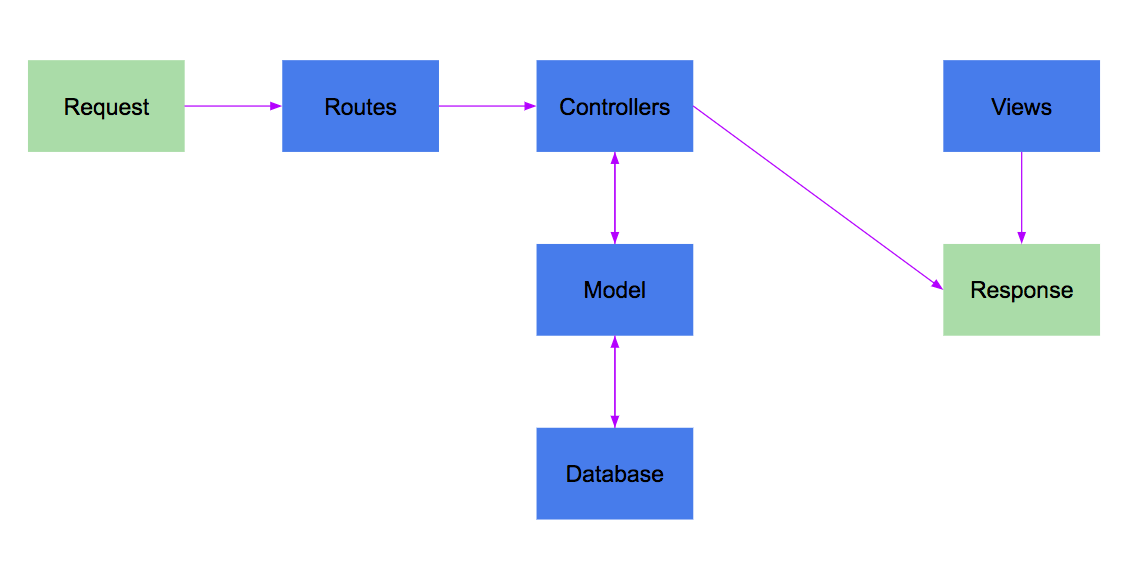
The Model consists of the data structures needed to store information and the methods used to interface with the data layer of the application.
The View controls everything a user sees and is handled by a view engine which takes dynamic content, replaces that content with placeholders inside of an HTML file, and then sends the final HTML to the client.
The Controller handles incoming requests from the client. It will interact with the model to move data in and out of the database and the view.
$ sudo service postgresql start
$ createdb -U postgres -w dbName-dev
$ createdb -U postgres -w dbName-test
$ npm i --save sequelize@4.32.6 pg@7.4.1 pg-hstore@2.3.2
$ npm i -g sequelize-cli@4.0.0
$ touch .sequelizerc
projectRoot/.sequelizerc:
const path = require("path");

module.exports = {
  "config": path.resolve("./src/db/config", "config.json"),
  "models-path": path.resolve("./src/db/models"),
  "seeders-path": path.resolve("./src/db/seeds"),
  "migrations-path": path.resolve("./src/db/migrations")
};
projectRoot/src/db/config/config.json
{
  "development": {
    "username": "postgres",
    "password": null,
    "database": "bloccit-dev",
    "host": "127.0.0.1",
    "dialect": "postgres"
  },
  "test": {
    "username": "postgres",
    "password": null,
    "database": "bloccit-test",
    "host": "127.0.0.1",
    "dialect": "postgres"
  }
}
$ sequelize model:create --name Topic --attributes title:string,description:string
New model was created at /Users/bloc/bloccit-node/bloccit/src/db/models/topic.js .
New migration was created at /Users/bloc/bloccit-node/bloccit/src/db/migrations/20180220054615-Topic.js .
$ sequelize db:migrate
$ sequelize db:migrate --env test
projectRoot/src/db/models/banner.js
Banner.associate = function(models) {
// associations can be defined here
  Banner.belongsTo(models.Topic, {
    foreignKey: "topicId",
    onDelete: "CASCADE",
});
projectRoot/src/db/models/topic.js
Topic.hasMany(models.Banner, {
  foreignKey: "topicId",
  as: "banners",
});
Specify which key to use and what to call the association. Edit the migration file:
updatedAt: {
  allowNull: false,
  type: Sequelize.DATE
 },
topicId: {
  type: Sequelize.INTEGER,
  onDelete: "CASCADE",
  references: {
    model: "Topic",
    key: "id",
    as: "topicId",
  },
},
And change the model as well: Open src/db/models/banner.js and add
description: DataTypes.STRING,
  topicId: {
    type: DataTypes.INTEGER,
    onDelete: "CASCADE",
    references: {
      model: "Topic",
      key: "id",
      as: "topicId",
    }
  }
$ sequelize model:create --name Banner --attributes title:string,description:string
New model was created at /Users/bloc/bloccit-node/bloccit/src/db/models/banner.js .
New migration was created at /Users/bloc/bloccit-node/bloccit/src/db/migrations/20180220054615-Banner.js .
$ sequelize db:migrate
$ sequelize db:migrate --env test
$ sequelize db:migrate:status
$ sequelize db:migrate:undo:all && sequelize db:migrate:undo:all --env test
$ sequelize db:migrate && sequelize db:migrate --env test
$ touch src/controllers/topicController.js
projectRoot/src/controllers/topicController.js
module.exports = {
  index(req, res, next){
    res.send("TODO: list all topics");
  }
}
$ touch src/routes/topics.js
projectRoot/src/routes/topics.js
const express = require("express");
const router = express.Router();
const topicController = require("../controllers/topicController")

router.get("/topics", topicController.index);

module.exports = router;
Finally, add the new route to projectRoot/src/config/route-config.js:
module.exports = {
  init(app) {
    const staticRoutes = require('../routes/static');
    const topicRoutes = require('../routes/topics');

    app.use(staticRoutes);
    app.use(topicRoutes);
  },
};
$ mkdir src/views/topics
$ touch src/views/topics/index.ejs