An efficient, enhanced tool to scan Google Form questions, retrieve options, and process them for lightning-fast answer generation—complete with advanced OCR, batching, multi-language support, caching, and stealth keystroke shortcuts!
| 🌟 Stars | 🍴 Forks | 🐛 Issues | 🔔 Open PRs | 🔕 Closed PRs | 🛠️ Languages | 👥 Contributors |
 |
 |
 |
 |
 |
 |
 |


-
Free & Fast
• 100% free – no hidden costs
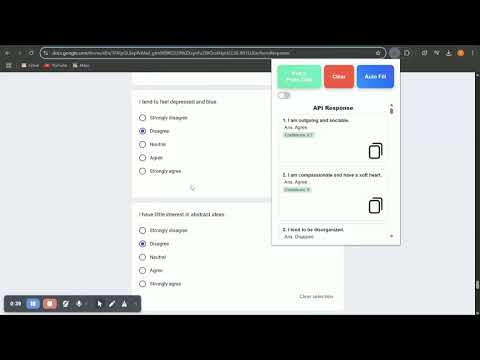
• Autofill forms in as little as 2.6 seconds using an efficient batch processing system (GOD SPEED!!! ⚡️) -
Advanced AI & Image Processing
• Powered by the fine-tuned Gemini 2.0 Flash model for highly accurate answers and multilingual support
• Cutting-edge OCR extracts text from images in multiple languages (Hindi, Tamil, Kannada, Malayalam, Telugu, etc.) and preserves mathematical formulas perfectly -
Robust Caching & Reliability
• Oops! Closed your form? Don’t worry—answers are cached so they’re always ready when you reopen it
• Never lose your data—your work remains safe and accessible -
Stealth Keystroke Shortcuts
• Afraid of opening a popup in front of a teacher? Use "Alt+A" to fetch form data discreetly
• Use "Alt+C" to trigger autofill instantly -
Efficient Batching System
• Automatically splits large forms (60+ questions) into smaller batches for rapid, error-free processing without exceeding token limits -
User-Friendly Interface
• Supports both light and dark modes for a comfortable viewing experience
• Clean, minimal design perfect for students and busy professionals
- Greater accuracy with a fine-tuned Gemini 2.0 Flash model
- Lightning-fast autofill through advanced batching (answers in 2.6 seconds!)
- Superior OCR for math formulas and multilingual support
- Reliable auto-caching: Oops, closed your form? Your answers are safe and waiting
- Stealth keystrokes let you work discreetly
- A user-friendly interface designed specifically for students and professionals
-
Frontend:
-
Backend:






-
Clone the Repository
git clone https://github.com/harshendram/GoogleFormFiller-with-OCR-and-Gemini.git cd GoogleFormFiller-with-OCR-and-Gemini -
Install Dependencies
npm install
-
Run the Backend
npm start
(Adjust commands if needed, e.g.,
node src/server.js.)
-
Open the Chrome Extensions Page
Go tochrome://extensions/ -
Enable Developer Mode
Toggle the Developer mode on (usually top-right corner). -
Load the Unpacked Extension
Click Load unpacked and select the folder containingmanifest.json.
For contribution guidelines, please see our CONTRIBUTING.md.
For any questions or support, feel free to reach out at harshendra16@gmail.com.