Describe the bug
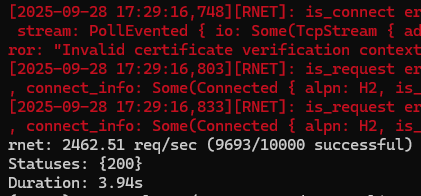
is_connect and is_request errors when trying to run high concurrency (10k requests submitted at once) on ubuntu, but works fine on windows.
To Reproduce
This is my code:
import asyncio
import math
from random import choice
from time import time

import rnet

from utils.custom_log_format import logger
from utils.increase_limits import set_max_open_files

log = logger(name='RNET')
set_max_open_files()
errors = set()


async def send_request(client, url):
    try:
        resp = await client.get(url)
        return resp.status.as_int()
    except Exception as e:
        if e not in errors:
            log.error(e)
            errors.add(e)
        raise e

async def test_many_clients():
    url = "https://forevercode.online/"
    num_requests = 10_000
    t1 = time()
    clients = [rnet.Client(timeout=60, verify=False) for _ in range(max(1, math.ceil(num_requests / 500)))]  # the verify flag was added to try to get linux to work without errors.
    start_time = asyncio.get_event_loop().time()
    tasks = [asyncio.create_task(send_request(choice(clients), url)) for _ in range(num_requests)]
    results = await asyncio.gather(*tasks, return_exceptions=True)
    end_time = asyncio.get_event_loop().time()
    duration = end_time - start_time
    successful = [r for r in results if not isinstance(r, Exception)]
    num_successful = len(successful)
    req_per_sec = num_successful / duration if duration > 0 else 0

    print(f"rnet: {req_per_sec:.2f} req/sec ({num_successful}/{num_requests} successful)")
    print(f"Statuses: {set(successful)}")
    print(f'Duration: {time() - t1:.2f}s')


if __name__ == "__main__":
    asyncio.run(test_many_clients())
You can just spin up an ubuntu server and run it, or you can pull from my repo: https://github.com/lafftar/requestSpeedTest
These are the types of errors we see:
[/home/runner/.cargo/registry/src/index.crates.io-1949cf8c6b5b557f/wreq-6.0.0-rc.15/src/error.rs:188:21] err = Error {
    kind: Connect,
    source: Some(
        Failure(
            MidHandshakeSslStream {
                stream: SslStream {
                    stream: PollEvented {
                        io: Some(
                            TcpStream {
                                addr: 207.148.90.202:50096,
                                peer: 149.28.192.18:443,
                                fd: 29,
                            },
                        ),
                    },
                    ssl: Ssl {
                        state: "TLS client read_server_hello",
                        verify_result: Err(
                            X509VerifyError {
                                code: 65,
                                error: "Invalid certificate verification context",
                            },
                        ),
                    },
                },
                error: Error {
                    code: SYSCALL (5),
                    cause: None,
                },
            },
        ),
    ),
    connect_info: None,
}
[2025-09-28 17:29:16,748][RNET]: is_connect error: wreq::Error { kind: Request, uri: https://forevercode.online/, source: Error { kind: Connect, source: Some(Failure(MidHandshakeSslStream { stream: SslStream { stream: PollEvented { io: Some(TcpStream { addr: 207.148.90.202:50096, peer: 149.28.192.18:443, fd: 29 }) }, ssl: Ssl { state: "TLS client read_server_hello", verify_result: Err(X509VerifyError { code: 65, error: "Invalid certificate verification context" }) } }, error: Error { code: SYSCALL (5), cause: None } })), connect_info: None } }
[2025-09-28 17:29:16,803][RNET]: is_request error: wreq::Error { kind: Request, uri: https://forevercode.online/, source: Error { kind: Canceled, source: Some(crate::core::Error(Canceled, "connection closed")), connect_info: Some(Connected { alpn: H2, is_proxied: false, extra: Some(Extra), poisoned: PoisonPill@0x7f36565eaad0 { poisoned: false } }) } }
Expected behavior
A clean run on linux, no errors.
Screenshots


Desktop (please complete the following information):
- Linux OS: Ubuntu 25.04 x64
- Windows OS: Windows 10
Additional context
I own the site and server i'm testing on, i'll leave it on for a day so you can run tests against it if you need, this is the config:
server {
    listen 80;
    server_name forevercode.online www.forevercode.online;
    return 200 $remote_addr;
}

server {
    listen 443 ssl backlog=65535;
    http2 on; # Updated, modern syntax for enabling HTTP/2

    server_name forevercode.online www.forevercode.online;

    # !!! IMPORTANT !!!
    # You must have already run certbot for these files to exist.
    ssl_certificate /etc/letsencrypt/live/forevercode.online/fullchain.pem;
    ssl_certificate_key /etc/letsencrypt/live/forevercode.online/privkey.pem;

    location / {
        default_type text/plain;
        return 200 $remote_addr;
    }
}
I'm doing this to prove to clients that python is fast enough for their needs, I was able to get to 4.7k requests/sec on HTTP only, But I want to get to 15k requests/sec on HTTPS.

Describe the bug
is_connectandis_requesterrors when trying to run high concurrency (10k requests submitted at once) on ubuntu, but works fine on windows.To Reproduce
This is my code:
You can just spin up an ubuntu server and run it, or you can pull from my repo: https://github.com/lafftar/requestSpeedTest
These are the types of errors we see:
Expected behavior
A clean run on linux, no errors.
Screenshots



Desktop (please complete the following information):
Additional context
I own the site and server i'm testing on, i'll leave it on for a day so you can run tests against it if you need, this is the config:
I'm doing this to prove to clients that python is fast enough for their needs, I was able to get to 4.7k requests/sec on HTTP only, But I want to get to 15k requests/sec on HTTPS.